

Wouldn’t your new Apple TV be much more enjoyable if you could beam Internet videos to it? One of our favorite fangirls over at TUAW, Erica Sadun, has just announced AirFlick (an alpha build) for OS X. Having previously released the awesome and MacStories approved AirPlayer (which allows you to play AirPlay content on your Mac), AirFlick allows you to drop files and URLs to play the content on your ATV 2. Can you say, “awesome!?” We’ll have an in depth review of AirFlick later, but in the meantime you can read the full release notes and download the application over at TUAW. You can also follow Erica on Twitter @ericasadun, where you may find recent tweets related to the progress of AirFlick and her related AirPlay hacks. Be sure to send her a warm thanks for all of her hard work!
Erica Sadun Releases AirFlick for OS X: AirPlay Just About Anything
“Yes, I’ve Always Wanted A Naked iPhone 4”

If all you’ve ever wanted is trick your friends to think you’re using a broken iPhone 4 with exposed internal, well – first I feel bad for you because, honestly, all you’ve ever wanted can’t be this, then I’m about to tell you this kind of weird dream can now come true thanks to a decal available on Etsy.
Well, it could have come true – the item’s been sold. But hey, maybe the creator will put new ones up for sale. Maybe there’s still a chance all you’ve ever wanted will be online again.
Anyway, it’s a decal that will make your iPhone 4 look “naked” on the back, with battery and camera lens well visible. I do think it’s pretty great and geek.
Still, you’ll have to wait for new units to become available. Dreams can take a while to come true. [Gizmodo via Etsy]
Screens 1.1 Available: More Gestures, Better SSH, Bug Fixes
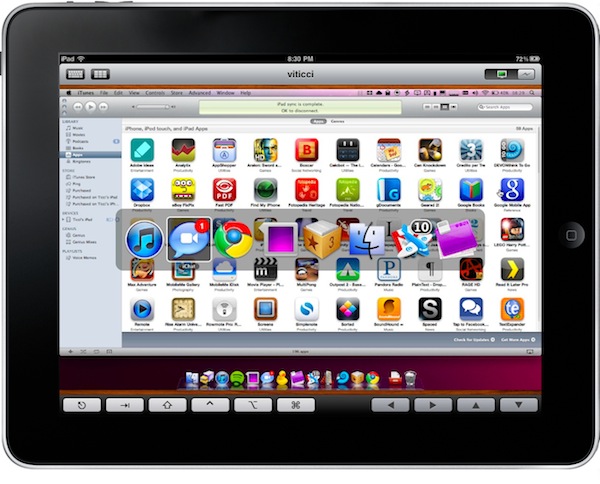
Edovia released Screens for iPhone and iPad last week, and it quickly became thousands of people’s new favorite VNC client for iOS. The app makes it easy to access a computer remotely and actually use it on the iPhone or iPad thanks to the support for multi-touch. No mouse cursors to move, you just touch the windows. Also, Edovia’s Screens Connect feature is simply great to log in a computer while on the go with a 3G connection. Tested last week and it was perfect.
Screens was updated a few minutes ago, and this 1.1 version brings a lot of improvements, new features and bug fixes to make the app even better. Screens now supports customizable 3-finger gestures to map to any action you want and lets you launch the Mac’s app switcher with a 4-finger gesture. Edovia improved SSH in the app, which now allows for an address for the SSH tunnel, lets you customize the port and also doesn’t force you to activate SSH tunneling when connecting to a computer on a local network.
The list of changes and bug fixes is huge, so check it out below. Support for more gestures single-handedly makes this update worth it, so go buy the app at $14.99 now if you still haven’t. Screens is the best VNC client for iOS, hands down. Read more
OpenDNS May Slow Down Your Apple TV Streaming
I noticed this issue last week and I thought it was, once again, my ISP’s fault. The Vodafone Station connection I have here doesn’t exactly play well with…anything. Basically, I tried to set up the device using OpenDNS and I saw streaming speed of iTunes content go terribly down – even lower than what I’m used to with the Vodafone Station. It turns out, though, that it might not be Vodafone’s fault at all this time. Instead, it appears that the Apple TV doesn’t play nice with third-party DNS providers such as Google’s DNS or OpenDNS.
According to TUAW, developer Joe Maller and quite a few users on Apple’s discussion boards, setting different DNS other than your ISP’s in the Apple TV can cause iTunes to take even hours to start a streaming session. Maller’s Apple TV took 2 hours to start streaming content under a 20 Mbs connection. Read more
#MacStoriesDeals - Monday

Today it’s all about the QUALITY -> Here’s some great deals for today on iOS & Mac apps that are on sale for a limited time, so get ‘em while they’re hot!
It Turns Out 56 iPads Can Be A Giant iPhone
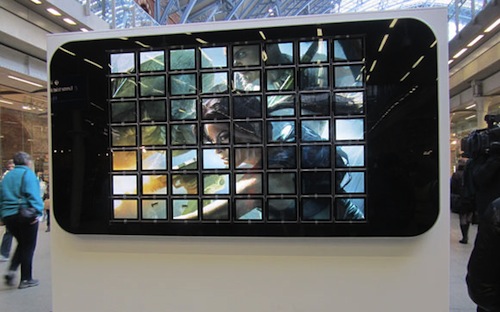
It’s over, guys. Motorola is right. The iPad is just a giant iPhone. Well, 56 iPads actually – but let’s just go on with Motorola’s argument here, shall we?
Seriously though, what you’re looking at is a giant iPhone made of 56 iPads’ screens displaying a promo image for Lara Croft and the Guardian of Light, a new game for the iPhone released last week. The giant device can be admired at London’s St. Pancras International Train Station and we think it’s kind of awesome. I mean, I wouldn’t mind having such a video system in my room.
You know, just to watch fake Inception trailers on Youtube.
Or maybe I’ll just wait until next year to put together 56 Motorola tablets and build a giant Droid X. [Electricpig via 9to5]
Motorola Teases New Tablet, Calls iPad “A Giant iPhone”
Look, I’m excited for the Android 3.0 “Honeycomb” update that will likely be teased by some tablet makers at CES 2011, but I just can’t get Motorola’s advertising campaigns.
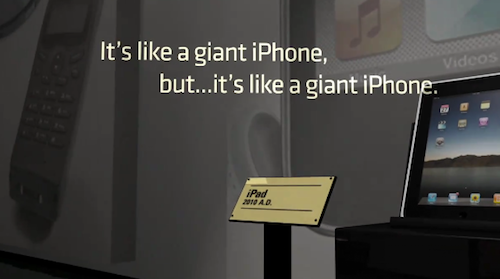
In their latest teaser video of a tablet that they’ll unveil at CES 2011 (which we assume is the same Android chief Andy Rubin demoed at Dive Into Mobile) Motorola focuses on the “tablet evolution” by listing several tablets from the past (such as the Rosetta Stone, or Egyptian’s hieroglyphs) and making fun of their “features”. The Rosetta Stone, for instance, is labelled as “low-resolution”.
Motorola, though, also took the time to include the iPad and Samsung Galaxy Tab in the teaser video. And guess what, the iPad is called a “giant iPhone”.
We look forward to seeing Motorola unveiling their Android tablet at CES. [via Engadget] Read more
Why Half-Life 1 For Mac Never Came Out→
Why Half-Life 1 For Mac Never Came Out
Jump to the 16-minute mark for the juicy bits. Basically, the game was ready and the developers even managed to deploy a system that allowed Mac and PC users to play together on a special server. The game had a few bugs but was a few weeks away from golden master. Retail stores orders were coming in.
It was done. So why didn’t it come out? Hint: Apple.
Au Naturale iPhone Dock
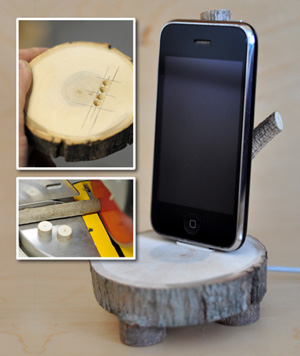
The Enchanted Woods iPhone Dock from Anthropologie is “a fun nature-meets-technology way to stand and display your iPod or iPhone.” It’s very popular but has a very high price (for what it is). Chris Gardner over at ManMade decided to make his own because at nearly $100, it’s lot to pay for something that didn’t have “speakers, a clock, or even a way to plug it into the wall.” Because it’s 100% wood and doesn’t require electricity he made a DIY instructional guide.
Garder’s version is good, if not better. As long as you have easy access to some timber and some power tools, why not make one yourself instead of forking out $100? Then you can cross ‘making something with your own hands’ off your Man Stuff To-Do list.
[via Crave]