Apple Releases Updates for GarageBand and iMovie

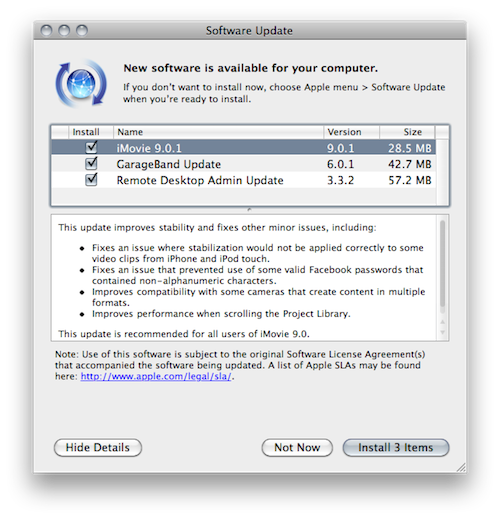
A few minutes ago Apple released an update to iMovie and GarageBand, which reach version 9.0.1 and 6.0.1, respectively. The GarageBand update improves the overall stability and performances of the app, removes latency on certain guitar tracks and fixes issues related to Flex Time edits. It is a recommended update for all GarageBand users and it’s a 47.5 MB available in Software Update now or on Apple’s website.

iMovie 9.0.1 fixes an issue with stabilization not applying correctly to videos shot on the iPhone and iPod touch, improves performances in the Project library and improves compatibility with cameras that record videos in multiple formats. It’s a 27.5 MB update available in Software Update or on Apple’s website.

Full changelogs embedded below. Read more


The Japanese Government Wants Apple To Add Filters To The iPhone

The iPhone is becoming one of Japan’s best selling smartphones – something quite strange for a country that’s not usually huge on products coming from the States, or Europe – and now the Japanese government is asking Apple and Softbank, the iPhone carrier in the land of the Rising Sun, to add content filters on the iPhone by default. To prevent teenagers from accessing “harmful” web content (can we have a guess? porn) and, generally, stuff they shouldn’t be able to see on a smartphone, the National Police Agency requires handsets markers to ship devices with this kind of filtering.

As you can imagine, this isn’t going to be easy for the Japanese government and Softbank, who’s just the middle man between Cupertino and the Japanese folks lining up to buy iPhones every day. Softbank can’t install proprietary code on the iPhone – they should open an iPhone first and find a way to give it to customers with some filtering software enabled. But we know iOS doesn’t allow for these kinds of software to be installed. So it’s all on Apple now, which has to evaluate whether or not they should follow the Japanese government’s request.

The way I see it, Japan will have to wait for filters to come on their iPhones for a long time. [via TUAW]


Mac App Store Preview: Lyrica

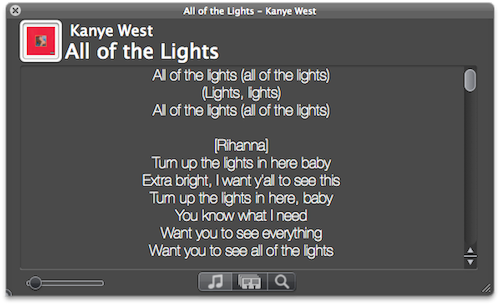
Lyrica is an upcoming new Mac app created by 17 year-old German developer Florian Zand which has been submitted to Apple for approval and should be available on the Mac App Store on January 6. As the name suggests, the app is aimed at fetching and displaying song lyrics – which is a pretty common task, although Lyrica has a few tricks up its sleeve that should grant it a relevant position in the new App Store. First off, the app queries 6 different lyric databases to find the most appropriate lyrics for the songs you’re listening to. Of course, Lyrica automatically takes the music that’s playing in iTunes and contacts the servers on its own. You just have to fire it up and wait a few seconds for the lyrics to show up on screen.

Lyrica can change from a classic OS X grey window to a more unobtrusive translucent black panel that can easily sit on top of any app without getting in the way. If lyrics for a song can’t be found, you can add them manually from the app itself. In addition for “now playing” capabilities, the app can also add lyrics to a specific playlist or your entire iTunes library – that will take a few minutes though, as it’ll have to tag your whole music collection.

We look forward to seeing Lyrica available in the Mac App Store on January 6. More information about the app will be available on the developer’s website here.


Remote Conductor: All-in-One OS X Controller for iPad

If you’re that kind of user who has set up a home entertainment system based on a machine running OS X, then probably you’re always looking for the next big thing in remote control. Several users, instead of buying a dedicated set-top box like an Apple TV or a Roku Player, prefer to get a relatively entry-level machine like a Mac Mini and route all their music, movies and photos through it. Because entertainment aside, the thing also happens to be a computer that can backup itself on a daily basis and serve content to other computers or iOS devices in the house. Just think of all the iTunes libraries or Plex installations shared through Mac Minis or, at best, Mac Pros that are powerful enough to be both desktop machines and entertainment systems for when the work is done and all you need is a good movie. A Mac computer set for such tasks, however, needs a good remote control system because, frankly, you just can’t use a mouse and keyboard on your couch.

Sure, you could use an Apple Remote and get most of your things done without having to lift a finger, but what about all those times when you want to use the stuff a computer also comes with – you know, like a web browser and high-def Youtube videos scaled to take all your TV screen? After all, even if geared towards home entertainment purposes, it’s a computer. And it needs to be remotely controlled. You could buy a VNC app like Screens for your iPhone and iPad, and control the computer that’s running on the TV in front of you with the comfort of also having it in your hands, in a portable app. Perhaps, though, you don’t need to have its screen mirrored on an iOS device and you just want a remote app that acts like a touchpad and lets you quickly launch and quit apps, and check on running ones.

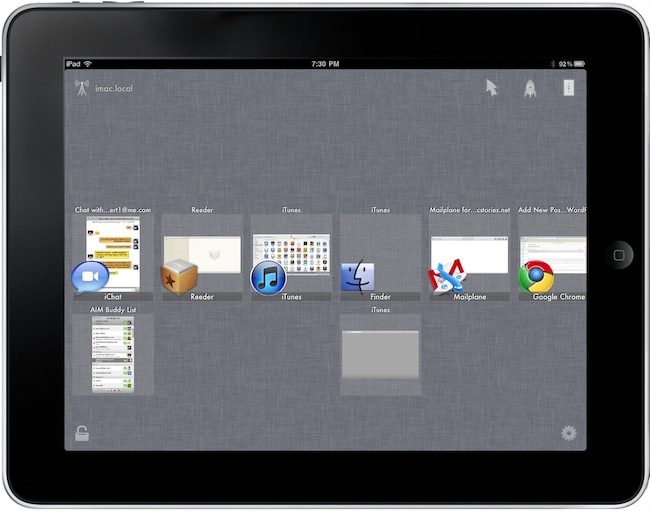
Remote Conductor, a new iPad app by m3me, aims at reinventing the “remote controlling” app genre by combining in a single package features like a touchpad, multi-touch gestures support and some sort of application launcher and OS X-like Exposè to let you easily and effortlessly control your Mac’s screen from anywhere in your room using an iPad. Read more


Griffin Set to Release Crayola ColorStudio™ HD for iPad

Griffin Technology, with a special partnership with Crayola, has announced the new Crayola ColorStudio HD. It’s a new iPad accessory that uses the “iMarker”, a AA battery-powered digital stylus, plus the Crayola ColorStudio HD app, to allows young artists to color and interact with “live” animated coloring books. Printing is available in-app on iPads running iOS 4.2 or later. Maybe this is one reason to actually use AirPrint, then you can hang your kids’ works of art on your fridgerators. Have a little Picasso on your hands? Shared them via e-mail or Facebook. The Crayola ColorStudio HD will be available in Spring 2011 for $30.

Looks like my son will be getting a great birthday present (as long as he shares with his dad and little sister)! Read more


Let a SuperHero Back Up Your iPhone While You Sleep

At MacStories, we tend to sync our various Apple gadgets to our Macs quite often because we’re blanketed in apps to review. But you guys might not have to deal with the kind of chaos we deal with between iTunes, 6 shots of espresso, and sync cables, so we’ll offer a middleman.

The Iomega SuperHero cuts out iTunes as a dock you won’t be ashamed to sit your iPhone in. As a bonus, this slick gadget backs up your iPhone so iTunes doesn’t have to! Wake up in the morning knowing that your data is backed up and safe at home - that’s the kind of convenience we aim for right? The SuperHero Backup and Charger is now available for $69.99, and works in combination with Iomega’s SuperHero app for the iPhone.

[Iomega via Gizmodo]


Mac App Store Preview: QuickMark QR Code Reader

Currently waiting in Apple’s review queue and hopefully launching on the Mac App Store on January 6, QuickMark is a new app that will let your Mac “read” the increasingly popular QR codes. Thanks to the built-in iSight every Mac (which Apple is apparently rebranding as “FaceTime camera”) will be able to recognize 2D barcode images or, if a Mac doesn’t come with an iSight, load an image file and scan it. You can also create your own 2D codes, if you wish.

QuickMark’s reader is capable of doing a bunch of stuff with a correctly scanned code, too. For example, the app can follow a web link with a Mac’s default browser, send an email or add a contact to the Address Book. The app also sports a neat Skype integration as it can send SMS and make a phone call; if you don’t like making phone calls and you’re more for meeting your friends in person, the app can also navigate to a Google Maps’ specific point of interest.

QuickMark for Mac should be available in the App Store soon.


Logitech’s HD Pro Webcam Adds Mac Support - FaceTime in Hi-Def

The iSight is okay if you’re casually chatting with friends and family, but why not kick it up a notch with Logitech’s version of Microsoft’s 1080p LifeCam Studio?

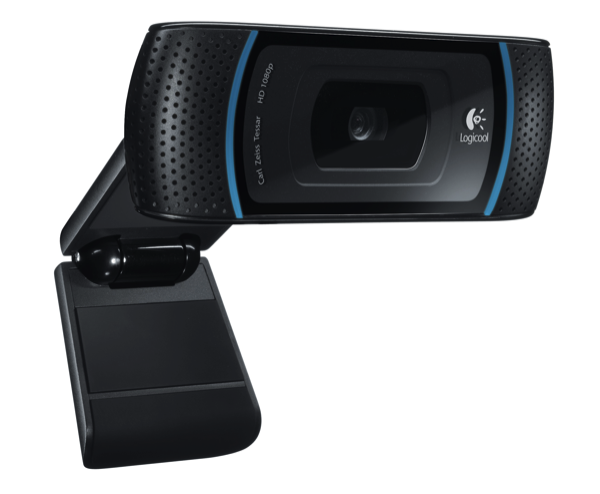
The Logitech HD Pro Webcam C910 gains Mac support, allowing you to record 1080p video, while streaming live in glorious 720p. Compatible with Skype, FaceTime, Gmail Voice and Video Chat, the Logitech HD Pro Webcam autofocuses to produce the best images while recording stereo audio thanks to its dual mics. Logitech’s Webcam Software enables simple one-click uploading to Facebook and Youtube as well for sharing those awesome MacStories product reviews, and if you’re into photos, you can snap 10 megapixel shots of that morning mug.

This is a solid offering from Logitech (especially for iMac owners) that brings high-definition to your favorite Macintosh. You can read the full press-release over at BusinessWire for more information. [via BusinessWire]