iPhone Alarm Still Not Working? Try A Reboot or Reset

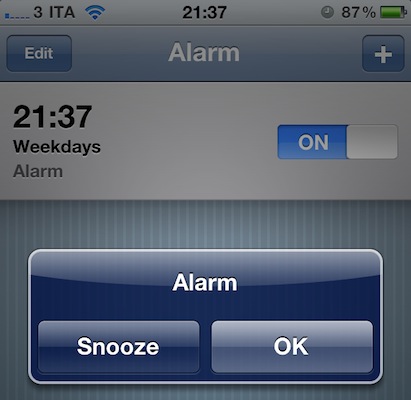
The New Year broke the iPhone’s built-in alarm clock app. After much of a backlash on the Internet (and too good reason, people depend on alarms to wake up in the morning and, you know, do stuff like go to work) and a temporary fix that involved setting a repeating alarm on the device, Apple then reassured everyone that the bug would auto-magically fix itself on Januar 3rd. That didn’t happen for many, as seen both on Reuters and Apple’s own Discussion boards. If you’re running an iPhone or iPod touch and you still can’t manage to get the device to work with alarms, the solution might be easier than you think.

Several users on Apple Discussions are suggesting that a simple power cycle (reboot) or “soft reset” can fix the iPhone software to work correctly with alarms after January 3rd. By “soft reset” they mean the procedure that involves pressing both the sleep / wake and home buttons until the Apple logo appears on screen. This will force the iPhone to dump its temporary stored files and should fix the alarm clock app woes. If you rebooted your iPhone before today and it didn’t fix the problems, do it again now.

The clock app on my iPhone 4 (with iOS 4.2.1) is working just fine both with single and repeating alarms, but I think a reboot or two happened in these past days. I have a jailbroken device so reboots and “resprings” are very frequent. If you’re still experiencing the alarm issues, you can give the method above a try and report back.

Draftpad, The Simple Notepad That Works With Any App

On your iPhone or iPad, I bet you’re using a note taking app like Simplenote, PlainText or Writings to organize your notes and have them backed up online. There are hundreds of alternative note-taking applications available in the App Store, and I’m not going to pretend I haven’t thought about trying a different one each week at least a couple of times. They all look so attractive. But I sticked with Writings, in the end. Still, aside from those users who are firmly convinced Apple’s own Notes app is the best you can have on the iOS platform no matter what, the note-taking app genre is strong and alive in the App Store.

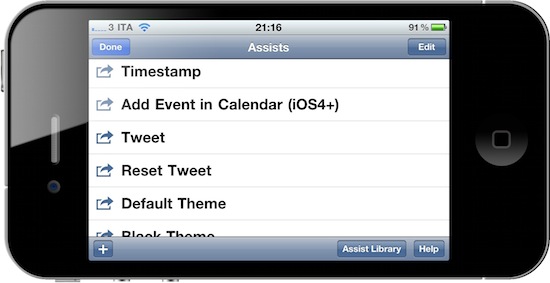
Draftpad, developed by Manabu Ueno, might look like yet another take on mobile note capturing, but it’s not. Indeed it is a notepad that lets you jot down quick notes and thoughts, but it hasn’t got built-in online sync nor any other tagging or folder management capability. Instead, Draftpad is all about doing stuff with the text you just wrote. This app can “route” text to a plethora of external native / 3rd party apps, like Apple’s SMS app or Facebook. You can write text and then share it via email or Twitter, search on Google, add it as a Calendar event or make it the body text of a new SMS, send it to Facebook or search in Maps. The “assist library” (the commands you can perform on text) can be extended and you can even write your own actions if you know how to play around with custom URI handlers.

Draftpad comes with a bunch of non-app related actions, too, like “insert timestamp” or “copy all text”. There’s also the possibility to switch to a black theme and check on your previous notes by tapping on the History button in the main page. What I really like, though, is that the app comes with support for multiple Twitter clients out of the box, and if you know how to find your way around iOS you can make Draftpad work with any app that supports text input. It’s really neat. And all of this for free, both for iPhone and iPad.

Draftpad won’t become your new Simplenote but it’s a great addition to iOS – a notepad that’s customizable and you can extend to work with your favorite apps. This is exactly what I’d like to see in a “Services” menu in iOS 5.


Layar Reality Browser Updated to Version 4.0

Layar was one of the first “augmented reality” apps in Apple’s App Store before all the competitors showed up. It’s had a few UI overhauls and the most recent is nice. Layar shows what is around you by displaying real time digital information on top of the real world as seen through the camera of your mobile phone. Layar augments the real world as seen through your mobile phone, based on your location. The idea is simple: Layar works by using a combination of the mobile phone’s camera, compass and GPS data to identify the user’s location and field of view, retrieve data based on those geographical coordinates, and overlay that data over the camera view.

Refresher video after the break.

What’s New in Version 4.0:

  • Layers now support new interactive features
  • The Camera View interface has been redesigned
  • The Camera View is stabilized using the gyroscope on iPhone 4.

Read more


With The 1.4 Update, Dialvetica Aims At Replacing Apple’s Phone App

Dialvetica is a “contact contacter” for the iPhone developed by the same creators of the hugely popular Calvetica calendar application. In his review of the first version of Dialvetica, Chris wrote:

Dialvetica is such a breeze to use, and once you get your contact defaults set up, prepare to move your Contacts.app to a folder and off the home screen. Where else can you email, call and SMS within the same app and keep it clean and simple? It’s also faster than using iOS’s Spotlight too.

Dialvetica is faster than Apple’s contacts app, but most of all it allows you to quickly call, email or text someone with just a few taps. Thanks to a custom “sticky” keyboard that sits at the bottom of the app, you’ll be able to filter out your contacts list and get to the friend you need to email the party invitation to. Dialvetica learns from your habits and will display the most contacted people at the top of the window over time.

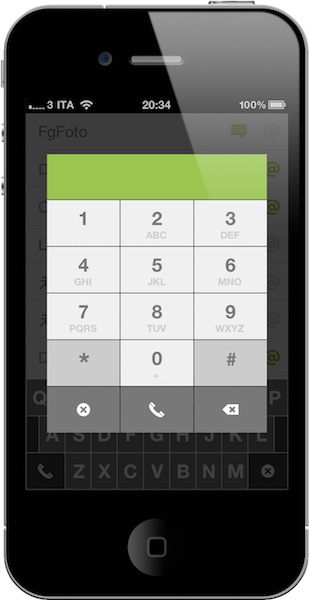
With the latest 1.4 update, which is propagating in iTunes now, Dialvetica aims at completely replacing Apple’s Phone app in your dock. With the introduction of a custom dialpad, the app now lets you compose phone numbers, but as you can guess relies on the Phone app to initiate the actual calls. The advantage is that if you’ve been using Calvetica to quickly go through your contacts, you can now use it to make phone calls, too, and put Apple’s phone app in a folder away from your homescreen.

I don’t know if I’m going to replace Favorites on my iPhone with this, but I’m pretty sure thousands of users will find Dialvetica 1.4 the best alternative to the stock phone application. Give it a try.


ClipTouch, Final Cut Server Client for iPad

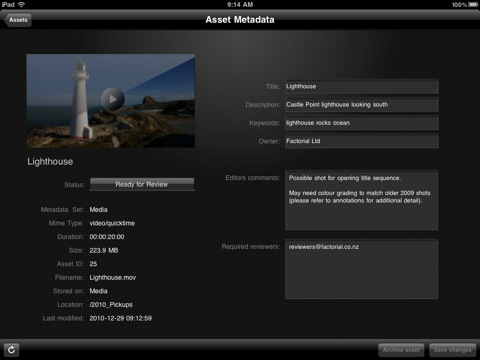
With an update for the Final Cut suite rumored to be released around March or early April, a new client for Final Cut Server showed up in the App Store. And I believe this is the first native Final Cut Server client specifically designed for the iPad – ClipTouch by Factorial. ClipTouch (which requires iOS 4.2, Final Cut Server v1.5.1 and access to open ports 8821 and 8826) works “out of the box” by giving you access to all your video assets stored in FCS, browse and collaborate on your media taking advantage of the iPad’s large screen and multi-touch functionalities.

You can use the iPad app instead of a review workstation to access your library over local or remote WiFi, 3G and VPN, download and view clip proxies, change the default asset’s metadata and add annotations. ClipTouch works with the standard format of clip proxies, but a compressor is available to achieve optimal results. A search feature is available, together with the possibility to clip the timecode display.

ClipTouch for iPad is available at $14.99 in the App Store. More screenshots below. Read more


The 90 Megapixel Steve Jobs Portraits Made of Apple Products

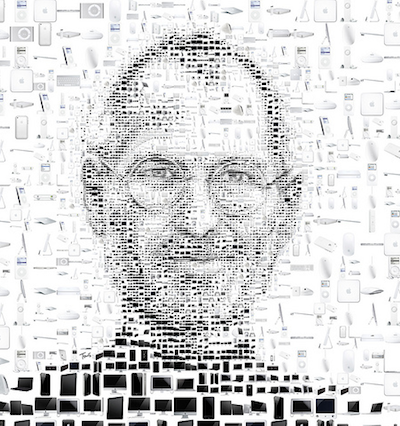
Realized by the popular Tsevis visual design studio, this might be one of the most impressive portraits of Apple CEO Steve Jobs you’ve ever seen. The design was commissioned by Italian magazine Panorama and ended up on the front page of the Economy section. The portrait comes in two different versions – the original files are 90 megapixel images available here and here.

If you look closer, the portraits are made exclusive of Apple products: iPhones, iPads, iMacs and MacBooks make every single details of Jobs’ face – yes, even the glasses.

The creative director of the magazine requested a ‘white on white’ portrait where Steve Jobs was to be illustrated with all of Apple’s white products. I created the mosaic but then became curious with what a black version would look like.

These mosaics are made with custom developed scripts, hacks and lots of love, using my Mac, Studio Artist, the Adobe Creative Suite and good music.

More portraits be Tsevis are available here but if you ask me, these are the best ones to date.


Apple Approves Another BitTorrent App, A Native Transmission Client

Apple has a strict policy on iOS apps that come with any mention of the BitTorrent file transfer protocol. Even if BitTorrent is not illegal by itself, Apple doesn’t want its name to be associated with it. Apps that had found their way past the app review team and into the App Store were quickly removed from sale. It happened with IS Drive in October.

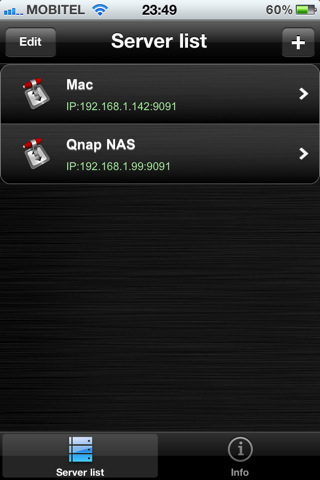
iControlBits by developer Luka Hlastec is a native mobile client for popular BitTorrent app Transmission, available for Mac, Windows and Linux users. Transmission, by default, allows you to check on active downloads using a mobile web interface that’s accessible from iOS devices, but it doesn’t have an official app in the App Store. iControlBits, a native front-end that relies on Transmission’s RPC protocol, offers a faster alternative to the web view and it lets view ongoing transfers, pause and resume downloads and even browse active downloads to a NAS server remotely. You can’t initiate new downloads from the app, but the developer says he’s working on it for a future update. In an interview to TorrentFreak, the developer admits he created the app mainly for himself as he didn’t like the way Transmission for Mac let you see downloads through a slow webapp. iControlBits, however, allows you to change and set speed limits without having to use Transmission on the desktop; all you have to do is enable remote access.

It is unclear whether or not Apple will pull iControlBits from the App Store, but if you’re in need for a remote Transmission client to manage your torrents, go download it now. The app is available at $1.99 in the App Store.


With Airplay Speaker Still Missing, iHome Announces Bevvy Of New Products For iPhone, iPad

iHome is a favorite of mine when it comes to finding a good bedroom clock/radio & speaker for my iPod touch. Expanding the line to include Apple’s iPad, you can expect a whole slew of iHome gadgetry to arrive later this year to support your army of iDevices you likely received over the holidays. A couple products really stuck out to Federico and I, so instead of going through iHome’s entire catalogue of product-sauce which you can review at iLounge, we’ll share our favorites past the break.

Read more