


It might be a brand new year, but that doesn’t mean your brand new Mac has to be left app empty. So we want to supercharge your OS X experience with four applications for a powerful Finder experience, smarter windows, and only the fastest downloader on your side of the MacStories Internet. We’re going to supercharge your Snow Leopard, and all you have to do is enter our giveaway for a chance at one of five bundles.
The AppSumo Supercharge OS X Bundle Giveaway
iPad 2 with SD Slot, Higher Res Screen? iPhone 5 To Feature Apple A5 CPU?

A report posted tonight by Engadget reveals several details of future Apple products scheduled for a 2011 launch, such as the iPad 2, the iPhone 5 and the successor to the second-generation Apple TV. Engadget’s track record with Apple scoops has been very solid, and the details are very interesting.
According to sources close to the website, the iPad 2 will feature a higher resolution screen similar to the iPhone 4’s Retina Display, but won’t be have the same DPI. In the past, we’ve heard rumors about the next-generation iPad featuring a display with higher pixel density, and we actually spotted higher resolution images in the iBooks app for iPad months ago. Those images suggested a 2x increase in resolution. Engadget also claims the device will have a SD card slot – that bigger hole we’ve seen in cases and mockups recently wasn’t a speaker, apparently. The iPad 2 is set to come out in April, won’t feature a USB port and will be “lighter”. Read more
The Beatles On iTunes: 5 Million Songs Sold In 2 Months

On November 16, 2010 The Beatles came to iTunes. The ever-popular Liverpool band was one of the big holes in Apple’s digital music offering, and an option long pursued by Apple CEO Steve Jobs, who also happens to be a huge fan of the Fab Four. In two months, 5 million songs and 1 million albums of The Beatles have been sold through iTunes, Apple told The Loop.
Two weeks after the initial release, Apple announced 2 million songs had been sold. Clearly sales have slowed down a bit, but it’s an impressive figure nonetheless. And just like when 2 million songs were already out of iTunes, the most popular album is “Abbey Road”. Most popular song in the U.S. is “Here Comes The Sun”.
November 16 might not be a day we’ll never forget, but it sure marked the beginning of a lucrative relationship between Apple and The Beatles.
Discovr for iPad: An Interactive Map of Music
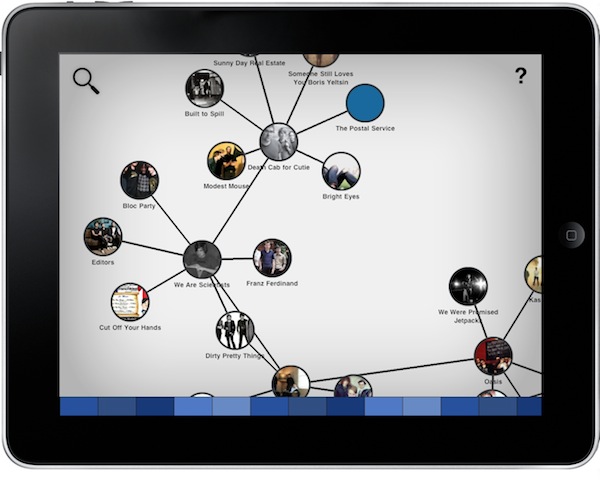
Months after its original release, I’m still using Aweditorium as my primary “music discovery tool” on the iPad. The app is nothing but a grid containing interesting independent artists and bands the Aweditorium developers think you should check out. You can listen to songs directly from the app, send them to an external speaker with AirPlay, run the app in the background or stay in there and check out bios, interviews and lyrics while you’re listening. It makes for a great way to discover new music when you have some free time to dedicate to music. But in Aweditorium, you won’t see your favorite artists coming up every once in a while, as the app is entirely based on music you’ve likely never heard of before. That’s where (I think) Australian music start-up Jammbox got inspired to develop Discovr for iPad. Read more
Sociable Updates Your Status On Multiple Social Networks At Once
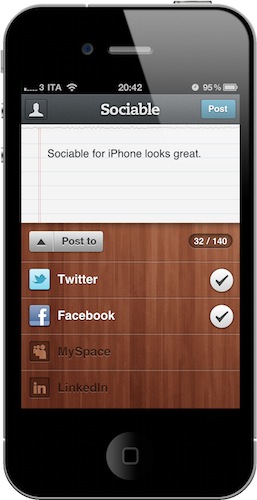
A few weeks ago I reviewed Update, a simple $0.99 iPhone app that can update your status on Facebook, Twitter, Google Buzz, LinkedIn and Hyves with a single screen, all at once. In what seems to be a renewed trend in the App Store, here comes Sociable, another take on the “share on multiple websites at the same time” idea. Sociable can share messages on Twitter, Facebook, LinkedIn and MySpace. Every time you want to share a new status update, all you have to do is choose the services you want to send it to.
So why would anyone prefer this over Update, which we already covered and liked? Well, Sociable comes with a beautiful interface and a great icon on your home screen. I couldn’t help but notice the pixels that went into this app. The sharing screen, for instance, kind of reminds me of the compose window in Twitter for iPad. The wooden background and icon are elegant.
Sociable is a $0.99 purchase in the App Store.
Handoff Pushes Web Pages From Your Computer to Any iOS Device
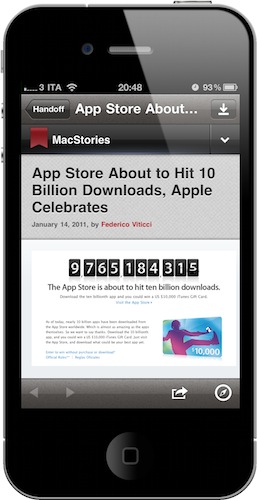
One of the features many users wish Apple implemented by default on OS X is the possibility to easily and quickly send any kind of content to iOS over the air. Through the Internet, in seconds, from a computer to the iPhone or iPad. We’re not talking “sync” here: I’m talking about web links, images, maps, phone numbers, Youtube videos “pushed” instantly to an iOS device. The other way around, from iOS to the Mac, would be welcome as well: instead of relying on third-party apps, one could save content and information to consume later on a Mac. Like a video you don’t want to watch while you’re out because, honestly, Instapaper wasn’t meant for video.
Luckily for us, a number of apps that enable OS X to iOS communication over the air have surfaced in the past years, and today we’re taking a look at a new one. The app / service is called Handoff, and it’s probably the simplest I’ve stumbled upon so far. It allows you send web links from your browser to the iPhone or iPad (the iOS app is universal) through a bookmarklet or extension. Read more
#MacStoriesDeals - Friday

Pew Pew Pew! Here’s today’s deals on iOS, Mac, and Mac App Store apps that are on sale for a limited time, so get ‘em while they’re hot! Read more
The External Touchscreen That Can Control An iPhone
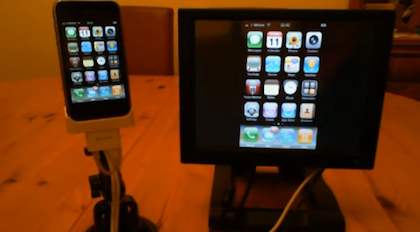
Geeks and modders have been looking for a way to control an iPhone or iPod touch from an external touch input for years. And when we say “a way to control”, we actually mean “an easy way to let the setup work”. In the past years, we’ve seen hundreds of individuals coming up with incredibly complex configurations that revolved around dozens of cables, jailbreak, dock stations, screens and modifications to the original iPhone software. What Mr. Romin has achieved is a rather simple, affordable and easy to understand method to get the iPhone to mirror its screen on an external monitor, and have the monitor capable of controlling the iPhone itself via touch.
With a Lilliput FA1042 touchscreen, an iPhone, a Belkin AV dock adapter cable and a software called “Centrafuse” he managed to get this two-way mirroring and controlling system to work. The iPhone’s Springboard is blown up on the screen in standard mode, but Youtube videos, for example, play in fullscreen mode on the external panel with controls visible on the iPhone.
Check out the demo video below. Read more
What Is This Psychedelic Macintosh Helmet?
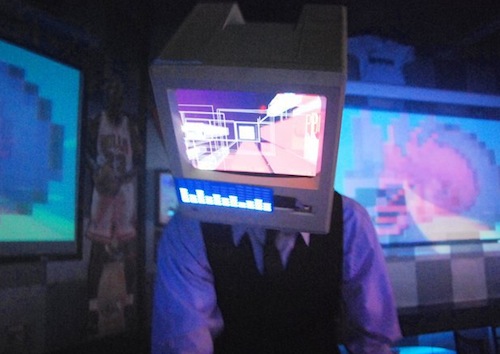
Matt “Kid Chameleon” Loniero is an audio engineer / graphic designer / DJ who creates visual experiences for live performances of other DJs and bands. He also likes to experiment with stuff. A lot. And his latest experiment, a Macintosh Plus helmet with an embedded iPad connected to a Bluetooth keyboard, is one of the coolest things we’ve seen in a while.
The visualizer helmet is made of a Macintosh Plus bought on eBay, which had its inner parts removed. A bicycle helmet was then placed inside the case together with an iPad. In the live performance you can watch below, this was the setup:
For this specific performance, we used an iMac connected to several projectors and televisions around the room and above the bar. The iMac was running Resolume Avenue and the video was triggered using a MIDI keyboard and a Wiimote. The iPad was connected to a bluetooth keyboard which allowed me to press play on the iPad video and press the B button on the Wiimote at the same time Kid Chameleon started his set.
If you missed the first DJ set in Phoenix, you can get the chance to see Kid Chameleon perform live again tonight at the LA Art Mix at the Gallery Godo in Glendale, CA. Check out the video below, and more photos here.
Read more