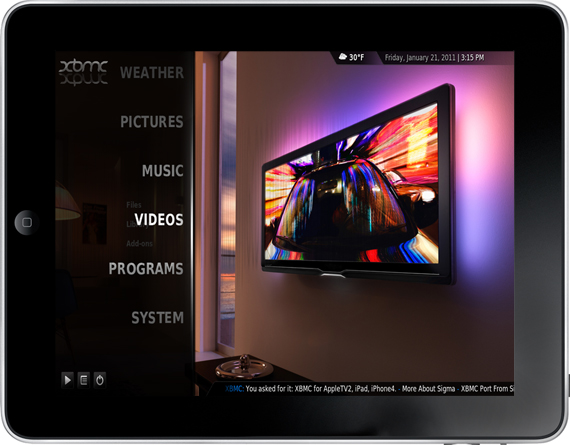
XBMC Comes to the iPhone, iPad, Apple TV 2

XBMC, a popular media center originally made for the first Xbox has become fairly widespread has been available for a variety of platforms, today that platform base extended to include the new Apple TV, iPhone and iPad.

The client on these new platforms is not stripped down to simply just view streams but is fully fledged with all the features you would come to expect it to have on a Windows PC. Because of this it is being distributed for the iOS devices through a Cydia repository and for the Apple TV through an apt-get install.

Scott Davilla one of the XBMC developers talked to TUAW and he revealed that development for the Apple TV 2 started only on November 1st last year and the iOS versions a few weeks later. He notes that the built in web server is currently disabled and the skin isn’t optimized but says improvements will be made including the possibility of implementing AirPlay into all the Apple related releases.

Perhaps one of the most interesting developments that occurred whilst XBMC was ported was the discovery of an API called VideoToolBox that allows hardware video decoding, encoding and scaling of the video size to match the final display size. So powerful is this API that Davilla and others that developed XBMC for iPad are able to stream full 1080p video with no transcoding to the iPad and it plays nearly perfectly, only dropping a few frames. Davilla’s confident however that the A4 processor can handle 1080p and will be working to ensure fully smooth playback.

TUAW put together some video’s demonstrating it running on all three of the new platforms, check it out here.


[Via XBMC, TUAW]


TestFlight Goes Live For Everyone - Distribute & Receive Beta Apps Effortlessly

TestFlight has been in lockdown mode for a while, and I’ve had plenty of opportunities to put the service through its paces before they opened their doors to everybody this evening. I’ll just say that TestFlight is incredibly convenient for installing beta applications on the fly - there’s nothing more annoying than unzipping iPad or iPhone files, dragging them to iTunes, syncing, and it doing all over again when updates are distributed. TestFlight simply has you log into their site via your iPad or iPhone, tap a button, and you can browse through the beta apps developers have subscribed you to for immediate downloads. It’s so much easier for developers to submit one beta to TestFlight than to package their app and distribute it to dozens of emails, and it’s much easier on the tester to be updated and install updates. It’s completely Apple worthy, and if you’re a developer we encourage you to sign up for the service so you can focus on creating content instead of worrying about beta distribution.

TechCrunch notes that the service is free to developers, while a paid Enterprise version is in the works that will allow for licensed versions of apps to be passed through the airwaves (presumably for corporate/in-house application use).

[via TestFlight, TechCrunch]


Verizon Launches First Official iPhone Commercial

It begins. Verizon has just launched its first official commercial for the iPhone 4, the very same iPhone that’s been in the Apple rumors for years. In case you missed it, it’s real and  it’s coming on February 10. The commercial is a little too dramatic, maybe, but I guess it’s also appropriate: Apple will sell millions of these things this year.

“To our millions of customers, who never stopped believing this day would come…”

February 10. Verizon iPhone. Video below. [Youtube via Engadget] Read more


Lyrica 2: Redesigned, And Still The Best App To Tag Songs

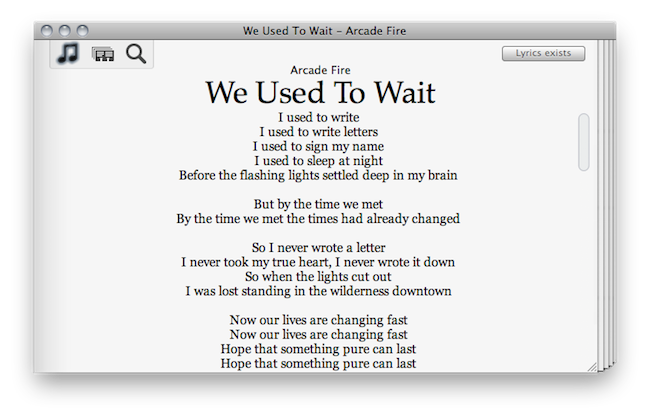
A few days ahead of the opening of the Mac App Store, we previewed a nifty little app for the Mac called “Lyrica” which helped you display lyrics from songs playing in iTunes through a translucent black, HUD interface. The Mac App Store launched, the app was priced at .99 cents, it was one of the few useful apps in the Music category – it snowballed. It quickly jumped the charts to get in the first spots of Top Paid, and two weeks after the grand opening it’s still firmly positioned in the top 30 apps.

It turns out, though, that many users didn’t like the HUD style of the app, which may or may not make it difficult to read lyrics on a translucent background. So developer Florian Zand redesigned the entire application and added some new features during the process. Lyrica now comes with a white, cleaner look with a stacked style that kind of reminds me of a newspaper. I also like the fact that I can choose between different fonts – personally, I sticked with Georgia.

Graphics changes aside, the app now searches through seven lyrics databases, including AZLyrics and MetroLyrics. Several preferences have been added (Lyrica can still automatically tag any song playing in iTunes, even if it already has lyrics on its own) and the developer also implemented a new functionality to replace and remove broken lyrics. Useful for those (like me) who tried to tag their music library in the past with some shady Mac app that didn’t work at all.

Lyrica is available at $0.99 in the Mac App Store. It’s getting better on every release, and even though it’s not perfect yet (and design-obsessed folks will still have something to say about it) it just works, better than many other apps sold at a higher price by well-known developers. Give it a try.


Apple Seeds Mac OS X 10.6.7 To Developers

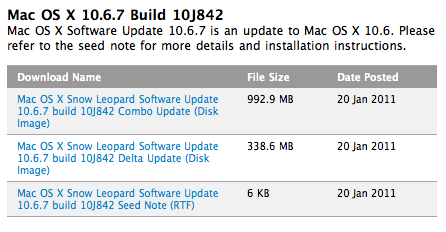
Looks like 10.6.6 wasn’t the last version of Snow Leopard, after all. Earlier today Apple seeded a new version of OS X to developers, 10.6.7. Build number is 10J842. From the release notes, the focus areas are:

  • AirPort
  • Bonjour
  • SMB
  • Graphics Drivers

Mac OS X 10.6.6 was released two weeks ago with support for the Mac App Store. No word yet whether or not support for AirPrint through shared printers will find its way back into this new version of OS X once it’s released.


Skyfire Makes Another Million With iPad App

Remember Skyfire? The alternative browser for the iPhone that comes with a lot of extra functionalities, including the possibility to play Flash videos through remote proxy servers that transcode Flash content to iOS-optimized video. The iPhone app was insanely successful as it managed to pull in a million dollars in just three days in the App Store. The app has also been sitting on top of the iPhone charts for weeks now.

In case you didn’t notice, right ahead of Christmas the Skyfire team released an iPad version of the app, priced at $4.99. It was good timing and a clever move as the App Store was about to shut down for developers and apps that climbed the charts in those days gained thousands of downloads. Skyfire for iPad is no exception: three weeks into the App Store, another $1 million in the developers’ hands – although 30% will go to Apple. That’s around $700,000 in revenue so far, as MobileCrunch reports.

Skyfire for iPad is available here. It’s a cool browser, but I’m still not sure what’s the real need of Flash compatibility for videos on iOS devices. Apparently though, people bought it. And that should be enough for the developers. Read more


Apple Employees Average $46k a Year

The New Yorker’ John Cassidy looked over the balance sheets of Apple and Goldman Sachs to decide which company offers the best return on its capital. Cassidy used the latest earnings reports from the two American companies, then calculated that the two had similar profit margins but very different economic returns. Each company’s return on assets was examined, determining that Apple is twenty times more profitable than Goldman Sachs.

Apple is more profitable for a few a few reasons - it makes highly desirable products that people spend their hard-earned money on. There’s always a huge demand all Apple products so they can decide their margins (usually high ones) which are well over the cost of manufacturing; thus giving them a nice profit on every iDevice or Mac sold. Read more


Transparent iPhone 4 Exposes Ive’s Best Kept Secrets

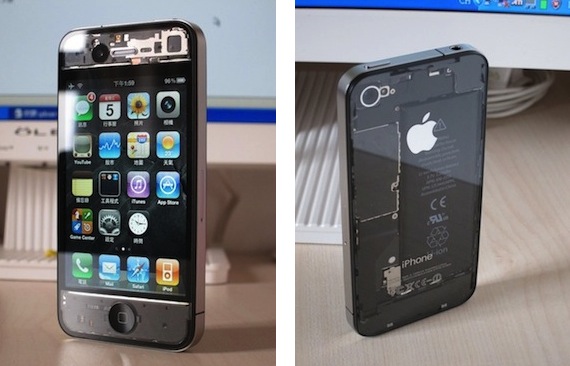
This iPhone 4 mod is the best I’ve seen so far. There, I said it. No other mod can compete with this one, from my personal point of view. I don’t know about build quality and difficulty of installation (I guess it’s not a 5-step How To), I just know I like it.

It’s a fully transparent mod for the iPhone 4, where you get to see the battery and innards through the back of the device, front-facing camera, sensors and screen at the front. It reminds me of those semi-transparent Game Boy Colors Nintendo released in the mid-90s, only for something made in Cupertino.

Full gallery available here. If you know where to buy it, please let us know in the comments. [via TUAW]

Update: Looks like it’s a DIY mod with paint thinner used on standard black OEM components. [Thanks, Markus]


#pastblast - The Potential of MobileMe

#pastblast - The Potential of MobileMe

We think Shawn Blanc’s “Blast from the Past Link Day” initiative is a great idea: today only, get to share and discover again great & interesting articles from months or years ago. I thought I might link back to an article from Shawn himself, from October of last year. The article is about the potential of MobileMe, and I think it’s still particularly relevant to Apple fans and iOS users as it provides exquisite insight into features we’re still waiting for Apple to implement:

In many ways Dropbox and Google are driving the iOS / OS X relationship more than MobileMe is. While MobileMe is syncing my contacts and calendars, Dropbox is syncing my most-dear files: the projects, articles, and notes I’m interacting with every day. What are iWork.com and MobileMe for if not for the sharing and syncing of everything between our Macintoshes, iPhones, and iPads in sync?

Imagine if you will what a merging of Dropbox and MobileMe might look like. Something simple and completely expected, I suppose. It would be free, it would sync and share info and files, and it would let other apps use it for syncing. Imagine setting up your iPhone with your Apple ID once, and then any app that has a Mac and/or iPad counterpart would sync. Sounds like mobile bliss.

To keep some bit of a revenue stream, there could easily be a paid version of MobileMe as well. The free version could offer syncing and come a small yet reasonable 2GB of data storage. Paying for an upgrade might buy you increased cloud storage, an @me.com email address, Find my iPhone support, and that photo gallery thing which nobody uses.

Sounds like the perfect solution for geeks, or those OS X users who know what app-to-app OTA sync is. I don’t know if the average iOS user – your friend who bought the iPhone for Angry Birds – would be excited about a Dropbox-like feature in iOS, though. And that’s why Apple is working on two features that can be easily explained to anyone: Photo Stream and Media Stream.

Permalink