


Last weekend I decided that I wanted to try to set up a VPN server on my MacBook Pro running Snow Leopard 10.6.6. What’s that? – you may ask. A Virtual Private Network (VPN) is a type of Internet connection that allows users to establish a secure connection between a computer or a mobile device and a server. The cool thing about the secure connection is that all traffic is “tunneled” through a cryptographic system that makes it almost impossible (let’s say very difficult) for hackers or people who want to take a peek at your Internet traffic to access your data. There are several implementations of VPN out there, but the main concept is that through a secure connection multiple computers and devices can stay on the same local “virtual network”. Read more
How To Set Up A VPN Server On Your Mac and Access Everything Remotely With An iPhone
TweetDeck Teases New App That Will “Raise The Bar” On iOS

Popular service TweetDeck has announced this morning that a major update to their official iOS app is in the final stages of testing and it will be a completely revamped version of TweetDeck for iPhone and iPad. Ready to be submitted to the App Store “in the next couple of weeks”, the new iOS TweetDeck will apparently put huge focus on iOS 4 compatibility and Retina Display graphics, as well as the possibility to create “flexible” columns blending status updates and messages coming from Twitter and Facebook.
This totally new, fully iOS4-compatible TweetDeck app has been built completely from scratch. It is not only the most powerful and flexible mobile app we have ever produced, but also the most jaw-droppingly beautiful. This is the app your retina display has been crying out for.
A major new feature of iOS TweetDeck will be totally flexible columns. You want to create a column blending your Mentions and some Twitter Lists? No problem! Always wanted to see your Facebook feed and Twitter DMs in a single column? We’ve got you covered! New iOS TweetDeck puts you in control of your columns, giving total flexibility over which feeds appear in which columns. Your social world has never been so personal.
TweetDesk says the Android app has been insanely successful (in spit of fragmentation issues) and set new standards for the service on mobile platforms. The new iOS iteration promises to “raise the bar” for iPhone and iPad apps – something we’re pretty sure several users are looking forward to after the whole Twitter Quick Bar debacle.
Whether or not TweetDeck will prove itself to be the answer to an official Twitter client clearly shifting the focus to promoted tweets and ads, we’ll have to wait and see.
Apple Asks Developers To Update Apps for iPad 2

In a note posted on the iOS Dev Center and, most specifically, on the webpage that lists the new features of the upcoming iOS 4.3, Apple is asking developers to update their apps for the iPad 2 to take advantage of the improved hardware performances of the device.
With a new A5 dual-core chip running at 1 Ghz per core, Apple clearly mentions that most operations inside applications will be faster “ouf of the box” but developers can further tune their software with tools like OpenGL Profiler for “greater performance”. Even though Apple hasn’t stated how much RAM went inside the iPad 2, the A5 chip alone should be twice as fast than the A4 in iPad 1 with graphic performances up to 9x faster. Most apps will be generally faster on the iPad 2, but developers can manually update their apps to use the new iPad 2 hardware if they want to.
Developers are also asked to enhance their apps “with new user experiences” thanks to the iPad 2 cameras and gyroscope + accelerometer. While the possible implementations of rear and front-facing cameras are pretty obvious (self portraits and HD video, expect a lot of Photo Booth and iMovie alternatives coming from 3rd party developers), Apple has put the focus on the precision granted by the combination of gyroscope and accelerometer with “6-axis of motion sensing, including user acceleration, full 3D attitude, and rotation rate”.
The iPad 2 will be released on March 11 and it will come with a special version of iOS 4.3 (containing FaceTime and Photo Booth) pre-installed.
iPad 2 Launch Details Roundup
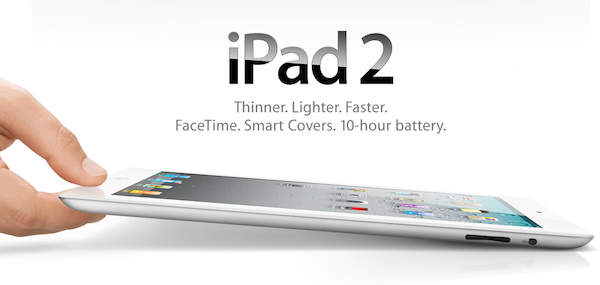
There has been an avalanche of information regarding the iPad 2 launch since the Apple event last week so if you are confused, unsure or just want a refresher on the launch details just jump the break for a full roundup of all the important details!
Also be sure to check out our iPad 2 roundup to get all the details what exactly is new and awesome about the iPad 2.
Yes, The iPad 2 Is Carrier Unlocked
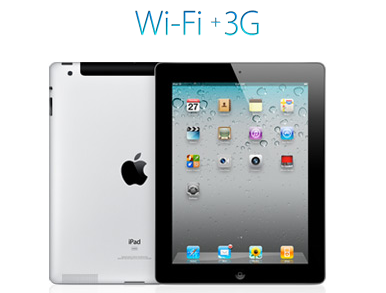
Over the weekend there were some reports that WiFi+3G iPad 2’s would be locked to a specific carrier after people read on the Canadian Apple site that “the iPad model you purchase is specially configured to work with either Bell, Rogers, or Telus.” It turns out that this wordage, whilst technically correct, is very confusing in that whilst the iPad is initially configured to work with a specific carrier, it can be reconfigured to work with other carriers at any stage.
This has been confirmed by a number of people from iPadinCanada to TUAW that have all confirmed from a variety of sources including Rogers Wireless, Apple Experts and Apple Support that you can swap SIMs and carriers with the iPad 2. The only issue (a very minor one) is that the iPad will need to connect to iTunes after the SIM has been swapped to download the new carrier settings, which is required for the 3G service to be usable.
So to be totally clear to all those interested, the iPad 2 is not carrier locked, rather Apple has just over-simplified the information it provided, because you can indeed reconfigure the iPad to work with another carrier with a simple SIM swap and iTunes sync. The one caveat to all this is of course the Verizon (CDMA) iPad 2 which will not be able to switch to any carrier using a GSM network because it does not contain a 3G chipset compatible with GSM networks.
[Via TUAW]
iPhone 5 To Revert Back To Aluminum Back And Internal Antenna?
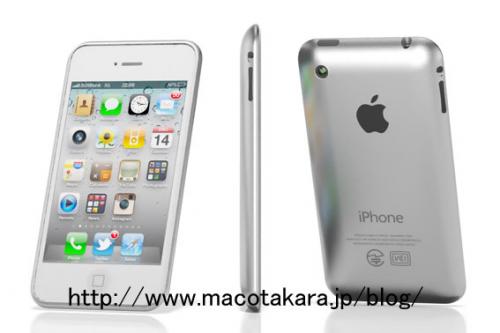
A Chinese source has told Economic Daily News (translated by Macotakara) that Apple is abandoning the glass backing of the iPhone 4 in favor of an aluminum casing as well as ditching the external antenna design. According to the source the;
Decision to design similar to iPod touch instead of using glass is supposed that Apple seems to stop problems which are told widely damages from scratching, difficulties of painting white and weight of glass.
The source also reported that Apple is abandoning the current external antenna design that was plagued with controversy over the “death-grip” signal loss and attenuation issue. Although unclear, it seems that the translation implies that the “antenna will be designed to penetrate cellular and Wi-Fi waves via resin made Apple logo” which Apple actually does have a patent for.
Finally the source noted that Apple will include the new A5 processor in the fifth iteration of the iPhone, the same processor in the new iPad 2. As with all Apple rumors, including those regarding the iPhone 5, take them with a grain of salt. In particular when the source has a shaky record in previously predicting a 7-inch iPad by Christmas 2010.
[Via MacRumors]
iOS Multitasking: It Doesn’t Need To Be PC-like
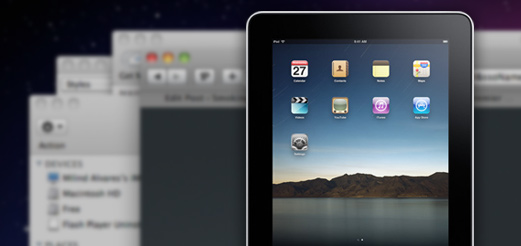
In a recent article on his personal blog, Lukas Mathis argues that the iPad’s multitasking doesn’t actually help people get things done and focus more as it forces you to constantly switch between apps. He writes:
a task (or an app) on a computer, and a task performed by a human don’t map to each other one-to-one. In fact, a single task performed by a human can easily make use of several applications running concurrently on a computer.
For example, right now, I’m typing this text in Notational Velocity, and I’m looking at the New York Times in a browser. The computer is showing me two windows at the same time. It is multitasking. I, however, am not. I’m absolutely focused on writing this essay. In fact, the computer’s multitasking is precisely what allows me to focus on writing my essay. I can type text into this window while looking at the Times article in another window without being forced to interrupt my task, and consciously switch between apps.
This is a common point being raised by people curious to try out iOS, but afraid it won’t help them be productive: “can I see multiple apps at once”? No, with iOS you can’t. And the way I see it, there’s good reason to enforce this implementation. First off, let’s consider the devices iOS runs on: iPhone, iPod touch, iPad, Apple TV. The Apple TV 2nd gen doesn’t exactly have apps and I don’t understand why would anyone want to see multiple photos and movies at once. The iPhone and iPod touch? The screen is so small (in spite of high resolution) I honestly can’t believe some people are exploring the possibility of seeing multiple apps on a single screen. It doesn’t make sense. Read more
Test Shows iPad 2 with iOS 4.3 Is Incredibly Faster Than iPad 1
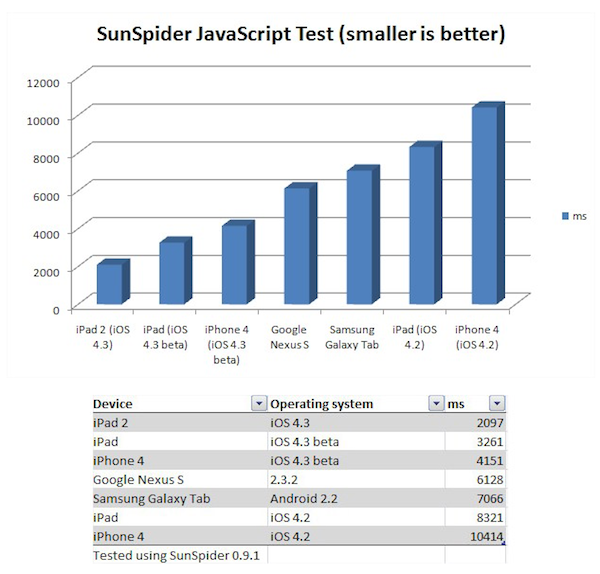
Surprise: the iPad 2 running iOS 4.3 is faster than the original iPad running iOS 4.2. According to CNET UK, which had the chance to run a JavaScript SunSpider benchmark test on the iPad 2 during a brief demo at San Francisco, the iPad 2 will outperform the competition and even other Apple’s devices when it comes to web browsing experience and overall snappiness of the browser application. The SunSpider test is usually a good test of how a browser will perform with “heavy” webpages with lots of content and functionalities such as Facebook.
Indeed, Apple itself promotes the new Nitro JavaScript engine that powers Safari on iOS 4.3 as “twice as fast” than its predecessor on iOS 4.2. The original iPad, however, also comes with a slower and non-dual core processor (Apple A4), whilst the iPad 2 will get a dual-core A5 and likely more RAM. These hardware features, together with the iOS 4.3, should make the device a lot faster than iPad 1, iPhone 4 and several Android tablets out in the market or coming soon.
Back to the SunSpider JavaScript test, CNET writes:
Incidentally, when you compare the iPad to the other devices we tested, Android phones and tablets don’t come out particularly well. The Galaxy Tab is more than 3x slower than the iPad 2 in this test, and about 2x slower than the original iPad with the new software. The Google Nexus S smart phone doesn’t fare too well either, at nearly 3x slower than the iPad 2. There’s really good news for iPhone 4 owners out there: when it arrives, iOS 4.3 will deliver a 2.5x speed increase in this test.
The one device we’d like to test, but can’t, is the Motorola Xoom. This tablet has a dual-core processor and runs the latest version of Android, 3.0 Honeycomb.
We will get our iPad 2’s next week and we’ll make sure to run some tests as well to see how the new tablet is really faster than other devices with iOS 4.3 and the iPad 1.
Vodafone Issues Carrier Update and (Finally) Activates FaceTime in Egypt
Back in October of last year, it was reported that several countries in Africa and the Middle East were excluded from Apple’s list of supported countries for FaceTime on the iPhone, iPod touch and Mac. Not only did Apple mysteriously remove mentions of FaceTime from Saudi Arabia’s website, they later confirmed through an official document that carriers were blocking video calling on the iPhone and even went ahead to restrict FaceTime for Mac (which doesn’t rely on any mobile carrier – well, unless you tether your Mac to an iPhone) to specific countries in the application’s preferences. After months of discussions and hacks to enable FaceTime on African and Middle Eastern handsets, the takeaway was that carriers were definitely putting a lot of pressure on Apple for some reason.
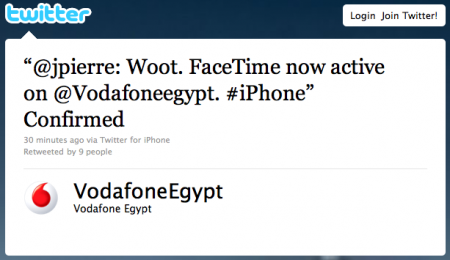
The first step towards FaceTime availability in these countries has finally been taken by Vodafone, which has enabled FaceTime in Egypt with a carrier software update for iPhone. As noted by SaudiMac, the update simply adds a boolean string to the iPhone’s configuration file with video calling set to “yes”. This leads us to think that carriers can restrict and restore FaceTime at any time with software updates – something Apple can’t apparently control.
Egypt is still included in the countries with blocked FaceTime, but we guess it will updated soon with possibly more countries receiving carrier updates. [via SaudiMac]