

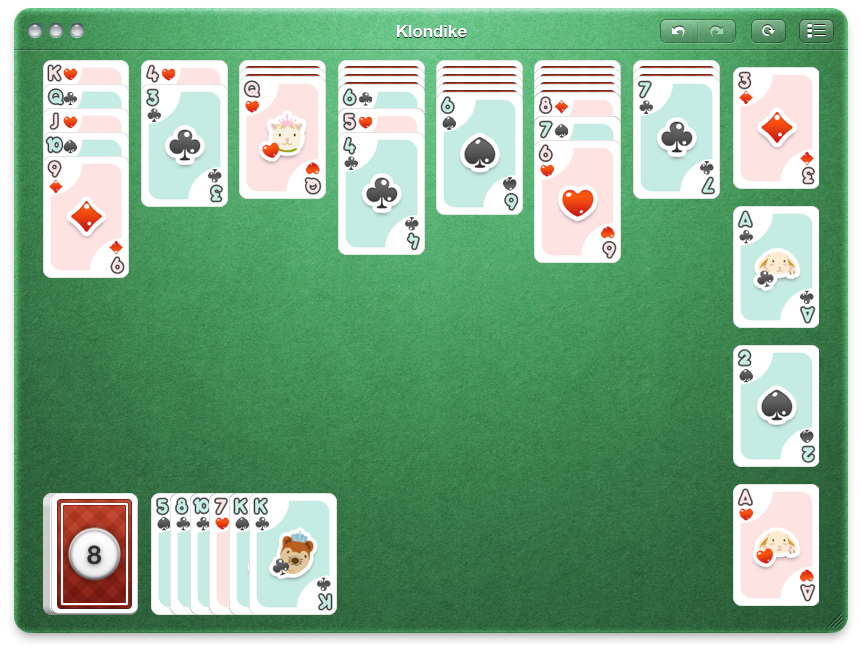
There isn’t too much you can say about solitaire on its own. It’s the card game your coworker plays instead of writing formulas for Excel spreadsheets on Windows, but that doesn’t mean we can’t turn solitaire into something more than a time waster. Proof of concept: Mondo Solitaire from Ambrosia Software is solitaire done right. You aren’t just playing the same game of Klondike over and over - instead you’re offered over 300 variants of solitaire madness to choose from. If you include the beautiful game board that looks like it should bundled with Apple’s own Game Center, then you have yourself one premium handful of card games.
Mondo Solitaire: Deliciously Beautiful Solitaire For Mac
WordPress for iOS Updated, Quashes Bugs and Improves UI
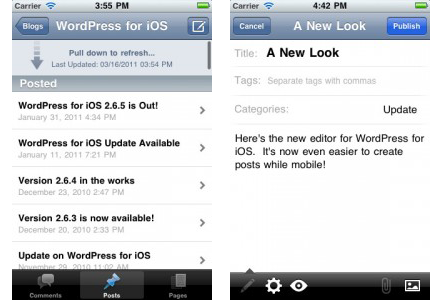
The WordPress iPhone and iPad app just got updated to version 2.7 and it’s a big bug-quashing update that supposedly fixes 117 bugs to vastly improve performance and reduce crashes.
UI has also been retooled with the ‘Post Editor’ interface improved to “make it easier to write and edit posts and pages” with quick access to edit post settings, view attachments and add media. Finally multiple attatchments can be added simultaneously, you can use the “pull down to refresh” feature to quickly update comments, posts and page lists and email and URLs left in comments are now able to be clicked on.
[Via WordPress Blog]
Beware The 200 Scalpers Outside New York’s 5th Ave. Store

If you’re still trying to get your hands on an iPad 2, you might want to avoid the 5th Avenue Apple Store in New York for now. The New York Post has a piece today on the issues with “scalpers” waiting outside the Apple Store for iPad 2 stock to become available again, and buy a large amount of units to sell later at a higher price in Asian grey markets and the United States as well. Apparently almost 200 of these Asian scalpers have been spotted around the 5th Ave. location, and they’re well organized with “leaders” telling them how many iPads to buy, which models, at which rate. These “leaders” were seen handing out $100 bills to the scalpers as if it was normal to get hundreds of iPads and put them in large bags to ship to China right away.
Prices for these iPad 2s range from $1700 to a whopping $2000 – you could get 4 iPads WiFi 16 GB for that price.
An Apple worker inside the store said he didn’t like what was going on – but he couldn’t do much about it.
“Listen, we all know what’s going on here. I find it sad and disgusting,” the worker said. “These people are preventing ordinary folks from getting their hands on an iPad.
The problems with scalpers and grey market isn’t new to Apple product launches. When the iPhone 4 went on sale last summer in the US and, later, in Europe, we saw the same thing happen with hundreds of people waiting in line outside the Apple Store just to buy devices to sell right away at a higher price, or export all the way back to mainland China.
The situation looks very bad this week as iPad 2s are nowhere to be seen, not even online, and these people are preventing regular, non-scalper customers from legitimately purchasing an iPad 2. Until Apple solves its problems with stock and availability, or releases the device in more countries as promised, we’re going to hear more and more stories like this.
We Have Five Copies Of Zen Viewer HD For iPad Up For Grabs
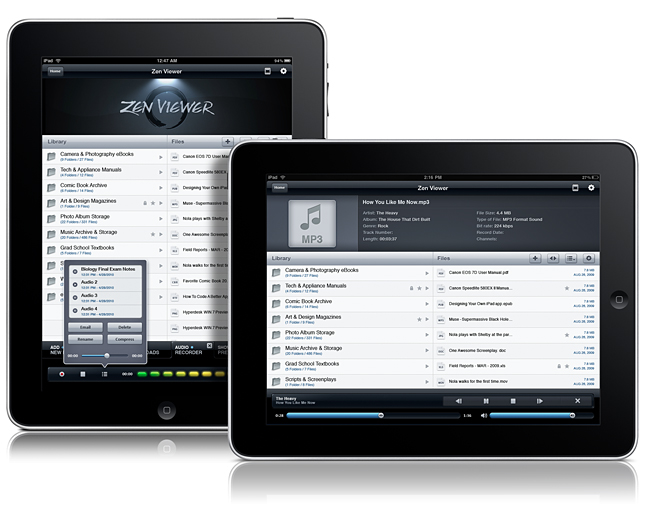
File managers on the iPad need not be boring nor unintuitive. Zen Viewer HD for iPad wrangles documents and media into a stylish file viewer that plays back audio, movies, pictures, PDFs, and gives you the ability to organize documents. You also have the cloud at your fingertips, thanks to Dropbox, Box.net, and MobileMe integration so you can pull files from just about anywhere. Record audio on the fly, manage files and folders (easily get files into Zen Viewer HD by drag & drop while in Manage Mode), and compress & decompress files to save storage space on your iPad. If you want to carry your Windows or Mac files around with you, Zen Viewer shouldn’t disappoint. Currently on sale for $2.99 in the App Store (with some additional artist themes costing $.99 in app), who says managing files shouldn’t be both easy and beautiful? Your new iPad should have a proper system in place for handling all of the documents stored on your home system, so we’re giving away five copies past the break.
Microphone In iPad 2 WiFi Offers Better Quality Than 3G Model
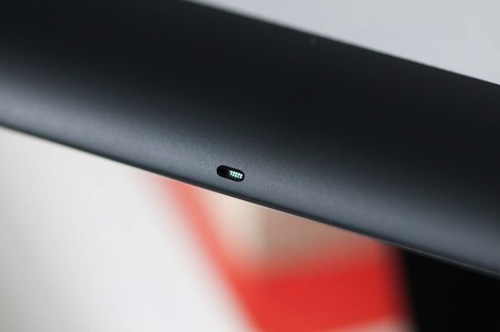
If you’ve recently bought an iPad 2 WiFi + 3G (good luck finding one now with a 4-5 weeks wait on the Apple Store) and your friends have told you they can’t really hear you on FaceTime, that might be a problem with the microphone in your 3G model. According to iLounge, the iPad 2 WiFi offers clearer microphone quality as the microphone has been placed in the top metal housing, whilst it sits in the plastic antenna band on the iPad WiFi + 3G.
Perhaps due to this change in materials, the Wi-Fi model offers markedly cleaner audio than that of the 3G, which sounds slightly muffled and echo-prone as a result. Curiously, we found the GSM 3G model’s audio to be slightly preferable to that of the CDMA model, which seemed to suffer the issues more severely.
The iPad 2 saw a change in size and shape of the microphone, and iLounge reports the differences in sonic qualities can be clearly spotted in apps like FaceTime with the iPad’s screen facing the user. If you have a 3G iPad 2 and you’ve spotted these differences, too, please let us know in the comments below.
[image via]
Disk Drill Out Of Beta, Adds S.M.A.R.T Disk Monitoring
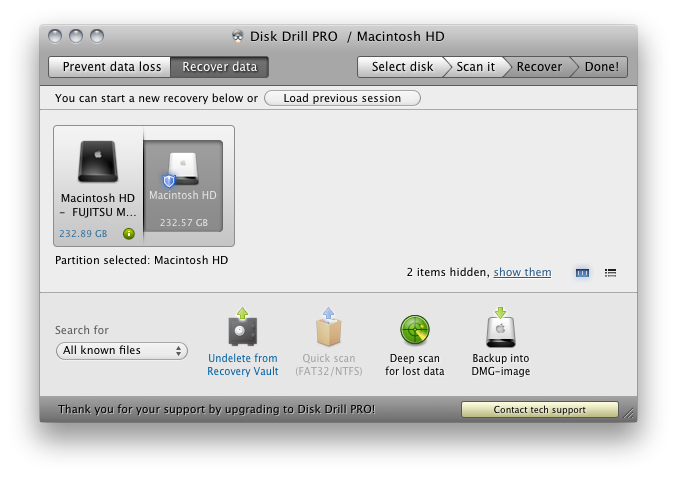
While Disk Drill was in beta, we had it thoroughly reviewed as an excellent file recovery solution for the Mac, helping prevent disaster from unavoidable data loss thanks to power failure, hard drive crash, or accidental file deletion. Not only does the Recovery Vault watch what files you delete and keep a tab on them in case of recovery, you can also have Disk Drill scan external HFS/HFS+ or FAT drives and flash media to possibly undelete pictures, music, and documents. Disk Drill comes in free and Pro versions, with the free version supports files protected Recovery Vault, you’ll gain the ability to recovery anything thanks to a new deep scan algorithm in the Pro version, which will attempt to recover files that haven’t yet been overwritten by the operating system. Included in both versions is now a menubar utility that monitors your hard disk for errors, and will allow you to back up failing partitions to a disk image at the first sign of trouble.
Disk Drill is user friendly, and I recommend you check out our initial review before checking out the free version. The Pro version costs $89, but if you already own a competitor’s product that you’re unsatisfied with, you can send Disk Drill a proof of purchase for a 50% discount. Students and non-profit organizations also qualify for a 20% discount.
Doodle Jump Closes Hollywood Deal, Movie Tie-In Version Now Available

Back in January we reported Lima Sky, the developers of popular iPhone game Doodle Jump, closed a deal with Hollywood studio Universal to develop a special version of Doodle Jump featuring the main character from the upcoming animation movie Hop, from the creators of Despicable Me.
The movie tie-in is now available in the App Store, and it’s a free universal app for iPhone and iPad. In 25 levels featuring the usual disappearing and breakable platforms, you’ll have to control E.B., the Easter Bunny’s son, in his quest to become the best jumper before taking over “family’s business” and becoming the Easter Bunny himself. Sounds like a terrible plot but at least the app is free and the cute little monsters from the classic Doodle Jump seem to be there, too.
If you like the idea of Doodle Jump mixed with a Hollywood movie about a bunny (perhaps your kids will), the app can be downloaded here.
The Daily Launching in the UK by June 2011

Are you iPad owners still using the over-hyped and very criticized iPad newspaper, The Daily? Well, Rupert Murdoch’s News Corporation is going to launch The Daily in the UK by June 2011. You can read MacStories’ thoughts on The Daily here.
Jonathan Miller, the chief digital officer at News Corporation, said “Western Europe is up first in not too long from now,” saying that a launch will be in the first half of 2011.
The European version of The Daily is dependant on the geographical roll-out of Apple’s subscription model, which is only US based right now.
Mr. Miller said that charging for The Daily in the US will begin next week. “We will charge for it but we haven’t started yet. We have our beginning moment of truth next week when we start to ask people to get out their wallets,” he said.
The Daily, which will be begin charging next week in the US, is aimed at a younger, mobile audience. He added that there are hundreds of thousands of people reading The Daily, I think that number will drop significantly once the trial period ends this week.
It does skew younger. If you follow what’s happening with news consumption around the world, it’s aging. And younger people as a generalisation are not consuming news at least in the ways they used to. So we want to make a product that has broad appeal and that means it has liveliness to it, its very graphic and is very pictoral - a lot of video on it, all media in the same place. It is skewing much younger than newspapers.
For anyone that doesn’t already know, The Daily brings users more than 100 pages of daily content, including news, opinion and sports. It also has video, 360 degree photography, 3D technology, interactive charts and read-later functionality all built into the app. If you’re interested in checking it out or subscribing, here’s a direct link.
[via The Telegraph]
Google Adds A Bar to Gmail iOS Webapp
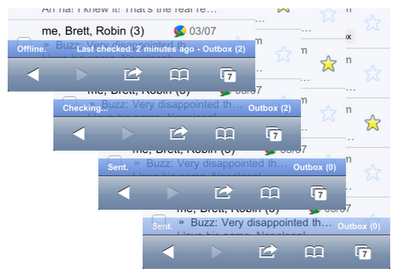
Fear not, Google didn’t add a #dickbar to Gmail for iPhone. What the Gmail did is actually pretty smart: to better communicate the status of their inboxes to iPhone users, Google recently tweaked the Gmail webapp for iOS devices to include a “connection bar” that displays information for outgoing and sent mail, internet connection, and so forth. It doesn’t appear all the time, it only shows up when a certain activity is triggered – like an email you’re sending from your phone.
It also appears when your phone is offline, back online and sending, and then again when it finishes sending all messages.
You can see the connection bar in action by visiting mail.google.com from your iPhone or iPod touch now, running iOS 4 or later. If you don’t see it, try clearing Safari’s cache in the Settings app. Too bad Retina Display support in the Gmail webapp is still nowhere to be seen.