Fring To Introduce Group Video Calling For iPhone

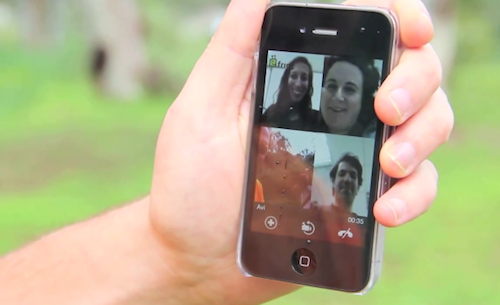
In its continuous effort to develop the best mobile video calling app for iOS and Android devices, popular service fring has announced that they’ll soon launch a private beta to pilot a group video calling feature that will be available on fring later this year. The beta program is open to Android and iOS users, and it’s been demoed in a video published by the developers in a blog post.

The new fring will allow you to easily browse the buddy list and pick a contact to add to a group call. The functionality apparently supports up to 4 simultaneous conversations and works both on WiFi and 3G. Once a person has been added to the group call, you can go back to the main screen and keep adding buddies until the limit is reached. As soon as you tap on a contact’s name, fring will initiate the call – meaning you don’t have to wait for all connections to go through at the same time. You can see how it works in the video below.

The dev team is putting the finishing touches on a super cool new service: free, mobile Group Video Calls. We are having too much fun with it already, and want to get some feedback from users ahead of public launch on Android & iPhone.

Of course, this is super-exciting as it’s the 1st time the world will get to enjoy free Group Video calls.

Fring for iPhone was recently updated to include the possibility to switch between cameras, buy credit through in-app purchases and enjoy fullscreen video calling with a “Dynamic Video Quality” the company has heavily promoted on mobile devices. Fring for iPhone is available for free in the App Store.
Read more


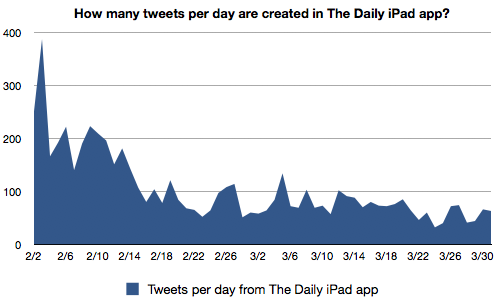
Decline, plateau, decline: New data on The Daily suggests a social media decline and a tough road ahead

Decline, plateau, decline: New data on The Daily suggests a social media decline and a tough road ahead

The data doesn’t look good for The Daily. Its activity on Twitter seems to match my own perceptions of how they’re doing — an early rush of excitement; a decline as people lost interest and the app struggled with technical problems; a plateau once the tech got sorted out; and then another decline once the app started charging users.

The data here only takes tweets into account, and not the actual number of The Daily subscribers. While there has been a general decline in tweets with occasional upticks depending on the content being promoted for that day, I ask whether this is a fair assessment of the number of people using The Daily versus how people use The Daily. I know for a fact that I would share articles I found interesting on Twitter, but would somebody like my parents who’re switching to a digital format even bother? Once I tweet an article on Twitter, what return am I getting out of it? As MacStories writers, our whole audience is interested in tech (specifically Apple news), thus I don’t know if I’m going to see a lot of retweets if I share a sports article. Too, the social implementation in The Daily isn’t as user friendly as it could be, and without the flow that apps like Flipboard have, you’ll certainly see a decline in interest over time. The next thing to look at would be whether Facebook sharing declined and how many people are utilizing The Daily’s comments section (and audio tool).

I don’t argue that The Daily isn’t seeing a decline in readership, but I want to see (though probably impossible) heat maps of how customers are interacting with articles, complaints on Twitter about usability, and most importantly subscriber numbers. The Daily certainly got its fair share of promotion in the media, but are people prepared to move from finding free content on the Internet into a dedicated news source that they have to pay for? We’ll save these ideas for another time, but Joshua Benton has shown that social interactions with The Daily have seen a substantial decline.

Permalink

Giveaway: Be Distraction Free With Byword for Mac

You wouldn’t want your fingers to glide across the keyboard to type in just any regular text-editor. Ladies and gentlemen, you deserve nothing but class and a distraction free environment that helps you focus on the text and nothing more, or nothing less. Byword for the Mac from the folks @metaclassy is a bite-sized text editor that packs a big punch in the downright-beautiful department. In your choice of a shell white for an afternoon scrawl or an alternate dark theme for evening pondering, Byword contains five typography presets for plain or rich text editing that when combined with contextual formatting presets create a pleasurable typing experience for your sensitive neural inputs. Out of love for writing, Byword helps improve text legibility by implementing text substitutions for Smart Quotes, Smart Dashes, and a user friendly interface that simply disappears as your fingers strike the keys. Reviewed at the onset of March and now at version 1.1 in the App Store, Byword is available for a small expense of $4.99.

We’re giving away five copies of Byword to our MacStorian authors who frequent our site for the latest in Mac apps, and we’d be remiss if we didn’t offer you the opportunity to put away your thoughts in this beautiful text writer. The giveaway rules can be had after the break.

Read more


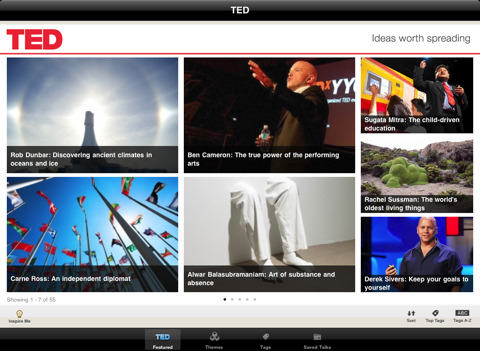
Official TED iPad App Now Supports AirPlay

We’re big fans of the official TED app for the iPad, and we’re also huge fans of Apple’s AirPlay streaming technology and the second-gen Apple TV – entirely based on streaming content from iTunes or your local network. The latest update to the TED app doesn’t introduce several new features and optimizations (the app was initially released in October 2010), but it adds one key functionality: AirPlay support for all talks and playlists.

Version 1.3 doesn’t add anything else, but it’s okay. AirPlay support for TED talks was our most requested feature, and it’s finally available. Go get the app here.


Apple Launches Free App To Browse iAds

Released a few minutes ago in the App Store, iAd Gallery is a new iPhone app developed by Apple and aimed at showcasing the best iAd campaigns that landed on iOS in the past weeks. The app collects several iAds for iPhone, you can browse by advertiser, category or ad feature thanks to a spinning wheel that lets you easily jumo through ads and select the ones you want to “watch”. You can also learn more about the advertising agencies behind a campaign, and check out the latest ads from the iAd network. You can also “love” specific iAd campaigns and access them at any time from the Loved tab in the bottom toolbar.

The iAd Gallery is a celebration of advertising, featuring iAd campaigns from some of the world’s best brands and their advertising agencies. The iAd Gallery gives you easy access to a selection of the fun and informative ads that have run in some of your favorite apps. Use the Browse feature to discover ads you haven’t seen, or to find those you want to see again. Even lets you tag your favorites to a Loved section that’s all your own.

From a first quick test, it appears that the app takes a few seconds to load the initial gallery (even on a fast WiFi network), but once loaded everything is quite responsive. Browsing through ads in the wheel feels smooth and fast; in the More section, you can contact the iAd team to ask for more info about joining the network. Clearly this is an app meant for media and business to showcase the capabilities of iAds, and perhaps also educate App Store users about the interactivity of Apple’s ad platform. We’re not sure what kind of message Apple is sending to advertisers here, and if the impressions generated in this app account for the iAd campaign itself. It is worth nothing, though, that Apple recently cut the minimum iAd buy in half to $500,000 from the previous $1 million, and a released a desktop tool called iAd Producer to simplify the creation of iAds for designers and developers. Advertisers claimed that iAd wasn’t off to a happy start at all after the initial hype, although we’re hearing iAd revenue for iOS devs has seen a huge rise in the past three weeks. Apple also rolled out fullscreen iAds for the iPad.

You can find iAd Gallery here. More screenshots below. Read more


nvALT 2.0 Launches with (Multi)Markdown, HTML/CSS Template Support

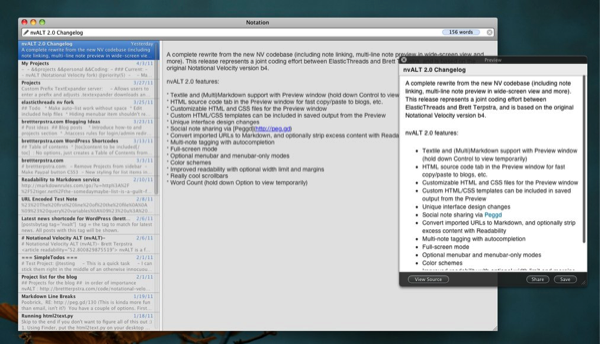
Notational Velocity is a huge productivity tool for keep tracking of internal notes with tags and content linking, and followers of Brett Terpstra are probably already big fans of the nvALT project that’s designed to add power-user friendly features to a favorite text client. With help from ElasticThreads, nvALT 2.0 has been released which highlights lots of killer features that can be added to Notational Velocity. I’ve listed just a few below (I encourage you to check out Brett’s site and the project page) for a quick taste of what nvALT 2.0 has to offer.

  • Textile and (Multi)Markdown support with Preview window (hold down Control to view temporarily)
  • Custom HTML/CSS templates can be included in saved output from the Preview
  • Convert imported URLs to Markdown, and optionally strip excess content with Readability
  • Word Count (hold down Option to view temporarily)
  • Full-screen mode

As a fork of Notional Velocity, nvALT is a keyboard-focused text editor that’s being improved to deliver rich features that writers such as myself rely on to get things done, take notes, and quickly exit ideas from my brain box. If you’re already familiar with Notational Velocity, it works with Simplenote on your favorite iOS device, and it can be extended thanks to the great nvALT project Brett and other volunteers are working on. It doesn’t replace Notational Velocity, but runs alongside it with it’s own set of preferences and additional features.

[via Brett Terpstra]


Camera+ hits 2 million sales / Revealing details about upgrade numbers and in-app purchase sales

Camera+ hits 2 million sales / Revealing details about upgrade numbers and in-app purchase sales

If we were to stay on the same weekly pace that we’re currently on (~160k sales per week), we’ll get to 3 million in only 1.5 months from now. But with the volatility of the App Store, our fortune could change in a heartbeat. The one thing you learn to count on as an iPhone app developer is not to count on future sales based on past performance.

John Casasanta has been on a roll lately with his latest set of iPhone tips & tricks, and now he’s released the sales figures for Camera+. By far Camera+ is one of the most successful photography apps on the App Store, and according to the charts it’s one of a few apps that customers are consistently using on their iOS devices. The sales figures for in app purchases are telling, and Casasanta notes that while customers are buying for and requesting new effects packs, that’s not where you want to make the bulk of your cash.

There are companies with free photography apps that are trying to have their business models revolve around selling effects via in-app purchases, but it’s very unlikely that this can be an effective business model.

Camera+ is a success because tap tap tap doesn’t need in-app purchases to unlock features or drive their business model. All of the functionality you need is provided in the app, and additional effects don’t fundamentally alter your experience - they only supplement the tools already available if you find yourself using the app a lot. You’re sold the entire experience upfront, and in-app purchases are like adding an extra flower to the already delicious icing on the cake.

Permalink

#MacStoriesDeals - Tuesday

If you didn’t already know, we’ve set up a new twitter account for Deals, it’s @MacStoriesDeals. We’ll tweet the daily deals there as well as exclusive weekend deals too. Help spread the word! Here are today’s deals on iOS, Mac, and Mac App Store apps that are on sale for a limited time, so get ‘em while they’re hot!

Read more


Apple Asks Toyota To Take Cydia Theme Down

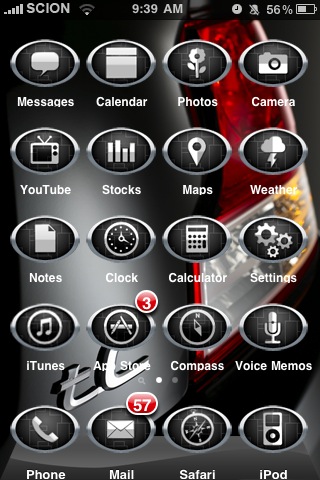
Two days ago we reported Toyota launched a new advertising campaign in the Cydia through ModMyi’s repository based on a custom theme iPhone users could install on their jailbroken devices. The theme promoted Toyota’s affiliate Scion 2011 tC vehicle, with graphics on screen depicting the car in various elements of the standard iOS interface. Toyota didn’t directly get in touch with Cydia’s creator Jay Freeman to launch the ad campaign, which was organized and hosted through ModMyi’s repository. Many saw the advertising campaign as the first step for large companies like Toyota to avoid the App Store altogether to promote their brands and products on the iPhone. With 10-15 million jailbroken devices out there, launching an ad campaign in Cydia through a third-party repo must have sounded like the perfect opportunity to Toyota.

Too bad Apple didn’t think that was a really good idea. In fact, Toyota was apparently asked by Apple to take the theme down, and Toyota accepted to ”maintain their good relationship with Apple.” The campaign had been in the works since April 2010 with Toyota and advertising agency Velti.

Kyle Matthews of ModMyi reports:

Apple also heard about the theme and ad campaign. I received a call from our contact at Velti this evening as well as an email asking me to please take the theme out of Cydia. On the phone, he explained Apple had contacted Toyota and requested they remove the theme and stop the advertising campaign. They (Velti) in turn contacted me relaying the message.

Apple doesn’t obviously like jailbreak (they called it “illegal” before the Digital Copyright Millennium Act updated its rules and observed jailbreaking a phone is in a consumer’s rights), and they’re taking another hard stance against those who promote or support (or make business with) Cydia in any way. Sorry Toyota, but you’ll have to take that theme down.