OS X 10.6.7 Introduces OpenType Text Bug (You’re Not Alone)

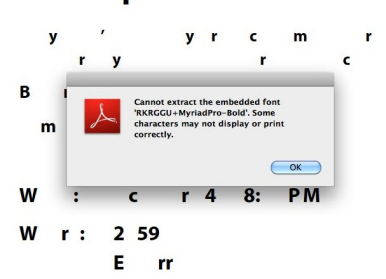
If you find yourself scratching your head over jumbled text in (commonly) PDF files after the 10.6.7 update, it’s an issue that’s cropped up and found its way on Apple’s Discussion boards according to the folks over at Macworld. The text bug occurs with OpenType Postscript fonts, which aren’t included by default with your new Mac but can be later added with the installation of third party software (Adobe is noted). The problem seems to only occur in apps utilizing OS X’s rendering engine outside of the Preview application, displaying jumbled text that’s impossible to read. Upon printing, you may encounter an “invalid font error” in rare cases. The bug only crops up if you’re using software such as Adobe Reader, and the PDF you’re reading utilizes the aforementioned fonts. By using Preview or opening documents that use a common font such as Helvetica for example, it’s possible you’ll never see the word scramble in action.

[via Macworld]

Image credit Macworld


iBackupTunes: Copy, Backup & Share Your iOS Music Library

Released yesterday in the App Store, iBackupTunes by drahtwerk is one of the most powerful music apps for iOS I’ve recently installed on my iPhone and iPad. This time, though, I’m not talking about a new iPod replacement app that aims at enhancing music playback with Wikipedia or last.fm integration: instead, iBackupTunes is “powerful” in the way it lets you copy songs and albums off your synchronized iPod library, back them up locally on your device and share them with others, even wirelessly. Whilst the procedure of importing songs might sound a little too complicated at first, iBackupTunes provides a graphical user interface that makes it easy to choose music, listen to it, and back it up. Read more


#MacStoriesDeals - Friday

Happy birthday Apple! If you didn’t already know, we’ve set up a new twitter account for Deals, it’s @MacStoriesDeals. We’ll tweet the daily deals there as well as exclusive weekend deals too. Help spread the word! Here are today’s deals on iOS, Mac, and Mac App Store apps that are on sale for a limited time, so get ‘em while they’re hot!

Read more


The Onion iPad App Now Available

Right in time for April Fool’s Day, The Onion – “America’s Finest News Source” – has released its first official application for the iPad, available now for free in the App Store. The Onion delivers hilarious fake news, stories and reports every day, and releasing the tablet app today, with all those pranks and not-so-clever fake stories that are floating around on the Internet, seems more than appropriate to us. In fact, we love The Onion and reading its articles directly on our iPads is something we’ve been looking forward to.

The app is very simple: it lets you read, share articles on social networks with a few taps and watch videos without leaving the app. It’s also got support for Instapaper and Google Reader, among others. The interface design doesn’t look exactly beautiful, but all the content from The Onion is there. It should be enough for now.

You can find The Onion for iPad here.


OS X Lion: Multi-User Remote Access, New Auto Save & iChat Options

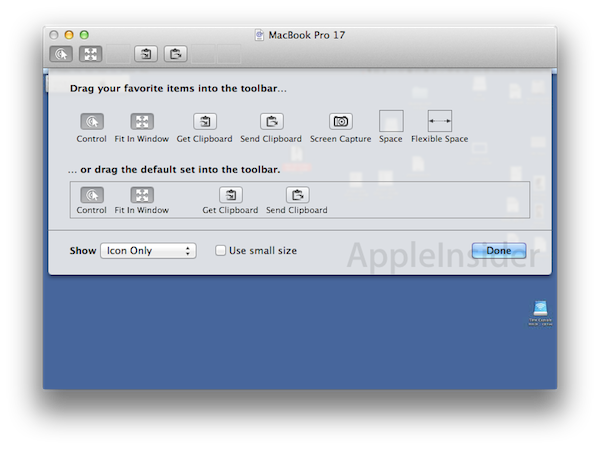
Following the release of the second Developer Preview of OS X Lion two days ago, several blogs have posted details and screenshots of what’s new, improved and changed in this build and, overall, Mac OS 10.7 itself. Together with the new features we covered in the past, Lion introduces a brand new multi-user screensharing system that will allow users to remotely log into their own computer even while it’s being used (locally) with another account. This is a major change that turns Mac OS’ Screen Sharing tool into a powerful remote computing solution with fast users switching options.

AppleInsider has posted details and screenshots of the new feature. A user has the possibility to log into a computer with his own account while another account is currently managing and using the machine; the “remote user” will still see his desktop environment, all his files and applications. In previous versions of OS X, when a user tried to connect remotely and share the screen, the “local user” would have to give up on the possibility of controlling the screen – or otherwise find a way to communicate in real-time with the remote user to decide who should move the mouse and control the computer. We’ve all been in this situation: when a friend asks us to control his machine for troubleshooting purposes, we have to make sure he doesn’t do anything while we’re controlling his desktop UI. Or, we tried to remotely log into our home computer only to find out a family member was using it and we had no way to independently access to our apps, files and folders. Lion will change this, and we believe it’s quite possibly one of the most interesting features unveiled so far, as it opens to a lot of possibilities for remote access, troubleshooting and, overall, effortless management of a machine not in our local network. Read more


Forbes: Rapid Retail Sales Growth In China Could Propel Apple Shares Skyward

According to Eric Jackson at Forbes, an expected boom in Apple’s business in China could be a driving force that propels Apple’s shares (AAPL) to $547 per share by next January. That’s an expectation of shares increasing by around $200 on yesterdays close of trade price of $348.51 and in just nine months.

Jackson bases his expectations on the expansion of Apple’s retail stores, which currently bring in US$1.3 billion per year per store in China, with four currently in existence. Numbers floating around suggest that up to 25 stores could be opened up by Apple in China, where Jackson says consumers are going “gaga for Apple”, and rake in an extra US$32 billion. Such projected figures don’t even take into account third-party sales of Apple products from carrier stores or Cybermart – which is the largest third-party retailer of Apple products in the world.

Jackson and others thus consequently believe that it is well within possibility that Apple could see 50% sales growth in 2011, driven by the growth in China, and reach revenue of around $114 billion and “assuming the same trailing 20x P/E” Apple shares would be reach a value of $547 per share.

MacStories.net does not provide investment advice; consult an expert before buying or selling equities.

[Via Forbes]


Happy 35th Birthday Apple!

Today, 35 years ago on April 1st 1976, Apple Computer was established by Steve Jobs, Steve Wozniak and Ronald Wayne so that they could later sell their Apple I computer kit. Interestingly Wozniak, who hand built the Apple I decided to permanently leave  the company in 1987 – but is still technically an employee and receives a paycheck.

The other, more unfamiliar founder, Ronald Wayne, assisted Jobs and Wozniak in drawing the first Apple logo (seen above), writing the manual for the Apple I and writing the original partnership agreement. He however decided to leave the partnership just two weeks later and declined Jobs’ attempts to recruit him back years later.

It’s been a truly fascinating 35 years for the company and over the past decade in particular it has transformed the technology industry with the iPod, OS X, exceptional design in all its hardware and of course the iPhone and iPad. Here at MacStories we can’t wait to see what the next year will see Apple bring, let alone the next 35 years. As always Wikipedia provides some great reading about the early years about Apple that I thoroughly recommend if you’re curious and what to read more about those early days of Apple.

[Via MacJournals]


Oldie but Goodie: Play External Audio Thru Your Mac With LineIn

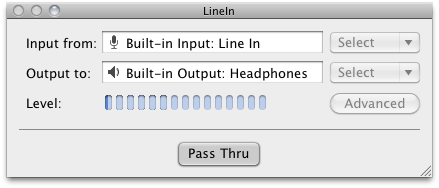
If you’re one of my crazy Twitter followers, you’re already well aware that I’ve significantly reduced the role of iTunes in my life thanks to Instacast, which has been reviewed by everyone from Shawn Blanc, to Michael Hurley on Macgasm, and myself on MacStories. Though I could talk about Instacast for ages, the problem I had to solve next was figuring out how to get the audio off my iPod touch and into my office speakers. The big issue is that my setup can’t accommodate more than two audio inputs, and while audio over AirPlay is probably possible with AirFoil, I notice a significant battery drain as I stream both audio from the web and broadcast it to my local speakers in the bedroom. I wanted to avoid this in the office since outlets are scarce, so I needed a way to pipe audio from my iPod touch thru my Mac. Enter an old Rogue Amoeba goodie: LineIn. Not only is it free (who doesn’t love free), but it requires nothing more than a button press to set up and pass my iPod touch audio through the audio line in to the audio line out. There isn’t a close button for LineIn, but you can simply press ⌘H to hide the app when you don’t need it.

It’s a great find, and something that might come in handy for at least one of our dear readers down the road. Download it (and check out other Rogue Amoeba freebies) here.


Typeplace - Share Your Typeface Passion: Review and Giveaway

Serif, San Serif, letterpress, kerning - typenerds of the world know these terms and know them well. Everywhere we travel, we see interesting uses of fonts in public places. Many of us even take pictures of them for inspiration and interest. What if you could use your iPhone to share these interesting findings within your social circle?

Typeplace is a new and cool way to discover, share, fave, and even share geo-tagged noteworthy pieces of typography with friends. Like Gowalla, Typeplace also awards virtual “badges” and certificates. The app has a nice interface, a familiar bottom tab bar and subtle brown and wood color scheme.

Read more