Shazam, the popular music tagging application for iPhone that allows you to hold your device up to a speaker and instantly get to know what’s playing, has been updated earlier today to include a new functionality called LyricPlay that, according to the developers, will display lyrics for the song you’ve just tagged in a beautiful landscape view. It works like this: once Shazam (Encore or RED, as LyricPlay has only been added to the Premium versions) has found a song, it’ll be saved in the My Tags section as usual. In the section, there’s a new LyricPlay button that is capable of syncing lyrics with the song you’ve just tagged, quite possibly promising to start visualizing lyrics in the exact position you just tagged a song. Turn your iPhone in landscape, and lyrics will start flowing in real-time in a Star Wars-esque interface that’s actually quite nice and undoubtedly accurate as far as lyrics go (Shazam says they have access to 25,000 songs with Lyrics after the acquisition of Silicon Valley startup Tunezee).
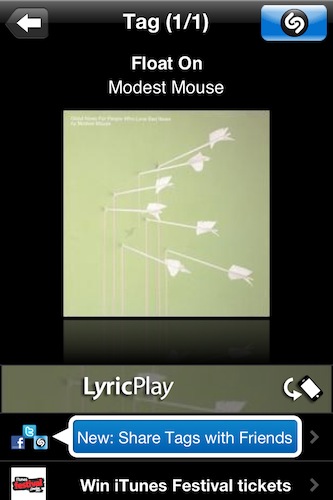
In reality, I found Shazam’s new LyricPlay feature somewhat unreliable, as it didn’t show up on most (old and recent) songs I have in my iTunes library (best way to run a quick Shazam experiment is to use your own songs), and when it did it definitely wasn’t “synced” with the position of the song. I’m not sure how a listener is supposed to follow the song and the lyrics running on screen, but there’s no doubt Shazam needs to make the whole thing more intuitive.
Overall though, the idea is pretty nice and it comes s a free update. I’m sure LyricsPlay will get better over time, so go download the app here and check out what Shazam has to say in the official press release below. Read more