

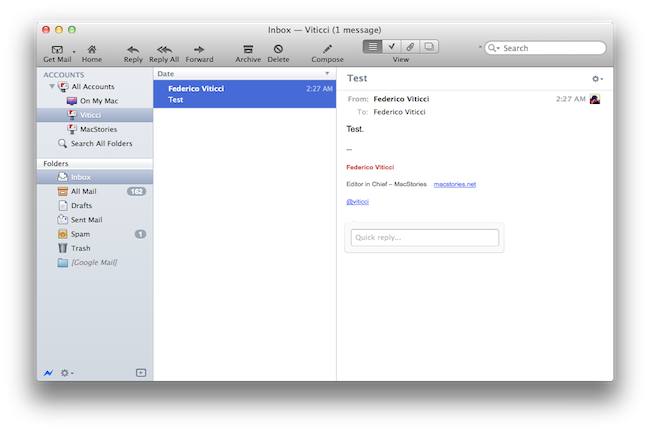
Earlier today, we published an article detailing some of the interface changes set to be introduced in Postbox 2.5, a major update for the popular alternative email application for Mac and Windows that, among other things, was teased by the developers as one of the biggest rewrites of the app to date. With a series of blog posts, the Postbox team had in fact already announced that the client would get an overall improved interface, new toolbar icons on the Mac, a completely re-imagined message view, and a vertical pane view to take advantage of widescreen monitors – admittedly one of the glaring omissions from the previous versions of Postbox. Read more
Postbox 2.5 Released: New UI, Faster, Lots Of New Features
Apple Responds To Final Cut Pro X Criticism With Another Q&A

Apple’s recent launch of Final Cut Pro X has brought a lot of criticism from Pro users who aren’t satisfied with the new direction that the Final Cut product has taken. The backlash has been fairly significant, the product was made fun of on Conan last week, a petition has been made and yesterday it was revealed that Apple is offering fairly widespread refunds for disappointed customers. Despite some comments made to David Pogue last week, Apple had remained silent on the backlash, until today.
Final Cut Pro X is a breakthrough in nonlinear video editing. The application has impressed many pro editors, and it has also generated a lot of discussion in the pro video community. We know people have questions about the new features in Final Cut Pro X and how it compares with previous versions of Final Cut Pro.
It has released an online Q&A page that provides the “Answers to your Final Cut Pro X questions” which covers four main topics of discussion. Some of the most common complaints of FCP X are answered by Apple including importing FCP 7 projects, multicam editing, XML exporting and volume licensing.
Many of the answers are what were communicated in the Pogue article, with Apple saying “not yet, but soon”, which applies to the questions of multicam editing, XML exporting and volume licensing. We have attached all the questions below the break (you can also access it here on Apple’s website), but here are the most common questions answered by Apple:
Can I import projects from Final Cut Pro 7 into Final Cut Pro X?
Final Cut Pro X includes an all-new project architecture structured around a trackless timeline and connected clips. In addition, Final Cut Pro X features new and redesigned audio effects, video effects, and color grading tools. Because of these changes, there is no way to “translate” or bring in old projects without changing or losing data. But if you’re already working with Final Cut Pro 7, you can continue to do so after installing Final Cut Pro X, and Final Cut Pro 7 will work with Mac OS X Lion. You can also import your media files from previous versions into Final Cut Pro X.
Does Final Cut Pro X support multicam editing?
Not yet, but it will. Multicam editing is an important and popular feature, and we will provide great multicam support in the next major release. Until then, Final Cut Pro X offers some basic support with automatic clip synchronization, which allows you to sync multiple video and audio clips using audio waveforms, creating a Compound Clip that can be used for simple multicam workflows.
Can I share projects with other editors?
Yes. You have several options for sharing projects. You can hand over just the project file, and the recipient can reconnect the project to his or her own copies of the Event. Or you can send the complete project and Event as a package to another editor. Final Cut Pro X includes options for duplicating, moving, and consolidating projects and associated media to streamline sharing between editors.
Can Final Cut Pro X export XML?
Not yet, but we know how important XML export is to our developers and our users, and we expect to add this functionality to Final Cut Pro X. We will release a set of APIs in the next few weeks so that third-party developers can access the next-generation XML in Final Cut Pro X.
Does Final Cut Pro X support OMF, AAF, and EDLs?
Not yet. When the APIs for XML export are available, third-party developers will be able to create tools to support OMF, AAF, EDL, and other exchange formats. We have already worked with Automatic Duck to allow you to export OMF and AAF from Final Cut Pro X using Automatic Duck Pro Export FCP 5.0. More information is available on the Automatic Duck website: http://automaticduck.com/products/pefcp/.
Can I purchase a volume license?
Final Cut Pro X, Motion 5, and Compressor 4 Commercial and Education Volume Licensing will be available soon via the Apple Online Store for quantities of 20 or more. After purchasing, customers will receive redemption codes they can use to download the applications from the Mac App Store.
[Via 9to5 Mac]
Apple Announces Q3 2011 Conference Call For July 19

Apple has scheduled its Q3 2011 earnings call for July 19, 2011. The conference call will be streamed live on Apple’s website (audio-only) here.
Apple’s conference call webcast discussing Q3 - 2011 financial results will begin at 2:00pm PT/5:00pm ET on Tuesday, July 19, 2011.
Please note that comments made during this call may include forward-looking statements that are subject to risks and uncertainties, and that actual results may differ materially from these forward-looking statements. For more information on the factors that could influence results, please refer to Apple’s SEC filings.
In Q2 2011, Apple posted revenue of $24.67 billion, with 4.69 million iPads, 18.65 million iPhones and 3.76 million Macs sold. The company also reported quarterly revenue growth of 83% and profit growth of 95% with international sales were 59% for the quarter. In the year-ago quarter, Apple posted record revenue of $15.7 billion with 3.47 million Macs, 8.4 million iPhones, 9.41 million iPods and 3.27 million iPads sold.
The third quarter is set to provide some insight into the sales of the long-awaited white iPhone 4, and whether or not the lack of a new iPhone release this summer has affected the overall sales of the iPhone 4, now a 12-month old device.
We will provide live updates from the call on our site’s homepage on July 19 starting at 2 PM PDT.
[Thanks, Shawn]
Apple Releases Java Updates for Mac OS X 10.6 and 10.5

A few minutes ago Apple released two separate updates for Java on Mac OS X 10.5 Leopard and 10.6 Snow Leopard. The updates are available now on Apple’s website and Software Update desktop app, and they’re both aimed at improving “compatibility, security and reliability” alongside other Java SE 6-related updates.
Java for Mac OS X 10.6 Update 5
Java for Mac OS X 10.6 Update 5 delivers improved compatibility, security, and reliability by updating Java SE 6 to 1.6.0_26.
Please quit any web browsers and Java applications before installing this update.
Java for Mac OS X 10.5 Update 10
Java for Mac OS X 10.5 Update 10 delivers improved compatibility, security, and reliability by updating J2SE 5.0 to 1.5.0_30, and updating Java SE 6 to 1.6.0_26 for 64-bit capable Intel-based Macs.
J2SE 1.4.2 is no longer being updated to fix bugs or security issues and remains disabled by default in this update.
Please quit any web browsers and Java applications before installing this update.
More information about the updates are available in Apple’s support documents here and here.
Designing GitHub for Mac→
Designing GitHub for Mac
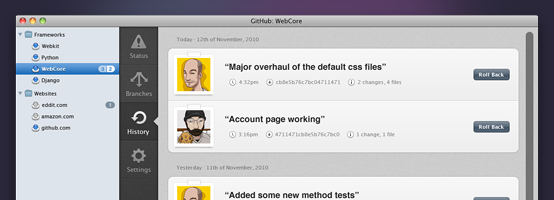
It blows my mind that no one tried to do anything special. Git (and it’s DVCS cousins like Mercurial & Bazaar) provide an amazing platform to build next generation clients — and it’s like the entire OS X ecosystem left their imagination at home.
Eventually, I (well, many of us) decided that better native clients (OSX, Windows, Linux, Eclipse, Visual Studio, etc) was the best way to grow GitHub. And since we all use Macs — we should start off with an OS X application.
Kyle Neath has posted an excellent overview of what designing the official GitHub Mac app was like, the challenges he and his team had to face when dealing with Apple’s recent interface changes coming in Lion, and the overall “new trend” of Mac apps inspired by their counterparts.
Check out the whole story and screenshot gallery here.
Postbox 2.5 Will Bring A Completely New Mac Interface
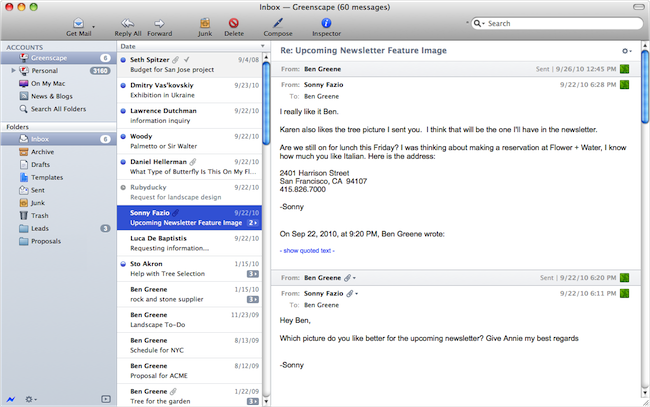
Postbox, the “first-class” email application that shipped a major 2.0 release last year with features such as unified inboxes and quick reply, will have a completely redesigned user interface once the 2.5 version ships this summer on the Mac App Store. Currently in private beta for lifetime Postbox users only, the upcoming 2.5 update has been teased several times by the company in the past weeks, showing off new functionalities like vertical view, a redesigned message view that’s cleaner, elegant and more readable, as well as new toolbar icons also in monochrome variations to get ready for OS X Lion’s new UI paradigms.
Earlier today, the Postbox team has posted a series of screenshots of the UI overhaul they’ve been busy working on with the help of Belgian designer Benjamin De Cock. As you can see from the screenshots in this post and the full gallery here, Postbox 2.5 looks like a massive update design-wise that will be aimed at cleaning the overall experience on OS X which, quite frankly, kind of resembled a Windows program in its previous iterations. With the final goal of “reducing clutter and complexity” in mind, the Postbox team has set out to create an email client that’s just as beautiful as a native Apple app would be, with the addition of unique features like attachment browser, topics, file sidebar, and much more.
There are a lot features and a lot of different ways to use Postbox. It was important for us to account for those different needs, but we also wanted to keep the interface as clean as possible. Mac OS is a huge inspiration for this, as they’re doing a terrific job in reaching people who are less tech-savvy and hardcore geeks. It has been a real benchmark for me for Postbox 2.5.
Postbox 2.5 is a terrific design milestone, and more design improvements are on the way to make Postbox even more user-friendly and accessible for everyone.
The new version of Postbox looks really promising and we can’t wait to get our hands on it to see what’s improved, changed, and refined. Postbox 2.5 will be a free upgrade for existing 2.x customers, so if you haven’t yet, go get Postbox from the Mac App Store at $19.99. Check out more screenshots of the app after the break. Read more
Carousel Instagram Client Gets Gestures, Search, Refined UI

Back in May I reviewed the first version of Carousel, a beautiful Instagram client for Mac that, thanks to the Chameleon framework built by The Iconfactory, brought Instagram’s photo streams and profiles to the desktop with a gorgeous iOS-like user interface. Whilst in the past month, with Lion nearing its final release and the WWDC, we’ve seen several examples of iOS apps making the big leap to the Mac, Carousel was one of the first apps to try the iPhone-inspired approach with a vertical layout, tabs, and popover menus. Together with Twitterrific, Carousel is a fine example of iOS interface schemes coexisting with more standard Mac applications.
Carousel 1.1, released today, adds a number of new features and refinements to make the Instagram experience on OS X even more beautiful and easy to use. First off, search: you can now search for specific @users or #keywords on Instagram, pin your searches as you would in Twitter for Mac, or click on tags and usernames in photo comments, which now are better styled to indicate the original author’s caption. Saved searches sit below the search bar, but to perform a search you’ll have to choose an element from a popover menu. The app has gained a new “likes” tab to see all the photos you’ve liked and a fetch separator to start where you left off in the stream, but more importantly gestures are now supported to easily open a photo in Quick Look (pinch and zoom) or check out a profile (swipe on the photo). It feels very natural and smooth using a Magic Trackpad.
Among the little fixes and refinements, the developers have updated the iOS-like toolbar to make sure the selector is draggable (try it, neat animation in there) and the comment form remains visible even if you click outside of Carousel’s main window.
Carousel 1.1 is a solid update for the most beautiful and intuitive Instagram client currently available on the Mac. You can buy Carousel at $4.99 on the Mac App Store.
#MacStoriesDeals - Tuesday

Here are today’s @MacStoriesDeals on iOS, Mac, and Mac App Store apps that are on sale for a limited time, so get them before they end!
Flexiglass: The Dock & Menubar Utility That Makes Window Management a Breeze
One of the old habits Apple kept around in Snow Leopard was the handle that’s used to resize windows from the bottom right corner. While convenient out of habit, my transition to the Mac from Windows back in 2008 was met with a few minor complaints with window resizing and “snapping” being two convenient features I missed. Other oddities, such as the close button (which is really a close window button) and the zoom button (which questionably works as a maximize button) took some getting used to, although I’ve adopted the common command-Q reflex.
While Spaces manage the slew of windows I’ll open during the workday, there is an occasional need to sort between multiple windows in the same place and to group work or school related content together. The problem is that it’s not always easy getting everything just the way you want it, and as I drag windows to each side of the screen for some crazy dual setup, I would gripe before grabbing the corner, then snatching the titlebar and dragging the window to the left or right side of the display. It’s not always a problem, but boy it would be convenient if…
Flexiglass! Oh yes, we have yet another utility designed to manage your windows as efficiently as possible. I’ve covered my fair share of “window controllers” including MercuryMover, SizeUp, Cinch, Zooom/2, DoublePane, WindowFlow and I’m sure there are many others to solve a switcher’s common complaints. Flexiglass meets a nice middle ground. While MercuryMover and SizeUp are clearly geared towards power users who can’t keep their fingers off the keyboard, Cinch and DoublePane were designed for the everyday Joe wanting to replicate basic Windows features. Flexiglass contains a little bit of everything, and I think it’s one of the most approachable, yet tricked out window managers I’ve seen. It doesn’t overwhelm users with a handful of keyboard shortcuts, and it does a good job of striking a balance between mouse and keyboard interactivity.