This Week's Sponsor:

Inoreader

Build your own newsfeed and cut through the noise


Forget fancy formatting: Why plain text is best

Forget fancy formatting: Why plain text is best

Although modern word processing programs can do some amazing things—adding charts, tables, and images, applying sophisticated formatting—there’s one thing they can’t do: Guarantee that the words I write today will be readable ten years from now. That’s just one of the reasons I prefer to work in plain text: It’s timeless. My grandchildren will be able to read a text file I create today, long after anybody can remember what the heck a .dotx file is.

David Sparks from the wonderful MacSparky blog and Mac Power Users has made a debut post on Macworld with a great discussion on working with plain text files (I also believe Patrick Rhone talks about this and information silos in his Minimal Mac podcast, Enough).

I’ve been increasingly using TextEdit with Marked for writing everything that shows up on the website, and I know Federico recently put Byword (in combination with OmniOutliner) to the test with his great MacBook Air review. No matter what tools I use, whether it be TextMate, iA Writer, or another app, I’m always writing in Markdown and writing in text files. These text files are saved in Dropbox or some temporary workspace (which I consider to be my alternate directory to the Desktop).

Honestly, the best way to get started with plain text before you invest in another app is to simply open up TextEdit, hit ⇧⌘T, and start typing. David makes a strong case for nvALT, which you might like better since you can have the best of both worlds: accessible plain text files in the file system in a big container that makes it easy to search through everything you’ve written (as a bonus, these files can be tagged and synced to your iPad and iPhone via Simplenote).

Permalink

Let Auto-Correct Beep in Lion with AutocorrectBeeper

Auto-Correction in Lion is similar to iOS: if the word isn’t automatically corrected, then you get a small notifier allowing you to dismiss the correction before you continue typing. Normally, this happens to me with lowercase abbreviations when typing to friends on SMS or email, and on iOS it isn’t a problem since your typing speed is considerable slower (and more careful) than on a desktop or laptop keyboard, and the pop-up is generally easy-to-see and easy-to-catch. While I think this behavior is backwards (I think tapping on the corrected word should accept that word instead of ignoring it), the same behavior on iOS has been translated to Lion. My typing speed on Lion is significantly faster than on my iPad or iPod touch, and catching the error before I hit the spacebar often results in an auto-correction I didn’t want to make. Whose going to catch a correction when typing upwards of 90 WPM? I don’t necessarily want to turn it off (some corrections can be helpful), but I want Lion to be smarter at helping me make the right corrections.

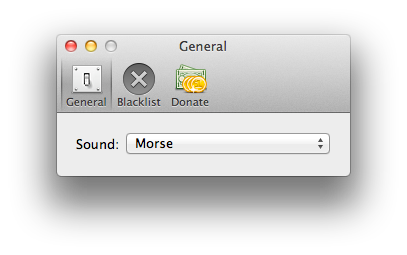
A user at AskDifferent asked whether a sound could be enabled to better inform him that an auto-correction was about to take place, and a friendly developer quickly whipped up an app to solve the problem. Joshua Garnham of Squared Tiki (Joshua on AskDifferent) created AutocorrectBeeper as a way for Lion to beep you when an auto-correction takes place: the simple app can simple be dragged to the Applications folder at the root of your drive, and running it provides you with simple preferences for choosing between the default sounds available on OS X Lion. As an auto-correct happens, your Mac will beep at you when a correction for a misspelled word is offered. A handy blacklist function is available so you can get beeped in some apps, but not others. The app is free, but donating to the developer if you find the app useful is definitely welcome (available through the app).

Check out the AskDifferent thread here (you can download the app in the middle of the page), and we’ve included a link to the direct download if you just want the app to hit your Downloads folder.

Thanks Joshua for getting in touch with us!


Apple Updates Migration Assistant for Lion

If you still haven’t upgraded to Lion, Apple is continuing to improve how you migrate information from Leopard onto the new OS. In an update posted this afternoon, Apple cites the following changes.

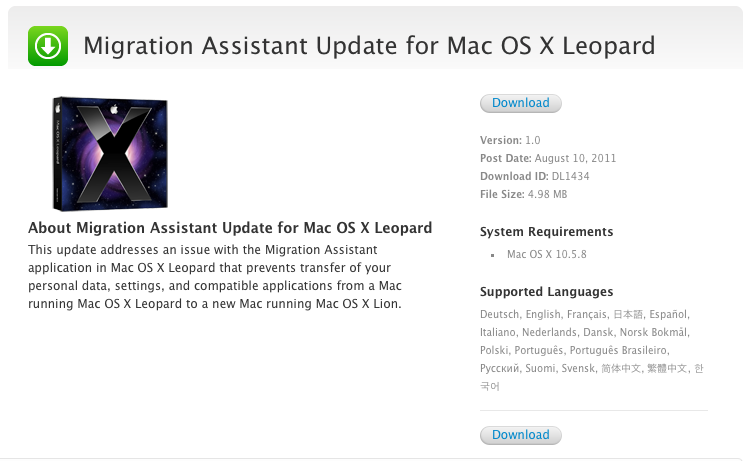
This update addresses an issue with the Migration Assistant application in Mac OS X Leopard that prevents transfer of your personal data, settings, and compatible applications from a Mac running Mac OS X Leopard to a new Mac running Mac OS X Lion.

What’s the issue? The Next Web pinpoints that the updated Migration Assistant will warn users that their Rosetta based applications (designed for older generation macs PowerPC Macs) won’t be available on Lion, which culled Rosetta support in the transition to support 64-bit Intel applications. Rosetta apps, no longer available in Lion, will have to be updated (or you’ll need to find alternatives) for the apps to work. It’s a small change, but one that should help make aware that the applications you rely on may be broken.

Download the Migration Assistant Update for OS X Leopard.

[via The Next Web]


Hands on with Lion Recovery Disk Assistant

Hands on with Lion Recovery Disk Assistant

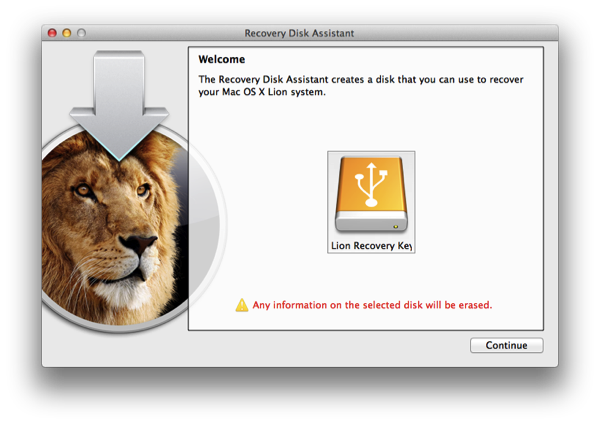
In my testing of the initial release of Lion Recovery Disk Assistant, I encountered an apparent FileVault conflict. If I used Lion Recovery Disk Assistant to create a recovery drive while FileVault was disabled, the resulting drive would successfully boot any compatible Mac, whether that Mac had FileVault enabled or disabled. However, multiple recovery drives created on Macs with FileVault enabled would not boot compatible Macs, regardless of whether the Macs being booted had FileVault enabled or disabled.

Good to know. Dan Frakes from Macworld reached out on Twitter to get confirmation on whether this was an issue, and others experienced it as well. He recommends that you either use a machine that has FileVault disabled, or to turn it off if you’ve decided to create a recovery drive. Also, keep in mind that the recovery partition you create will be invisible to the Finder, even if other partitions are available on that drive. The Recovery HD partition is hidden in the same way it’s hidden on your Mac’s internal drive.

Permalink


Apple Targets Motorola’s Xoom Tablet Design in EU

Just after we reported on Samsung’s injunction in the European Union, FOSS Patents has dug up some hidden information pertaining to Apple’s patent battle (currently over 40+ patents are in dispute) with Motorola. In Apple’s complaint against Samsung, Apple details that prior to (or simultaneously) filing for the preliminary injunction against Samsung, Apple filed a similar complaint against the design of the Motorola Xoom. The passage uncovered by Florian Mueller doesn’t explicitly state whether Apple filed for a preliminary injunction against Motorola, although he assumes the complaint would be EU-wide.

A preliminary injunction, however, has been obtained by Apple against another company named JAY-tech for a tablet (the operating system was unspecified, but Mueller assumes it was Android).

Apple’s dispute with Motorola began in October 2010, but so far it was not known that it has also branched out to Europe – just like Apple’s disputes with Samsung and HTC. In the U.S., an ITC hearing was due later this month on Motorola’s complaint against Apple, but due to the retirement of Chief Administrative Law Judge Paul Luckern it was postponed.

Apple might not be able to file a preliminary injunction against Motorola in this case as the German courts frown upon cases where the rights holder has been aware of the infringement for a long time (over a month for example). The Xoom, released in the Spring, would have been on Apple’s radar long enough for them to be unable to seek a preliminary injunction since there’s no sense of “urgency”.

[FOSS Patents via The Next Web]


Gizmodo Officially Not Being Charged in iPhone 4 Case

Gizmodo Officially Not Being Charged in iPhone 4 Case

We are pleased that the District Attorney of San Mateo County, Steven Wagstaffe, has decided, upon review of all of the evidence, that no crime was committed by the Gizmodo team in relation to its reporting on the iPhone 4 prototype last year. While we have always believed that we were acting fully within the law, it has inevitably been stressful for the editor concerned, Jason Chen, and we are glad that we can finally put this matter behind us.

The two men behind the stolen iPhone, however, are being charged with misappropriation of lost property, and possession of stolen property according to the DA’s official statement posted on Gizmodo. I’m sure both Gawker Media and Apple are glad to have this case put behind them.

Permalink

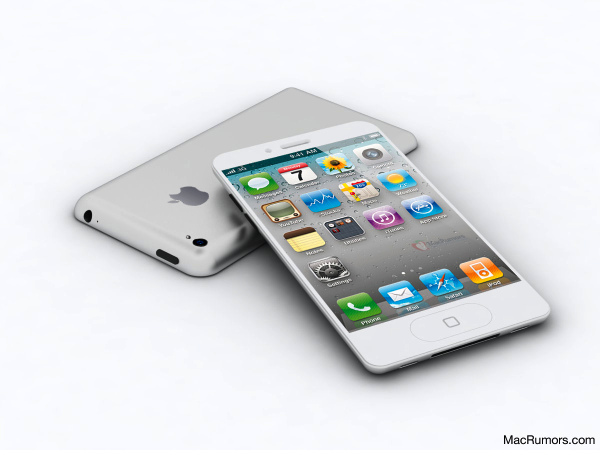
MacRumors Mocks up the iPhone 5 Based on Design Specifications

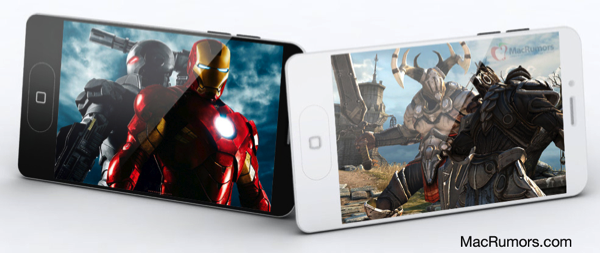
Just about everyone is talking about the iPhone 5, and while I remain skeptical of most rumors, I have to give MacRumors some props for commissioning CiccareseDesign to create a mockup based on a leak of the phone’s design specifications. Before we dig into the MacRumors’ render, I’m going to put my thoughts on the table (might as well at this point — all the cool kids are doing it). We don’t talk about these iPhone 5 rumors too often.

When This Is My Next published a crude mockup of the iPhone 5, Joshua Topolsky introduced his take on a tapered design — that the next iPhone would have a shape similar to the MacBook Air with a fat top which tapers down to a smaller edge at the bottom of the phone. But I think the tapered design means this: that the next iPhone is going to follow the iPod touch 4th gen’s design in that the buttons are going to be hidden underneath the display along the curved edges. Apple re-used the iPod touch’s 4th generation design with the iPad 2, and I see them continuing this design ethos with iPhone. When you look at the front of the phone, I do think Apple only wants you to see the display. Apple wants the lines of the phone to be very clean. I also agree with the idea that Apple will move away from the glass backing since it’s fragile and easily cracks when dropped — Apple doesn’t want damaged phones in the press or in Flickr photos online.

MacRumors’ “take-it-to-the-max” mockup of the iPhone 5 is interesting simply because it matches my idea of what Apple will do with the next iPhone. It nicely takes most of the rumors we’ve heard about for the last months and wraps it one nice package that looks believeable: you’ve got your oval home button (which could very well be a gesture area for flicking between apps as suggested by Gruber on The Talk Show), your edge-to-edge display (although MacRumors shows a 4” display — I think it’ll be smaller), and tapered edges which hide the volume buttons underneath the glass of the phone.

The final dimensions of the new design are calculated to be: 4.33” x 2.36” and .27” thickness at the top and .21” at the bottom In comparison, the iPhone 4 dimensions are: 4.5” x 2.31” x .37”. So the new design is actually shorter than the existing iPhone 4, but slightly wider and thinner.

I think MacRumors’ mockup captures the idea that the next iPhone will be thin, a little wider, and more comfortable in the hand. The phone can’t be too thin — battery technology is still going to be a concern with iOS 5 between the Notification Center and new uses for location based data. We’re at point now with these rumors where we’ve gotten the general idea of what the iPhone will look like, and a lot of sites have shifted focus to release dates instead of speculating on features. Federico and I have been very careful not to spew a lot of these rumors onto the site (they’re not interesting enough most of the time), but MacRumors took a lot of these bits and pieces and actually did something very cool with it.

My concern — as always with rumors — is that it sets us up for a lot of false hope. “Man this iPhone looks so good I hope it looks just like this!” Then when the iPhone comes out, people are disappointed when a site’s mockup doesn’t turn out to be the real thing that they wanted. My suggestion is to look at the MacRumors’ mockup as the summary (but not the conclusion) of where we are with rumors and speculation on the iPhone. They’re confident that their rendering is very close to the final product, but I think seeing the final product will ultimately be more impressive.

[via MacRumors]