


Here are today’s @MacStoriesDeals on iOS, Mac, and Mac App Store apps that are on sale for a limited time, so get them before they end!
#MacStoriesDeals - Friday
QuickShot 1.6 Overview & Giveaway
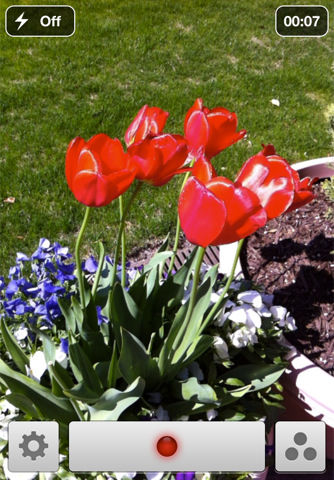
You’re already familiar with QuickShot as the photo app that integrates with your Dropbox, and now it does video too. That’s right: shoot video, have it appear in your Dropbox via upload video from your photo library (WiFi only is an option for 3G users), and navigate more quickly through the app thanks to some shortcuts utilizing the the settings button (just tap and hold to quickly access your photo library). The Photo Library itself has a hot new update for the iPad, which makes navigation even more finger friendly. For those who like to leave their orientation lock on but would prefer that their camera remain free, QuickShot is now independent of the device so you can still browse email in portrait but take pictures in landscape. QuickShot also has some new abilities under the hood for sharing your media with friends — you can upload photos, email, and copy them from the library (to paste in OmniOutliner for the iPad for example).
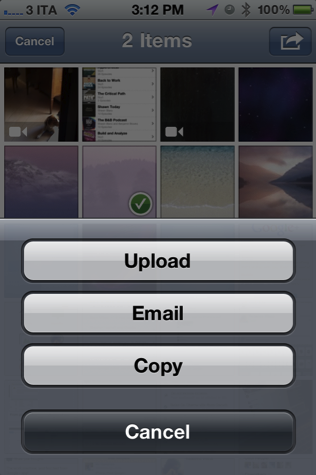
QuickShot is a $1.99 universal application available on the App Store, and we’re giving away ten copies to lucky readers who follow the rules after the break.
Report: TSMC Begins A6 Chip Trials, Won’t Be Ready For Any iPad HD This Fall
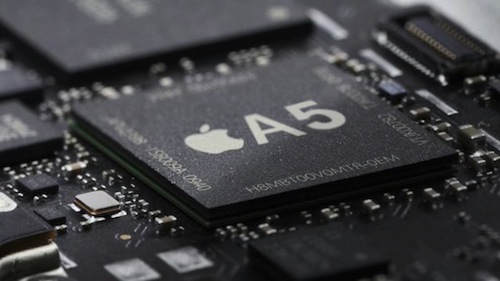
Last month a flurry of reports suggested that Apple might release a new model of the iPad that would be targeted at ‘Pro’ users and featuring a Retina display - many dubbed it the iPad HD. That suggestion (or at least the schedule) seems less reliable today with Taiwan Economic News citing sources within the chipmaking industry that claim the A6 processor won’t be available until at least the second quarter of next year with trials of the A6 only just beginning in earnest now.
Taiwan Semiconductor Manufacturing Co., Ltd. (TSMC), the world’s largest semiconductor foundry by market shares now, has allegedly started trial production of the A6 processor in cooperation with Apple Inc., with the production design to be taped out in the first quarter of next year and scheduled to be publicly unveiled in the second quarter at the earliest, according to industry sources
As previous reports have noted, Taiwan Semiconductor Manufacturing (TSMC) is producing the A6 chip, which would be the central component of the iPad ‘Pro’. The chip is said to be extremely-low powered whilst far exceeding the processing capabilities of the A4 and A5 chips because of a new 28-nanometer process and 3D stacking technologies. Darrell Etherington of GigaOm explains that this differs from the previous layered designs because “the 3D stacking tech will allow layers to be integrated vertically and horizontally into one single circuit”.
[Via GigaOm]
Apple’s Fall Media Event Scheduled For September 7?

For months there has been discussion of a Fall media event for Apple to reveal the iPhone 5 and according to a report by Kodawarisan Apple has scheduled the event for Wednesday, September 7th. The date falls in line with previous years in which the traditional iPod event was held on September 1st in 2010 and September 9th in 2009 and 2008.
MacRumors clarified with Kodawarisan that the September 7th date was not a “product of guesswork, but came from a source in the know”. They also note that Kodawarisan has had a long history of rumors (nearly a decade) but had recently been pretty quiet - with the last “sucessful” rumor arising in 2009 in whcih they correctly predicted the Mac Mini launch date.
If this date does come true and the event includes the announcement of the iPhone 5, it would differ from reports earlier this month in which AllThingsD claimed an “October surprise” for the iPhone 5 launch.
[Via MacRumors]
101 ways to save Apple, revisited→
101 ways to save Apple, revisited
Some of my favorites:
22. Create a new kids’ computer, an upgradable Wintel-compatible machine. Bad advice. Really, really bad advice.
60. Abandon the Mach operating system you just acquired and run Windows NT kernel instead. Bad advice. Really, really bad advice.
88. Acknowledge that there are people with repetitive stress injuries. Good advice. Apple didn’t follow it, though.
There are lots of gems in this great finding by Shawn Blanc, who points to the weblog of Rafe Colburn, reminiscing on an 1997 article by Wired’s James Daly titled, “101 ways to save Apple”. I got a laugh out of number 88, and you can read the full list (with commentary) at RC3.org.
Apple’s Andromeda Galaxy is Missing A Few Stars
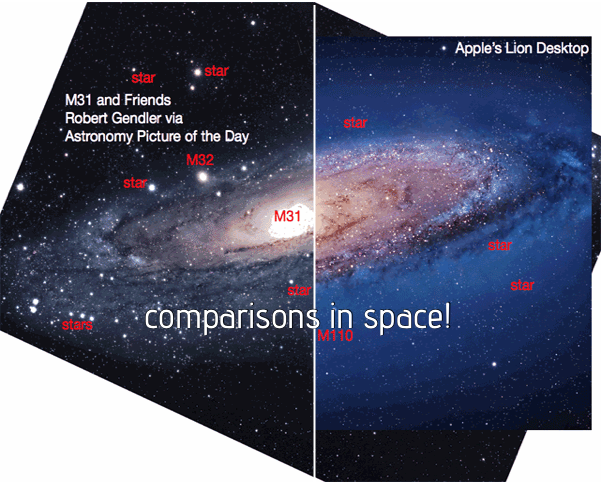
Boing Boing’s Maggie Koerth-Baker made a great comparison today between the actual Andromeda Galaxy (which is 2.5 million years away from Earth), and the Andromeda Galaxy representation that ships as the default wallpaper in OS X Lion. Thanks to a reader of the site (David Kaplan, assistant professor of physics at the University of Milwaukee), a GIF shows a comparison between what’s actually in the sky and what Apple shows you — Apple’s representation has of course been photoshopped. With the removal of stars and galaxies, the professor points out that one of Andromeda’s big satellites (M110 for those keeping track) is completely missing.
Apple has once again altered the Universe according to their whim. They moved/removed many stars, and got rid of a whole galaxy. This is M110, which is one of M31’s [Andromeda’s] satellites. The other big satellite, M32, is still there.
Okay, it is purposely done for the sake of art and keeping things pretty, but what I like about Boing Boing’s piece is that it actually gets people to see and learn about one of our galaxies. And normally I wouldn’t plug apps in a post like this, but this would be a good time to check out the Andromeda Galaxy via Qwiki (it’s an audio link). Cool right? See the side by side by comparison at Boing Boing.
Toshl Review: Your Personal Mobile Expense Tracker
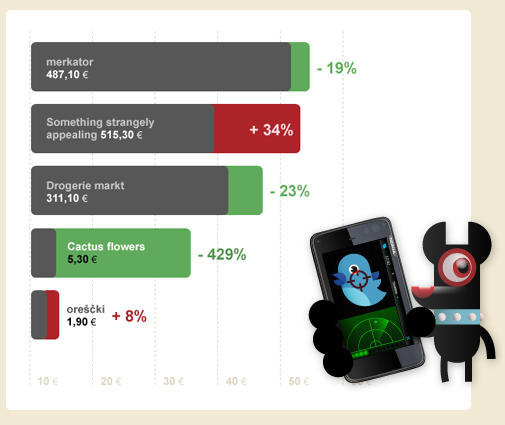
Call me old fashioned: I like to track my spending habits by writing down (with a pen and paper — more recently OmniOutliner) my purchases. The purpose in tracking your expenses by hand is so you can better verify your purchases against paper or digital statements you get in the middle or at the end of each month, and it also has the side-effect of making you better aware of the money you’re actually spending. If you’re buying a Starbucks coffee everyday, you’re running upwards of $150 a month, minus the lunch you eat out (an additional $400+ if we take $15 meals into account) and evenings spent out at the bar. Money adds up, and that’s not realized when you’re letting a computer do a lot of that work for you. Maybe you can afford it, but imagine how much money you could save to spend on all the awesome iOS apps we review? See.
#MacStoriesDeals - Thursday

Here are today’s @MacStoriesDeals on iOS, Mac, and Mac App Store apps that are on sale for a limited time, so get them before they end!
Forget fancy formatting: Why plain text is best→
Forget fancy formatting: Why plain text is best
Although modern word processing programs can do some amazing things—adding charts, tables, and images, applying sophisticated formatting—there’s one thing they can’t do: Guarantee that the words I write today will be readable ten years from now. That’s just one of the reasons I prefer to work in plain text: It’s timeless. My grandchildren will be able to read a text file I create today, long after anybody can remember what the heck a .dotx file is.
David Sparks from the wonderful MacSparky blog and Mac Power Users has made a debut post on Macworld with a great discussion on working with plain text files (I also believe Patrick Rhone talks about this and information silos in his Minimal Mac podcast, Enough).
I’ve been increasingly using TextEdit with Marked for writing everything that shows up on the website, and I know Federico recently put Byword (in combination with OmniOutliner) to the test with his great MacBook Air review. No matter what tools I use, whether it be TextMate, iA Writer, or another app, I’m always writing in Markdown and writing in text files. These text files are saved in Dropbox or some temporary workspace (which I consider to be my alternate directory to the Desktop).
Honestly, the best way to get started with plain text before you invest in another app is to simply open up TextEdit, hit ⇧⌘T, and start typing. David makes a strong case for nvALT, which you might like better since you can have the best of both worlds: accessible plain text files in the file system in a big container that makes it easy to search through everything you’ve written (as a bonus, these files can be tagged and synced to your iPad and iPhone via Simplenote).