This Week's Sponsor:

HomeSnap

A Private, Read-Only Window Into Your HomeKit Home


Use “Mobile Documents” Folder To Sync Files with iCloud Across Macs


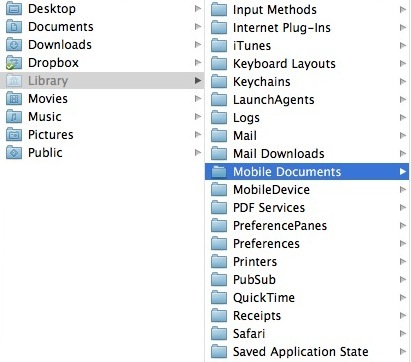
Hidden into Lion’s ~/Library (which can be displayed in a variety of ways as we detailed in our Lion review) there’s a Mobile Documents folder that’s capable of syncing files across Macs configured with iCloud, Mac OS X Hints reports. Sure enough, the Mobile Documents folder is the directory iCloud uses for Documents & Data, a feature available both on iOS 5 and Lion. Mobile Documents is the same folder that contains data for apps that already work with iCloud, such as Instacast, iWork, or Galaxy on Fire 2.

What’s interesting about this folder when used with two Macs under the same iCloud account is that it provides a basic “drop box” functionality for files that don’t necessarily belong to an iCloud-enabled app. As you can see in my screenshot, the Mobile Documents folder contains data and sub-folders for App Store apps that work with iCloud. In order to follow Mac OS X Hints’ suggestion, I tried to drop a few images directly in the folder – as I’d normally do with Dropbox – using my iMac. In a few seconds, those files were synced back to my MacBook Air. Both my iMac and MacBook Air use the same iCloud account, and have Documents & Data on. Clearly, those images didn’t belong to an officially-registered iCloud app (such as Instacast), but the files were synced back and forth between the two machines.
So what we have here is a cool hack to use the Mobile Documents folder as a temporary Dropbox-like solution based on iCloud. This is interesting because Apple could technically prevent files that don’t belong to a signed iCloud app from syncing across Macs, but decided not to, at least on 10.7.2. If you think about it, this could imply the company will offer some sort of iDisk replacement sometime in the future, or build a GUI for syncing documents back and forth between Macs manually. Or, it could be the foundation for an upcoming iWork for OS X update. Or then again, it could simply be a cool trick that won’t receive any official support from Apple.

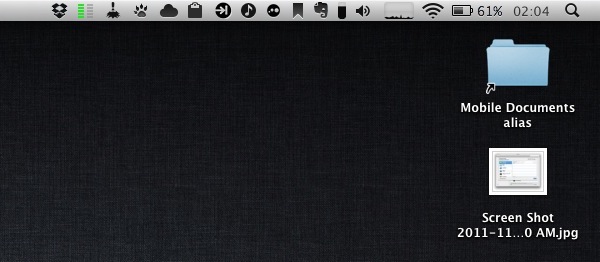
If you want to try the Mobile Documents sync (Mac OS X Hints claims the system even supports conflict resolution, which was suggested by John Gruber months ago), I’d recommend you make an alias of the folder, drop it onto your Desktop, and start dropping files into it. Make sure all your Macs are configured with a single iCloud account, and do not delete the documents & data that are already in there, or you’ll lose precious app libraries, preferences, or saved states.
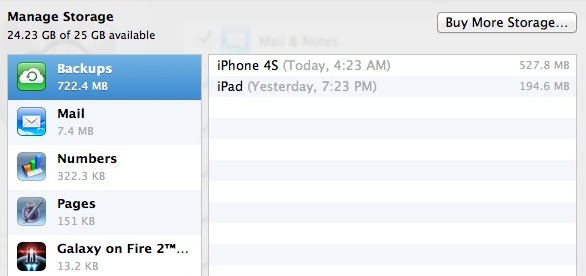
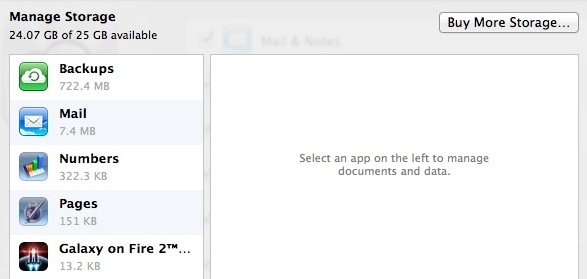
Finally, please note that even if files you’ll sync won’t show up in “official” iCloud apps, they’ll still count against your iCloud storage.

Update: here’s how you can use Mobile Documents with GoodReader for iOS.


Apple Pushes Back Mac App Store Sandboxing Requirement To March 2012

In an email to developers today obtained by iClarified, Apple has informed them that all apps submitted to the Mac App Store must implement sandboxing by March 1st, 2012. Originally Apple had told developers that the sandboxing requirement would take place this month. It isn’t entirely clear why Apple has delayed the introduction of this requirement but it does give developers a few more precious months to implement the restriction and resolve all issues that it might cause for their app.

In the email Apple notes; “Sandboxing your app is a great way to protect systems and users by limiting the resources apps can access and making it more difficult for malicious software to compromise users’ systems”. For those who aren’t familiar with the technical ‘feature’, John Siracusa has a great (and in-depth) discussion of the feature in his Mac OS X 10.7 Lion review on Ars Technica. In short, sandboxing restricts the number of actions that an app can do so that if the software is compromised, the amount of damage it can do is greatly minimised.

In Lion, the sandbox security model has been greatly enhanced, and Apple is finally promoting it for use by third-party applications. A sandboxed application must now include a list of “entitlements” describing exactly what resources it needs in order to do its job. Lion supports about 30 different entitlements which range from basic things like the ability to create a network connection or to listen for incoming network connections (two separate entitlements) to sophisticated tasks like capturing video or still images from a built-in camera.

In its email to developers, Apple also notes that if an app requires access to “sandboxed system resources”, the developer must also include justification for why it needs those entitlements when submitting the app to the Mac App Store. Finally, Apple notes that it is willing to offer developers additional, temporary, entitlements if the app is being re-engineered for sandboxing - but only on a short-term basis.

[Via iClarified, Image via Apple]


Apple Seeds New iTunes 10.5.1 Beta with iTunes Match To Developers

iTunes Match, Apple’s upcoming cloud music service based on “scan and match” technology, was scheduled to launch by the end October. As October went by and Apple missed its pre-announced release date – which Apple’s Eddy Cue announced at the “Let’s talk iPhone” media event on October 4th – it appears the company is now requiring additional testing for iTunes Match, which is available in a new version of iTunes not released to the public yet, iTunes 10.5.1.

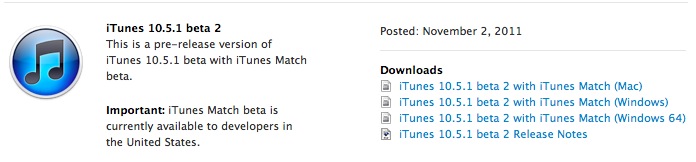
A new beta of iTunes 10.5.1 has been seeded to developers a few minutes ago, including the iTunes Match functionality that Apple has been testing since August. From the release notes of this beta, it appears iTunes Match is now also available on Apple TV for testing. iTunes 10.5.1 beta 2 comes with a number of bug fixes and improvements, and Apple notes iCloud music libraries will be deleted at the end of this beta.

iTunes Match is currently in beta for developers and US-only. Rumors in the past weeks suggested another reason for the delay of iTunes Match could be Apple trying to get international rights to launch iTunes Match in additional countries besides the US – a rumor seemingly confirmed by Apple’s Eddy Cue himself, who stated iTunes Match would become available in Canada shortly after the US launch. Of course Apple may have added more countries to the launch list since September, although the company’s website still reports iTunes Match as a US-only service.

iTunes Match will work on iTunes for Macs and PCs, iPhone, iPad, iPod touch and Apple TV.


Powered by Amazon, Flow Scans Products You Can Buy Online

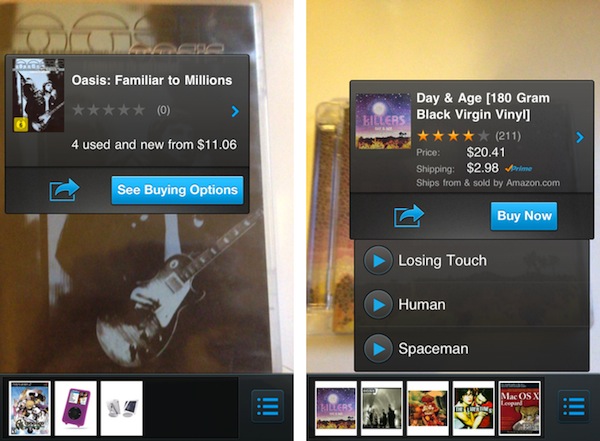
Today A9 Innovations, a subsidiary of Amazon.com, released Flow, a new iPhone app that allows users to scan objects in real-life with the iPhone’s camera, and instantly get results for available “product matches” on Amazon.com. Flow, based on A9’s scanning technology and augmented reality software, can look at a product’s cover or UPC barcode, and find in a few seconds if the selected item is also available for purchase on Amazon.com. Think Google Goggles, only based on Amazon’s retail infrastructure rather than search. Flow works with book and videogame covers, CDs and DVDs and any product barcode, but I’ve managed to find other products such as iPad accessories and Apple gadgets without scanning the barcode, only by pointing my camera at the product’s packaging for a few seconds.

The tech behind Flow for iPhone is quite impressive. As you hold your camera towards a product’s cover or barcode, the app begins “scanning” its contents and matching the image with Amazon.com in real-time. You can see the scanning process in action through a series of colored dots appearing on screen, capturing the “key areas” of a cover – such as the title, lead image, or artwork. Once a product is “found” on Amazon.com, a pop-up overlay appears on screen with options to Buy Now, see more buying options, share it, or even listen to embedded media available on Amazon.com if it’s a CD.

For example, I was able to listen to some Killers and Led Zeppelin songs after I scanned some old CDs of mine. This pop-up interface item is displayed live on screen, on top of the camera view, as Flow takes advantage of augmented reality technologies built by A9. This means that if you have multiple items on your desk, scanning one after the other will close and re-open multiple popups – it’s very neat.

This is our first step towards integrating product search technology with augmented reality,” said Bill Stasior, president of A9.com. “The integration of a live camera display, graphical overlays, and visual recognition technology creates a seamless experience for a customer looking to discover information about objects in their physical surroundings.

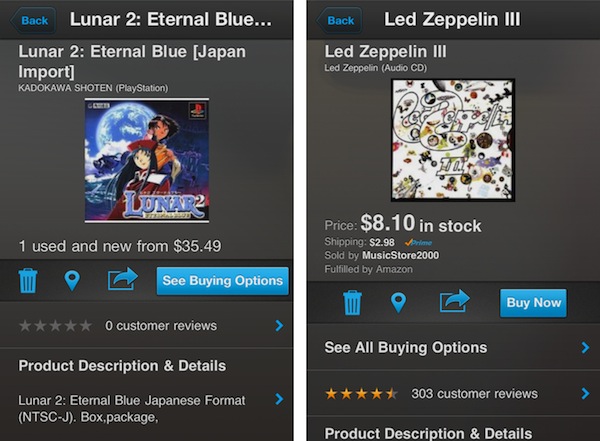
Flow uses continuous scan technology developed by A9.com’s visual search team to identify products and provide related information found on Amazon.com. The app displays Amazon’s popular shopping features such as product details, customer reviews and ratings, as well as sharing options via Twitter, Facebook, or email.

In my tests, Flow managed to recognized old CDs from the early ’90s, Nintendo 64 games, Japan-imported PSX, PS2 and GBA games, European Wii releases, DVDs, books, comic books, iOS accessories and various Apple products. The app also comes with a list view, allowing you to delete scanned items, see the best reviews and buying options on Amazon.com, and even the locations you’ve scanned from through Bing Maps. Alternate Matches, descriptions, related products and previews are also displayed when available.

Flow’s impressive scanning technology will only get better with time, and it’ll be interesting to follow the development of the app and see if Amazon will further integrate with its retail and Prime services. You can get Flow for free on the App Store.


Apple Releases iOS 5.0.1 Beta

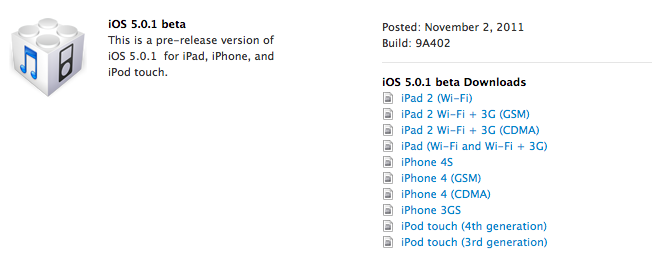
Right after the statement from Apple regarding the iOS 5 battery life issues and the promised software update “in a few weeks”, the company just posted a beta of iOS 5.0.1 to developers. It’s unclear what’s new in this beta, but it’s very likely testing will focus on battery life before the update is released publicly.

Update: According to the first reports surfacing on Twitter, it appears iOS 5.0.1 beta restores multitasking gestures on the iPad 1 (a feature that wasn’t available in the public release of iOS 5), resolves various bugs with iCloud and, as mentioned above, fixes battery life issues. Pre-release software is only available to registered developers, and users will be able to upgrade wirelessly to iOS 5.0.1 once it comes out “in a few weeks”.

iOS 5.0.1 is available now in the iOS Dev Center.


Apple Promises Software Update “In A Few Weeks” To Address iOS 5 Battery Life Issues

Ever since the release of iOS 5 on October 12th, a number of users have reported battery life issues with their devices, with the new OS seemingly draining more battery than usual after the upgrade. Specifically, the reports that have surfaced in the past weeks focused on the iPhone 4S, which according to several users that have commented on Twitter and various blogs suffers more than other devices due to the iOS 5 software update. A number of “unofficial” fixes have suggested disabling the iPhone’s location features and notifications might improve the device’s battery life.

In a statement released to AllThingsD, Apple has confirmed they have found a series of bugs in iOS 5, and they will release a software update in a few weeks to address the aforementioned battery life issues.

A small number of customers have reported lower than expected battery life on iOS 5 devices,” Apple said in a statement to AllThingsD. “We have found a few bugs that are affecting battery life and we will release a software update to address those in a few weeks.

In the past weeks, many have speculated a possible iOS 5.0.1 software update was in the works to address iOS 5’s battery life issues. Apple didn’t provide an official solution for the problem yet, but expect a software update (which can be delivered wirelessly to iOS 5 devices) to correct the problem soon.

Update: iOS 5.0.1 has been seeded to developers.


Yahoo Releases Livestand, IntoNow, Updated Mail for iPad

At Product Runway today, Yahoo released a series of new apps and updates for iOS and Android, particularly targeting the iPad with an updated version of its Mail web app, a universal version of “media check-in” tool IntoNow, and Livestand, a new take on social magazines that we first covered earlier this year. According to Yahoo, these “new mobile, tablet, and PC experiences” will help the company deliver a “personal Web” to its users.

Yahoo already had an HTML5-based web email client specifically optimized for the iPad, and the update released today introduces some interface tweaks to quickly skim through weather information and local headlines from the Mail homepage, check out new items from Flickr contacts, and watch video from the Trending Now section. Yahoo says the new Mail homepage is touch-optimized to scroll through tiles, and users will be able to tap on a new items to open the associated Yahoo website in a new browser tab.

More information is available in Yahoo’s blog post.

IntoNow, acquired earlier this year by Yahoo, is also part of today’s updates. The “Shazam for TV” that enables the app to instantly recognize what’s playing on TV through audio recognition is now available on the iPad with a brand new interface as a universal update. IntoNow impressed us months ago with their audio matching technology that was capable of recognizing TV shows and movies, displaying content recommendations and letting users share and comment on what they were watching at the same time.

Picture this - press the green button while you’re watching TV and stats from that football game, tweets from that show’s actors, or related news headlines emerge on the topic your newscaster is talking about …. all in real time as you’re watching.

The new IntoNow app (version 2.0) is available on the App Store.

Livestand

Last is Livestand, a new app that Yahoo started teasing months ago and promised would provide a better magazine-like experience for web articles thanks to direct partnerships with content providers and websites, as well the properties Yahoo already owns, such as News, Finance and Entertainment. After having tried the app for the past hour, I have to say Livestand is actually a very nice app – perhaps not as revolutionary as many thought it would be, but certainly a well-done piece of software with a good selection of content, good-looking UI, and nice animations for the iPad. To start using Livestand, Yahoo offers you the choice to manage up to 4 user accounts – great for iPads in the family – that can be associated to a Yahoo account or Facebook profile. I chose my Yahoo account, as I’ve already got one in place and figured I might give it a shot after a long time with Livestand.

Upon launch, Livestand greets you immediately with Featured content on the bottom (there are thumbnail images for publications like Forbes, Consumer Reports and several other Yahoo properties) and “Personal Mix” at the top. Read more


Evernote Peek Updated with “Virtual Smart Covers”

Back in June Evernote, one of our favorite note-taking and data collection tools here at MacStories, released Evernote Peek, a study aid designed specifically around Apple’s Smart Cover for the iPad 2, allowing students to easily exercise on questions and various topics by simply creating notes in their Evernote account, and quickly “peeking” at the app’s interface by lifting the iPad’s Smart Cover to show a question. Evernote Peek is one of the most original experiments built around the Smart Cover, which thanks to the iPad 2’s hardware can quickly unlock the device’s screen and show a portion of the display as you take the cover off. With a mix of design (the app’s interface has been built with the Smart Cover in mind) and Evernote’s online storage for notes and notebooks, Evernote Peek is a great tool not just for students strengthening their memory for an exam, but for anyone who wants to retain specific information in a new way.

The downside, of course, if that the app made sense only on the iPad 2 with a “real” Smart Cover. With a 2.1 update released today, Evernote is introducing “Virtual Smart Covers” for any iPad model, which will allow iPad 1 users or those that don’t use a Smart Cover on their iPad 2 to enjoy the app’s capabilities via software. In Evernote Peek 2.1 you can choose from a variety of virtual covers, and use the app with a Smart Cover displayed on screen, rather than physically attached to the device.

Peek was inspired by the iPad 2 Smart Cover, but not everyone has a Smart Cover, nor an iPad 2. Knowing this led us to develop a swipeable Virtual Cover that maintains the dynamics of a Smart Cover, but could be used with any iPad. Now, when you launch Peek, you’ll be able to swipe down a tab and select a Virtual Cover of your choice—it’s available in 10 colors.

From there, it’s just like using a real Smart Cover. Choose your study materials, close the cover, peek to see the clue, open the cover more to see the answer. Shut the cover and repeat. All this is done by simply swiping the screen. You may need to enable the Virtual Cover in the application settings.

As the Evernote team says, this is a “nice alternative” for those who don’t have an iPad 2 with a Smart Cover. You can get the update for free on the App Store, and check out the app’s promo video after the break. Read more