This Week's Sponsor:

Inoreader

Build your own newsfeed and cut through the noise


RSS.app

RSS.app

RSS.app is a very simple Mac app developed by Joost Schuttelaar following the removal of RSS feeds from Mail and Safari in Mountain Lion. RSS.app sits in the menubar, and checks for updates to your feeds every few minutes or hours. It then displays new article alerts using Notification Center.

The app is almost invisible: It is embedded in the status menu and uses Mountain Lion’s Notification Center to alert you of new posts. You can use RSS.app to import your existing list of RSS feeds from Apple Mail — even after you’ve updated to Mountain Lion.

The list of feeds to check can be configured in the app’s preferences, and you can import feeds from Mail even if you’ve already upgraded to Mountain Lion. The app is extremely simple: it’s got no keyboard shortcuts, menus, or distracting interface elements – it’s just a menubar checker for RSS feeds. Clicking on a notification will take you to the article using your default browser, and that’s it.

As Michael Tsai noted, the app has been rejected by Apple because of rule 2.8, which says “Apps that are not very useful or do not provide any lasting entertainment value may be rejected”.

If you think RSS.app can be useful to you, download it here.

Permalink

Average App Size Increased By 16% Since March

Average App Size Increased By 16% Since March

MacRumors points to new data by ABI Research, showing that, since March 2012, the average app size has increased by 16%:

The iPad 3’s Retina display and Apple’s more liberal submission policy have caused the file sizes of leading iOS apps to grow substantially, especially in games. The latest data from ABI Research shows that the global average app size across all categories was 23 megabytes in September, 16% more than in March.

On March 1, I wrote:

I see two solutions. Either Apple gets the carriers to agree to larger download sizes, establishing a new “average” that should work for most apps (let’s say 60 MB as Panzarino suggests), or they rebuild the download mechanism completely by allowing devices to “ignore” resources they don’t need. The second solution would be a “cleaner” approach, in that it would address the root of this likely scenario — that is, devices downloading apps containing all kinds of images and resources for Retina and non-Retina displays.

As we know, Apple decided to increase the maximum download size over cellular to 50 MB. This, combined with LTE networking, has allowed developers to be more relaxed in regards to their app sizes, and users to have reasonable download times on 4G (or DC-HSDPA). The solution I proposed earlier this year – a way to identify which assets to download for an app on a specific device – would still require a major rework of iOS.

Due to international pricing, this year I had to get a 16 GB iPhone 5. But I regret my decision. Something we’ve learned in the past two years (since the Retina display was introduced in 2010) is that that app sizes are only going up, and you’re never going to wish you got a device with less capacity. You’ll either be fine, or want more. With the iPhone 5 and Retina + Universal games, I find myself having to keep an eye on my available space, which is something I despise doing.

For the future, I hope 32 GB will become the new 16 GB, and I’m looking forward to 128 GB iPhones and iPads.

Permalink

SearchLink: Markdown Links Without The Browser

I don’t know how Brett Terpstra finds the time to do everything he does, but I do know I enjoy the results.

Brett’s latest effort is SearchLink, a system Service to generate Markdown links automatically for a variety of web services. In Brett’s words:

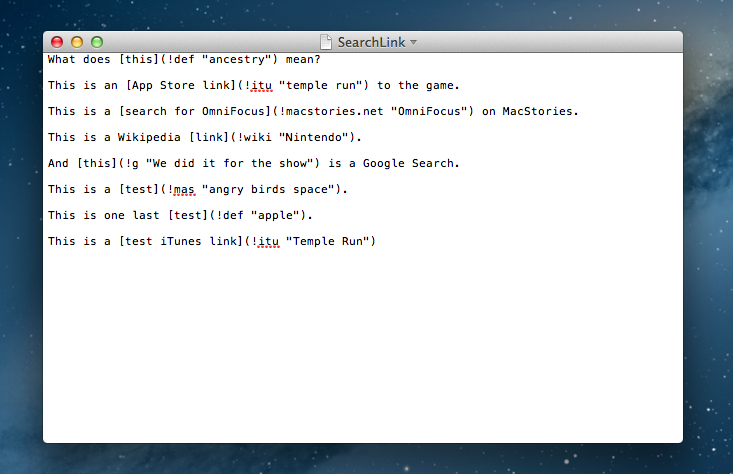
SearchLink is a System Service for OS X that handles searching multiple sources and automatically generating Markdown links for text. It allows you to just write, marking things to link as you go. When you’re done, you run it on the document and — if your queries were good — have your links generated automatically without ever opening a browser.

Essentially, SearchLink is a Ruby script that, in the background, generates valid Markdown for inline links inserted in plain text. These can be links pointing to a Google search, a Mac App Store or iTunes search, last.fm, Wikipedia, and more. Instead of having to switch to the browser when you’re writing, you can just write using SearchLink’s simple syntax. Once you’re done, run the Service, and SearchLink will contact web APIs to transform your text into the first/best result for your query, formatted in Markdown. Read more


Apple Confirms: Media Event on October 23

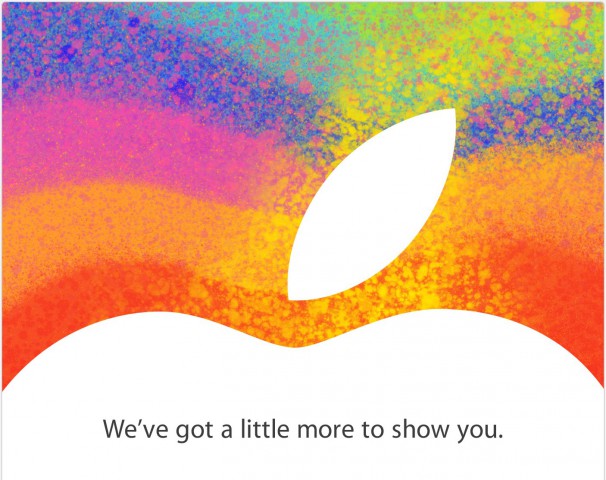
As first reported by The Loop’s Jim Dalrymple, Apple just sent out invitations to the press for a media event taking place on October 23 in San Jose. The invitations show an Apple logo with the tag line “We’ve got a little more to show you”.

Unlike other recent events that have been held at the Yerba Buena Center for the Arts in San Francisco, Apple will hold this event at the California Theatre in San Jose .

According to recent speculation, Apple will unveil a new, smaller 7.85-inch iPad at the event dubbed “iPad Mini”. The device has been long rumored to be a smaller version of the last-gen iPad 2, carrying the same 1024x768 non-Retina display in a thinner and lighter body with a smaller display. The core feature of the iPad Mini should be portability, as well as a reduced price for consumers.

Curiously enough, the invitation is somewhat reminiscent of the one sent for the original iPad event in January 2010.

As noted by Jason Snell, the last time Apple held an event in San Jose at California Theater was for the iPod photo announcement with a Bono/Edge live performance.

Based on more recent rumors, next week may also see the introduction of refreshed iMac, MacBook Pro, and Mac mini lines. Specifically, Apple is rumored to be planning a 13-inch version of the MacBook Pro with Retina display, a thinner iMac, and a new Mac mini model.

To get a sense of what a 7.85” (as opposed to 9.7”) iPad Mini would be like, check out our mockups from July.


Watermark Releases iPhone App

Watermark Releases iPhone App

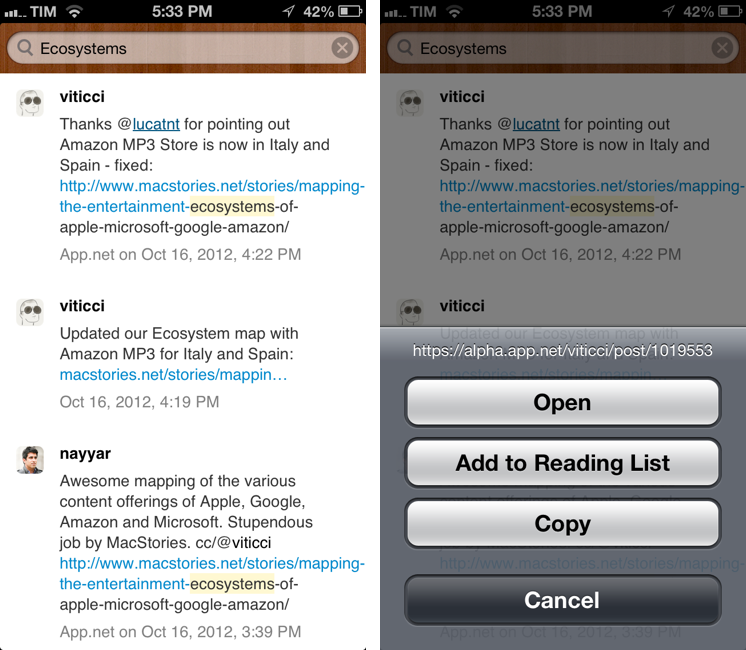
Twitter and App.net archiving and search tool Watermark.io gained a first official mobile companion today, a native app for iPhone. Dubbed “Watermark Mobile”, the free app is very simple, as it’s solely focused on letting you search and copy links to tweets or posts.

Watermark is a searchable archive of tweets and App.net posts. It downloads tweets from everyone you are following, so you can go back and find older tweets later. And it provides a backup of all your own tweets and favorites forever.

Watermark Mobile is, for now, an interface to your archive. There are no options or sidebars – just a search bar to retrieve posts from your Watermark archive. Right now, you can search and tap & hold on a post to copy its link; you can tap on usernames to open their profiles on Twitter or App.net. For a future version of the app, I hope developer Manton Reece will add native integration with Watermark filters and saved searches.

You can download Watermark Mobile for free on the App Store. You can catch up on our previous coverage of Watermark here.

Permalink

Mapping The Entertainment Ecosystems of Apple, Microsoft, Google & Amazon

Please note: An update to this article is available here, it includes the December 2012 iTunes expansion (Music & Movies) as well as Xbox Music.


The choice of what phone or tablet to buy is one that often involves many considerations, chief amongst those is the physical device and the operating system that it runs. But I think there is a third fundamental consideration that is growing in importance: what services and entertainment ecosystems you’ll be able to access. You need only look back to the recent criticism of iOS 6, in which Apple replaced Google Maps with their own Maps app. Summing it up generally, Apple’s Maps app is sub-par to what it was replacing and that mattered to people - enough that Tim Cook felt the need to apologise for the frustration the switch caused.

Today I want to focus specifically on the entertainment ecosystems of Apple, Google, Microsoft and Amazon. I’m referring to the various digital content stores that are run by Apple, Microsoft, Google and Amazon - specifically their Music, Movies, TV Shows, eBooks and App stores. In my mind, there are four general aspects that make a good entertainment ecosystem:

  • Wide selection of quality content
  • Competitive prices
  • International availability
  • Interoperable on a user’s devices

I want to explore the third aspect in depth today, because it’s something that I feel is all too often downplayed by the technology press (which, coincidentally, is based predominantly in the US). I’ll also briefly discuss the fourth aspect as well at the end. Why are these two aspects so important? Well, smartphones and tablets are devices that have universal appeal, so for Apple or any of the other three to win the smartphone or tablet “race” - an entertainment ecosystem that is available across the world, not just in the US, isn’t just a cool extra feature, it’s a necessity. The US may be one of the biggest markets for such devices today, but is there any doubt that these devices will rival the prevalence of personal computers (which are everywhere) in years to come?

I’ve collected data on which countries each service is available in and then added in population figures to create many of the graphs and diagrams you’ll see below, mixed in with some of my own analysis and thoughts. Please note that the five HTML5 map diagrams are interactive, click on the logos of the four companies to compare their coverage.

Read more


Apple’s Hire of William Stasior May Be for More than Just Search

Earlier this afternoon, AllThingsD’s Kara Swisher reported that Apple has hired Amazon executive William Stasior, who was in charge of Amazon’s A9, which focuses on product and visual search technologies. Swisher reports that Stasior will be working with the Siri team in his new position at Apple.

What’s more intriguing is what else Stasior might find himself working on — presumably, strengthening Apple’s search and search advertising technology in the wake of its increasing competition with Google.

“Apple’s search and search advertising technology” covers a broad swath of search that could be… well anything. If I was to take a stab at what Apple might specifically want Stasior for, I’d look at one of the products A9 ended up introducing on the App Store. Flow Powered by Amazon is a visual search app that attempts to visually recognize and display relevant information about books, music, video games, and more by simply pointing your smartphone’s camera at the cover or UPC barcode. The app allows people to bring up product details and customer ratings by identifying the product’s packaging (it’s in the same vein as Google Goggles).

Siri would be well suited as not just a voice assistant, but as a visual assistant. Given Apple’s recent foray into books, magazines, and textbooks, using Siri to scan and subscribe to a magazine through your iPhone, get more information on a paperback, or find more novels by an author could be a possibility. I could see Apple offering album ratings for music from iTunes, or displaying rental fees when you scan the cover of a Blu-ray boxset. A9 also powers CloudSearch and Product Search at Amazon — I don’t see the hire being related to search advertising, but rather for product search as it applies to Apple’s digital ecosystems.

Permalink

Tracking Stolen Macs with Undercover 5

I’m a big fan of Orbicule products. Aimed at making your Mac more secure, I’ve previously taken a look at Witness, a background application that, once activated, “blocks” your Mac’s screen and activates the built-in camera to snap pictures to see who’s using your computer. It can also do fancy things like running AppleScripts and recording sounds using the Mac’s internal microphone.

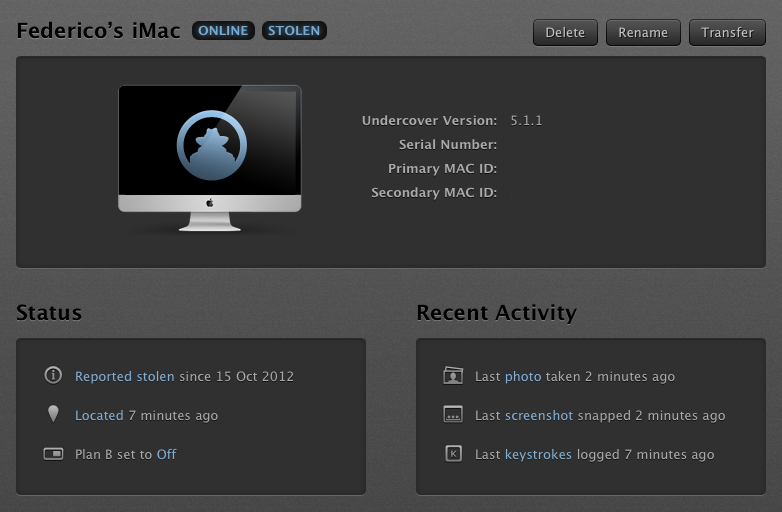
I recently installed Undercover 5, the latest version of Orbicule’s OS X tracking solution for stolen Macs, and I’m very impressed by it. Think of Undercover 5 as Find My Mac on steroids.

In my coverage of the new iCloud web apps launched in September, I mentioned the improvements made to Find My iPhone, which included a new UI and more iOS-related functionalities, but nothing new on the OS X side. With Find My Mac, you can visualize computers on a map, lock them, and erase them, but there isn’t much you can do to identify the person using your computer or to gather information about his/her habits and identity. This is were Undercover comes in. Read more