


Facebook today released version 5.1 of its iOS app, which adds a new way of messaging friends and sharing multiple photos at once. The updated Facebook app now comes with a friend list on the right that you can use to easily start a private conversation. You can swipe left to access the chat panel, and add friends you contact the most to the top of the list. To customize the Favorites list, you can hit an Edit button to start “pinning” your friends in the Favorites section. Read more
Facebook 5.1 Released with Improved Messaging, Photo Sharing
Instagram Profiles Now Let You View and Share Your Photos On the Web→
Instagram Profiles Now Let You View and Share Your Photos On the Web

Just announced on the Instagram blog, a long awaited feature is finally hitting the web. Instagram Profiles allow you to share your Instagram photographs online, allowing anyone to comment and like photos from their favorite web browser.
Instagram web profiles are a beautiful new way to view and share Instagram on the web! Your web profile features your photos along with your profile photo and bio, giving others a look at the content you share on Instagram.
…
You can share your own profile with anyone you want to see your Instagram photos. In addition, web profiles provide an easy way to follow other users, comment & like photos, and even edit your profile directly from the web.
The address for your Instrgram profile is ridiculously simple (For example, Federico’s profile would be instagram.com/viticci). You can make your photos public so that anyone can view your profile, or make them private so that only Instagram users you’ve allowed can see your photographs. However, not all profiles are available yet. According to Instagram, online profiles will be rolling out over the next couple of weeks.
Apple: 3 Million iPads Sold In 3 Days

With a press release, Apple just confirmed it has sold over 3 million iPads (iPad mini + iPad 4th gen) in three days. Interestingly, Apple is not separating sales figures of the iPad mini from the regular iPad; in the press release, Apple simply says it is a new record doubling the previous milestone of 1.5 million weekend sales of the iPad 3 in March.
Apple today announced it has sold three million iPads in just three days since the launch of its new iPad mini and fourth generation iPad—double the previous first weekend milestone of 1.5 million Wi-Fi only models sold for the third generation iPad in March. The Wi-Fi + Cellular versions of both iPad mini and fourth generation iPad will ship in a few weeks in the US and in many more countries later this year.
Apple notes how “demand for iPad mini exceeded the initial supply”, confirming that some pre-orders (which began on October 26) will be shipped “later this month”. Tim Cook was quoted in the press release:
Customers around the world love the new iPad mini and fourth generation iPad,” said Tim Cook, Apple’s CEO. “We set a new launch weekend record and practically sold out of iPad minis. We’re working hard to build more quickly to meet the incredible demand.
To put these numbers in a better context, here’s how iPad sales evolved over time since the release of the original model in 2010:
- Apple sold 1 million iPads in 28 days after the device went on sale in April 2010;
- 2 million iPads were sold in less than 60 days;
- 3 million iPads were sold in 80 days;
- 3 million”new iPads” were sold in four days, from March 16 to March 19, 2012.
And here’s a visualization of the iPad’s growth every quarter since launch, based on Apple’s Q4 numbers (which don’t include sales for the new models).
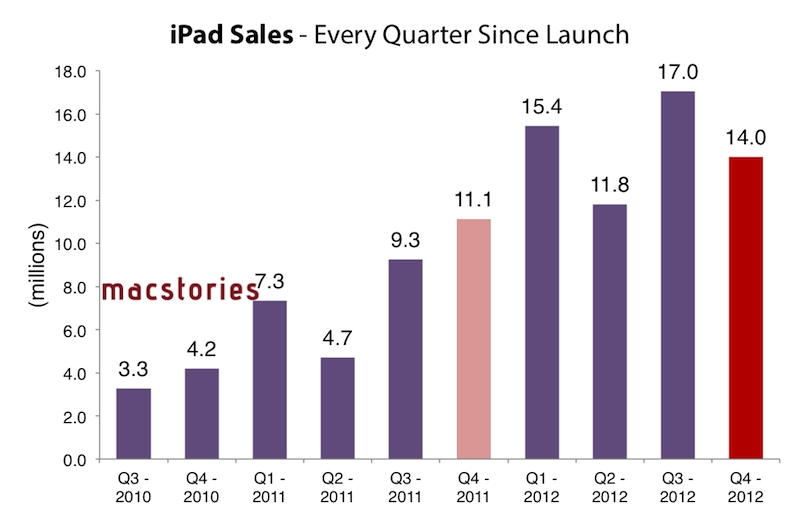
In today’s case, however, the comparison is different as Apple is accounting for two models (iPad mini and iPad 4th gen) in a somewhat clear intention to report iPad sales as a single category without specifying models – similarly to how they do for iPod sales or iPhone sales without differentiating between device models. It’s also worth remembering how the new iPads’ rollout has been one of the largest ones for Apple to date: the iPad mini went on sale on November 2 in 34 countries, whereas the 3rd generation iPad launched in 10 initial countries, and then rolled out to 25 more a week later; both WiFi and WiFi + Cellular versions of the 3rd generation iPad were available at launch.
The iPad mini launched to positive reviews, but saw fewer and shorter lines around the world with online pre-orders quickly sold out for every model.
Evernote Announces Major Redesign Of iOS App
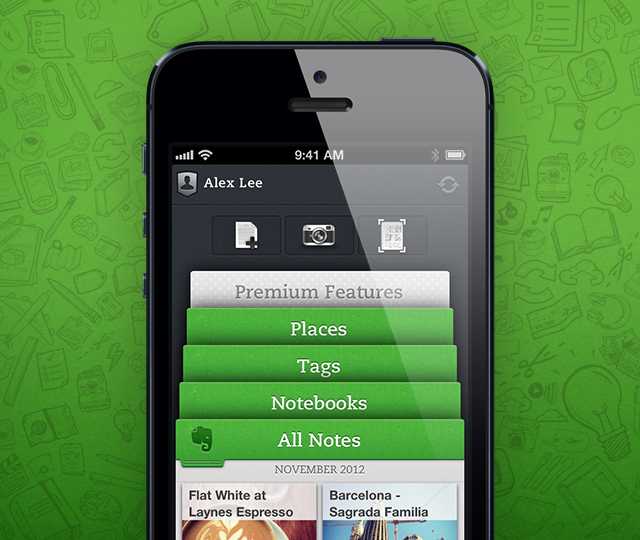
Following last week’s announcement of a redesigned Mac client (more details here), which was released yesterday as public beta, Evernote has today announced a major update “coming very soon” for the iOS version of the app.
Dubbed like the Mac counterpart “Evernote 5”, the new Evernote for iOS presents a brand new interface to browse notes, notebooks, and tags on the iPhone and iPad. Using a “stacked” interface for sections, Evernote has implemented a new navigation to switch views with just two taps; on the iPad’s larger screen, the team also managed to fit in a “recent notes” scrollable menu at the top, which should allow users to quickly switch between notes from different notebooks or tags.
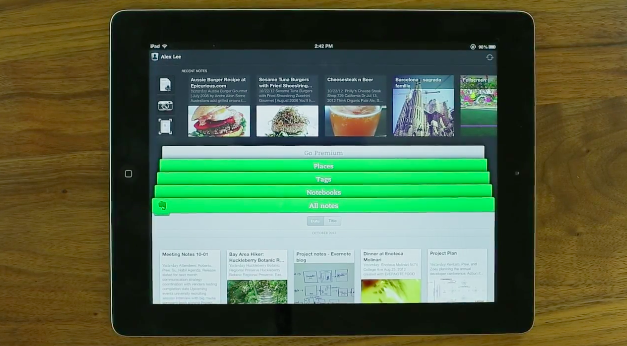
The update seems to borrow heavily from the new Mac app. There’s an Atlas view to browse notes by location, redesigned Tags and Notebooks views, Cards, Filters, and Sorting options reminiscent of what we saw in Evernote 5 beta for Mac. The iOS app places great emphasis on three shortcuts at the top to create a new note or photo note, the latter being a feature that leverages the iPhone’s camera to snap photos and automatically save them as new notes. It’s unclear whether users will also be able to create shortcuts for notes and notebooks on iOS – shortcuts are a new major feature of Evernote 5 for Mac that, personally, I’d love to see on iOS.
We’ve learned a lot over the years about how people use Evernote on mobile devices. It’s all about speed. Whether you’re creating a note or browsing to one, everything needs to happen fast. Also, you want the app to easily support your preferred organization scheme. If you’re a tagger, then tags must be front-and-center. If you put everything into notebooks, then those need to be quickly accessible.
As an Evernote user, I’m looking forward to trying the new Evernote app for iOS. In the meantime, check out Evernote’s blog post here and official promo video below. Read more
My Must-Have Mac Apps, 2012 Edition

I concluded last year’s edition of My Must-Have Mac Apps suggesting that, with iCloud approaching its public debut and developers starting to integrate native sync in their iOS and OS X apps, “a new class of Mac software” would take us in new directions. While that has been (partially) the case, 409 days later the results are more nuanced.
#MacStoriesDeals: 20% Off Hazel Screencast & Superstorm Sandy Donations→
#MacStoriesDeals: 20% Off Hazel Screencast & Superstorm Sandy Donations
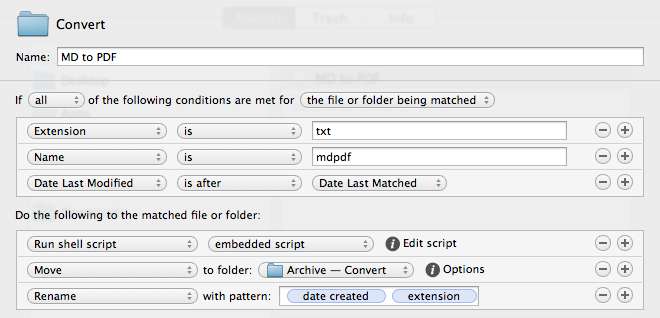
Last week, I linked to Mac OS X Screencasts’ Hazel tutorial, a 1-hour screencast detailing several Hazel features:
I have watched the entire video, and, indeed, I think it’s one of the best resources you can buy to get started with Hazel and understand all of the its potential. Screencast quality is good, with on-screen guides and labels, zoomed views on specific sections and menus, and clean transitions. The voiceover is concise and to-the-point. The video lasts an hour, but it passes quickly thanks to the provided examples and explanations – it’s definitely not boring, as most video tutorials can be nowadays.
Should you get it? Yes. If you’re new to Hazel, this will get you up to speed very quickly. And, even as a long-time Hazel user, the screencast refreshed my memory on several aspects of Noodlesoft’s app.
Thanks to Mac OS X Screencasts, we can offer a 20% discount off the Hazel screencast (regular price €10) with the coupon code MACSTORIES-IS-AWESOME. The coupon code is valid from November 1st - 18th. Simply head over to Mac OS X Screencasts’ website and paste our coupon code to receive a 20% discount.
But there’s more. For every screencast sold with our coupon code, Mac OS X Screencasts will donate €1.50 to American Red Cross to help people impacted by Hurricane Sandy in the United States. If you purchase the Hazel screencast without our coupon code, Mac OS X Screencasts will donate €3 to American Red Cross for every screencast sold.
The Hazel screencast offer is available here. If you’d like to donate to American Red Cross without having to buy the Hazel screencast, we recommend Apple’s own donation page available on iTunes.
UPDATE: Together with Mac OS X Screencasts we’re giving away 5 free screencasts for this Hazel tutorial. To enter, tweet to @macstoriesdeals with the hashtag #macstorieshazeltutorial and we’ll pick 5 winners later today! GOOD LUCK!
Evernote 5 Public Beta Now Available
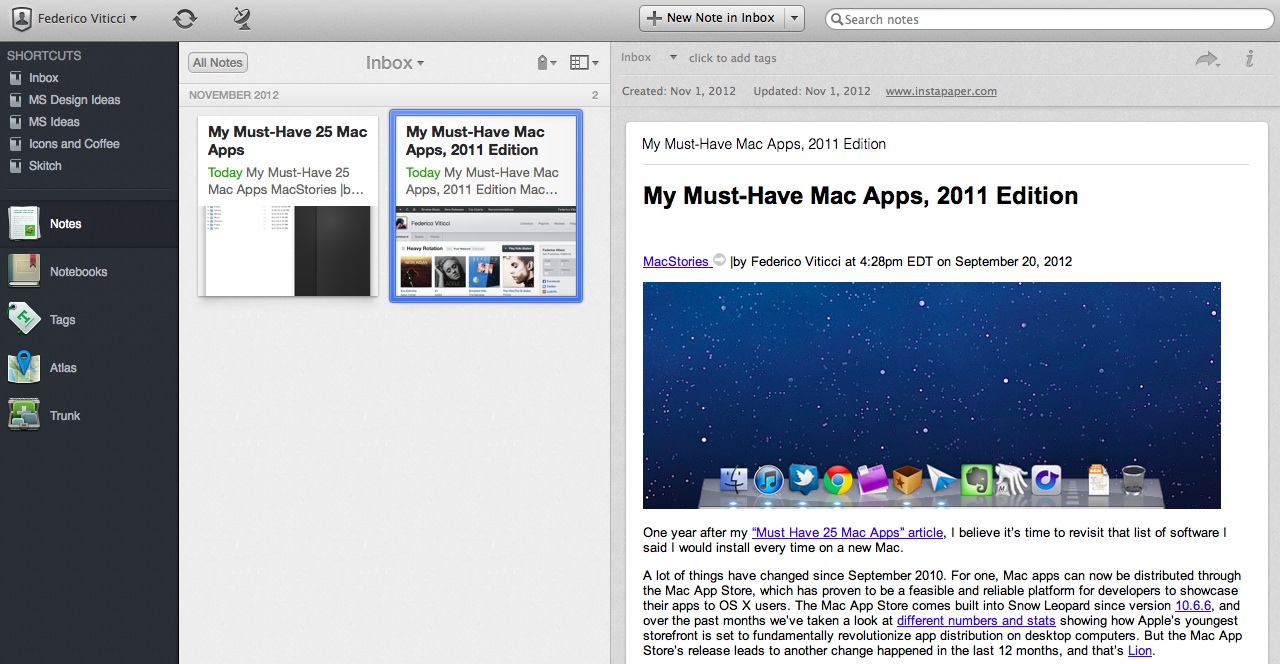
Announced last week, Evernote has today released version 5.0 of its Mac client as a public beta. Sporting a redesigned interface and over 100 new features, Evernote 5.0 is a complete rethinking of the desktop experience, built with easier access to most used notebooks and notes in mind. As I wrote last week:
Evernote 5 will primarily focus on improving the way users manage and access their notes, tags, and notebooks. With a new sidebar, users can drag items into the Shortcuts area; user shortcuts are accessible using CMD+1/9 keyboard shortcuts – just like bookmarks in Safari. Advanced users will still be able to “show lists” in the sidebar, but, overall, according to Evernote, the redesign will be focused on making the sidebar more visual, compact, and easier to use. In fact, the new sidebar will also list the five most recent notes for quick access. Evernote says there are over 100 new features in v5.0. These include a new iPad-like Cards view for notes, improved sharing, a new look for the notes editor, more keyboard shortcuts, new views for tags and notebooks, and more.
The new interface is primarily based on the new sidebar, which lists all the “shortcuts” created by the user. A shortcut can be a notebook, a tag, a note – anything that can be selected and dragged in the app can be manually placed in the Shortcuts area. Read more
October 2012 In Review

We’re back again with another month in review, and what a month October has been. On the news front there was, of course, the October 23rd Apple event which saw the launch of the iPad mini, fourth generation iPad, 13” MacBook with Retina Display, new Mac mini and iMac. Apple also had their fourth quarter earnings call and remembered the first year anniversary since the passing of Steve Jobs.
October was also chock full of new apps and big app updates. Tapbots in particular had a big month with the launch of Netbot and Tweetbot for Mac, Marco Arment launched The Magazine, Loren Brichter made his comeback with Letterpress, Pocket released a Mac app, and iPad drawing app Paper got a big update.
On the stories front, Federico has had a lot of fun putting together a number of guides and tutorials this month and we’ve collected them all together below. Federico also interviewed Loren Brichter for the launch of his new Letterpress app, talked about the leadership changes at Apple and I mapped out the entertainment ecosystems of Apple, Google, Microsoft and Amazon.
Be sure to check out our previous Month in Review posts here.
Apple Releases iOS 6.0.1 [Direct Links]
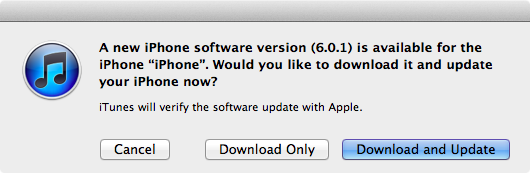
Apple just released iOS 6.0.1. The software update has hit Apple’s servers and is propagating now; iOS 6.0.1 is a bug fix release, which improves reliability of the iPhone 5 and iPod touch 5th gen on WiFi networks with WPA2 encryption, fixes the widely-reported issue of horizontal lines showing up on the software keyboard, and improves the behavior of the Camera flash.
iOS 6.0.1 changelog
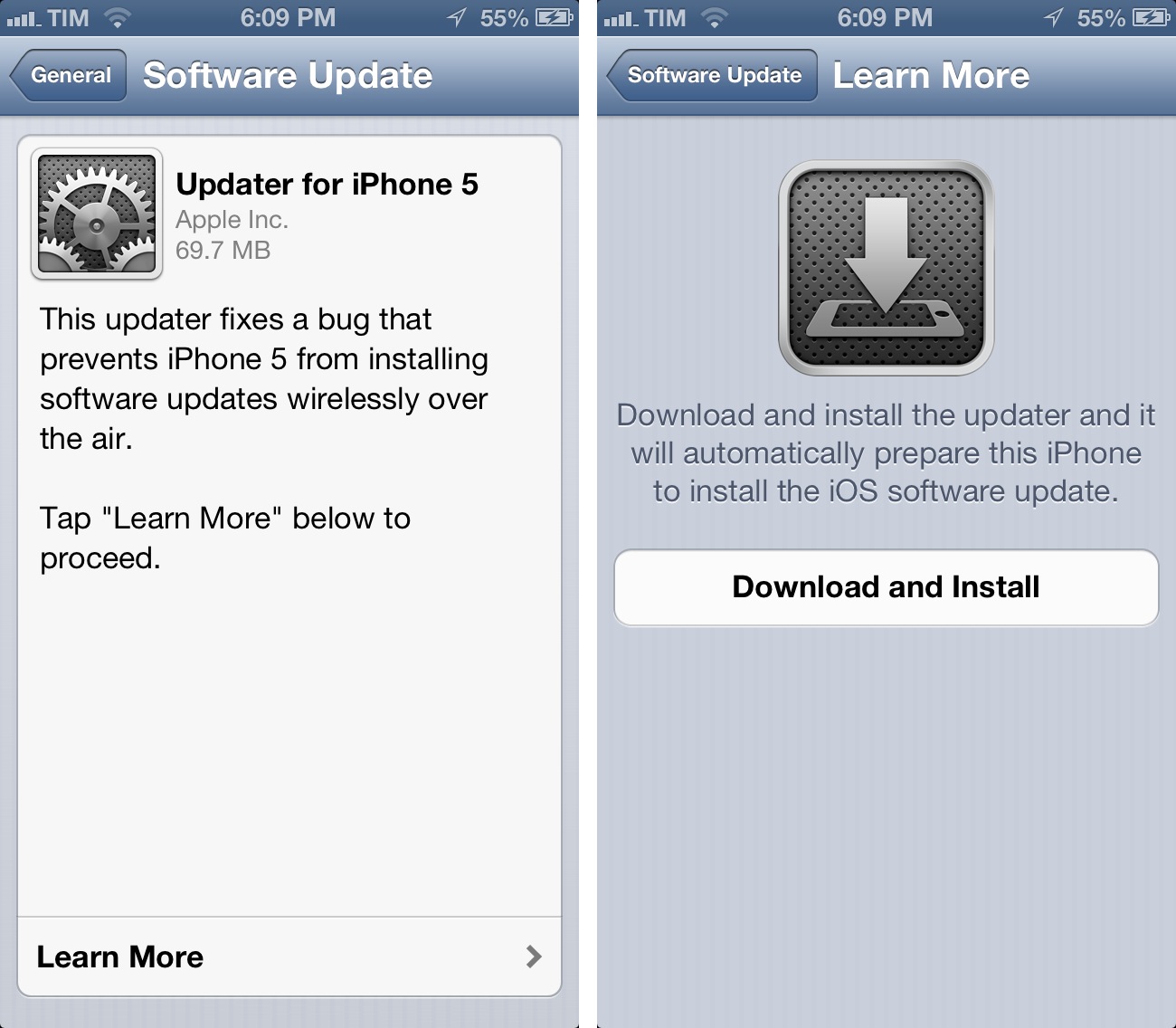
- Fixes a bug that prevents iPhone 5 from installing software updates wirelessly over the air
- Fixes a bug where horizontal lines may be displayed across the keyboard
- Fixes an issue that could cause camera flash to not go off
- Improves reliability of iPhone 5 and iPod touch (5th generation) when connected to encrypted WPA2 Wi-Fi networks
- Resolves an issue that prevents iPhone from using the cellular network in some instances
- Consolidated the Use Cellular Data switch for iTunes Match
- Fixes a Passcode Lock bug which sometimes allowed access to Passbook pass details from lock screen
- Fixes a bug affecting Exchange meetings
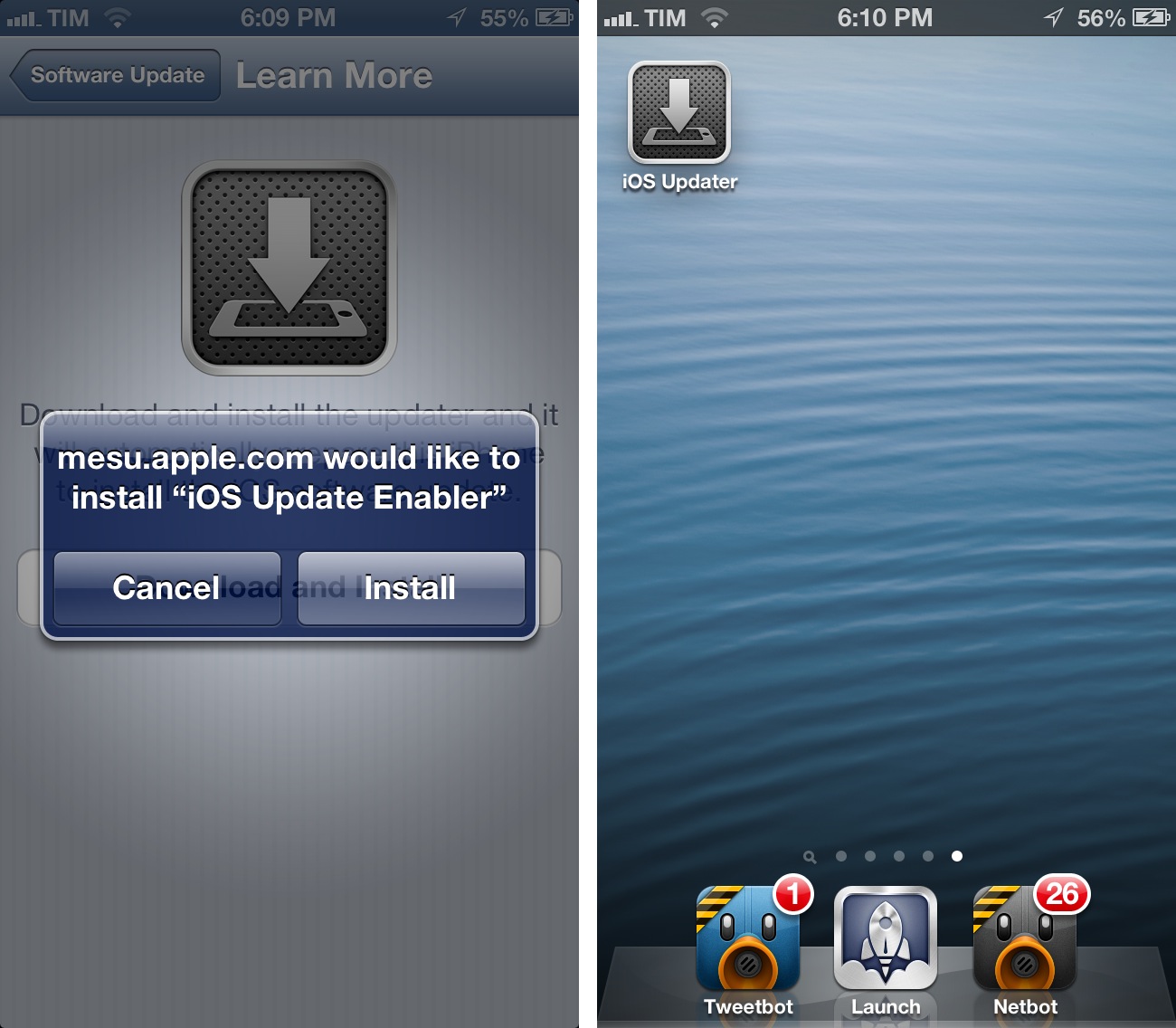
For over-the-air updates, iPhone 5 users will have to install an iOS Updater utility first, which requires a full reboot of the device before installing iOS 6.0.1. After the restart, the Software Update panel in settings will allow you to download iOS 6.0.1.
Direct Links
iOS 6.0.1 direct download links below (build number 9B206).
- iPhone 3GS
- iPhone 4 GSM
- iPhone 4 CDMA
- iPhone 4S
- iPhone 5,1 (model A1428, AT&T/Canada)
- iPhone 5,2 (model A1429, all others)
- iPad 2 (also iPad 2 AT&T and iPad 2 Verizon)
- iPad2,4 (32nm 16GB iPad 2)
- iPod touch 4th gen
- iPod touch 5th gen
- iPad 3 WiFi
- iPad 3 CDMA (3,2)
- iPad 3 Global (3,3)
- iPad 4th gen (3,4)
- iPad mini (2,5)