Shiori, Free Pinboard Client for Mac

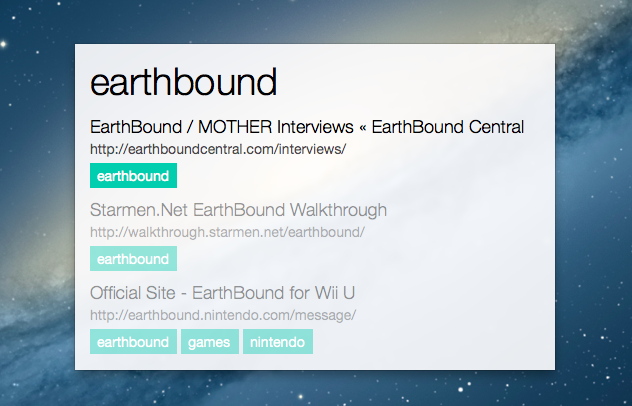
Shiori is a nice new Pinboard client for Mac that lets you find and add bookmarks. The app can be configured to have two separate keyboard shortcuts for adding and finding items; alternatively, you can click on the app’s icon in the menubar and work with the dropdown menu (which also contains shortcuts for Refresh and Preferences).

The interface is clean and minimal, with tags highlighted in light blue/green; Shiori comes in the foreground with a list of the latest 7 bookmarks from your account (by default; you can show up to 10) and you can start typing to filter results. The app is extremely fast at retrieving items, and it supports abbreviations to look into bookmark titles, URLs, and tags. According to the developer, the app can get smarter over time by learning from your “habits” (I assume it means abbreviation use and choice of results in search).

There are other nice touches worth mentioning. There’s a Private URL feature to automatically make URLs that match criteria specified in the Preferences private in your Pinboard account; when adding a new bookmark, Shiori can get the active webpage URL and title from the browser (Safari, Chrome, and Firefox are supported) and provide a list of recommended tags (a feature of the Pinboard API).

Shiori is simple, elegant, and fast. Get it here for free.


Japanese Emoticons for iOS

A few months ago I covered Kaomoji, an app that makes it easy to browse and copy Japanese emoticons (also known as, indeed, kaomoji) on iOS. This morning, thanks to Sean’s recommendation, I bought Japanese Emoticons, the official app by website japaneseemoticons.net that, like Kaomoji, lets you browse through over 1000 built-in emoticons organized by type (such as “positive emotions”, actions, evil, “hello and goodbye”, and more).

Unlike Kaomoji, the Japanese Emoticons app lets you add your most-used emoticons to a set of Favorites, which you can rearrange at any time and access anywhere in the app from a button in the upper right corner. Japanese Emoticons also has an editor to create your own emoticon based on parts like eyes, mouths, and arms (there’s also a button to create a random one). The app features one-tap copy, but the interface isn’t as polished as Kaomoji.

If you’ve been looking for a Kaomoji-like app with favorites and an editor feature, Japanese Emoticons is $0.99 and Universal.

Permalink

Feedly Launching Pro Version with Evernote Integration and Search

RSS service Feedly, one of the most popular alternatives to Google Reader that quickly hit 12 million users after the shutdown of Google’s service, has today started rolling out a Pro version that, starting at $5 per month, will enable search, Evernote integration, HTTPS navigation, and premium support for users. However, there’s a catch: Feedly Pro’s regular $5/month subscription ($45 annually) will be available publicly for everyone this Fall; today, the company has launched a $99 Feedly Pro lifetime membership that will unlock the Pro features, forever, for the first 5000 users.

As a daily Evernote user and fan of RSS apps that implement full article search, I was curious to try out the initial feature set of Feedly Pro, so I purchased the lifetime membership this morning. My first impression is that, overall, the Pro features will add value to the service for power users, but they will need several improvements and refinements. Feedly says that, in the future, Pro users will be able to directly vote for the features they want to see in the service. Read more


iPod Eclipse

Benedict Evans:

As music has moved on from the iPod, it has actually become much less important to the tech industry. With streaming and the decline of ownership, there are fewer barriers to switching service, and every device has a choice of music services, both from the platform owner (i.e. Apple/Google/Microsoft/Nokia etc) and as third-party apps. In effect,  music has become a commodity.

Compare this to dedicated eBook readers, which still have a feature that smartphones haven’t replicated (E Ink). The iPod didn’t have exclusive features that tied music (and customers) to the device; the built-in WiFi and cellular options of iPhones facilitated the rise of streaming services and access over ownership. The only iPod-only feature I can think about is storage in the 160 GB iPod Classic; millions of people just don’t need an iPod anymore.

For further evidence, look at Apple’s upcoming launches: iTunes Radio can be used on iPod touches connected to WiFi, but iPhones (and cellular iPads) can use it all the time.

Permalink


Pushpin 2.1 Adds iPad Support and Speed Enhancements

Pushpin

Pushpin

Pushpin already was my favorite Pinboard app on the iPhone: with a great 2.0 update that added a redesigned interface and saved feeds, Pushpin gained a spot on my Home screen as the app I would open to access the full Pinboard experience. From my review:

At $9.99, Pushpin 2.0 is a powerful Pinboard client for users who want to use Pinboard to add bookmarks, manage them, and discover new ones using the service’s (lightweight) social features. Pushpin 2.0 looks great on the Retina display, and new features like Saved Feeds, new tag filtering and suggestions, and improved web browsing strike a good balance between advanced functionality and general usability. Pushpin 2.0 can be used as your only Pinboard client on the iPhone, packing both management and browsing features, and I’m looking forward to an iPad version.

With last night’s 2.1 update, Pushpin is now optimized for the iPad and it looks just as good as the iPhone version. Navigation takes places in a main screen (not a sidebar) where you can find links to your bookmarks, community links, and saved feeds. The iPad version works out of the box with the URL scheme of the iPhone app, and the developer added support for opening links in Dolphin, which is a fine browser with direct Evernote integration (the best of its kind on the App Store).

Pushpin benefits from the increased space of the iPad’s larger screen. For one, it’s much nicer to open links in the app’s built-in web view, and tapping & holding links in the list view opens a popover that doesn’t take over the entire screen; from the popover, you can easily copy a URL, copy a link to your account, or save an item to your read later service of choice.

Alongside speed improvements and bug fixes, saved feeds have been enhanced with support for from: tags: by combining these with regular usernames and tags, you’ll be able to see, for instance, what a specific user has saved from email or Twitter favorites – the app’s changelog on iTunes contains the full list of supported from: tags for your perusal.

Pushpin is a powerful all-in-one Pinboard app, and with an iPad version I can now enjoy the same experience on all my devices (I would like the ability to sync saved feeds, though). You can get Pushpin at $9.99 on the App Store.


App Updates For iOS 7

Craig Hockenberry:

An overwhelming number of developers were updating apps for iOS 7. Of 575 valid responses, 545 developers indicated that they were working on an update for iOS 7. That’s an adoption rate of 95%!

From what I’ve seen (and heard) so far, it looks like releasing new, paid, separate versions of apps for iOS 7 will be a common trend among developers. I think that, in most cases, it makes sense considering the major rewrite and redesign required by iOS 7 to ensure an app can be technically and visually ready by this Fall.

If we’ll end up with an App Store full of old iOS 6 apps kept for “compatibility mode” or existing customers, I believe properly showcasing iOS 7 apps will be even more necessary in the (already crowded and poorly searchable) App Store.

Permalink

Rymdkapsel

How do I even begin to explain Rymdkapsel?

First there’s the tetris pieces, the various rooms you add on to your ship at any given moment. You can assign these pieces to rooms that create materials, or rooms that create sludge which can be used in a kitchen. These pieces intertwine to create the foundation of your ship, complete with weapons rooms, reactors, and quarters where new minions can be spawned. Vast corridors are needed to connect all of these tetris pieces together, making it necessary to create little microcosms of civilization that live in different sections of your ship.

Next there’s the little pixels, the minions and materials that you’ll watch travel around the ship as they man guns and carry materials to their proper destinations. No single minion is managed individually — they’re just dragged between the available resources on your ship. None of them are individually important, but all of them are equally important. There isn’t necessarily strength in numbers. Do you create a lot of minions and a sprawling city, hoping to complete your defenses on time to protect your civilization? Or do you keep your ship small and narrow, relying on a brave few to explore your surroundings? I chose the former.

Then there’s the enemy. As soon as you begin building you’re attacked and forced to defend yourself. As the game progresses enemies become much more numerous and dangerous. Without the proper defenses you could lose a swath of minions, having to dedicate a significant amount of time into growing sludge and working the kitchens so you can generate more little pixels in their quarters. It’s almost pathetic how helpless they are when they’re exposed.

It’s these enemies that control the pace of the game. You don’t have an infinite amount of time to build your ship and build resources. Instead the enemies come in waves and you must carefully keep an eye on a meter that informs you of when an attack is imminent. Your minions must travel the length of the corridors to reach a weapons room, and if they’re not properly protected the enemy will have their way.

A tutorial is given, but I don’t think the it does the game any justice beyond inviting you into the world. You’re walked through the general concepts of the game as events unfold and things happen, but it’s not until you start experimenting with the pieces that you’ll really begin to understand how all of this stuff fits together. And once you do, you begin to realize that Rymdkapsel is very much like and unlike a lot of our favorite games.

It’s Tetris. It’s an RTS strategy. It’s a tower defense game. It’s a race against the clock. It’s endless. It’s all of these things.

I don’t know how to summarize the game and how it makes me feel. An overreaching atmosphere of tranquility masks impending panic. You want to build quickly to meet objectives, but it’s easy to stretch yourself thin. This is evident when you become aware of how important time and distance are. Rooms have limited space and there has to be a balance when deciding how to expand your ship. Don’t forget that you’ll have to find more resources once your extractors are empty; will you have enough materials to continue on? Your minions are all separate pixels doing their own things, such as building rooms or idling, but they’re managed just like a resource would be. There’s all of this complexity and micromangement but it happens at this macro level and the game is actually really simple. The whole thing works so well and once it clicks you cannot put it down.

Rymdkapsel’s own description as a “meditative space strategy” is perfectly apt. It’s so good. Featured by Apple this week, download Rymdkapsel from the App Store for $3.99.


Apple Now Offering Free Downloads in the Apple Store App

Much like visiting Starbucks and picking up a free song, the Apple Store is now distributing their own freebies. This week it’s an app called Color Zen, which shows up in the Apple Store app alongside the store’s information. If you’re at home, the app just shows up in the list of things that Apple is currently featuring. Mark Gurman from 9to5Mac writes that it’s an incentive to get people to download the app.

We previously reported that Apple Store employees are instructed to install this application on a new iOS Device during Personal Setup (After a purchase). At an internal event in San Francisco last month, Tim Cook revealed that only a small percentage of Apple customers are aware of the app, but Cook wants to use the app as an element of his plan to boost iPhone sales in his stores.

Permalink