Fantastical for Mac Gets Due Times For Reminders

With the release of Fantastical 2 for iPhone, using the Mac app revealed an annoying bug that I either hadn’t noticed or just forgotten about: you couldn’t assign due times to reminders created inside the app.

The bug has been fixed with version 1.3.11, available on the Mac App Store. You can now write “todo Buy Zelda at 5 PM” and Fantastical will parse every piece of your command correctly. In the process, Flexibits also fixed some iCloud-related errors, which I’ve been noticing in the past few weeks.

Permalink


The Prompt: Radioactive Chocolate Cake

This week, Jason Snell puts on his best Italian accent and joins Stephen and Myke to talk about online collaboration, keyboards and the third rail of 5by5 podcasting — comic books.

Bad news: as you may know by now, I couldn’t record on Wednesday due to issues with my ISP.

Good news: Myke and Stephen had a great discussion with Jason about iPads, comics, and more. And: my Internet should be back next week. Get the episode here.

Permalink

Life on iPad

Last night, Apple published a new mini-site called “Life on iPad” that, alongside a video that was first shown at the iPad event on October 22, includes profiles of people whose personal lives and businesses have been transformed and enriched by the iPad.

While I agree with Fraser Speirs’ comment, I think that this bit from Palmaz Vineyards’ profile sums it up well:

iPad brings us the perfect balance of function and creativity. And I don’t think it’s a coincidence that the one device we all love at home is the same device we want to use at work. Nothing else comes close.

The examples that Apple is showcasing are obviously specific (wind service technicians; Broadway dancers; a surgeon) because they need to tell a captivating story (“Frank, average iPad user from Dallas” doesn’t exactly make for an enticing profile), but the underlying theme is clear. The iPad is what you make of it.

Permalink

Dropbox 3.0 Released with iOS 7 Redesign

Dropbox

Dropbox

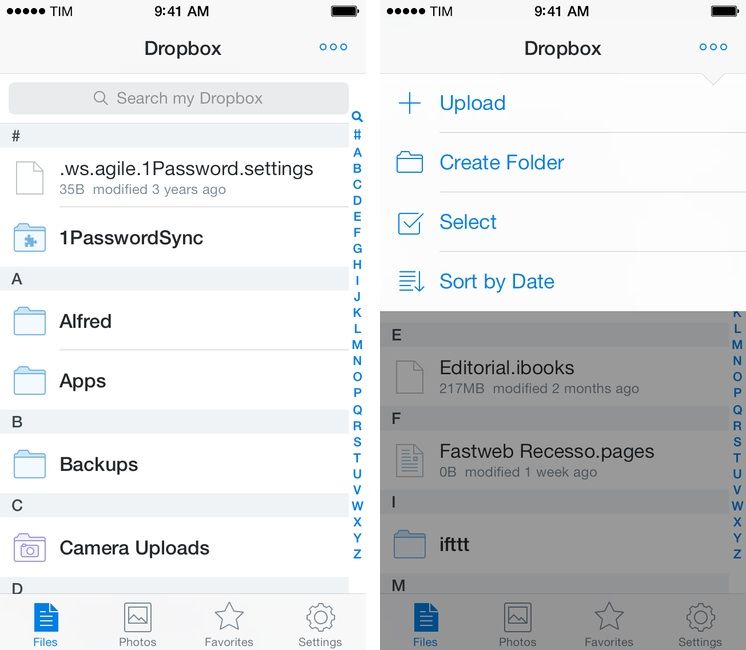
Released today on the App Store, Dropbox 3.0 is a complete redesign that gets the app ready for iOS 7.

Two months after the release of iOS 7, the new Dropbox shows the work of designer Tim Van Damme, who left Instagram to join the Dropbox design team earlier this year. “Dropbox 3.0 is all about your content. We stripped out as much branding as we could, just so you can focus on what’s important”, Van Damme told me. Noting how several functionalities and interactions have been simplified in this update, he mentioned how, for instance, documents and photos are easier to enjoy in full-screen: “On your iPad, it used to take two taps to see a photo full-screen. Now, a single tap will let you enjoy your photo full-screen, and this also works for most other file-types”, Van Damme added. Read more


TextExpander touch To Be Revised Significantly Following Apple Rejection

Smile just sent out a press email confirming what they shared in a Google group earlier today: following a rejection by Apple’s review team, TextExpander touch is going to be revised significantly to stay on the App Store.

Yesterday, after a period of engagement with the App Review Team from Apple, they informed us that TextExpander’s use of Reminders for shared snippet data storage is not an intended use of Reminders and will no longer be accepted. TextExpander touch will not clear review until this is resolved. Apps which implement the current TextExpander touch SDK may not clear review until their TextExpander touch SDK is updated.

To expand snippets in iOS apps that integrate with the TextExpander touch SDK, Smile relies, essentially, on a hack that lets them store snippet data in the Reminders database (it used to be a persistent pasteboard before iOS 7). Smile is bending the rules to make TextExpander touch work seamlessly within apps, but it’s still sad to hear that they’re facing technical issues because TextExpander touch is a great app that, to my knowledge, never caused problems due to its workarounds.

Smile is looking for an alternative solution and they want to publish an updated SDK by Monday. They are considering x-callback-url, which would make apps store TextExpander data in their own database but lose the possibility of syncing snippet changes with the main TextExpander touch app. It’s not good news, and I hope that Smile can figure out a solution soon.

Permalink


Runtime: Track And Share Your Runs

Runtime keeps track of not only where, but how you run, highlighting workout intervals and displaying your path on a shareable map. Runtime lets you add individualized notes to each workout, define custom interval timers (useful for mixing up intensity), and safely backs up your data to Dropbox. You can even use it as a basic pedometer and step counter, as a tool to track hikes, and as a way to measure your athletic progress. Because Runtime is so focused around places and routes, I’d love to see integration with an app like Day One so you can turn trips into memories. It’s simple, looks great on iOS 7, and is well done.

Runtime can be had for $2.99 from the App Store.

Permalink