Posts in reviews

Getting Away from Your Desk with JSAUX’s FlipGo Pro Dual Display

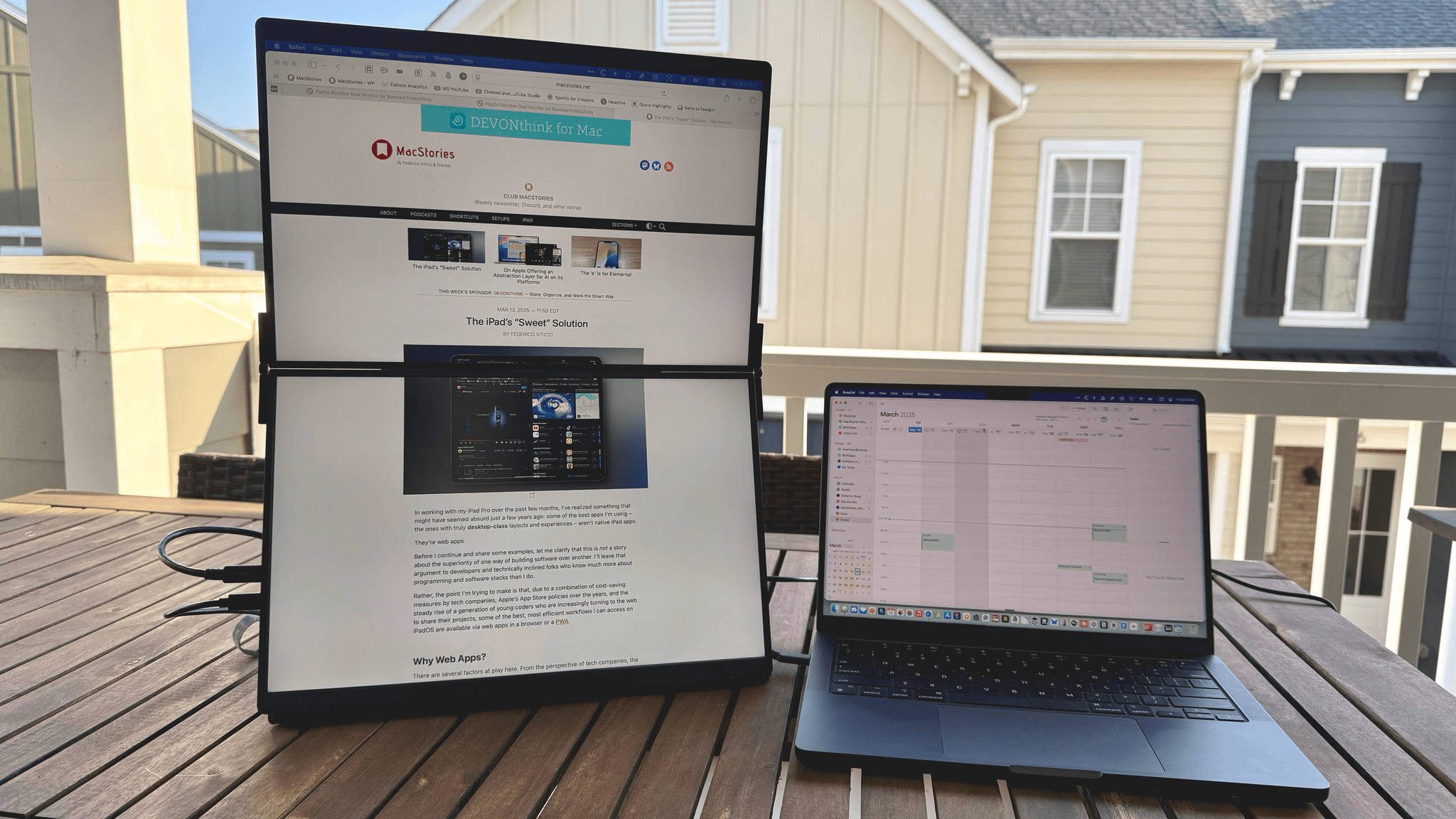
JSAUX’s 16” FlipGo Pro Dual Portable Monitor is the sort of gadget that I expect most people will look at and either understand immediately or dismiss, which makes it the kind of hardware I love. I have a fascination with portable displays borne of too many hours sitting at a desk staring at the same screen. I love my desk setup, but an occasional change of scenery goes a long way toward improving my day. It clears the cobwebs, sparks creativity, and is just nice.

So when JSAUX offered to send me their 16” FlipGo Pro dual-screen portable display after CES, I took them up on it. I’ve tried other portable displays, a journey that began with the C-Force CF015 15.6” portable OLED display and more recently led me to try 15.6” 1080p and 17” touch-enabled 4K displays from espresso. Each has had its strengths and weaknesses, but all were roughly laptop-sized displays. There’s a place for that; however, I was intrigued by the idea of something that’s even bigger yet still portable.

That’s exactly what the FlipGo Pro is aiming for by taking two 16” IPS displays and joining them with a hinge. The result is a big, bright display that can adapt to a number of use cases. Yet, while the FlipGo Pro is portable, it’s still a lot of display that will make you think twice before throwing it in your bag. That isn’t a deal-breaker, but it’s a factor worth examining more closely, along with the display’s full specs and the situations where it works best.
Read more

Access Extra Content and Perks

Founded in 2015, Club MacStories has delivered exclusive content every week for nearly a decade.

What started with weekly and monthly email newsletters has blossomed into a family of memberships designed for every MacStories fan.

Learn more here and from our Club FAQs.

Club MacStories: Weekly and monthly newsletters via email and the web that are brimming with apps, tips, automation workflows, longform writing, early access to the MacStories Unwind podcast, periodic giveaways, and more;

Club MacStories+: Everything that Club MacStories offers, plus an active Discord community, advanced search and custom RSS features for exploring the Club’s entire back catalog, bonus columns, and dozens of app discounts;

Club Premier: All of the above and AppStories+, an extended version of our flagship podcast that’s delivered early, ad-free, and in high-bitrate audio.

Learn more here and from our Club FAQs.


Hands-On with Raycast’s New AI Extensions

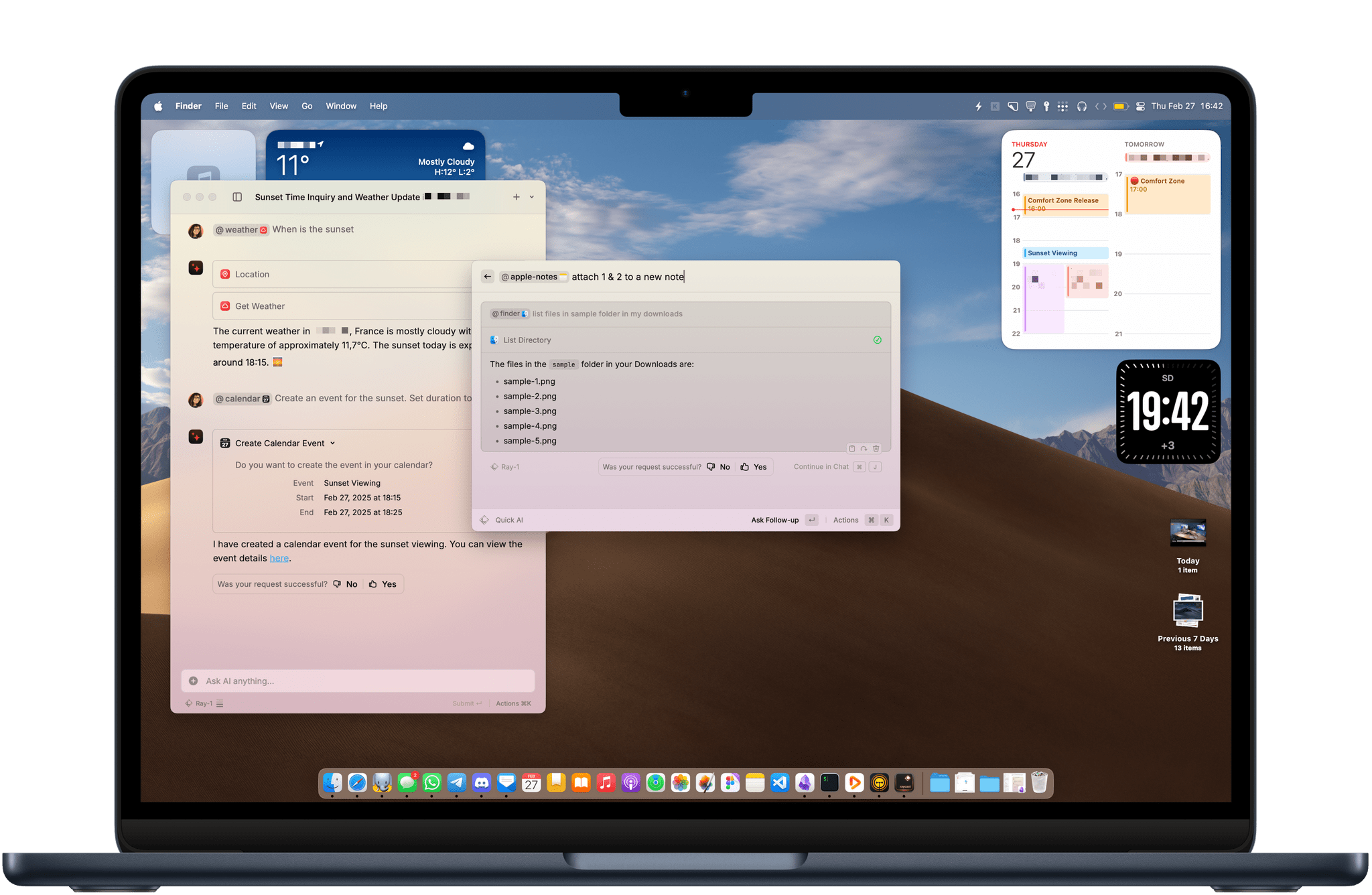
Yesterday, Raycast unveiled AI Extensions as yet another addition to the app’s ever-expanding feature set. As we’ve covered on MacStories before, Raycast is a powerful launcher and command bar for the Mac with a sizable ecosystem of built-in and third-party extensions. Extensions allow the launcher to integrate with apps installed on your Mac as well as a multitude of online services such as Google Calendar, translation tools like DeepL, and even handy development tools like Color Picker and Git Commands.

Starting this week, Raycast says it will be possible for any of these extensions to integrate with AI so they can be invoked with natural language directly from the app’s main command window and even chained together as part of complex workflows.

Here are my first impressions.

Read more

Access Extra Content and Perks

Founded in 2015, Club MacStories has delivered exclusive content every week for nearly a decade.

What started with weekly and monthly email newsletters has blossomed into a family of memberships designed for every MacStories fan.

Learn more here and from our Club FAQs.

Club MacStories: Weekly and monthly newsletters via email and the web that are brimming with apps, tips, automation workflows, longform writing, early access to the MacStories Unwind podcast, periodic giveaways, and more;

Club MacStories+: Everything that Club MacStories offers, plus an active Discord community, advanced search and custom RSS features for exploring the Club’s entire back catalog, bonus columns, and dozens of app discounts;

Club Premier: All of the above and AppStories+, an extended version of our flagship podcast that’s delivered early, ad-free, and in high-bitrate audio.

Learn more here and from our Club FAQs.


Hyperspace: Quickly Recover Mac Storage Without Deleting Files

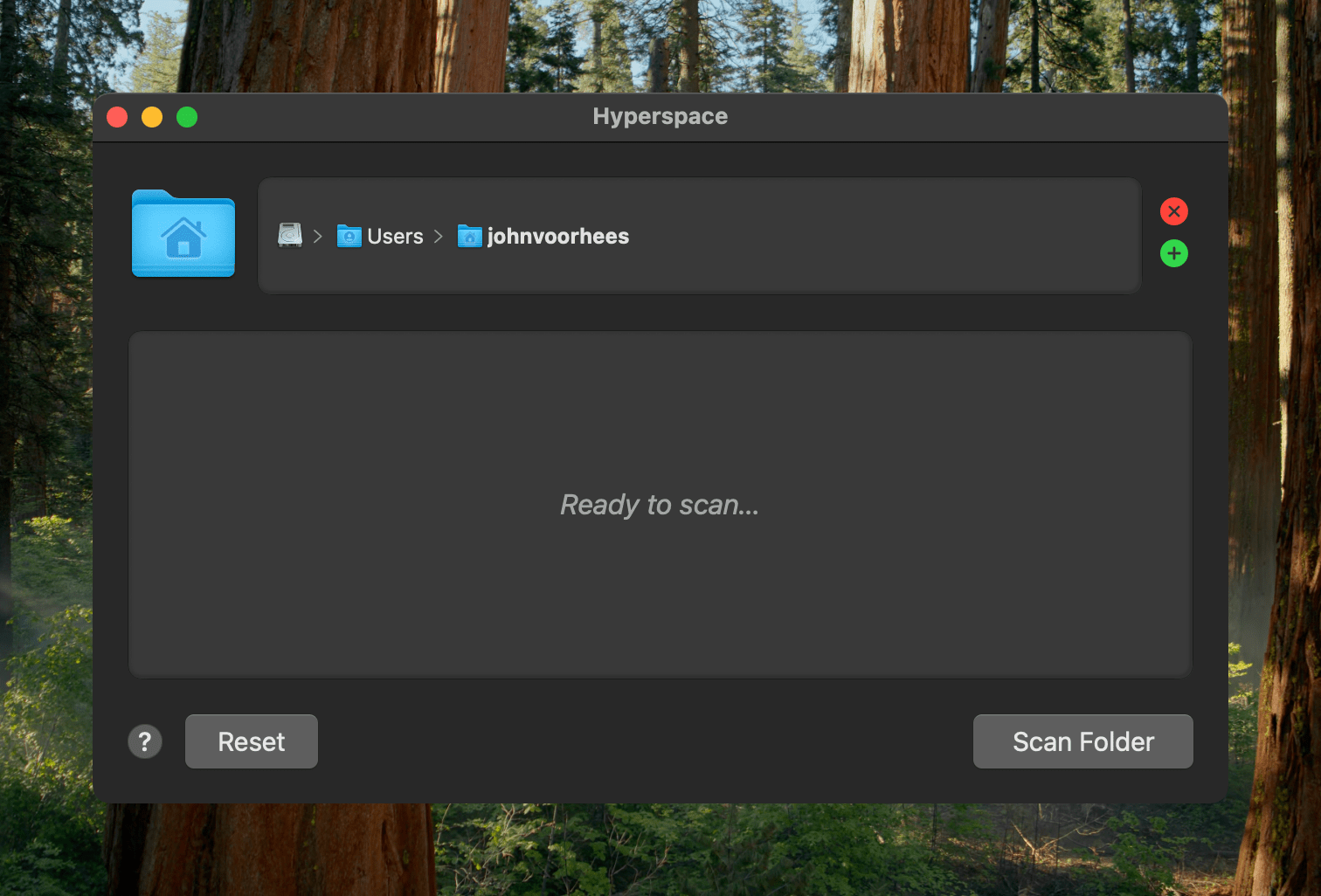
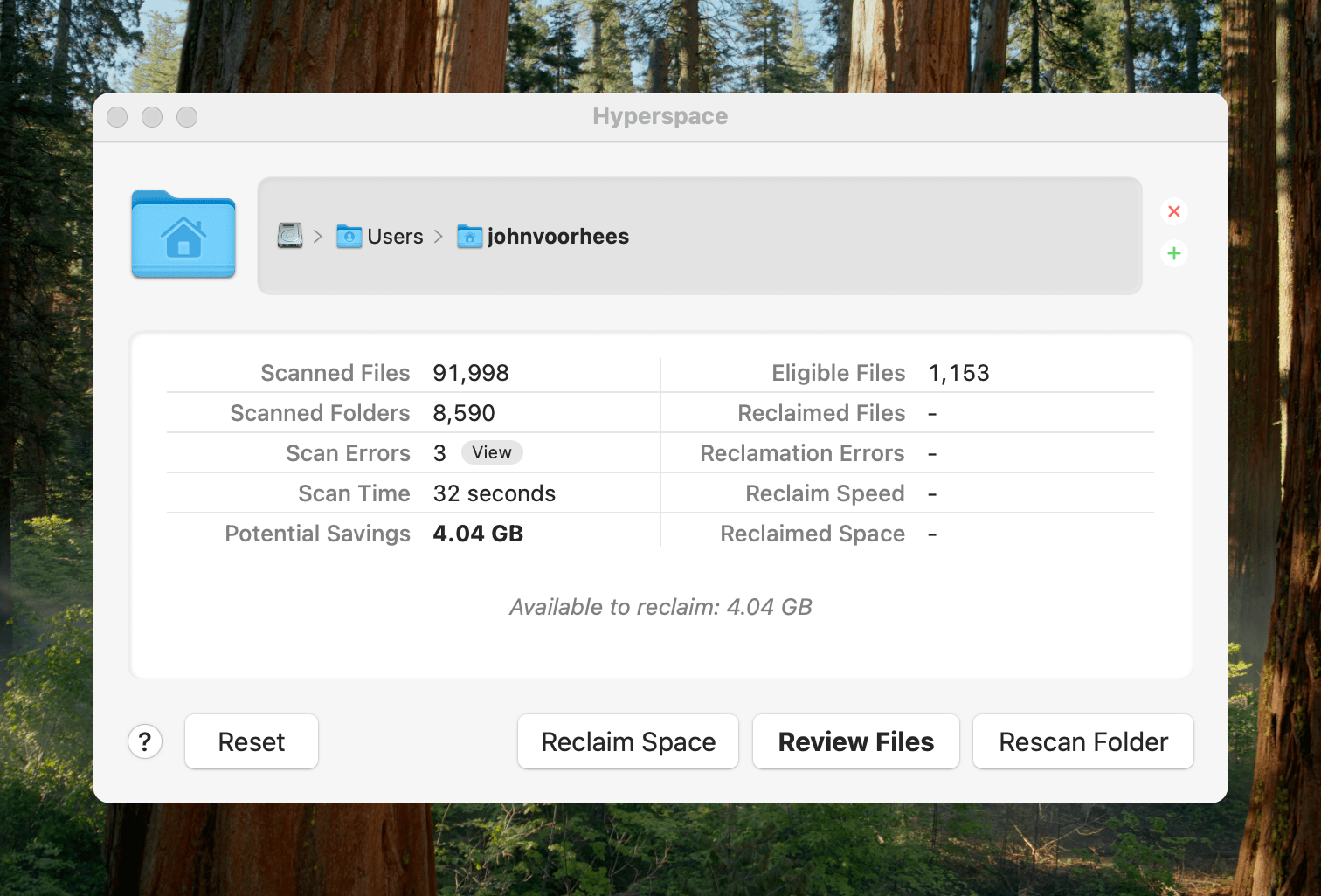
Earlier today, John Siracusa released a Mac app called Hyperspace. The app scans any folder on your Mac, identifying duplicates. When the scan is finished, you can review the results and choose whether to reclaim the unnecessary space taken up by the duplicates.

Ready to scan.

Ready to scan.

Because of the way Apple’s APFS file system works on the Mac, Hyperspace’s deduplication of files doesn’t delete or move anything. How APFS does this is complicated and explained on the app’s website if you want to learn more, but to over-simplify a bit, APFS allows Hyperspace to eliminate duplicative data without changing the location of the files or their metadata. That means it’s a non-destructive operation, allowing you to reclaim drive space at no cost to your data’s integrity.

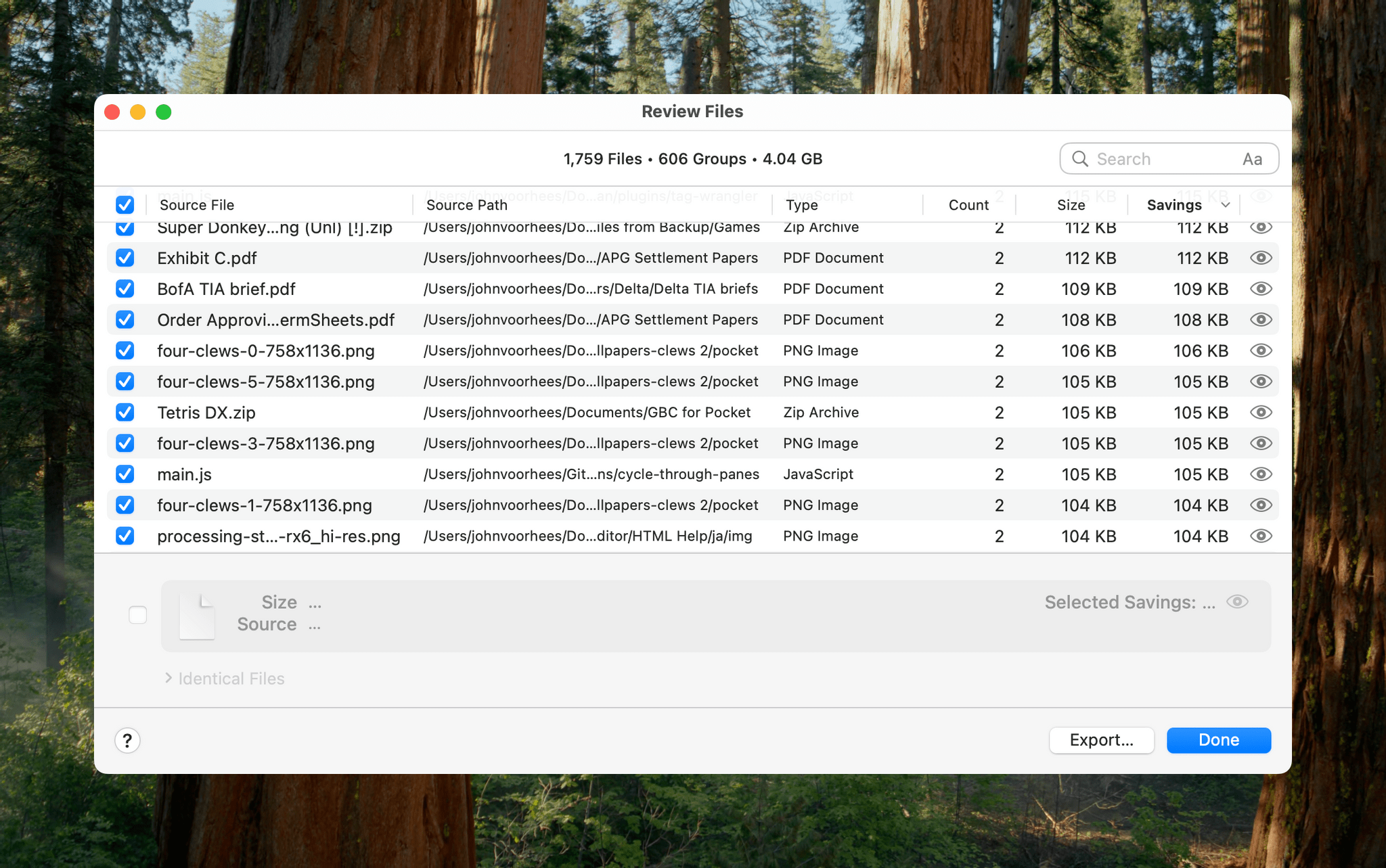
Hyperspace gives you a chance to review the files it has identified as duplicates.

Hyperspace gives you a chance to review the files it has identified as duplicates.

The app has safety measures in place so system files aren’t affected, and users can label certain folders as ‘Source’ folders that will never be altered. You also have an opportunity to review the results of Hyperspace’s scan before the app does anything to your files.

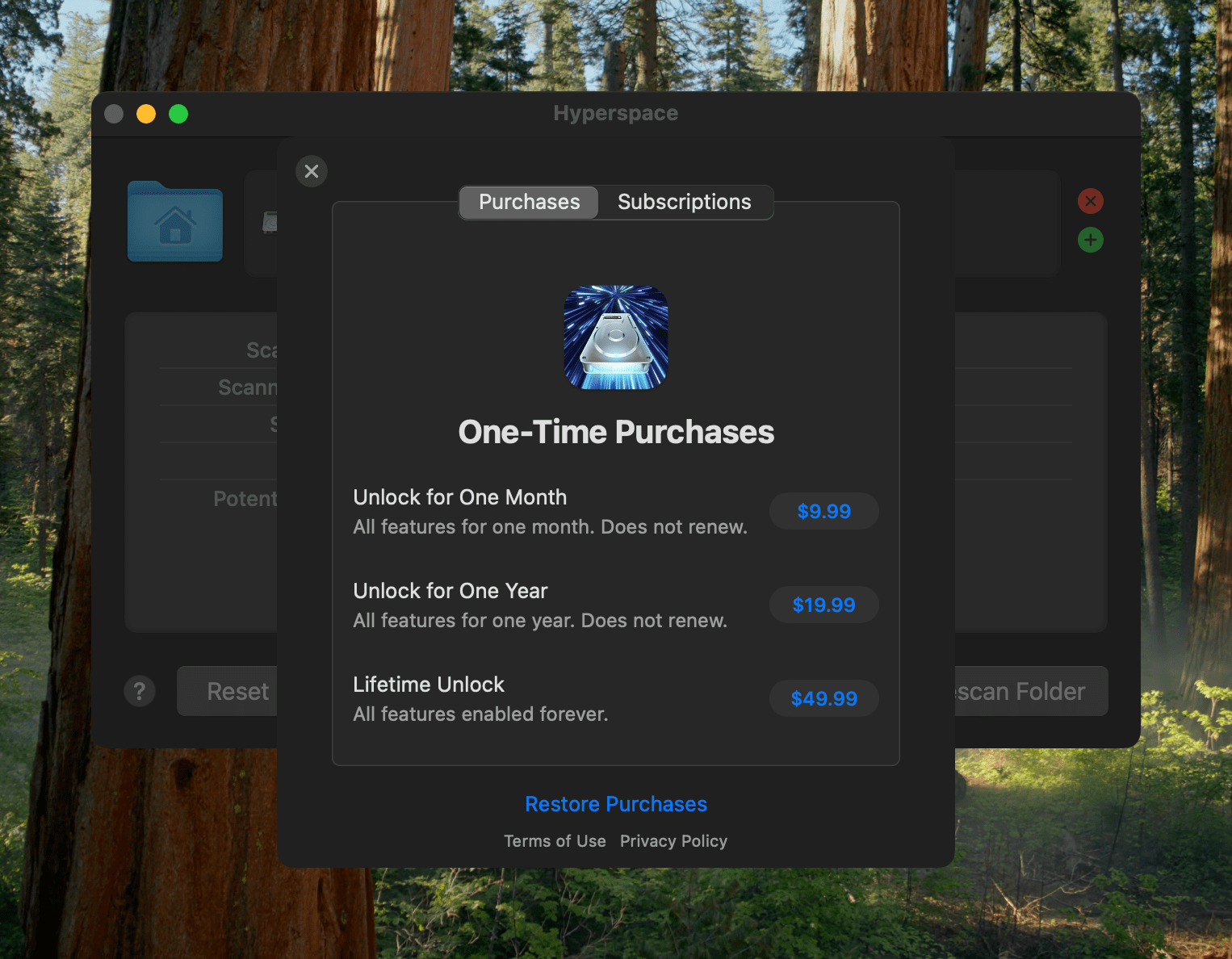
Hyperspace requires a subscription or one-time purchase to reclaim space.

Hyperspace requires a subscription or one-time purchase to reclaim space.

I took Hyperspace for a spin to see what it could find on my Mac Studio, which stores about 2.5 TB of data. The scan was impressively fast at around 30 seconds, identifying 4.04 GB of data that it could free up. That’s not a lot in the grand scheme of things, but it was also nice to know that I don’t generate a lot of duplicate files with my workflows.

Hyperspace is free to download from the Mac App Store. The free version allows you to scan the folders on your system. However, to recover space, you need to subscribe for $9.99 per month or $19.99 per year, or purchase a lifetime license for $49.99. There are also options to purchase a single month license for $9.99 or a single year for $19.99.

Access Extra Content and Perks

Founded in 2015, Club MacStories has delivered exclusive content every week for nearly a decade.

What started with weekly and monthly email newsletters has blossomed into a family of memberships designed for every MacStories fan.

Learn more here and from our Club FAQs.

Club MacStories: Weekly and monthly newsletters via email and the web that are brimming with apps, tips, automation workflows, longform writing, early access to the MacStories Unwind podcast, periodic giveaways, and more;

Club MacStories+: Everything that Club MacStories offers, plus an active Discord community, advanced search and custom RSS features for exploring the Club’s entire back catalog, bonus columns, and dozens of app discounts;

Club Premier: All of the above and AppStories+, an extended version of our flagship podcast that’s delivered early, ad-free, and in high-bitrate audio.

Learn more here and from our Club FAQs.


Rugged, Reliable, and HomeKit-Ready: A Review of Aqara’s G5 Pro Outdoor Camera Hub

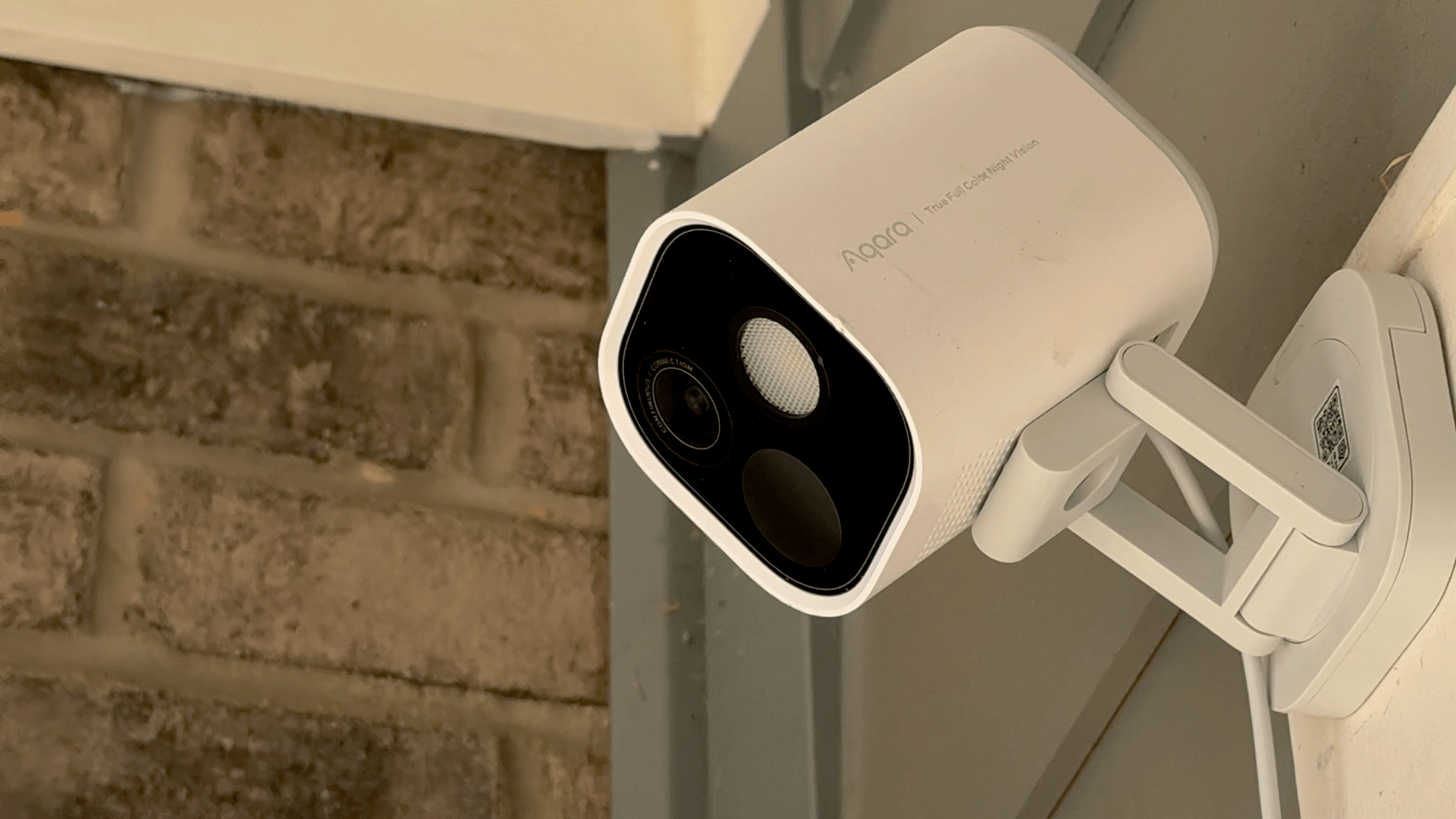
I’ll cut to the chase: Aqara’s G5 Pro is the best HomeKit-compatible camera I’ve ever used. The device’s capabilities go far beyond its HomeKit integration, and I’ll touch on those below. However, given how hard it can be to find high-quality hardware like the G5 Pro that works with HomeKit Secure Video, that’s been my primary focus while testing this camera.

Read more

Access Extra Content and Perks

Founded in 2015, Club MacStories has delivered exclusive content every week for nearly a decade.

What started with weekly and monthly email newsletters has blossomed into a family of memberships designed for every MacStories fan.

Learn more here and from our Club FAQs.

Club MacStories: Weekly and monthly newsletters via email and the web that are brimming with apps, tips, automation workflows, longform writing, early access to the MacStories Unwind podcast, periodic giveaways, and more;

Club MacStories+: Everything that Club MacStories offers, plus an active Discord community, advanced search and custom RSS features for exploring the Club’s entire back catalog, bonus columns, and dozens of app discounts;

Club Premier: All of the above and AppStories+, an extended version of our flagship podcast that’s delivered early, ad-free, and in high-bitrate audio.

Learn more here and from our Club FAQs.


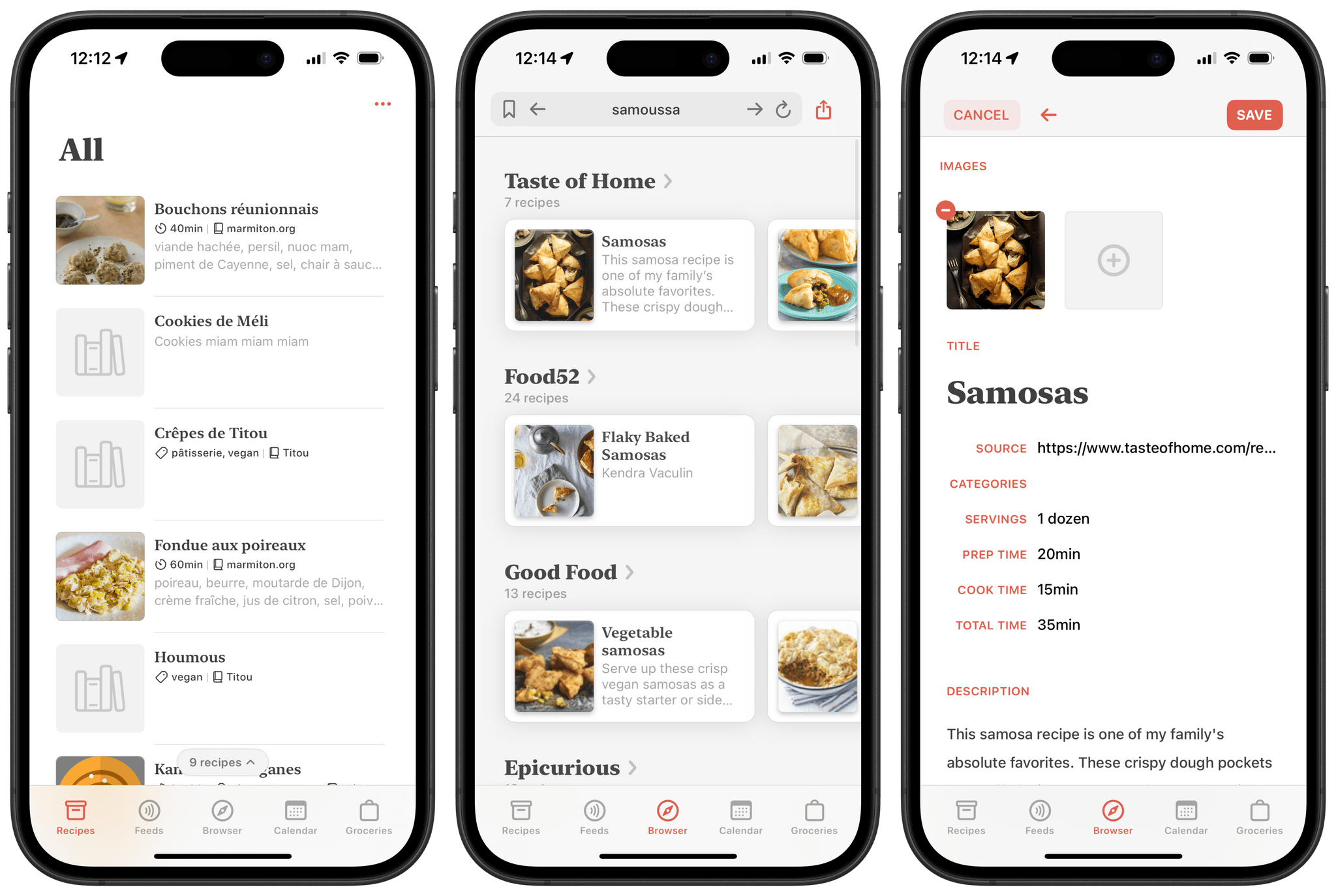
Mela 2.5 Adds Web Search Engine and Recipe Import from YouTube, Instagram, and TikTok Videos

Back in 2021, Silvio Rizzi, developer of the all-time great RSS client Reeder , released Mela, an app for importing, collecting, and sharing recipes. Right from the start, Mela stood out as a delightful take on the recipe app genre. Just like Reeder, it features a beautiful design and is a joy to browse and use. The app originally shipped with the ability to import recipes directly from the web, subscribe to RSS feeds, and even scan recipes found in physical cookbooks and magazines. Combining those features with its built-in tools for converting measurements and dynamically adjusting meal sizes, Mela truly cooked up the perfect recipe (pun intended) for becoming your one and only cooking app companion. You can check out John’s original review of the app on MacStories to learn more.

This month, Mela was updated to version 2.5 with several improvements, including an option to search for recipes on the web using a new native recipe search engine and the ability to import recipes from video descriptions on YouTube, Instagram, and TikTok, all of which have become popular platforms for discovering and sharing cooking ideas. This new version takes the app’s web scraping capabilities even further than before, and I was curious to see how it fared.

Let’s check it out.

Read more

Access Extra Content and Perks

Founded in 2015, Club MacStories has delivered exclusive content every week for nearly a decade.

What started with weekly and monthly email newsletters has blossomed into a family of memberships designed for every MacStories fan.

Learn more here and from our Club FAQs.

Club MacStories: Weekly and monthly newsletters via email and the web that are brimming with apps, tips, automation workflows, longform writing, early access to the MacStories Unwind podcast, periodic giveaways, and more;

Club MacStories+: Everything that Club MacStories offers, plus an active Discord community, advanced search and custom RSS features for exploring the Club’s entire back catalog, bonus columns, and dozens of app discounts;

Club Premier: All of the above and AppStories+, an extended version of our flagship podcast that’s delivered early, ad-free, and in high-bitrate audio.

Learn more here and from our Club FAQs.


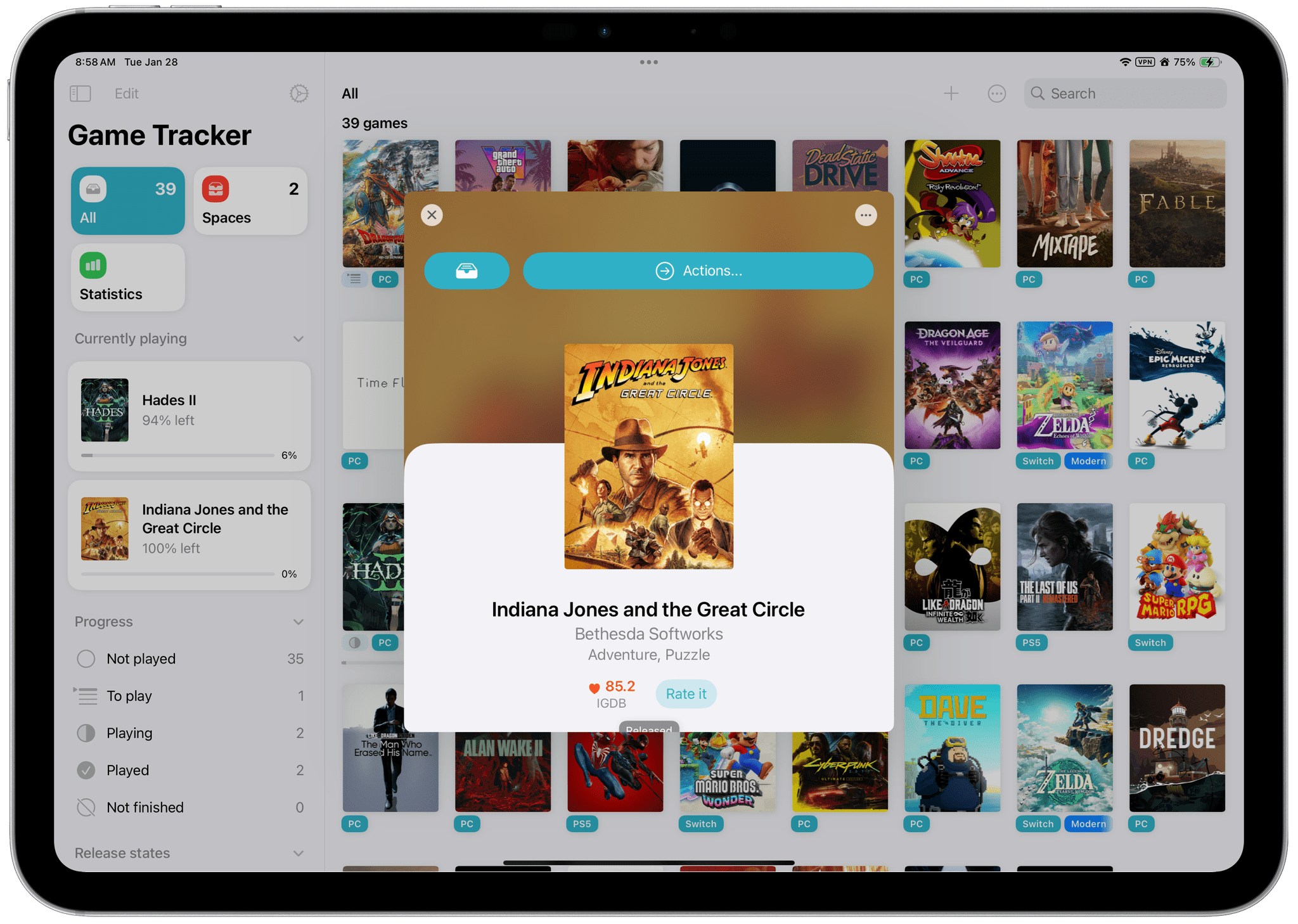
Game Tracker: A Powerful App to Track, Organize, and Customize Your Videogame Library

Game Tracker is a new videogame tracking app for iPhone, iPad, and Mac from Simone Montalto, who is probably best known to MacStories readers for developing the excellent Book Tracker. In fact, Montalto has created an entire suite of tracking apps that also includes Movie Tracker, Music Tracker, and Habit Tracker. That experience with various tracking apps shows with Game Tracker, which does a fantastic job of tailoring to the particularities of videogames and leveraging metadata to allow users to make the app their own.

Let’s take a closer look.

Read more

Access Extra Content and Perks

Founded in 2015, Club MacStories has delivered exclusive content every week for nearly a decade.

What started with weekly and monthly email newsletters has blossomed into a family of memberships designed for every MacStories fan.

Learn more here and from our Club FAQs.

Club MacStories: Weekly and monthly newsletters via email and the web that are brimming with apps, tips, automation workflows, longform writing, early access to the MacStories Unwind podcast, periodic giveaways, and more;

Club MacStories+: Everything that Club MacStories offers, plus an active Discord community, advanced search and custom RSS features for exploring the Club’s entire back catalog, bonus columns, and dozens of app discounts;

Club Premier: All of the above and AppStories+, an extended version of our flagship podcast that’s delivered early, ad-free, and in high-bitrate audio.

Learn more here and from our Club FAQs.


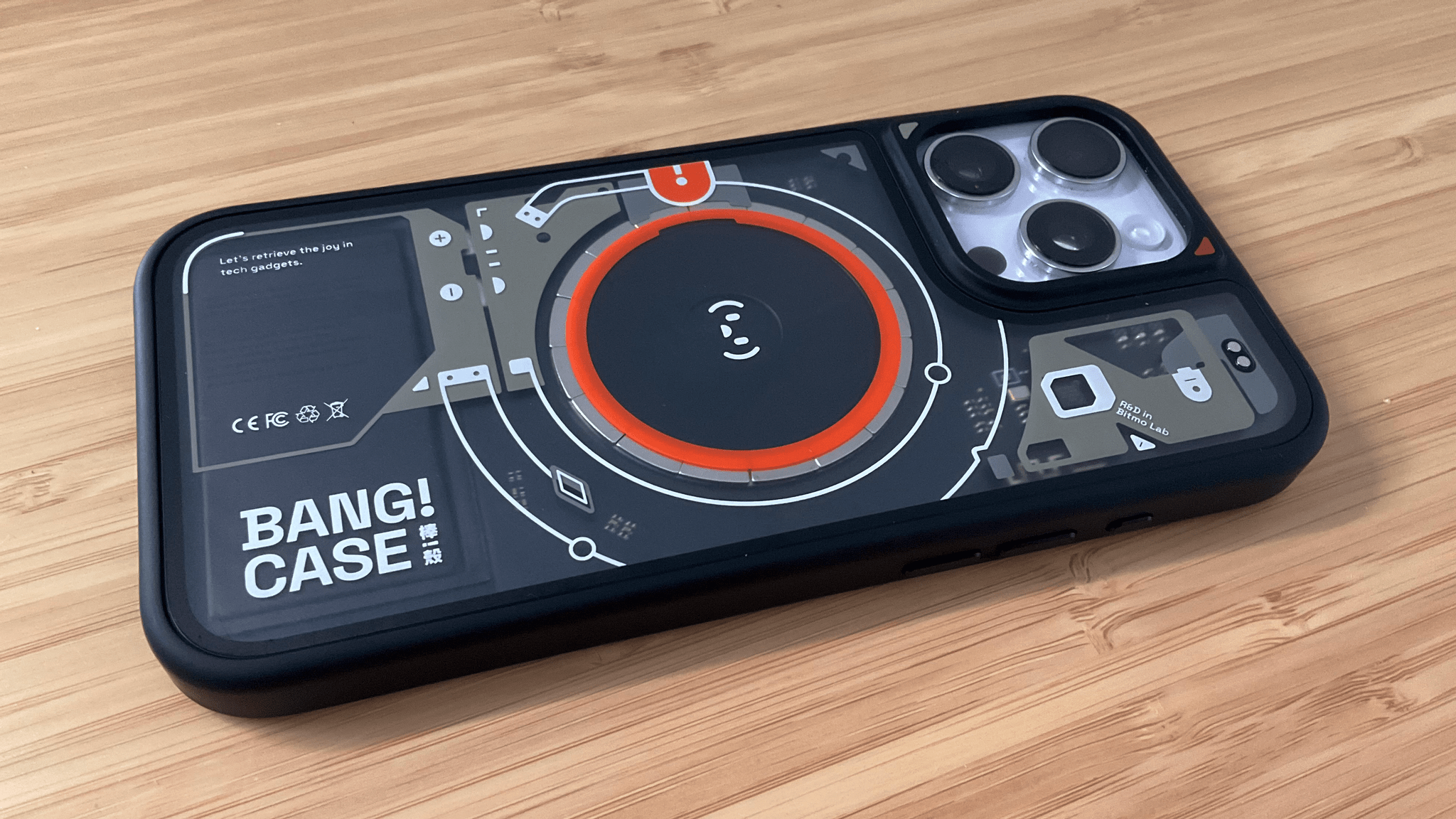
BANG!CASE: Push-Button iPhone Automation

I’ve been intrigued by the BANG!CASE ever since it was introduced by Bitmo Lab as a Kickstarter campaign about a year ago. The case includes a programmable button that can be used to automate actions using your iPhone’s accessibility features. However, because I don’t normally use a case with my iPhone, I never followed through on buying the BANG!CASE.

Fast forward to early January at CES when I visited the booth for JSAUX, an affiliate of Bitmo Lab. In addition to JSAUX’s portable displays and gaming accessories, the company was showing off the BANG!CASE and GAMEBABY. (More on that on NPC soon.)

It just so happens that since the holidays, I’ve continued my quest to refine how I collect and process information throughout my day. That’s led me to test a dozen or so apps, build new shortcuts, and explore other new setups. As a result, I was primed to give the BANG!CASE a try when Bitmo offered me a review unit at their booth, and I’ve been using it for a couple of weeks.

The case has a couple of minor drawbacks that I’ll get to, but by and large, it’s the most unique and useful case I’ve ever put on an iPhone. After enjoying my iPhone without a case for nearly two years, I’ve found that the utility of the BANG!CASE is significant enough that I’ve decided to keep using it, which I didn’t expect. So today, I thought I’d lay out why I like the BANG!CASE so much and how I’m using it.

Read more

Access Extra Content and Perks

Founded in 2015, Club MacStories has delivered exclusive content every week for nearly a decade.

What started with weekly and monthly email newsletters has blossomed into a family of memberships designed for every MacStories fan.

Learn more here and from our Club FAQs.

Club MacStories: Weekly and monthly newsletters via email and the web that are brimming with apps, tips, automation workflows, longform writing, early access to the MacStories Unwind podcast, periodic giveaways, and more;

Club MacStories+: Everything that Club MacStories offers, plus an active Discord community, advanced search and custom RSS features for exploring the Club’s entire back catalog, bonus columns, and dozens of app discounts;

Club Premier: All of the above and AppStories+, an extended version of our flagship podcast that’s delivered early, ad-free, and in high-bitrate audio.

Learn more here and from our Club FAQs.


Default Browser: A Mac Menu Bar Utility for Quickly Switching Browsers

Sindre Sorhus has released more apps than most indie developers I’ve covered, and many are among my favorite utilities. I suspect that a big part of Sorhus’ success is the tight focus of most of those apps, which are designed to eliminate specific points of friction for users.

Sorhus’ latest utility is called Default Browser. It’s a Mac menu bar app that, as the name suggests, lets you change your Mac’s default browser on demand. Just head to the menu bar, and with a couple of clicks, you can switch between any browsers you have installed.

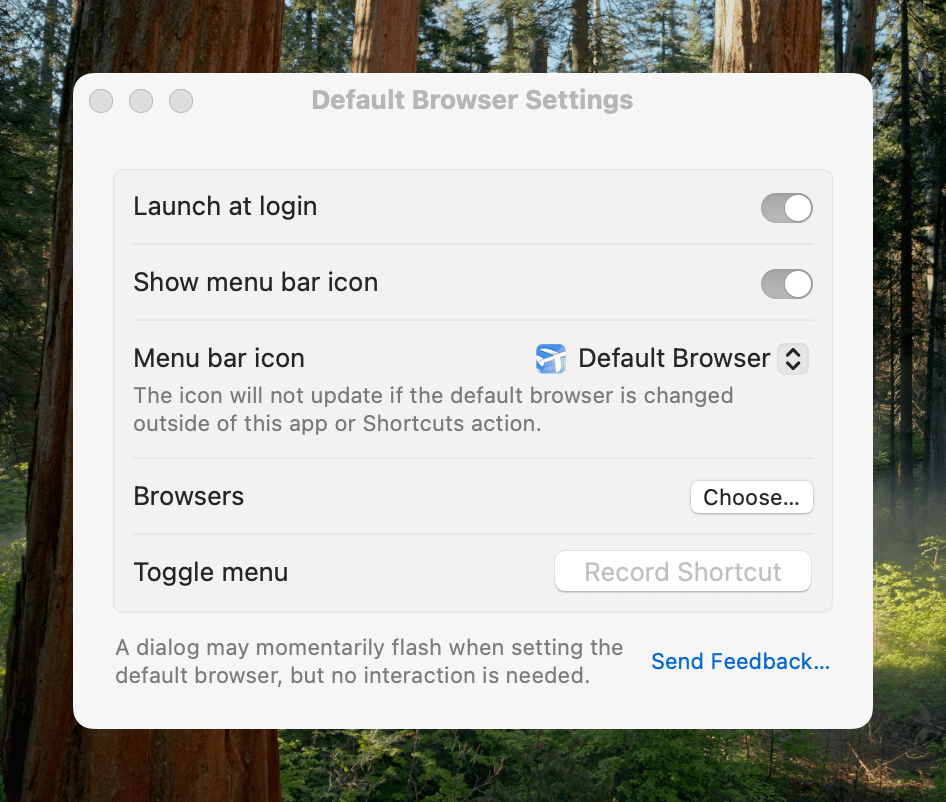
Switching default browsers can be simplified even further by setting a hotkey to reveal the app’s menu and then hitting the number associated with the desired browser. Alternatively, holding down Option as you click on a browser opens it without making it the default. Another nice touch is that, among the multiple menu bar icon options in the app’s settings, there’s an option to use the icon of the currently active default browser, a great reminder of which is active.

Default Browser includes several handy settings.

Default Browser includes several handy settings.

Default Browser works with Shortcuts, too, with actions to get and set your default browser programmatically with actions. That makes it easy to assign browsers to a device like a Stream Deck or Logitech Creative Console for push-button convenience. As Sorhus suggests in the app’s documentation, combining Default Browser with an app like Shortery, which has shortcut triggers for Mac events like connecting to a Wi-Fi network or launching a particular app, opens up a wide array of possibilities as well.

Default Browser also offers a Focus filter, giving you the ability to associate a particular browser with a Focus mode. I don’t have Focus modes for contexts where using a different browser would be useful, but I can imagine it working well for separating web browsing at home from browsing at your workplace or school, for example.

I primarily use Safari, but I’ve been experimenting with Microsoft Edge more, and I’m testing Surf, a browser fused with an AI assistant. I expect we’ll see many more browsers like Surf that aim to combine traditional search and web browsing with the best of what AI can do to organize and provide insights into data. That’s why I purchased Default Browser. The app is available directly from Sorhus for $4, and it makes it easy to quickly switch between browsers whether you’re testing them like me, you’re a developer testing code in different browsers, or you simply prefer certain browsers for certain tasks.

Access Extra Content and Perks

Founded in 2015, Club MacStories has delivered exclusive content every week for nearly a decade.

What started with weekly and monthly email newsletters has blossomed into a family of memberships designed for every MacStories fan.

Learn more here and from our Club FAQs.

Club MacStories: Weekly and monthly newsletters via email and the web that are brimming with apps, tips, automation workflows, longform writing, early access to the MacStories Unwind podcast, periodic giveaways, and more;

Club MacStories+: Everything that Club MacStories offers, plus an active Discord community, advanced search and custom RSS features for exploring the Club’s entire back catalog, bonus columns, and dozens of app discounts;

Club Premier: All of the above and AppStories+, an extended version of our flagship podcast that’s delivered early, ad-free, and in high-bitrate audio.

Learn more here and from our Club FAQs.


iOS and iPadOS 18.2: Everything New Besides Apple Intelligence

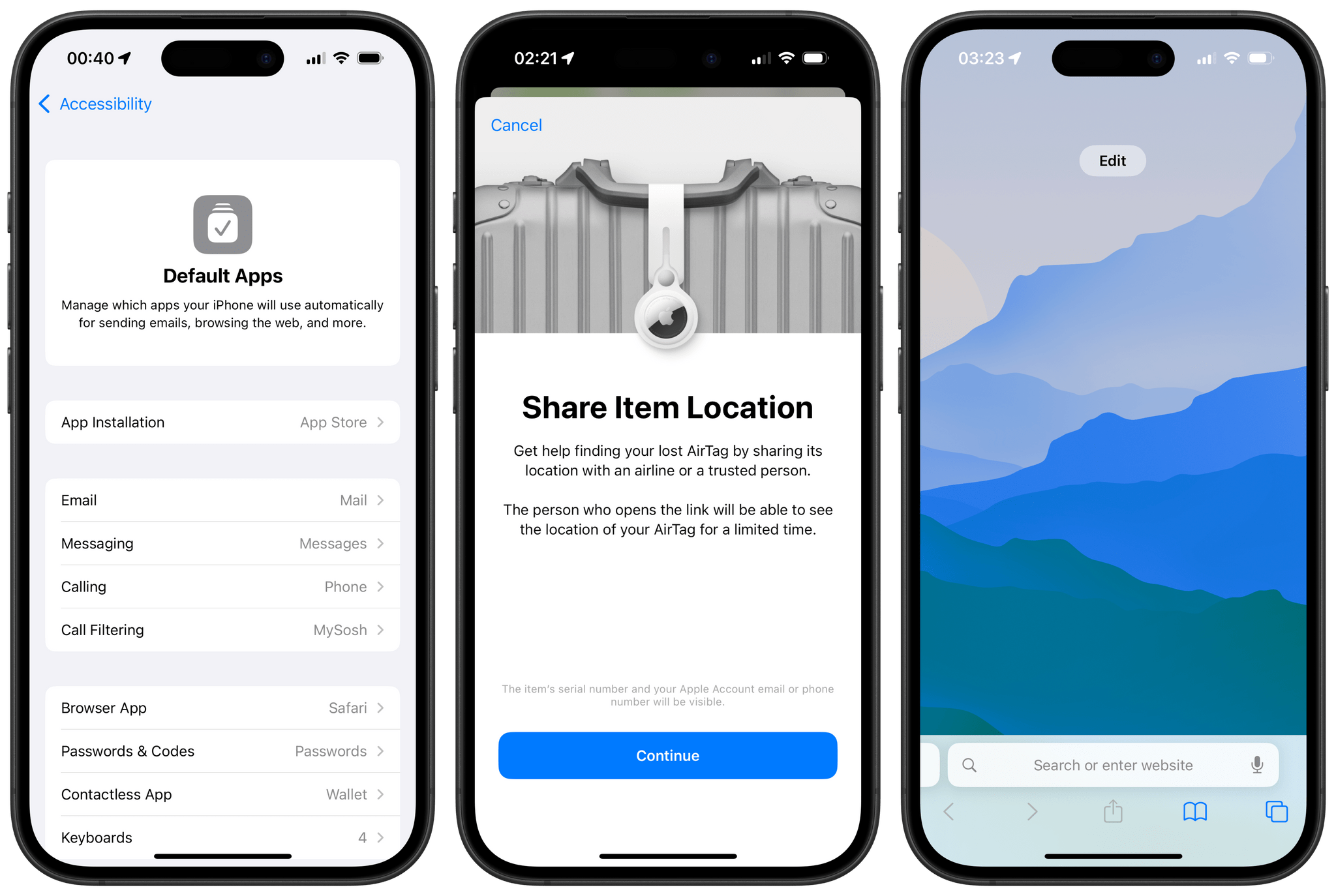
Today, Apple is releasing iOS and iPadOS 18.2, the second major updates to the iPhone and iPad’s latest operating system versions. Once again, this release’s main highlight is a wave of new Apple Intelligence features that are now available to the public. And just like in October, we’re covering these new AI features separately in a special story for MacStories readers. Be sure to check out Federico’s story, which goes over the new Apple Intelligence features included in iOS and iPadOS 18.2.

But besides another batch of Apple Intelligence features, this release also includes a series of changes to the system, from updates to Safari, Find My, and Photos to the arrival of new system-wide settings for Default Apps and more. Here’s a roundup of everything new besides Apple Intelligence in iOS and iPadOS 18.2.

Read more

Access Extra Content and Perks

Founded in 2015, Club MacStories has delivered exclusive content every week for nearly a decade.

What started with weekly and monthly email newsletters has blossomed into a family of memberships designed for every MacStories fan.

Learn more here and from our Club FAQs.

Club MacStories: Weekly and monthly newsletters via email and the web that are brimming with apps, tips, automation workflows, longform writing, early access to the MacStories Unwind podcast, periodic giveaways, and more;

Club MacStories+: Everything that Club MacStories offers, plus an active Discord community, advanced search and custom RSS features for exploring the Club’s entire back catalog, bonus columns, and dozens of app discounts;

Club Premier: All of the above and AppStories+, an extended version of our flagship podcast that’s delivered early, ad-free, and in high-bitrate audio.

Learn more here and from our Club FAQs.