Inspiration hits us often at MacStories, and we’ll usually collaborate by sharing sketches thanks to Skitch and iChat. Imagine, however, if we didn’t rely on static images and browser refreshes to share content collaboratively over the Internet: SyncPad is an answer to our clunky workflow, thanks to immediately accessible online sketch rooms available via the Internet or SyncPad’s reader component for the iPad. In realtime, you can watch as the creators create instant wireframes, sketch over photos, markup PDFs (yes!), or draw the “OctoTicci” as I’ve done screwing around when I first tried the app with Federico. Below you’ll find many a 4th grader’s sketch (read: my terrible finger painting), an overview, and a little something for our readers who’d like to win one of ten copies. We can’t keep all of this collaborative-ness to ourselves after all.
Posts in reviews
SyncPad: The Collaborative Online Whiteboard For iPad. Review & Giveaway!
FileSorter for OS X Applies Rules To Files, Folders
If you’re constantly struggling to manage or automate simple tasks like moving files out of your downloads folder, keeping files in your documents folder organized, or simply need an extra hand to batch automate certain tasks, FileSorter may be of some help. While it’s not as powerful as Hazel, it provides a decent middle ground for users who don’t need Hazel’s background automation. FileSorter applies rules to files much like how you’d apply rules to e-mail: simply specific what kinds of files (by name or extension for example) you’d like to manage, then apply rules to move, copy, or even delete files. After your rules are created, you can simply open the folder you’d like to manage to apply the rules you’ve created – I open my home folder and use rules to specify where FileSorter should look instead of opening everything individually. DMGs get moved to the desktop, folders SpeedDownload creates get removed, and instantly processes are tidied up thanks to the custom rules I’ve created. It’s $7.99 in the App Store, and its manual functionality will be the deciding factor of whether this app is right for you.
Lyrica 2: Redesigned, And Still The Best App To Tag Songs
A few days ahead of the opening of the Mac App Store, we previewed a nifty little app for the Mac called “Lyrica” which helped you display lyrics from songs playing in iTunes through a translucent black, HUD interface. The Mac App Store launched, the app was priced at .99 cents, it was one of the few useful apps in the Music category – it snowballed. It quickly jumped the charts to get in the first spots of Top Paid, and two weeks after the grand opening it’s still firmly positioned in the top 30 apps.
It turns out, though, that many users didn’t like the HUD style of the app, which may or may not make it difficult to read lyrics on a translucent background. So developer Florian Zand redesigned the entire application and added some new features during the process. Lyrica now comes with a white, cleaner look with a stacked style that kind of reminds me of a newspaper. I also like the fact that I can choose between different fonts – personally, I sticked with Georgia.
Graphics changes aside, the app now searches through seven lyrics databases, including AZLyrics and MetroLyrics. Several preferences have been added (Lyrica can still automatically tag any song playing in iTunes, even if it already has lyrics on its own) and the developer also implemented a new functionality to replace and remove broken lyrics. Useful for those (like me) who tried to tag their music library in the past with some shady Mac app that didn’t work at all.
Lyrica is available at $0.99 in the Mac App Store. It’s getting better on every release, and even though it’s not perfect yet (and design-obsessed folks will still have something to say about it) it just works, better than many other apps sold at a higher price by well-known developers. Give it a try.
Security Cam for iPhone Keeps An Eye On Your Stuff, With Motion Detection
Now this is an interesting app I’ve recently discovered in the App Store. Months ago, I began thinking about setting up a homemade wireless security system in my house; I saw that the system could be easily put in place with a couple of hundred dollars, and I was getting serious about purchasing all I needed to get it up and running. As usual with my personal projects I dream about and save in my “someday” list, it didn’t happen. Work got in the way, priorities changed, I didn’t set up a home security system. As my to-do list suggests, I may actually do it “someday”.
Home security and monitoring, anyway, is a personal requirement (and hobby, I guess, or obsession) that can change according to one’s needs, workplace and items to protect from unwanted eyes and hands. This is why I think Security Cam, a $0.99 app for iPhone, may be just what the average user is looking for. Read more
DesignScene: An Inspiration Browser For Graphic Designers
It’s hard not to be inspired from others in the community who started with virtually no experience, and end up building really great utilities for the iPad. Roger Wong and his code partner David Wheeler took arms in 2010 to build an iPad app worthy of being featured as an “App of the Week” on the App Store. The year long development process from HTML junkie to a decorated iPad developer has ended with the fruition of DesignScene, the graphic designer’s browser for finding inspiration on the social web. Some would believe this is a new clone of Flipboard, but I’ll be quick to dismiss that having read Roger’s motivational backstory. Hard work pays off, and again I’m reminded of Mike Rundle’s “be curious” recommendation to success.
DesignScene is very cool, and I’ve been personally looking for something that was purely focused on art and discovering new content. Featuring over thirty sites, DesignScene pulls in regularly updated feeds to provide you with the freshest content from around the web.
Window Cleaner Hides Inactive Apps To Prevent Desktop Clutter
The desktop isn’t iOS. On our Macs, we tend to open lots of apps and create new windows every minute, and we rarely remember to close them once we’re done with them. Unless you’re a serious window management geek who has installed scripts and utilities to keep your Mac’s screen elegant and neatly organized, free of useless and inactive windows, then I guess you’re looking for a simple, automated way to prevent “window clutter” from taking over your machine.
Window Cleaner, a $0.99 utility available in the App Store, does one thing very well: it hides app windows that have been inactive for a certain amount of time. The app, which lives in the menubar, comes with a Preferences panel that allows you to set an amount of minutes after which inactive windows will be hidden. You can opt to start the app at login (recommended) and “whitelist” applications that you want to be open all the time, like DVD Player or Movist, for instance.
This app just works, and even though I guess it’s possible to achieve similar results with a bit of Applescript – the average user will appreciate the advantages offered by a user interface and automatic Mac App Store updates. One thing that I would like to see in Window Cleaner is the possibility to set per-app expiration times, instead of a single amount of time to hide all apps.
Go get Window Cleaner here.
This Free App Lets You Control Music with Gestures
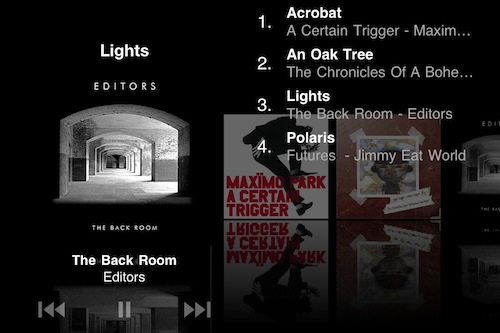
The app is called SongSwiper, it’s available for free in the App Store and it was updated yesterday to include Retina-ready graphics for the iPhone 4 and iPod touch 4th gen. SongSwiper is basically a controller for music playing from the standard Apple iPod app, but it allows you to control songs with swipes and taps instead of buttons, as in the iPod application.
The app looks a lot like Bowtie or Coversutra for OS X in the way it displays the artwork for a song currently playing. Unlike the aforementioned Mac apps, though, SongSwiper can’t live on top of your desktop – you’ll have to open the app every time if you want to enjoy its feature set. You can change between songs with a single swipe left or right, or adjust volume with a swipe up / down. To play and pause, double tap on the artwork. You can shuffle, manually pick songs from your Library.
SongSwiper might be the perfect app for those who use the iPhone in their car a lot and find it easier to swipe on the screen rather than having to point to a specific little button. The app’s free, so you should give it a try.
New Music Notifications with Nomis
We cover lots of music apps on MacStories, we even had a Roundup at the end of 2010. What can we say, we’re all big audiophiles here at MSHQ. Today we’re showing you another music app, but this one is unique and a first to the app store. It’s called Nomis, by Taprockets - an independent company in Germany - and it reminds you of new releases for all your favorite music artists. It’s very easy and simple to use. Read more
TV Show Tracker 2.0 for iPhone: One To Add To Your Homescreen
Not having cable, keeping tabs on the shows that appear on cable TV bites because I have to constantly check in on online schedules (all on different networks) just to see when the next episode of House is going to air. What sucks is that when having only Hulu as my prime source of entertainment, December was a month devoid of any content as weekly shows began to grind to a halt. With the exception of Saturday Night Live and a maybe two other shows, I’m paying for nothing. Shows will come back, but when?
We’ve already covered TV Show Tracker on MacStories, but the 2.0 update is worth mentioning since it delivers a much improved interface, a notification system alerting you before or after a show ends, inline video previews of episodes, and quick iTunes links so you can rent those shows quickly from the interface. TV Show Tracker consolidates all of the shows you watch into an instant access panel where you simply search for the popular program you watch and add it to your list of shows. TV Show Tracker displays the artwork for the program’s season, displays previous and upcoming showtimes, and keeps tabs on what episodes you’ve already seen. This is an app to add to your homescreen if you’re at all interested on keeping track of your favorite shows – it’s super convenient to have only the show listings you care about all in one place.