Posts in news

Opera Follows The Canary and Releases “Next” Version

Looks like releasing unstable, buggy, developer-only versions of popular desktop browsers is a priority these days for the big players in the scene. Google started this trend with the Beta, Dev and (recently launched on the Mac, too) Canary Chrome channels; Mozilla followed earlier this year with Aurora, a new name for the old Minefield pre-beta version of Firefox; Opera has now entered the “developer-only, please report bugs” marketplace as well with Next, a new name for the internal dev builds that were never released to the public. Opera’s current Next version is dubbed 11.50 Swordfish which, alongside bug fixes and general improvements (as usual), adds a brand new plugin system for Speed Dials that will allow developers to build extensions for the browser’s popular start page – like live-updating weather widgets and other fancy toys. Opera Next, like Chrome Canary, has the huge advantage of letting you run it side-by-side with your existing Opera profile – the dev build is unstable, so you might not want to use it as your main browser. However, you can still sync the two using Opera Link.

Opera Next for OS X can be downloaded here.


“New and Innovative Features” Coming to iOS Maps App, According to Job Posting

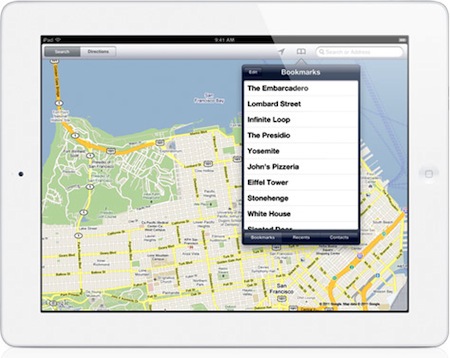
It’s no secret Apple is working on new functionalities for its iPhone and iPad Maps application to introduce in iOS 5, but a new job posting on Apple’s website seems to confirm that the focus for the next major version of Maps will a completely new user interface, and a series of “innovative features” that, supposedly, will dramatically change the look and feel of the app. Apple already emphasized in the past through other job postings that they were looking for engineers to bring Maps “to the next level” with deeper integration with navigation software, so it doesn’t come as a surprise that the team is still looking for new designers and developers to enhance the Maps experience.

Come work for the team that revolutionized the mobile technology industry as it continues to define what computing looks like in a post-PC era. The Maps team is looking for a proactive and hardworking software engineer to join our team. Along with excellent skills in object-oriented software design and programming, the successful candidate will have real-world experience developing sophisticated user interfaces. Excellent communication skills are also a must, as you will be collaborating closely with Apple’s peerless human interface team to add new and innovative features.

Whether the new version of Maps will be bundled with iOS 5 is still unknown at this point; Apple confirmed last week that they are currently working on an improved traffic service to launch in the next years, but several reports in the past indicated iOS 5 – coming out later this year, with a preview at the WWDC in June – would be heavily based on location, Maps, and other cloud-oriented features. Many even speculated Apple could leverage its own version of mapping software, thus ditching Google Maps, to build a new social location service to include in the new MobileMe / iCloud. Speculation about the new iOS Maps application is running wild lately, and the job postings from Apple do nothing but increase the amount of guesses and rumors we’re hearing on the subject. Seeing an improved Maps app in June wouldn’t surprise anyone, but it’s unclear how many of the new functionalities Apple is working on will be rolled out this year with iOS 5. [via 9to5mac]


Instagram 1.6.5 Gets More Tiltshift And It’s Faster

A new update to Instagram for iPhone was released a few minutes ago in the App Store, and it looks like Burbn’s main goal with this app really is to make sharing photos as fast as possible. Just as with the recent 1.6 update, Instagram’s performances have been improved to make the overall navigation faster, more responsive and less buggy when switching between sections. The difference is notable and makes resuming the app from the multitasking tray or tapping quickly on the bottom bar’s tabs a pleasure. The developers say the new Instagram also has “image quality improvements when choosing from library.” I usually don’t pick photos to share on Instagram from the iOS camera roll, but that’s a welcome addition nevertheless.

Instagram 1.6.5 also get a new filter – or, an expansion to the existing tiltshift mode. Alongside regular tiltshift introduced a few months ago, the developers added a “radial” variation that should come in handy when applying the effect to large objects or multiple ones in focus. You can download the latest Instagram update from the App Store.


Kickstarter: Dialoggs - A Better Communication Network

Yesterday we featured a unique Kickstarter project, Hive. Today we’re featuring the first type of browser-based Kickstarter Project we have featured on MacStories and it’s called Dialoggs by Drew Wilson, a popular designer/developer from California. Drew is best known for his Pictos icon sets and Valio, a web application development company. He also has a few new projects up his sleeve too, one being a Mac app called Screeny.

Dialoggs is set to be a new network for better communication, “filling the gap between Twitter, iChat and Tumblr” – it is NOT a client for any of the previously mentioned networks.

It’s realtime, has invites for open and private discussions, and all posts are saved and have their own page. You can attach media and code as well in each post. There’s even an option to “follow” and “unfollow” other Dialoggs users. Recommend users, browse others and “mention” people in posts like Twitter/Facebook; it’s more than just status updates, and it’s much more than a static blog with comments. Drew calls it “the best of both worlds. It’s realtime communication that is permanently stored and (optionally) publicly available.”

Video and screenshots after the break.

Read more


Hack Enables iPhone To Control Multiplayer Kinect Game

Singapore-based developer Rockmoon realized that there was a need for more iOS hacks that interacted with Microsoft’s Kinect controller, and created a game prototype that allows two players to steer a vehicle in a 3D environment on screen, and shoot the vehicle’s gatling gun the same time using a custom iPhone app. As noted by TUAW, the whole game shown in the demo video looks a lot like Sega’s old Sewer Shark, with one player handling the steering wheel with his arms and other movements (such as leaning back and forward) and the other hand taking care of the shooting. The setup looks pretty cool and we’ll never get tired of hacks and applications that enable functionalities and interactions otherwise unsupported by the platform, but really – an iPhone that connects to a Microsoft Kinect is something we won’t officially see anytime soon.

Still, it’s neat and it appears to be working quite smoothly. Check out the video below. Read more


Firemint to be Acquired by EA

All of your favorite titles such as Real Racing and Flight Control are about to be snatched up by EA as independent mobile studio Firemint will be acquired by the game giant within the next four weeks. EA announced this morning that they’ll likely close the deal soon, but aren’t yet releasing any financial details on the acquisition.

“The Firemint team is remarkable for its critical and commercial success,” said Barry Cottle, Executive Vice President and General Manger of EA Interactive. “Having them as part of EAi will accelerate our position as worldwide leader in game development for mobile devices and online gaming platforms.”

The agreement follows EA’s recent acquisition of Mobile Post Production Inc. (MPP), the worldwide leader in high quality cross-platform development and porting of games for smartphones.

Firement recently released Real Racing 2 HD for iPad, delivering a 1080p racing experience straight to your television set via the Digital AV Adapter. Whether the trend of great mobile apps from the Firemint team at EA or elsewhere is unknown, but we sure hope the same great group of game developers can continue to deliver top notch experiences to the iPad outside of EA’s usual slew of cookie-cutter titles.

[via EA]


New iMac Notes: Dual External Display Output, OS X on SSD - No Video Input? [Updated]

Following this morning’s refresh of the iMac – you can read more about it here – a few technical tidbits have started popping up on the Internet causing some interest and speculation from Apple fans and bloggers. Among the new features of the updated line – such as improved graphics, and new Intel “Sandy Bridge” processors – support for the Thunderbolt technology on the 27-inch iMacs has been extended, as the bigger models now come with two Thunderbolt ports to use for data transfer, daisy-chaining of external drives and peripherals and, as noticed and confirmed with Apple by GigaOM, dual external display output. Support for dual display out through Thunderbolt means you’ll be able to connect two external monitors to the new 27-inch iMac, and output the computer’s screen to the monitors simultaneously. This is great news for those who like external vertical monitor setups, and it’s now made extremely easy by the Thunderbolt ports located on the back of the iMac.

One of the most exciting things about today’s new iMacs (and the thing that will probably result in me buying one) are the dual Thunderbolt ports on the 27-inch iMac. They’re great in that they provide a lot of potential I/O transfer power, but more importantly because it allows the new iMac to output to two external monitors simultaneously, Apple confirmed to me this morning.

Achieving a similar setup was possible before, but it required users to buy USB or VGA adapters that resulted in loss of quality and poor performances when compared to native, wired Mini DisplayPort connections. Thanks to Thunderbolt’s daisy-chaining functionality, using both Thunderbolt ports for dual display output doesn’t mean you’ll be forced to constantly plug in and disconnect peripherals: if you own a Thunderbolt-based external drive, you’ll be able to connect it to the iMac, and then plug a secondary display into the drive’s Thunderbolt port. This way, Thunderbolt is used at its full capacity and you still retain the possibility to output to two different monitors simultaneously. Read more


Adobe Releases CS5.5 and Updates Photoshop To Support Mobile Apps

Today was a big morning for Adobe, releasing Creative Suite 5.5 and updating Photoshop to version 12.0.4. Whilst normally the Photoshop update wouldn’t be of much interest, this update brings support for Photoshop Touch Mobile Apps.

Adobe will sometime today also release its iPad demo apps, Adobe Color Lava, Adobe Eazel and Adobe Nav, onto the iTunes App Store. The apps, which we previously wrote about, are provided as demonstrations of the power of the Photoshop Touch SDK and vary in price from $1.99 to $4.99.

As for the release of CS5.5, being called a mid-cycle update, a big component is the greater ability for users to author and deliver content and applications for any screen, particularly mobile devices using iOS, Android and BlackBerry through enhanced HTML5 compatibility. New in CS5.5 is Adobe Digital Publishing Suite, which provides a hosting service and viewing technology so that publishers can easily deploy content across the iPad, Android Tablets and the BlackBerry PlayBook.

The last major component of CS5.5 is the beginning of Adobe’s subscription plans for the Creative Suite. Beginning at $19 per month for Dreamweaver, ranging up to $129 per month, users can “pay as you use” rather than paying the large lump cost of the products.

[Via MacNN, 9to5 Mac]


Apple Introduces New iMacs with Thunderbolt and New Quad-Core Processors

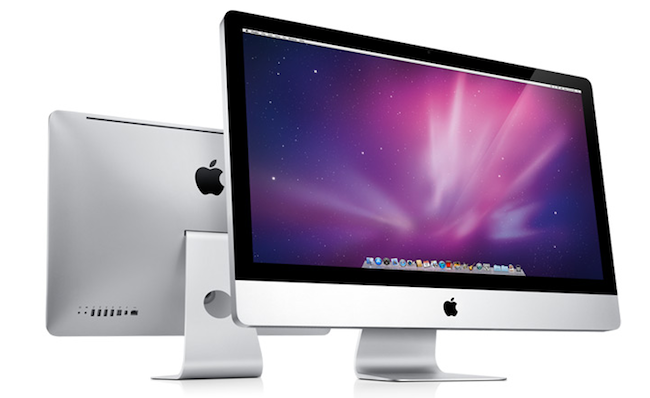
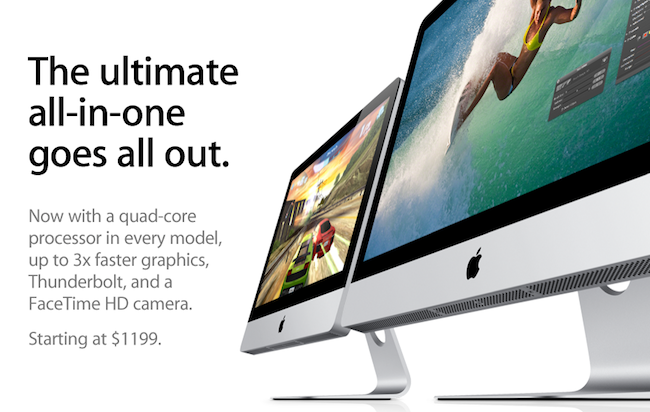
Right on cue, Apple has just introduced an updated line of iMacs on its online store, which notably feature the Thunderbolt technology and come with the new quad-core processors from Intel. The refresh brings the iMacs in line with the MacBook Pros that received an update in February, which also added Thunderbolt and “Sandy Bridge” processors, as well as a general speed bump. The new iMacs also feature a FaceTime HD camera and new AMD Radeon HD graphics for better gaming performances, photo editing and video processing; the 27-inch models come with two Thunderbolt ports for greater expansion with future Thunderbolt-enabled peripherals.  The new iMacs feature quad-core Intel Core i5 “Sandy Bridge” processors, but customers have an option to order a Core i7 in the configuration page (only for high-end 21.5-inch and 27-inch models, base models don’t support Core i7).

With next generation quad-core processors, powerful new graphics, Thunderbolt technology and a FaceTime HD camera, we’ve made the world’s best desktop even better.”
“Our customers love the iMac’s aluminum enclosure, gorgeous display and all-in-one design,” said Philip Schiller, Apple’s senior vice president of Worldwide Product Marketing. “With next generation quad-core processors, powerful new graphics, Thunderbolt technology and a FaceTime HD camera, we’ve made the world’s best desktop even better.”

The new iMac features quad-core Intel Core i5 processors with an option for customers to choose Core i7 processors up to 3.4 GHz. These next generation processors feature an integrated memory controller for an amazingly responsive experience and a powerful new media engine for high-performance video encoding and decoding. With new AMD Radeon HD graphics processors, the new iMac has the most powerful graphics ever in an all-in-one desktop.

Press release is available here and embedded below. The official iMac page on Apple.com has just been updated with a detailed explanation of all the new specs.

As for other specs:

Graphics:

  • 21.5-inch iMac base model: AMD Radeon HD 6750M graphics processor with 512MB of GDDR5 memory
  • 21.5-inch iMac: AMD Radeon HD 6770M graphics processor with 512MB of GDDR5 memory
  • 27-inch iMac base model: AMD Radeon HD 6770M graphics processor with 512MB of GDDR5 memory
  • 27-inch iMac: AMD Radeon HD 6970M graphics processor with 1GB of GDDR5 memory (Configurable to AMD Radeon HD 6970M with 2GB GDDR5, only at the Apple Online Store.)


Video support and Camera:

  • FaceTime HD camera
  • Simultaneously supports full native resolution on the built-in display and up to a 30-inch display (2560 by 1600 pixels) on an external display
  • Support for extended desktop and video mirroring modes

Connections:

  • One Thunderbolt port on 21.5-inch iMac
  • Two Thunderbolt ports on 27-inch iMac
  • Mini DisplayPort output with support for DVI, VGA, and dual-link DVI (adapters sold separately)
  • One FireWire 800 port; 7 watts
  • Four USB 2.0 ports
  • SDXC card slot
  • Slot-loading 8x SuperDrive with 4x double-layer burning (DVD±R DL/DVD±RW/CD-RW)
  • Audio in/out
  • 10/100/1000BASE-T Gigabit Ethernet (RJ-45 connector)
  • IR receiver

Read more