Posts in news

OS X Lion Developer Preview 4 Update Released

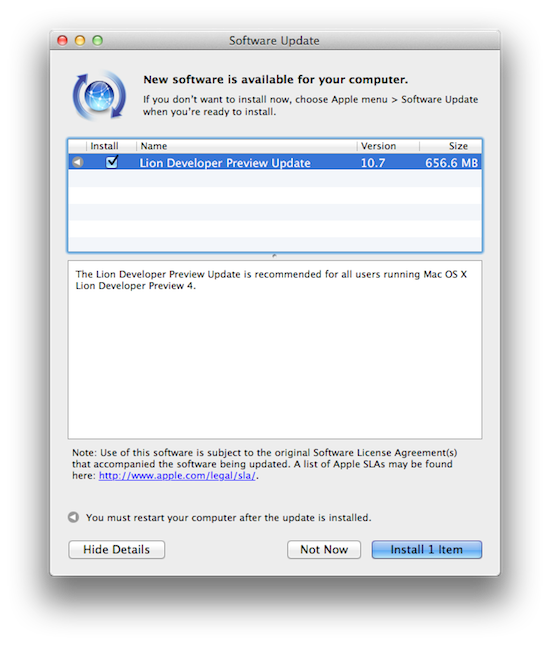
As Lion’s development moves forward and nears the public release set for July, Apple has pushed another update to developers running OS X Lion Developer Preview 4. The new version, available through the Software Update control panel on the desktop, weighs at 656 MB and should be one of the latest updates before Lion gets its pre-announced Mac App Store rollout this summer. Lion will be available at $29.99 as digital-only upgrade for all your Macs configured with your Apple ID.

We’ll update this story with more details on what’s new as we get them, so make sure to refresh this page later.

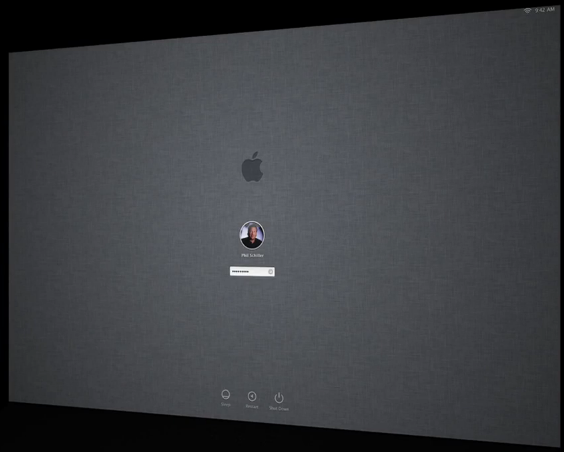
Update: Build number is 11A494a. First reports seem to indicate the login window has got a new linen background – the login window was briefly shown during the WWDC keynote. [image via]


Chinese Court Sends 3 To Jail for Leaking iPad 2 Details

In what could possibly be related to the arrest of Foxconn employees back in December, Tuesday, a Chinese court have convicted three individuals with leaking Apple trade secrets and have sentenced them to prison. In March, Foxconn employees that leaked case designs revealing the iPad 2’s shape were convicted of violating Foxconn’s trade secrets–an employee who was previously a manager of MacTop and two others were sentenced on similar charges on Tuesday–case designs were leaked revealing the shape of the iPad 2. Two of the individuals claimed to be Foxconn employees, so they may likely be linked be the same individuals we’ve heard about before.

It said that Xiao Chengsong, general manager of Shenzhen MacTop Electronics Co., had offered 20,000 yuan, or about $3,000, plus discounts on MacTop products to a former Hon Hai employee named Hou Pengna, for information about the iPad 2. The court said Ms. Hou then paid Lin Kecheng, a Hon Hai research-and-development employee, to get digital images of the device’s back cover from last September, six months before the iPad 2 was publicly announced.

Many leaked case designs made their way online before Apple’s announcement, and an iPad 2 was even spotted at this year’s CES. The individuals will serve sentences up to 18 months with fines ranging from $4,500 to $23,000.

[WSJ via MacRumors]


Evernote for Mac Update Brings New View, Useful Note Links

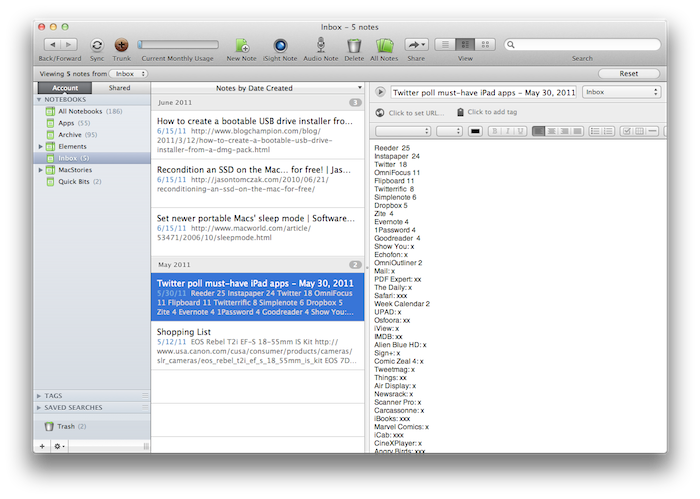
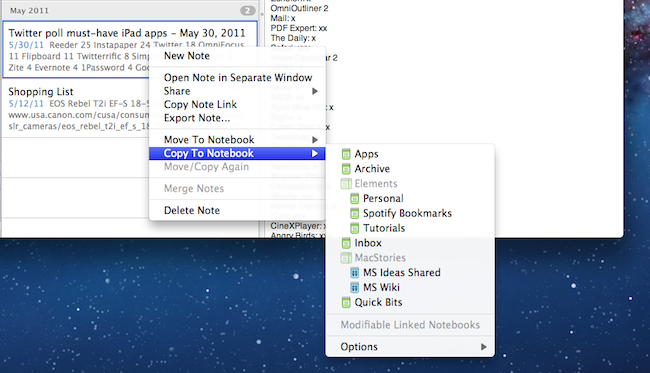
An important update for Evernote, the cross-platform “memory tool” that allows you to capture notes, ideas, images and webpages, is coming out today on Mac and Windows and, after some weeks of testing, I can say it’s one of the most interesting new versions of the desktop app to date. The new Evernote 2.2, in fact, heavily relies on a new feature called “note links” that assigns a unique URL to each note in your Evernote account – meaning, you can generate a note link, paste it somewhere else on your Mac, and clicking on it will automatically open that note in Evernote. It’s very handy if you’ve always wanted to add relevant Evernote information to, say, calendar events or OmniFocus but never found the right way to do so. With note links and the new “copy to notebook” functionality, notes in Evernote 2.2 can be linked, duplicated and accessed from anywhere. If you paste a note link on your iOS device, the system will try to launch the Evernote app with that note in the foreground – again, this is a very welcome addition that has greatly improved my Evernote workflow in the way I can reference notes and link items between various notebooks. On top of that, you can also select multiple notes and grab a list of links with a single click.

There’s more in Evernote 2.2 however: the new Snippet view, much like on the iPhone, allows you to view text and image thumbnails for notes in your account at a glance. Rather than displaying a simple list of note titles, snippet view combines text, tags, dates and media to offer an integrated view of what’s in your Evernote – plus, it looks really nice. Evernote writes on the official blog:

If you use Mixed View in your note list, the most obvious change you’ll see is the new Snippet View. Snippets are designed to provide the most useful information possible at a glance. If your note contains only text, then the Snippet will display the text at full width. If the note contains both images and text, then it will show text and a thumbnail. If it’s just an image, then the snippet will show the note title and a larger thumbnail. Not only does this view give you more information about the content of the notes, but it also makes browsing through your notes easier.

Last, new navigation buttons in the upper left corner let you easily navigate back and forth between content you’ve viewed and archived, and just like the web browser click & hold on the buttons will bring up a menu with more navigation options.

While waiting for the promised huge update for the iPad version that will bring a new UI and rich text editing capabilities, you can get the new Mac version from the Mac App Store or Evernote’s website. Evernote 2.2 is propagating at the moment of writing this, so if you don’t see the update right away, you should try later today.


Google Updates Google Sync for Better Mail and Calendaring on iOS

Not familiar with Google Sync? It’s not an app on your iPhone, iPod touch, or iPad, but rather something that exists in the background to help you keep your Mail, Calendars, and Contacts in check. Today, Google is announcing improvements to the service so you can better push and pull information from the cloud.

The first improvements are with Mail, and I think this one is my favorite. Google is now giving iOS users the ability to search for messages stored on the server, and not just locally on your device. The next time you’re looking up an old love letter, just search in Mail for your message and it’ll continue the search on the server.

Mail is also getting another improvement in the account department. If you have multiple addresses tied into one gmail account, it’s now way easier to send as an alternate address in Mail. If you “send mail as” in Gmail, iOS will now respect those settings so you’ll never send email from the wrong address again.

Want to edit calendar events? Now you can! Accept, decline, and edit calendar event (invitations) are now possible through iOS.

For more information, and how to setup Google Sync on your device, please refer to the recent blog post and how-to-guide here.

[via The Official Google Enterprise Blog]


Shazam for iPhone Updated, Gets New LyricPlay Feature

Shazam, the popular music tagging application for iPhone that allows you to hold your device up to a speaker and instantly get to know what’s playing, has been updated earlier today to include a new functionality called LyricPlay that, according to the developers, will display lyrics for the song you’ve just tagged in a beautiful landscape view. It works like this: once Shazam (Encore or RED, as LyricPlay has only been added to the Premium versions) has found a song, it’ll be saved in the My Tags section as usual. In the section, there’s a new LyricPlay button that is capable of syncing lyrics with the song you’ve just tagged, quite possibly promising to start visualizing lyrics in the exact position you just tagged a song. Turn your iPhone in landscape, and lyrics will start flowing in real-time in a Star Wars-esque interface that’s actually quite nice and undoubtedly accurate as far as lyrics go (Shazam says they have access to 25,000 songs with Lyrics after the acquisition of Silicon Valley startup Tunezee).

In reality, I found Shazam’s new LyricPlay feature somewhat unreliable, as it didn’t show up on most (old and recent) songs I have in my iTunes library (best way to run a quick Shazam experiment is to use your own songs), and when it did it definitely wasn’t “synced” with the position of the song. I’m not sure how a listener is supposed to follow the song and the lyrics running on screen, but there’s no doubt Shazam needs to make the whole thing more intuitive.

Overall though, the idea is pretty nice and it comes s a free update. I’m sure LyricsPlay will get better over time, so go download the app here and check out what Shazam has to say in the official press release below. Read more


BBC iPlayer Rolling Out To Western Europe By Year’s End

A number of countries in Western Europe will be the first to experience the BBC iPlayer outside of the UK as the BBC begins its international rollout this year. Fans of BBC content such as Doctor Who that live in Western Europe will be the first that will be able to access it and other BBC shows (including archive content) on the iPlayer app available on the iPad.

The BBC will begin the rollout for Western Europeans sometime before the end of the year and at a monthly cost of something under $10 – the fee has yet to be finalised. The content library will be available on the iPad app but only in English at this stage.

For its international rollout of the BBC iPlayer, Jana Bennett who works for BBC Worldwide said to The Guardian that they are looking forward to adding collections of content for various genres including music, comedy and documentaries. She says that the international version is a “different proposition” from its British counterpart that is primarily for catch-up content.

The freedom from catchup means that we’ve got a lot more flexibility in terms of what we put on there and how we present it.

[Via The Guardian]


References to New Time Capsule With Software Update Caching Found

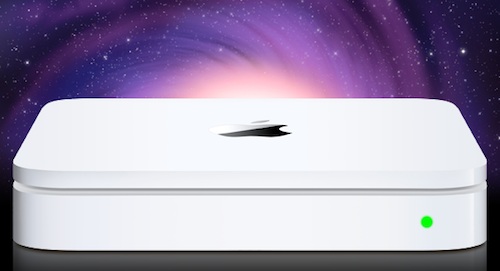
Following the variety of reports from the past weeks that claimed Apple would announce new Time Capsule and AirPort Extreme models at WWDC, an AirPort Utility update was released last night for Mac and Windows, bringing minor fixes to desktop users. AirPort Utility is Apple’s management software to configure and set up an AirPort base station or Time Capsule. Hidden in the update, however, there were some code strings spotted by MacRumors forum members that are hinting at 3rd generation Time Capsules and AirPort Extremes with a software update caching system. This was previously reported as a new feature of these products that would allow a Time Capsule (or AirPort Extreme) to download software updates in the background, cache them, and send them to computers and devices in seconds without the user waiting for the entire download process.

The code strings:

“bsUP.productName” = “Store Apple software updates on this %@”;

“bsUP.description” = “Apple software updates that are copied to this %@ are available to anyone using this network.”;

K31 K30B Time Capsule (Simultaneous Dual-Band, Gen3)

K10B Apple AirPort Extreme (Simultaneous Dual-Band, Gen3)

Mentioned in the app’s contents are also a 4th generation Time Capsule and a 5th generation AirPort Extreme. The existing simultaneous dual-band Time Capsules and AirPort Extremes are indicated as 2nd-gen by Apple, thus leading to speculation that an upcoming refresh would be the third generation mentioned in code.

In the weeks leading up to WWDC, several rumors suggested the new Time Capsule (Apple’s flagship router solution with integrated Time Machine capabilities) would be a complete redesign running a custom version of iOS through an A5 chip. Others also claimed Apple had implemented a way to store iCloud media on the Time Capsule (or hard drive attached to an AirPort Extreme) so iOS devices on the same local network wouldn’t have to download or stream content every time. As Apple didn’t announce any streaming feature for iCloud, however, it’s unlikely the Time Capsule would be capable of caching content downloadable from iTunes otherwise. The possibility of a caching system was also suggested by Daring Fireball’s John Gruber, who hinted at iOS software update without tethering to a computer. iOS 5 does have OTA updates built into the Settings app, so the Time Capsule would serve as a caching mechanism to download updates in the background, allowing users to close the Settings app and receive the update when it’s already been downloaded.


Facebook Working on Instagram-like Photo Sharing App

TechCrunch has posted a screenshot of what they claim to be a new photo sharing app for iPhone developed by Facebook and soon to be released in the App Store. The new app, internally codenamed “Hovertown” or “WithPeople” according to the website, from a first look at the leaked documents looks like a mix of Instagram, Color, Path and With. With the exception of Instagram  (for those who don’t know, an iPhone app / social network that allows you to share photos in seconds with cool built-in effects and geo-tagging capabilities), all the other apps mentioned by MG Siegler are photo sharing solutions meant to capture what’s around you, with people that are with you, are share it with people you know. Basing on these alleged similarities and the screenshot itself, Facebook may be working on an iPhone app that leverages the social graph and location information to share places, people and moments in single shots or entire photo streams.

How do we know? We have obtained roughly 50 MB of images and documents outlining the entire thing.

To be honest, we’re still sorting through all of them. But again, the app looks amazing. We’ve heard that internally it is being called either “Hovertown” or “WithPeople”. And while it looks like a stand-alone app right now, there are also signs that it could be eventually integrated into Facebook’s main iPhone app — as well as the main site.

It’s unclear whether the new photo product may be integrated with the official Facebook iPhone app (which is heavily web-based as far as the interface goes) in a new photos tab or if Facebook is really planning on releasing it as a standalone application. The Facebook iPhone app is the most popular free app of all time, and it wouldn’t be a surprise to see Facebook growing its catalogue of official software for the iOS platform. Facebook has been criticized for not having a native iPad app, a choice that has allowed third-party developers to build their own paid and successful solutions for the tablet. Read more


BBC Reporters Getting iPhone App to Broadcast Breaking News

Journalism.co.uk is reporting that the BCC in the United Kingdom is working on their own iPhone app that will let its reporters in the field record video, pictures and audio, and then incorporate the data directly into the BBC’s network.

The iPhone app is going to be available to BBC employees this month, giving their field reporters the ability to broadcast while on a 3G or WiFi network. This could be the perfect tool for those that report breaking stories and don’t have the professional A/V equipment with them at the exact moment.

The BCC sees mobile device use as a “logical extension of what [it] can do already” but this will be a great experiment to see how far they can take it.

Martin Turner, head of operations for news, said that “reporters have been using smart phones for a while now but it was never good quality… Now it is beginning to be a realistic possibility to use iPhones and other devices for live reporting, and in the end if you’ve got someone on the scene then you want to be able to use them.”

I can see how important this could be to reports on the scene of a breaking news story, a sporting event or an impromptu interview.

[via TNW]