Posts in news

Apple Highlights Apps “Enhanced for OS X Lion”

OS X Lion has been out for less than a month, and Apple is now starting to promote apps that take advantage of some of the new features of the OS on the front page of the Mac App Store. As noted by Stephen Hackett at Forkbombr, Apple has included the “Enhanced for OS X Lion” tagline in the banners pointing to applications that have recently been updated with Lion-exclusive features such as Versions, Full-Screen, or multi-touch gestures. These banners can be seen on the front page of the Mac App Store, both in the top section (Screenflow 3.0 and Touchgrind) or in the lower part of the page, where currently there are promotional images for Fantastical, swackett x, and Scrivener. Fantastical is indeed one of the apps that has been updated in the past month with “Lion compatibility” and Lion-only gestures for navigation in the calendar view.

This is not the first time Apple has taken special interest in apps updated to take advantage of new functionalities introduced by the company in a new version of their OSes. For example, Apple went as far as creating a dedicated section for apps updated with AirPlay support soon after the release of iOS 4.2 back in November 2010. In April, Apple showcased subscription-based magazines in the App Store’s homepage. The “Enhanced for OS X Lion” tagline doesn’t have its own category just yet, but it wouldn’t be a surprise as more customers upgrade to Lion, and developers start releasing Lion-specific app updates.

With over 250 new user features and 3,000 new developer APIs, Lion is opening a whole range of possibilities for developers willing to rewrite or update their applications to trigger the new OS. Such features and APIs include the aforementioned full-screen mode and Versions support, as well as desktop notifications, In-App Purchases, new UI controls, Resume, and Auto-Save. This Fall, developers will also be able to integrate their apps with iCloud, which will allow them to store documents and data in the cloud, enabling seamless synchronization of content between devices.

In November, Apple will also start requiring developers to update their apps with Lion’s Sandboxing APIs – you can  read more about this in John Siracusa’s OS X Lion review. By highlighting apps that have already been updated for Lion, Apple is both encouraging other developers to do the same in the next few weeks, and showcasing great software for new customers that have installed Lion and are looking for new apps to try out. Apple itself updated several apps ahead of Lion’s launch to enable new functionalities exclusive to 10.7, such as Safari 5.1 – which comes pre-installed on Lion – and the iWork suite.


OS X Lion USB Thumb Drive Now Available

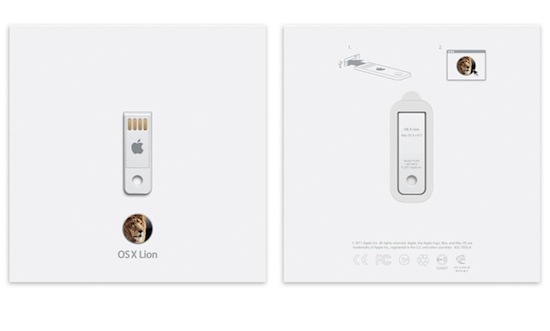
Initially announced on July 20, when OS X Lion was released to the public through the Mac App Store at $29.99, Apple has released the OS X Lion USB Thumb Drive today, allowing customers without a broadband connection – unable to download the 3.49 GB installer from the Store, or willing to keep a physical copy of the OS – to install the latest version of OS X with a USB stick similar to the one Apple shipped with the 2010 MacBook Airs (and didn’t include in the 2011 models, which come with Lion pre-installed but no USB drive in the box).

OS X Lion is available on a USB thumb drive for installation without the need for a broadband Internet connection. Just plug the drive into your USB port and follow the instructions to install. OS X Lion is also available for a lower price as a digital download from the Mac App Store.

As noted by 9to5mac, those who install Lion through the USB Thumb Drive won’t be able to perform re-installs with Lion’s built-in Recovery functionalities, as they will need to use the thumb drive again. The OS X Lion Thumb Drive is shipping in 1-3 business days.

Earlier this month, Apple released a free utility to turn any external drive into a Lion Recovery partition, and a number of unofficial solutions have also surfaced. You can find Apple’s OS X Lion Thumb Drive at $69 in the online store.


Steve Jobs Biography Gets A Classic Cover

There are many pictures of Steve Jobs, and perhaps one of the most iconic is the scraggly bearded CEO posing for the camera, hand up to his chin as he imagines Apple’s next greatest device (at least I like to think that). The image will also be making an appearence on the cover of Walter Isaacson’s biography of Jobs (previously: The Book of Jobs), can be seen on the Barnes & Noble storefront with a publication date set for November 21st. You can currently preorder the hardcover for $20.40 (list price is $32.50), with B&N’s digital eBook availalbe for $14.99.

[via AllThingsD]


Amazon Student Price Checks Textbooks, Helps you Sell Old Ones

I’m currently in the process of getting rid of old textbooks and stocking up on required reading materials for a new college semester, and Amazon’s timing couldn’t have been anymore perfect. As you’re textbook shopping in your college bookstore or elsewhere, Amazon Student let’s you scan the barcode (which is super fast) to compare prices online. Alternatively, you scan the barcodes of books you already have so you can attempt to trade-in books for Amazon gift-cards (for future purchases on whatever you’re looking to buy). Amazon Student does try to get students hooked into the Aamzon Student program (Amazon Prime) with a 6-month free membership, costing $39/year soon after.

The app integrates with other areas of Amazon as well: keep your Wish List handy (useful for all those Amazon gift-cards you’ll be getting back), view Amazon Gold Box deals, and check out purchases right from the Amazon Student app. You can download it for free in the App Store.

[TechCrunch via Gizmodo]


FlashtoHTML5 Turns YouTube In To A Flash-Free Zone On Safari

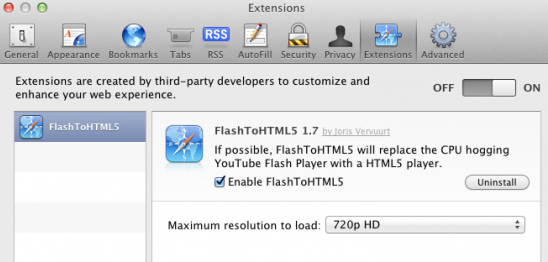
No-one really likes when their Mac’s fan decides to emulate a jet engine after you’ve been watching YouTube for a while because Flash has been running. It is particularly frustrating when you know that YouTube has been rolling out an experimental HTML5 video player that could work perfectly in Safari. Thankfully a new Safari plug-in, FlashtoHTML5, forces Safari to use that HTML5 YouTube whenever available (which is most of the time).

The plug-in from Juris Vervuurt will automatically choose the maximum video resolution available, up to 4K, although this can be manually changed. There are three minor caveats with FlashtoHTML5: this plug-in only works for Safari,  not all YouTube videos yet support the HTML5 version and subtitles and captions do not work in the HTML5 version. You can download FlashtoHTML5 for free.

[Via 9to5 Mac]


DigiTimes: Apple Ramping Up iPhone Production With The iPhone 5

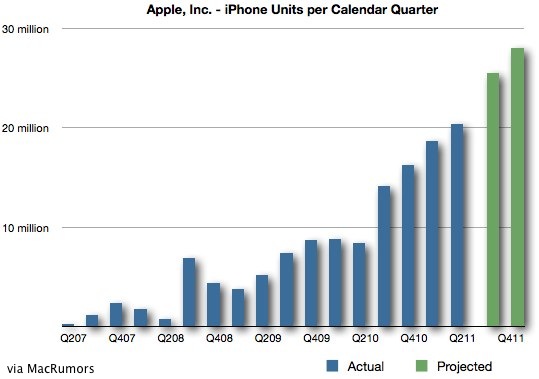
A report in DigiTimes today claims to reveal new estimates of iPhone production for the rest of 2011. In their report, DigiTimes says that Apple has increased the number of orders for iPhones from 50 million units to 56 million units - roughly a 12% increase. Furthermore, they note that iPhone 5 production would represent roughly 26 million units for the rest of this year.

Looking more closely at iPhone 5 orders, DigiTimes says that Apple has revised down their third quarter (July, August and September) orders from 7 million units o 5.5-6 million units. The fourth quarter (October, November and December), however, has seen an increase in orders from 14 million to 20 million units. Production of the iPhone 3GS and iPhone 4 would also alter between the third and fourth quarters, reducing from 20 million units to just 8 million units in the fourth quarter.

Continued production of the iPhone 4 in the fourth quarter would suggest that Apple is interested in following its recent trend of making the ‘old’ iPhone a cheaper option for those looking to purchase an iPhone. If these suggested forecast figures become reality, it would mean that Apple produces, and likely sells, 95 million iPhones (any generation) over the course of the 2011 calendar year.

[Via DigiTimes, Image via MacRumors]


Add a Second Hard Drive to Your New 2011 Mac Mini with iFixit’s Dual Hard Drive Kit

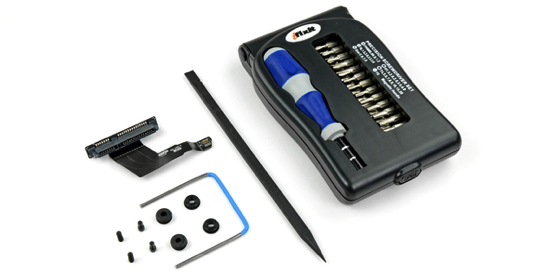
Don’t want to spend an extra $400 for the server model just for the ability to add a second hard drive? No problem! iFixit is offering a sweet kit that adds a second hard drive to the base model — it includes the the mounting screws, drive ribbon, and all of the tools you need to upgrade your Mac Mini. The kit is only $69.95 on iFixit, and gives you the ability to install any aftermarket SSD or HDD you want to the machine with an easy modification (if you’re going SSD, I recommend OWC). They’ve got all of the instructions you need to make the change, and have provided all the details in a recent blog post.

[via iFixit]


Mozilla Aims to Lessen Memory Issues With Release of Firefox 7

Like Matthew Humphries over at Geek.com, I was a big Firefox user back in the day. Before I had any care in the world about what a Mac was and before Google Chrome was in the pipeline, your three options were Opera, Firefox, and I.E. Firefox was great — I used it at home, loaded a portable version on a thumb drive so I could bypass the firewall at my high-school (yay proxy settings), and found it much more stable than Internet Explorer at the time. While I’ll occasionally return to Firefox, Chrome and Safari have dominated my work life, and unfortunately I’ve move on after slow browsing sessions and not wanting to deal with the memory hog Firefox has been (even after the quick turnaround in updates). Mozilla wants to change this perception however, and have started a project called MemShrink to deal with the runaway memory issues present in Firefox. According to Humphries,

Mozilla knows this problem exists and aims to fix it. By the time we see Firefox 7 available for download it will use as much as 50% less memory than any version that has gone before, as well as having those problematic memory leaks fixed.

Posting on his personal blog, Mozilla developer Nicholas Nethercote has stated that Firefox 7 will be noticeably faster. You will be able to leave it running overnight without issue, and closing tabs will free up memory.

Mozilla wants to do three things: improve speed, stability, and perception. Perception is important — while you don’t want to mask problem areas, making the user feel more engaged (instead of stalling) would be a terrific boon in usability. My problem with Firefox is that it feels like I’m always waiting for a webpage to load or for something to happen — maybe it’s slight and not as significant as I’m making it sound, but compared to Chrome (where everything loads as soon as I start typing), the difference is noticeable. Firefox 7 is slated for a 2011 release, so it shouldn’t be too long before we have a solid build in our hands. I’m looking forward to a faster and leaner Firefox.

[Mozilla Blog: Nicholas Nethercote via Geek.com]


GAget Puts Beautiful Google Analytics on Your Dashboard

What comes in linen and shows off really pretty graphs for your website? We’re talking about Zoltan Hosszu’s GAget of course, a Dashboard widget you might actually be interested in downloading. Not only is the website beautiful, but the widget is super handy as well. Right on your Dashboard, you can get analytics that feels like it was designed by Apple themselves with the fit and finish of OS X Lion while presenting lots of useful information like the day’s page views, your unique visitors compared to total visitors, new visitors to the site, your bounce rate, and a handy graph which can show you how well you’re doing today compared to the last two weeks. We need more Dashboard widgets like this — GAget is terrific in design, and the developer put in a lot of love for an area of OS X that many don’t pay enough attention to. If you’re a web developer or a website owner and want to be able to glance at your website statistics, I totally recommend installing this (it supports multiple profiles too). And as always, you can donate to the developer if you find this free extension to your Dashboard super useful (there’s a PayPal button at the bottom of the page).

You can download the GAget at http://www.zoltanhosszu.com/gaget/, and you can follow the developer on Twitter at @zoltanhosszu.