Posts in news

Another iPhone Prototype Lost In A Bar

As reported  by CNET, in a bizarre turn of events it appears Apple may have lost another unreleased iPhone model in a bar, this time at the Cava22 in San Francisco. According to the website, Apple never filed a police report based on such loss, likely from an employee field-testing the unit, although it ”sparked a scramble by Apple security” in an effort to recover it quickly. The device, CNET says, was lost in July. Rumors surrounding the next-generation iPhone date back to late 2010, although they have intensified lately as the company approaches the rumored October release date for the “iPhone 5”.

You may recall last year’s loss of an iPhone 4 prototype, which was lost by an Apple employee and sold to Gawker Media’s Gizmodo. Steve Jobs eventually joked on the incident, but Apple did intervene in a legal action against Gizmodo and the “seller” of the device, saying that unreleased prototypes are “priceless” in regards of the kind of information that gets out to competitors ahead of time.

This year’s lost iPhone. however, hasn’t showed up on the Internet yet, and it may have been sold on Craigslist for around $200.

Apple electronically traced the phone to a two-floor, single-family home in San Francisco’s Bernal Heights neighborhood, according to the source.

When San Francisco police and Apple’s investigators visited the house, they spoke with a man in his twenties who acknowledged being at Cava 22 on the night the device went missing. But he denied knowing anything about the phone. The man gave police permission to search the house, and they found nothing, the source said.

Apple usually goes to great lengths in order to protect its iPhone prototypes, using special cases to make these devices look like older models, as with last year’s lost iPhone 4 that was actually found inside a 3GS-like case. It’s not clear whether this year’s (allegedly) lost iPhone is the same version that will end up in consumers’ hands later this year, or if it’s an iPhone 4 prototype running a faster chip that was apparently sent to developers for testing months ago. CNET’s report doesn’t specify whether Apple ever got the phone back, and Craigslist didn’t respond to a request for comments, either.

Help Fund A New Q&A Video Series With Startup and Solo iOS Developers

A few weeks ago Anthony Agius ran the ‘One More Thing’ conference in Melbourne, Australia. It was a conference in which a number of Australia’s top iOS developers came and gave speeches about their paths to App Store success to an audience of around 160 people. Some of the developers that appeared at the conference included Matt Comi of Big Bucket Software (The Incident, TV Forecast), Thomas Killen of Voxel Agents (Train Conductor), James Cuda of Savage Interactive (Procreate) and a number of others. Those speeches have now been posted online in full and for free, so if you’re a developer looking for inspiration or just interested be sure to check them out.

Agius hasn’t stopped there though, and has now decided to embark on a new project to make a 5-episode online TV series that features Q&A sessions with the speakers from the One More Thing conference. It is all inspired from a 60 minute Q&A session from the actual conference in which over 100 questions were submitted but time only allowed for 12 questions to be answered.

We want to develop an online TV show to support new startups and solo iOS developers. We will interview some amazing iOS developers about what it takes to do well in this industry, and some of the unexpected challenges that come up.

To make this a reality, Agius is appealing for donations to fund the project. To do it (as he says) to “the quality the community deserves” he is looking for $25,000 to cover all the costs from video editing, web design, motion graphics, flights, equipment hire and various other costs which he has roughly calculated. He is attempting to fund the project through ‘Pozible’, which if you are unfamiliar with is very similar to Kickstarter, and is offering various ‘rewards’ for funding the project which increase as the size of the donation increases - everything from a “twitter hug” to a name on the credits to a free Blu-Ray copy to adverts within the episodes.

So as you can see, it gets expensive to put on a high quality production! I don’t plan to make a profit off the show. Unless the project exceeds the funding target, I won’t make a cent. All raised funds will be put into the development of the show and promoting it. I just want to cover the costs to get it made, enjoy the experience, produce a show I can be proud of and create a valuable information source for those wanting to be indie iOS developers.

Below the break is a video of Agius explaining the project and you can read even more about the project on the Pozible project page, which is where you can also go to help contribute to the project. Video of the speeches from the ‘One More Thing’ conference can be found on Vimeo and you can follow Anthony Agius who co-founded MacTalk Australia on Twitter.

Read more


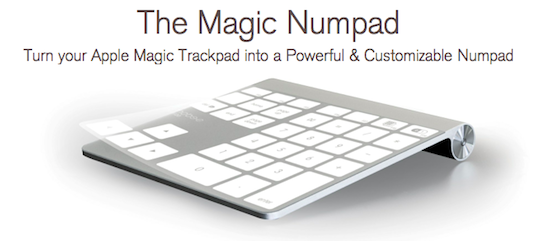
Turn A Magic Trackpad Into A Numpad With The Mobee Magic Numpad

A new accessory from Mobee, which makes some inductive charging accessories for the Magic Mouse and Apple Keyboard, aims to use the Magic Trackpad as a Numpad replacement. The accessory is simply 3 plastic films that are applied onto a Magic Trackpad and a piece of software that translates a tap into a key command from a Numpad.

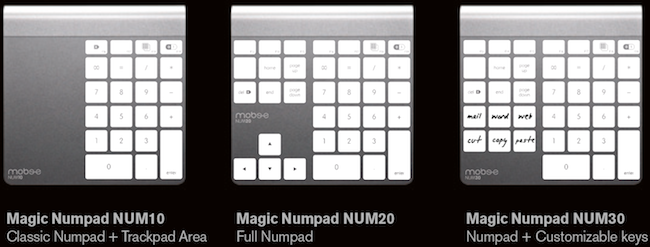
When purchasing the Mobee Magic Numpad you receive 3 different films to use on the Magic Trackpad, each of which have a different layout. You can see the three layouts below, the last of which includes six customizable keys. The films are claimed to be durable and re-usable in case you wish to change between layouts.

Mobee claims that with their product you will “instantaneously get both a Trackpad and a Numpad built into one single device” - although how exactly one switches between the Trackpad and Numpad ‘mode’ is not exactly explained. The Mobee Magic Numpad is available to order now for $29.90 but shipments won’t begin until October. So whilst this is certainly a niche product, it’s quite clever and fairly unobtrusive - although the real question would be how well it works and feels through some use.

[Via This is my next]


“Shrine of Apple” Wants To Photograph Every Apple Product Ever Made

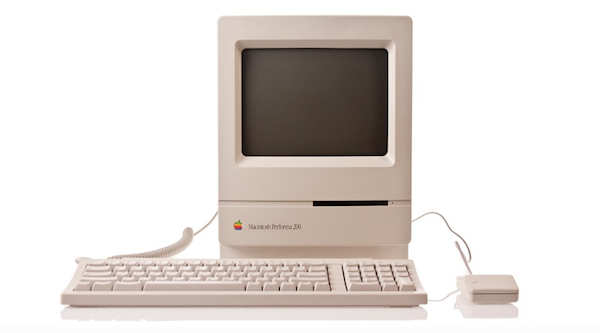
Brought to my attention this morning by The Loop’s Jim Dalrymple, Shrine of Apple is a new website that launched last night with a very ambitious goal: to photograph every Apple product ever made. Not just the ones from 2007 up until today – all of them. From the About page:

Our mission is to showcase the entire spectrum of products that Apple have sold to the public since 1976 – every product Apple Inc has ever produced, in the highest quality and definition possible. Every desktop, every laptop, every notebook, monitor, iPod, iPad, iPhone, mouse, keyboard, modem, cable, port, adapter, docking station, memory expansion card….and that’s just their hardware. Operating systems, productivity suites and all the great software titles that Apple have published will make an appearance too!

The website launched with a relatively small collection of products, with many more queued up for the next weeks. Shrine of Apple’s database consists of detailed high-res photos of products complete with original packaging when available, manuals, and cables. The website’s categories include Desktops, Displays, iPads, iPhones, iPods, Laptops, Peripherals, PDAs, Servers and Software, with more to come. The current selection includes old gems like the Apple IIe Numeric Keypad, Lisa 7/7 Office software, and the Macintosh PowerBook 150.

With high-res photography, descriptions, related links and a true passion for Apple products, I wouldn’t be surprised to see Shrine of Apple becoming a de-facto standard for Apple fans looking up information on old computers and devices, provided by someone who really “knows” and cares about these products, not a faceless online database. Shrine of Apple is, in fact, the creation of Jonathan Zufi, “leading expert in the field of mobility and wireless devices by day – vivid Apple collector by night”.

Make sure to check out Shrine of Apple, and follow the website on Twitter for updates on new products and photos.


Apple Releases New iTunes Beta with iTunes Match

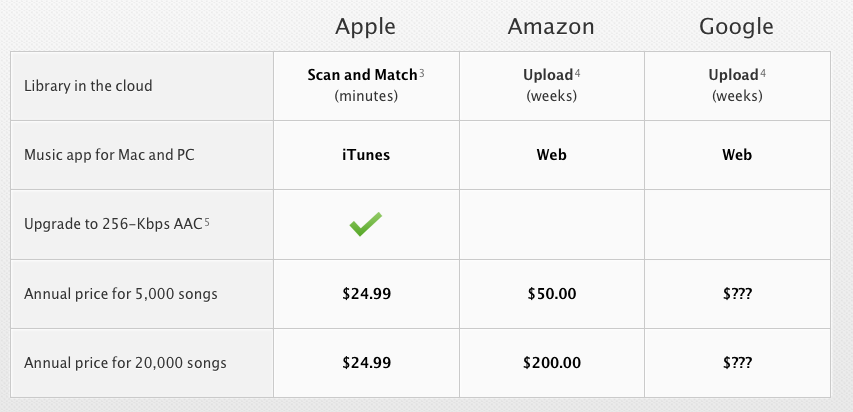
Apple just seeded a new version of iTunes 10.5 to developers, enabling the iTunes Match functionality that will allow users to upload songs to Apple’s iCloud directly from their iTunes libraries this Fall. Unlike other “cloud locker” services from Google and Amazon, Apple’s iTunes Match uses a “scan & match” technology that will try to match songs from a user’s library to the ones found on Apple’s iTunes Store servers, thus avoiding to upload a library in its entirety. The iTunes Match beta is currently available to developers in the United States, and as Apple explains in the release notes the music libraries added during this beta period may be subject to deletion, thus leading to additional re-scans and uploads.

As Apple also mentions in the release notes, iTunes Match beta subscribers “will receive the beta period and an additional 3 months of service with their 12 month subscription”, which as previously announced it’s set at $24.99 per year for 25,000 songs. iTunes LP and Extras are currently unsupported by Match, which is available as a subscription from iTunes’ new interface. From Apple’s official iTunes Match webpage:

Here’s how it works: iTunes determines which songs in your collection are available in the iTunes Store. Any music with a match is automatically added to your iCloud library for you to listen to anytime, on any device. Since there are more than 18 million songs in the iTunes Store, most of your music is probably already in iCloud. All you have to upload is what iTunes can’t match. Which is much faster than starting from scratch. And all the music iTunes matches plays back at 256-Kbps iTunes Plus quality — even if your original copy was of lower quality.

The first beta of iTunes Match comes with a few known issues such as impossibility to add music to iCloud from more than one computer at a time, or some playback issues on iOS. Apple is suggesting developers to backup their iTunes music libraries before installing and subscribing.

More information about iTunes Match is available on Apple’s website. Ars Technica also had a good write-up about this new service back in June.

Read more


Snow Leopard To Get Basic iCloud Compatibility with 10.6.9

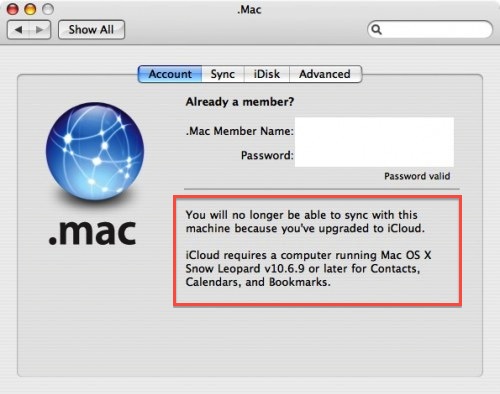
In a somewhat expected turn of events, a notice appeared on an old Mac running Tiger seems to confirm Apple will provide basic support for iCloud sync on Snow Leopard machines. As reported by MacRumors, a developer testing the MobileMe to iCloud transition with Tiger’s .Mac preference pane noticed a message about a 10.6.9 requirement for calendar, bookmark and contact sync.

You will no longer be able to sync with this machine because you’ve upgraded to iCloud.

iCloud requires a computer running Mac OS X Snow Leopard v10.6.9 or later for Contacts, Calendars, and Bookmarks.

Whilst Apple made no mention of Snow Leopard compatibility when detailing iCloud and the transition from MobileMe (actually indicating “some features of iCloud” will require iOS 5 and OS X Lion), it would certainly make sense to provide an additional 10.6 upgrade to ensure basic former MobileMe functionalities under the new iCloud brand. Apple has already started migrating MobileMe developer accounts to the new iCloud ecosystem, providing a desktop add-on for testing on the 10.7.2 developer seed. iCloud is expected to go public this Fall alongside the aforementioned 10.7.2 and iOS 5, whereas MobileMe will be officially discontinued on June 30, 2012.

Developer accounts that are being transitioned from MobileMe are automatically given free storage regardless of the previous subscription until next year, and considering Lion is still touted as an “upgrade to Snow Leopard” (which is required to purchase Lion from the Mac App Store) and that Snow Leopard is still available on Apple’s website, it would be an optimal solution to provide 10.6 users with one last software update to migrate from old MobileMe services to some new iCloud free offerings. There’s one caveat, however: assuming the MobileMe to iCloud transition goes as planned and Apple will really push 10.6.9 to enable iCloud sync, some old MobileMe features like syncing of Mac Dashboard widgets, keychains, Dock items, and System Preferences won’t be available on OS X anymore, as Apple explains here.


Saver For iPhone Giveaway: 10 Copies Of The Delightful Expense Tracker

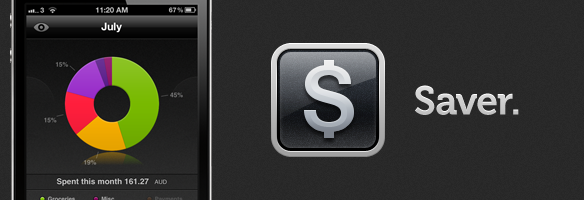
After a big bug-squashing and feature-adding update last week to Saver, the developers have decided to run another giveaway of their excellent expense-tracking app. I reviewed Saver for iPhone about two months ago where I raved about its excellent and loving design which made the usually dull task of expense tracking a more exciting and vibrant experience. The genius of Saver though is that unlike many other apps on the market, its design keeps things simple whilst still being powerful enough for what most users will need out of an expense-tracker.

The developers are running their own giveaway of Saver where they are giving away 3 copies of the app everyday from today till next Monday, but MacStories readers have another chance to win the app because they have been kind enough to give us 10 copies to give away! Make sure to read our full review of Saver, but jump the break for all the details on how to enter our giveaway of 10 copies of Saver.

Read more


Adobe Releases CreatePDF for iOS

Earlier today Adobe added another application to its iOS portfolio with the release of CreatePDF for iOS, a $9.99 universal app aimed at letting users easily create PDFs on their iPhones or iPads. According to Adobe, “CreatePDF brings the same high-quality PDF creation as Adobe Acrobat” to iOS devices, with PDF documents that look “exactly” like the original files they were generated from; the app uses Adobe’s online services for performance and quality, creating PDFs that preserve quality and accessibility standards with the inclusion of links, images, footnotes, and more.

The app supports the following formats:

  • MS Word (docx, doc), Excel(xlsx, xls), PowerPoint (pptx, ppt)
  • Adobe Illustrator (ai), Photoshop (psd) and InDesign (indd)
  • Images – JPEG, BMP, PNG, GIF, TIFF
  • RTF, Text and WordPerfect
  • OpenOffice and StarOffice documents

CreatePDF works through iOS’s default “Open In…” menu, which allows third party apps to communicate with each other by sending documents to other applications that support specific file types, such as PDF, .doc, or plain text. For instance, the feature was recently introduced in the Omni Group’s OmniOutliner, letting the app export outlines as plain text or OPML to other iOS software installed on device. CreatePDF registers as an app capable of opening (and converting) the file types listed above, and in my first tests it’s proven to be a fast and reliable solution to convert plain text documents, images and PSDs to the PDF format. From any app that supports sending files, you can choose CreatePDF from the “Open In…” menu, and wait for the app to finish the conversion process to PDF. For reference, the app took a few minutes to convert a 12 MB PSD to PDF, with good results. Similarly, a .docx document forwarded to me via email and sent from the iPad’s Mail app to CreatePDF took less than 30 seconds to become a PDF.

CreatePDF looks like a solid solution to convert files to PDFs, although I wouldn’t mind having more sharing options inside the app itself. Currently, CreatePDF can only “open in” other apps, send via email, or print. It’d be nice to have, say, direct Dropbox integration or more online exporting options in the future. The $9.99 price tag might be a little steep for the average iOS users, but quality of converted documents looked superior to me than other apps I tried in the past, and support for Illustrator, Photoshop and InDesign documents is also very welcome.

You can get CreatePDF at $9.99 on the App Store. Read more


Use Your iPad As A Digital Portfolio With The Excellent Foliozo

One of the iPad’s biggest strengths is the ease to which you can show various pictures, videos or websites to the people around you - its sleek form factor and large display makes it feel much more natural and personal than a laptop or desktop would. It is that inherit trait of the iPad that Apple is taking further advantage of with iOS 5 and its Photo Stream feature that lets you take pictures with your friends and family at the beach on your iPhone and then show those pictures on your iPad after a family dinner because Photo Stream effortlessly syncs photos between the two devices. Our own Federico recently wrote about how it removed the effort of manually syncing photos after he used the feature extensively on a recent summer holiday.

So we know the iPad is great (and will get better with Photo Stream in iOS 5) for sharing pictures and videos with our families and friends, but surely this experience could also translate into the professional realm. The true fact is that it does, with many firms already using the iPad as a portfolio to show concepts, photos and designs to clients and there are already a number of apps in the App Store that make this process easier. Today, however, I’m reviewing Foliozo which is a new entrant to the ‘digital portfolio’ app market, and one I think that stands above the pack.

Jump the break for the full review, screenshots and their promo video.

Read more