Posts in mac

Alfred 0.8 Adds Clipboard Snippets, Inline Definitions

Here at MacStories, we’re big fans of Mac application launcher Alfred. I stopped using Apple’s Spotlight thanks to Alfred, and the app got a lot of better in the past months with clipboard history, improved keyboard navigation and several new features introduced in the paid version of the app, the Powerpack. For instance, I’m a huge fan of the iTunes Mini Player and the file system browser, which allow me to quickly start playing music from iTunes and browse in a Finder alternative view, respectively. Most of all, I like Alfred because it’s lightweight, blazing fast and entirely keyboard-based. Not to mention that the developers are coming out with updated every few weeks or so. I love it.

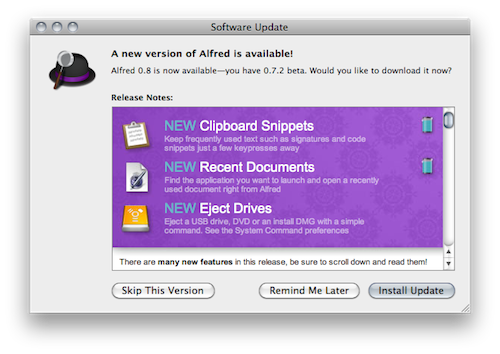
The latest Alfred update, version 0.8, brings lots of general improvements and bug fixes (check them out below) and a couple of new features that are very welcome in my workflow. Alfred can now save test snippets in its clipboard interface: say you have these recurring lines of text you find yourself typing on a daily bases (email addresses, templates, links), you can save them as snippets in Alfred’s preferences and paste them anywhere with a keyboard command. I type “snip” to open the snippet interface, then “keys” and there my snippet with unicode characters goes into the text field my cursor is on. Takes seconds and it just works.

Other new features include inline dictionary definitions, possibility to open recent documents and eject drives with just a few keystrokes. Great stuff for the keyboard geek. In case you still haven’t tried it, Alfred is available for free here.

Full changelog below. Read more


MacBook Air Runs On Four Screens, Including Apple IIc

Is the MacBook Air just another netbook that can barely run Photoshop? We all know it’s not. Benchmark numbers and stats aside, that thing is fast. I’ve been trying a 11-inch model (a friend of mine bought one) this week, and it literally screams. Instant-on thanks to SSD, strong battery life, responsive…just do yourself a favor and go try one at an Apple Store near you.

Or, if you want a quick example, take a look at the picture above. It doesn’t provide any numbers, but it gives you an idea of what this machine can do. It’s a MacBook Air running on four different screens: a 20-inch Apple Cinema Display, a 7-inch Mimo 720-S USB display and an old Apple IIc which is displaying a Terminal session through serial cable.

Geek stuff.

[Gizmodo via Flickr]


Evernote 2.0 Out Of Beta, Now Available For Mac Users

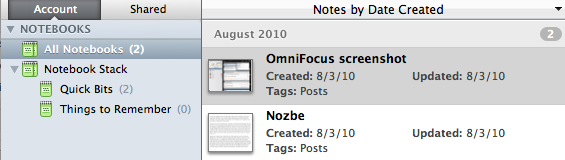
A few weeks ago we reported that Evernote launched a 2.0 beta version for Mac users to test some of the major new features like Stacks and in-app notebook sharing. In spite of the fancy name, stacks are basically folders for your Evernote notebooks that reside in the (redesigned) left panel. Stacks, sadly, are exclusive to the desktop client and won’t show up in the web version of Evernote.

Evernote 2.0 is now out of beta and available for download on Evernote’s website, or through the app’s built-in software update tool. This 2.0 update is pretty huge and comes with a lot of features such as support for up to 250 notebooks, a new attachment button to attach a file to a note and linked notebooks.

You can read about the new features over at Evernote’s official blog.


Lastify Brings Additional Last.fm Features to Spotify

Another week, another SIMBL plugin that brings additional features to a Mac app. This time, instead of adding new functionalities to Tweetie for Mac, we’re going to add some spicy Last.fm integration to Spotify for Mac which, by default, only scrobbles tracks to the popular music service.

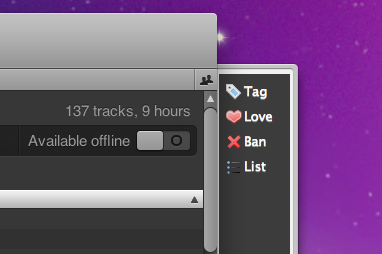
Lastify, developed by George Brocklehurst, injects a Last.fm in Spotify for Mac that allows you to “love” and “ban” tracks, tag them and add them to a playlist. Once you’ve downloaded the Lastify bundle, extract it and place the file in /Library/Application Support/SIMBL/Plugins or ~/Library/Application Support/SIMBL/Plugins if you want to install it for all user or just your account, respectively. Restart Spotify after that. To reveal the sidebar, resize the main Spotify window.

The integration with Last.fm is pretty sweet and works as you’d expect. Perhaps SIMBL isn’t the most elegant solution, but it works. Go download the latest Lastify build here.


AirPlay Video From iOS To Mac With AirPlayer

If you’re familiar with AirPlay, you know that it’s a pretty sweet technology that allows you to stream audio and video from any Mac or iOS device to an Apple TV, AirPort Express Station (audio-only) and AirPlay-compatible speakers. That’s the way it works. You can’t stream from Mac to Mac, iOS to iOS, or Mac to iPhone and iPad – although there’s a way to do that via jailbreak.

AirPlay’s streaming is great and almost “magical”, but it has its limitations, possibly due to the fact that Apple introduced it less than a month ago with the release of iOS 4.2. Ever since AirPlay hit the internet with the final public build of 4.2, hackers started working on mods to make it work in any app (video streaming from iOS apps is limited to Apple’s applications), on any device. TUAW’s Erica Sadun, for instance, has been busy working on a solution to make AirPlay work backwards, from iOS to the Mac.

The result is AirPlayer, “a custom Bonjour AirPlay service that pretends to be an Apple TV” that runs on your Mac. It’s a Mac app that can accept  incoming AirPlay video streaming from iOS – very simple. Read more


#MacStoriesDeals - Tuesday

In case you missed our announcement yesterday, we started another new feature, and it’s called #MacStoriesDeals. We’ll try our best to update the list throughout each day.

Here’s some great deals for today on iOS & Mac apps that are on sale for a limited time, so get ‘em while they’re hot!

Read more


#MacStoriesDeals

Another new feature here at MacStories! Last week we started our 2010 App Roundup here at MacStories, and today we’re starting another new feature, this one being a daily occurance. We’re calling it #MacStoriesDeals.

In this new series, we will recommend great deals every weekday on iOS apps, Mac apps and gadgets that are on sale for a limited time. We will be scouring our resources and providing you direct links to what we think are deals you shouldn’t miss out on. Whether it be games, health, lifestyle, music, weather, etc. - we’ve got you covered. So expect some choice picks starting later today!


ReTweetie Adds Native Retweets to Tweetie for Mac

Tweetie for Mac is one of the most popular desktop clients for the Mac, even if version 2.0 still has to show up and the app hasn’t been updated to support Twitter’s latest functionalities such as retweets, lists, real-time streaming. As I said, though, Tweetie for Mac still manages to be one of the most used apps by Mac users.

Developer Nick Paulson, feeling the need of native retweets in Tweetie for Mac and tired of seeing the old “RT @” or “(via @) being used by the app, wrote a plugin that adds Twitter’s native retweet functionality to Tweetie for Mac. It’s called ReTweetie, and it’s available here. Read more