Posts in Linked


Major FaceTime Bug Allows Any Caller Access to Your iPhone’s Microphone Feed, Potentially Your Camera

Benjamin Mayo of 9to5Mac, reporting on a serious iOS bug just discovered for FaceTime:

A significant bug has been discovered in FaceTime and is currently spreading virally over social media. The bug lets you call anyone with FaceTime, and immediately hear the audio coming from their phone — before the person on the other end has accepted or rejected the incoming call.

Naturally, this poses a pretty privacy problem as you can essentially listen in on any iOS user, although it still rings like normal, so you can’t be 100% covert about it. Nevertheless, there is no indication on the recipient’s side that you could hear any of their audio.

Mayo continues by listing the details of how to reproduce the bug yourself when calling someone else, which involves a few very simple steps that anyone can perform. The simplicity of reproduction makes this bug especially dangerous.

Following up on Mayo’s report, Dieter Bohn of The Verge shared that things get even worse:

https://twitter.com/backlon/status/1090049242809286656

To recap: due to this FaceTime bug, which appears to affect all devices running iOS 12.1 or later, any caller can gain access to another user’s microphone feed while the call is ringing. And if the person receiving the call in that scenario tries to dismiss the call, it may unintentionally be answered, activating the device’s camera as well.

Apple gave the following statement to John Paczkowski of BuzzFeed:

https://twitter.com/JohnPaczkowski/status/1090052150032445440

Hopefully ‘later this week’ ends up translating to the next day or two, as some serious havoc could be wrought by this bug on unsuspecting users. Until that software update is released, we strongly recommend disabling FaceTime from Settings ⇾ FaceTime on your devices, or at the very least be aware that incoming calls you receive could be tapping into your microphone without your consent.

Permalink

Apple in 2018: The Six Colors Report Card

Jason Snell:

It’s time for our annual look back on Apple’s performance during the past year, as seen through the eyes of writers, editors, developers, podcasters, and other people who spend an awful lot of time thinking about Apple.

This is the fourth year that I’ve presented this survey to a hand-selected group. They were prompted with 11 different Apple-related subjects, and asked to rate them on a scale from 1 to 5, as well as optionally provide text commentary on their vote. I received 55 replies, with the average results as shown below:

It was my pleasure to participate (again) in the latest edition of the Six Colors Apple report card, which features average scores and answers on a variety of Apple topics. As usual, it is a solid, balanced overview of where Apple stands today in different areas of its business. Personally, I was positive about iPad Pro hardware, iOS 12, and Apple Watch, but I noted I’d like to see Apple do more on iPad software, iPhone camera, and HomeKit in 2019.

Permalink

For AirPods Early Adopters, Apple’s Hit Wireless Earbuds Are Showing Their Age

I found myself nodding in agreement with this post by Zac Hall about how AirPods purchased in December 2016 are starting to show their age in terms of battery life:

Apple rates AirPods for up to five hours usage at 50% volume, and early testing proved that rating was actually slightly conservative. In practice, brand new AirPods could last almost five and a half hours before their batteries depleted. The carrying case doubles as a charging case, too, providing over 24 hours of battery life without needing to recharge from the wall.

But batteries are consumable, we all know so well now, and that’s proven true for the tiny batteries inside AirPods after two years of daily use. Battery life that once exceeded five hours now struggles to power AirPods through three hours of continuous usage at the same volume. Battery life results can be cut in half if you need to play audio at a louder volume.

In practice, I used to never hear the low battery alert during usage. I rarely listened to audio with AirPods for five straight hours before charging in the carrying case without thought. More recently, I’ve heard the bloop sound much more regularly, frequently followed by AirPods dying before I’m ready to recharge.

I’ve been thinking about this a lot lately (in fact, I proposed it as a topic for this week’s Connected) and I feel like Hall and I have gone through the same process. When my AirPods were new, I could listen to a full episode of Upgrade or Cortex at max volume and still have plenty of battery life left; now I cannot get to the end of an episode (roughly 90 minutes in length) without hearing the low-battery alert. My AirPods can’t hold a charge like they used to and I’m not surprised.

I could buy a fresh pair of AirPods now, but that seems like a waste of money given the (possible?) upcoming release of a new model. I could buy a third-party wireless charging adapter to make charging the case more convenient, but I don’t feel comfortable with an unofficial, bulky add-on case, which wouldn’t fix the battery issue of the AirPods anyway. I love my AirPods – they’re one of my favorite Apple products in recent years alongside the iPad Pro and Apple Watch – but I’m reaching the point where I’m always charging them, and I really want Apple to release whatever they’ve been working on.

Permalink

Apple Shares Behind the Scenes Look at the Creation of iPad Pro ‘A New Way’ Videos

Earlier this month Apple published a series of videos showcasing iPad Pro workflows for things like hosting a podcast, taking notes, and creating a presentation. Each ad’s title began ‘A new way to’ followed by the description of a productivity-themed task.

While these videos were great showcases of the iPad’s potential in their own right, what made them particularly interesting was that each ad ended by stating that it was made using the iPad Pro. Today, Apple has shared a follow-up video that goes behind the scenes into exactly which apps and processes were used to create this video series.

According to the video, Apple’s production team used Procreate and Notability to handle design work for the ads, FiLMiC Pro to shoot each video, LumaFusion for video editing, Keynote and Core Animator for animation, and finally, GarageBand was the composition tool for the ads’ music.

Federico and John discussed Apple’s iPad Pro video series on this week’s episode of AppStories, including some spot-on speculation that Apple used LumaFusion for editing the videos. This peek behind the curtain of iPad Pro video production further demonstrates the power of the iPad, and helps point users toward some of the best apps the App Store has to offer.

One of my favorite touches comes as the video ends, when we learn that, of course, the behind-the-scenes video itself was made on iPad Pro. A video made on iPad Pro, about the making of videos on iPad Pro, which all cover the subject of making things on iPad Pro. Perfect.

Permalink

Developer Demos HomeKit’s New Integration with Smart TVs

Benjamin Mayo, writing for 9to5Mac:

Developer Khaos Tian hacked the HomeKit protocol to simulate adding a smart TV accessory to the Home app. He shared some screenshots and videos of these features ‘in action’ …

By essentially faking the existence of a HomeKit-compatible Smart TV accessory on his network, he was able to add a television tile into his Home app.

This reveals new interfaces for controlling the TV. You can tap on the tile to turn it on or off and access the Details menu to change input.

Tian has posted a series of examples of this new HomeKit integration on his Twitter account, including one where he was able to control his LG TV running webOS from the iPhone’s Home app.

Interestingly, Tian has already contributed an update to homebridge – the third-party plugin to add all kinds of different accessories and platforms to HomeKit – with support for HomeKit’s new TV control APIs. Here’s where this gets really interesting for me: despite the launch of an online petition, LG has only confirmed that their latest 2019 TV sets will receive official HomeKit support. Thanks to homebridge, however, it should be possible to add native HomeKit integration to older LG televisions (such as my 2017 model) with plugins that bridge the webOS API to HomeKit’s new endpoints. This is precisely what Tian is doing for his demo.

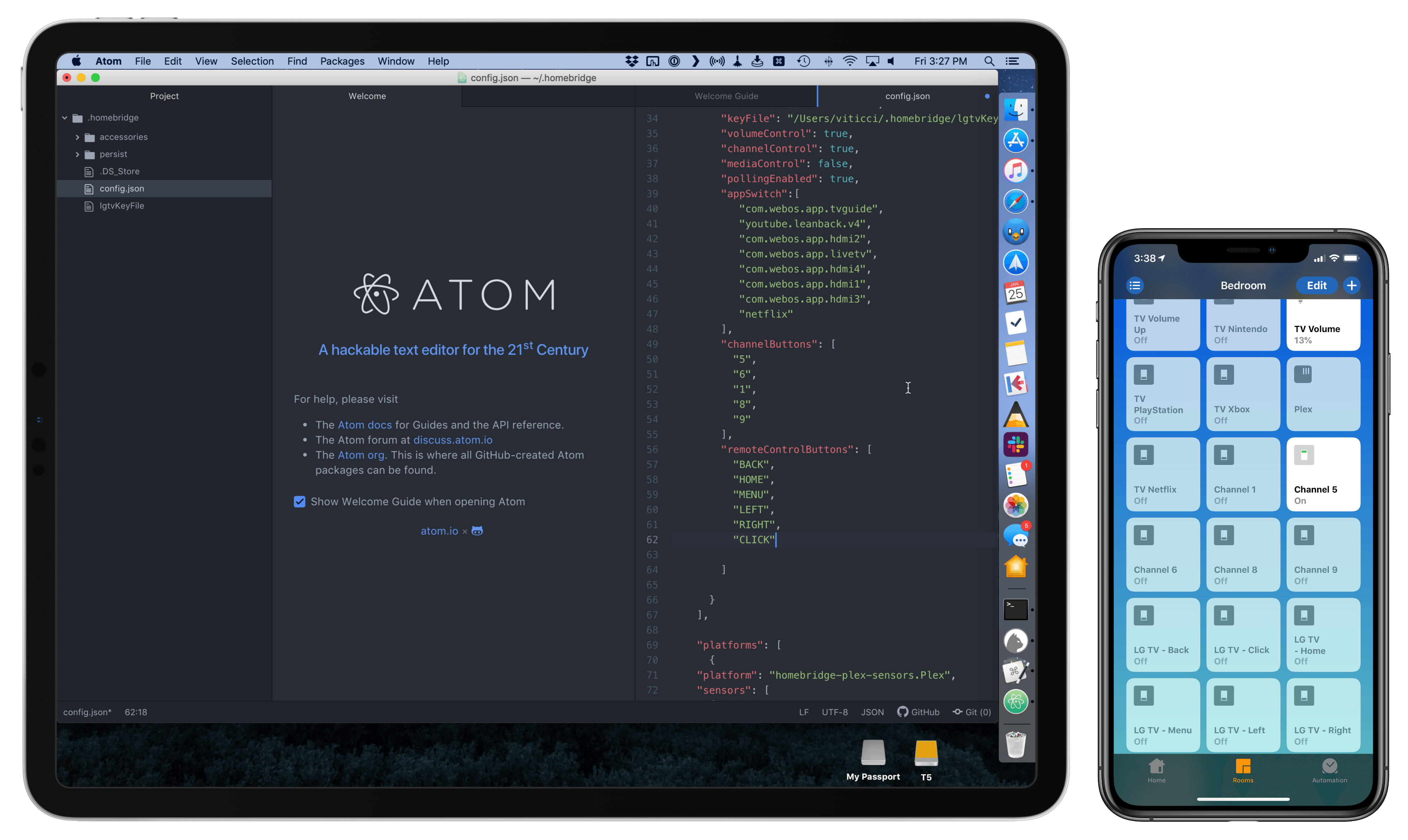
Now, as someone who’s been running homebridge and the homebridge-webos-tv plugin for the past few months (and I promise I will write about this eventually), I’m excited about the idea of having a native interface for controlling my TV from the Home app (and, ideally, Siri too). As you can see, the plugin I’m currently using can only “fake” controls in the Home app by adding switches. It can get…confusing:

Configuring homebridge plugins (left) requires working with a JSON document.

Configuring homebridge plugins (left) requires working with a JSON document.

But it works. I’ve been running homebridge and this plugin without issues for months now, and I’ve gotten so used to asking Siri to change inputs on my TV, I can’t imagine not having these integrations anymore. A recent update to homebridge-webos-tv even added support for individual channel input and more remote control buttons. For this reason, assuming that the folks at LG don’t change their mind and ship a HomeKit software update for older TV sets, I think I’m going to experiment with a dual setup for webOS TV support in HomeKit: some controls based on the official HomeKit API, and others provided as custom switches – both based on homebridge plugins. But that’s a story for another time.

Permalink

Connected, Episode 227: Caveats Ruin People

After Stephen ruins the intro, Federico finally gets around to talking about his second iPad Pro and Myke shares a secret.

On this week’s episode of Connected, I finally addressed why I bought a second (11”) iPad Pro last December. You can listen here.

Sponsored by:

  • TextExpander, from Smile: Multiply your team’s productivity.
  • Pingdom: Start monitoring your websites and servers today. Use offer code CONNECTED to get 30% off.
  • Luna Display: The only hardware solution that turns your iPad into a wireless display for your Mac. Use promo code CONNECTED at checkout for 10% off.
Permalink

AppStories, Episode 95 – Interview: Directing Animated Feature Films Using an iPad Pro with Yarrow Cheney

On this week’s episode of AppStories we interview Yarrow Cheney, whose animated feature film credits include directing The Grinch and The Secret Life of Pets and production design for the Despicable Me movies and The Lorax, about the role the iPad plays in his filmmaking process.

Sponsored by:

  • Toggl – Hassle-free time tracking, wherever you are.
  • Linode – High-performance SSD Linux servers for all of your infrastructure needs. Get a $20 credit.

https://www.macstories.net/podcasts/appstories/episodes/95/embed/

Permalink

Tim Cook Calls for US Privacy Regulations in Time Op-Ed

User privacy is one of the social drums Tim Cook has been consistently beating for years now, and today that’s continuing in an even stronger way with a new op-ed by Apple’s CEO published by Time. Cook writes:

I and others are calling on the U.S. Congress to pass comprehensive federal privacy legislation—a landmark package of reforms that protect and empower the consumer. Last year, before a global body of privacy regulators, I laid out four principles that I believe should guide legislation:

First, the right to have personal data minimized. Companies should challenge themselves to strip identifying information from customer data or avoid collecting it in the first place. Second, the right to knowledge—to know what data is being collected and why. Third, the right to access. Companies should make it easy for you to access, correct and delete your personal data. And fourth, the right to data security, without which trust is impossible.

In addition to outlining these four principles, Cook gets more specific in calling for a particular organization to be formed that counteracts a “shadow economy that’s largely unchecked” whereby people’s data is sold by retailers and other companies without express knowledge or consent. He writes:

Meaningful, comprehensive federal privacy legislation should not only aim to put consumers in control of their data, it should also shine a light on actors trafficking in your data behind the scenes. Some state laws are looking to accomplish just that, but right now there is no federal standard protecting Americans from these practices. That’s why we believe the Federal Trade Commission should establish a data-broker clearinghouse, requiring all data brokers to register, enabling consumers to track the transactions that have bundled and sold their data from place to place, and giving users the power to delete their data on demand, freely, easily and online, once and for all.

Apple has established a consistent practice of standing for user privacy, partly owing to its highly publicized standoff with the FBI in 2016, but it seems that in 2019 the company wants that value to be even more pronounced. First there was the unavoidable banner at CES touting the iPhone’s privacy advantage, and now today’s op-ed. It will be interesting to see if any of the ideas Cook pushes bring about productive discussion on this issue, leading to practical change in US policy.

Permalink