
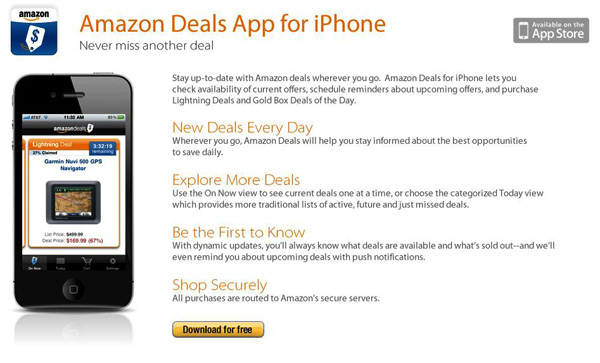
“Never miss another deal.” Amazon has released an official iOS app for their deals called Amazon Deals. I think it’s about time, there are tons of crazy deals that we miss every day until someone tweets about it. No more! The app lets you check availability of current offers, future offers and one you may have just missed (so you can cry over it). You can also schedule reminders for future offers and also purchase from within the app after signing into your account in the Settings tab. You can also share Deals from within the app. Click the ‘share’ icon in the upper right of the detail screen and send via E-mail, Twitter, Facebook or even SMS. Read more
Posts in iPhone
Amazon Releases Deals App for iPhone

Access Extra Content and Perks
Founded in 2015, Club MacStories has delivered exclusive content every week for nearly a decade.
What started with weekly and monthly email newsletters has blossomed into a family of memberships designed for every MacStories fan.
Club MacStories: Weekly and monthly newsletters via email and the web that are brimming with apps, tips, automation workflows, longform writing, early access to the MacStories Unwind podcast, periodic giveaways, and more;
Club MacStories+: Everything that Club MacStories offers, plus an active Discord community, advanced search and custom RSS features for exploring the Club’s entire back catalog, bonus columns, and dozens of app discounts;
Club Premier: All of the above and AppStories+, an extended version of our flagship podcast that’s delivered early, ad-free, and in high-bitrate audio.
#MacStoriesDeals - Tuesday

So are you loyal AT&T iPhone people switching over to Verizon after the big announcement today? I really doubt I leave AT&T. Anyway, here’s today’s deals on iOS & Mac (Store) apps that are on sale for a limited time, so get ‘em while they’re hot! Read more
Access Extra Content and Perks
Founded in 2015, Club MacStories has delivered exclusive content every week for nearly a decade.
What started with weekly and monthly email newsletters has blossomed into a family of memberships designed for every MacStories fan.
Club MacStories: Weekly and monthly newsletters via email and the web that are brimming with apps, tips, automation workflows, longform writing, early access to the MacStories Unwind podcast, periodic giveaways, and more;
Club MacStories+: Everything that Club MacStories offers, plus an active Discord community, advanced search and custom RSS features for exploring the Club’s entire back catalog, bonus columns, and dozens of app discounts;
Club Premier: All of the above and AppStories+, an extended version of our flagship podcast that’s delivered early, ad-free, and in high-bitrate audio.
Official PlayStation App for iPhone Now Available

Announced by Sony in December, the official PlayStation app for iPhone is now available in the App Store. The app is propagating in iTunes as we speak, so if you can’t download it just yet – make sure to try again in a few hours. In the meantime, the app is now live in the French store.
The PlayStation app doesn’t let you play games, but it allows you to check on the PlayStation Network by signing in with your PSN account. In this first version of the app you can read your friends’ status updates and browse the games they own, check on the trophies you have collected and read the latest entries from the official PlayStation Blog. Last, you can also read the latest news of games available for all PlayStation devices directly in-app. The interface seems to be quite clean and polished, although far from being native on the iOS platform.
PlayStation app for iPhone is available for free here. Check out the full description below. Read more
Access Extra Content and Perks
Founded in 2015, Club MacStories has delivered exclusive content every week for nearly a decade.
What started with weekly and monthly email newsletters has blossomed into a family of memberships designed for every MacStories fan.
Club MacStories: Weekly and monthly newsletters via email and the web that are brimming with apps, tips, automation workflows, longform writing, early access to the MacStories Unwind podcast, periodic giveaways, and more;
Club MacStories+: Everything that Club MacStories offers, plus an active Discord community, advanced search and custom RSS features for exploring the Club’s entire back catalog, bonus columns, and dozens of app discounts;
Club Premier: All of the above and AppStories+, an extended version of our flagship podcast that’s delivered early, ad-free, and in high-bitrate audio.
iGotYa Takes Photos and GPS Location Of The Guy Who Stole Your iPhone
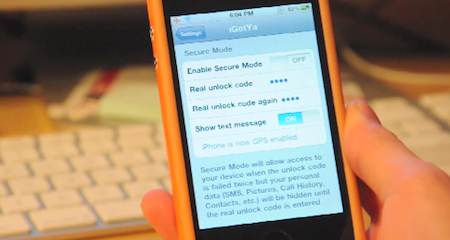
The iGotYa app is one those utilities you don’t know you need until you try it and see its potential. Available in the Cydia Store at $5.99 (Big Boss repo), iGotYa can take a picture of whoever tries to unlock your phone with the wrong passcode, using the front facing camera. We all want to keep an eye on our iPhones, right? iGotYa, combined with Apple’s Find My iPhone remote functionalities, is the ultimate tool to make sure you know who’s trying to mess with your iPhone.
The app requires a front facing camera, meaning that it will only run on the iPhone 4 and iPod touch 4th gen. As a picture is taken in the lockscreen, iGotYa can send it via WiFi or 3G to a specified email address, also attaching GPS information in the email message. So if you ended up losing your iPhone because of someone you took it, not only you’ll know where he is, you’ll also get to see his face. And he won’t know while attempting to unlock the stolen phone.
iGotYa will cost you 6 buck, but it’s that sort of investment you will not regret. Check out the demo video below. [Gizmodo via Redmond Pie] Read more
Access Extra Content and Perks
Founded in 2015, Club MacStories has delivered exclusive content every week for nearly a decade.
What started with weekly and monthly email newsletters has blossomed into a family of memberships designed for every MacStories fan.
Club MacStories: Weekly and monthly newsletters via email and the web that are brimming with apps, tips, automation workflows, longform writing, early access to the MacStories Unwind podcast, periodic giveaways, and more;
Club MacStories+: Everything that Club MacStories offers, plus an active Discord community, advanced search and custom RSS features for exploring the Club’s entire back catalog, bonus columns, and dozens of app discounts;
Club Premier: All of the above and AppStories+, an extended version of our flagship podcast that’s delivered early, ad-free, and in high-bitrate audio.
Kindle iOS App Updated, Lets You Add Your Own Files
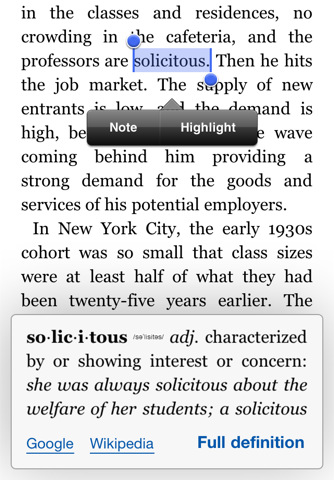
An important update to the official Kindle app for iOS (free and universal for iPhone and iPad) was released earlier today. Version 2.5 of the app adds much requested features that should satisfy all the Kindle users on the iOS platform that have been asking for functionalities such as proper multitasking support and access to the free Internet archive of Project Gutenberg books.
Kindle 2.5 for iOS, in fact, can now download books in the background leveraging iOS 4 APIs and supports thousands of ebooks downloaded through Project Gutenberg. Most of all, the app can now load files from any other iOS app thanks to the “Open in” feature seen in Safari, Mail and any other iPhone or iPad app that can forward files to other applications that can open a specific file type. This means you can now add your own files to the Kindle app, or even better drag & drop files into it using iTunes’ File Sharing. To add books in this way, simply connect your device to iTunes, head over the Apps tab in the device’s info screen, and drag files onto the Kindle section right below the iOS Springboard preview window. The bad news is that, like the actual Kindle, epub books don’t seem to be supported at this time.
Other new features and improvements in this update include bug fixes, a new book indicator and better image zooming. You can get Kindle for iOS for free here.
Access Extra Content and Perks
Founded in 2015, Club MacStories has delivered exclusive content every week for nearly a decade.
What started with weekly and monthly email newsletters has blossomed into a family of memberships designed for every MacStories fan.
Club MacStories: Weekly and monthly newsletters via email and the web that are brimming with apps, tips, automation workflows, longform writing, early access to the MacStories Unwind podcast, periodic giveaways, and more;
Club MacStories+: Everything that Club MacStories offers, plus an active Discord community, advanced search and custom RSS features for exploring the Club’s entire back catalog, bonus columns, and dozens of app discounts;
Club Premier: All of the above and AppStories+, an extended version of our flagship podcast that’s delivered early, ad-free, and in high-bitrate audio.
Who Wouldn’t Want To Perch This Wireless Speaker?

Interested in a two-piece wireless speaker and charger that looks like half a zen-birdhouse? Check out the Perch Mobile Wireless Speaker from Quirky. A two piece design elegantly flips around so you can stand it up, lay ‘er down, and stream your music through bluetooth through the little guy. It includes an AC Charger and allows you to dock, erm, Perch your iPhone for a makeshift bed stand, perfect for something like Rise if you’re not into the default alarm clock. It’s also compatible with Androids, Windows phones, and Blackberries, but face it – it doesn’t look as cool without an iPhone nested in its maw. It’s kind of pricey at $179.99 during pre-order (it’ll be $199.99 once it launches), and we think for the commitments needed it’d have been better left to Kickstarter.
Access Extra Content and Perks
Founded in 2015, Club MacStories has delivered exclusive content every week for nearly a decade.
What started with weekly and monthly email newsletters has blossomed into a family of memberships designed for every MacStories fan.
Club MacStories: Weekly and monthly newsletters via email and the web that are brimming with apps, tips, automation workflows, longform writing, early access to the MacStories Unwind podcast, periodic giveaways, and more;
Club MacStories+: Everything that Club MacStories offers, plus an active Discord community, advanced search and custom RSS features for exploring the Club’s entire back catalog, bonus columns, and dozens of app discounts;
Club Premier: All of the above and AppStories+, an extended version of our flagship podcast that’s delivered early, ad-free, and in high-bitrate audio.
This Lego iPhone Case Won’t Brick Your Phone

Of all the iPhone 4 cases I’ve seen in these past months, the SmallWorks BrickCase has to be the most original, if not craziest, one. In true old-style fashion, the BrickCase is a Lego-compatible iPhone case that, according to Daring Fireball’s John Gruber, feels good in your hands and also provides good entertainment for the most loyal Lego fan.
The cases are available on Amazon in White, Black and Clear versions at $19.99. If you’re a Lego guy, I guess you know what you have to do.
Access Extra Content and Perks
Founded in 2015, Club MacStories has delivered exclusive content every week for nearly a decade.
What started with weekly and monthly email newsletters has blossomed into a family of memberships designed for every MacStories fan.
Club MacStories: Weekly and monthly newsletters via email and the web that are brimming with apps, tips, automation workflows, longform writing, early access to the MacStories Unwind podcast, periodic giveaways, and more;
Club MacStories+: Everything that Club MacStories offers, plus an active Discord community, advanced search and custom RSS features for exploring the Club’s entire back catalog, bonus columns, and dozens of app discounts;
Club Premier: All of the above and AppStories+, an extended version of our flagship podcast that’s delivered early, ad-free, and in high-bitrate audio.
#MacStoriesDeals - Monday

Is the Mac App Store great or what? Here’s today’s deals on iOS & Mac (Store) apps that are on sale for a limited time, so get ‘em while they’re hot! Read more
Access Extra Content and Perks
Founded in 2015, Club MacStories has delivered exclusive content every week for nearly a decade.
What started with weekly and monthly email newsletters has blossomed into a family of memberships designed for every MacStories fan.
Club MacStories: Weekly and monthly newsletters via email and the web that are brimming with apps, tips, automation workflows, longform writing, early access to the MacStories Unwind podcast, periodic giveaways, and more;
Club MacStories+: Everything that Club MacStories offers, plus an active Discord community, advanced search and custom RSS features for exploring the Club’s entire back catalog, bonus columns, and dozens of app discounts;
Club Premier: All of the above and AppStories+, an extended version of our flagship podcast that’s delivered early, ad-free, and in high-bitrate audio.
Acclaimed Film Director Creates New Movie with an iPhone

South Korean film director Park Chan-wook has a new favorite gadget: an iPhone. The director of popular movies such as “Old Boy” and “Thirst”, in fact, managed to realize his latest short film using only an iPhone. The fantasy-horror movie, called “Paranmanjang”, was shot with an iPhone 4 and has a budget of around $130,000. It will debut in South Korean theaters on January 27.
Park Chan-wook says realizing the 30-minute with Apple’s smartphone was easy and fun, and minor edits were required in the post-processing stage. The only downside to the experiment is a little shakiness in the first minutes of footage – although this “real life” feeling of the film should help as far as “horror” and anxiety are concerned.
The short is a fantastical tale that begins with a middle-aged man fishing one afternoon and then, hours later at night, catches the body of a woman. The panicked man tries to undo the intertwined fishing line, but he gets more and more entangled. He faints, then wakes up to find himself in the white clothes that the woman was wearing. The movie’s point of view then shifts to the woman and it becomes a tale of life and death from a traditional Korean point of view.
Intriguing (and kind of insane) plot aside, it’s exciting to see filmmakers and directors exploring new ways to produce content using Apple devices. We know the iPad is already popular among directors at Hollywood, and we look forward to seein its little brother, the iPhone, in the credits of more movies and short films in the next months. [9to5mac via Wall Street Journal via Yahoo]
Access Extra Content and Perks
Founded in 2015, Club MacStories has delivered exclusive content every week for nearly a decade.
What started with weekly and monthly email newsletters has blossomed into a family of memberships designed for every MacStories fan.
Club MacStories: Weekly and monthly newsletters via email and the web that are brimming with apps, tips, automation workflows, longform writing, early access to the MacStories Unwind podcast, periodic giveaways, and more;
Club MacStories+: Everything that Club MacStories offers, plus an active Discord community, advanced search and custom RSS features for exploring the Club’s entire back catalog, bonus columns, and dozens of app discounts;
Club Premier: All of the above and AppStories+, an extended version of our flagship podcast that’s delivered early, ad-free, and in high-bitrate audio.