

Here are today’s @MacStoriesDeals on iOS, Mac, and Mac App Store apps that are on sale for a limited time, so get them before they end!
Posts in iPad
#MacStoriesDeals - Friday

Access Extra Content and Perks
Founded in 2015, Club MacStories has delivered exclusive content every week for nearly a decade.
What started with weekly and monthly email newsletters has blossomed into a family of memberships designed for every MacStories fan.
Club MacStories: Weekly and monthly newsletters via email and the web that are brimming with apps, tips, automation workflows, longform writing, early access to the MacStories Unwind podcast, periodic giveaways, and more;
Club MacStories+: Everything that Club MacStories offers, plus an active Discord community, advanced search and custom RSS features for exploring the Club’s entire back catalog, bonus columns, and dozens of app discounts;
Club Premier: All of the above and AppStories+, an extended version of our flagship podcast that’s delivered early, ad-free, and in high-bitrate audio.
#MacStoriesDeals - Thursday

Here are today’s @MacStoriesDeals on iOS, Mac, and Mac App Store apps that are on sale for a limited time, so get them before they end!
Access Extra Content and Perks
Founded in 2015, Club MacStories has delivered exclusive content every week for nearly a decade.
What started with weekly and monthly email newsletters has blossomed into a family of memberships designed for every MacStories fan.
Club MacStories: Weekly and monthly newsletters via email and the web that are brimming with apps, tips, automation workflows, longform writing, early access to the MacStories Unwind podcast, periodic giveaways, and more;
Club MacStories+: Everything that Club MacStories offers, plus an active Discord community, advanced search and custom RSS features for exploring the Club’s entire back catalog, bonus columns, and dozens of app discounts;
Club Premier: All of the above and AppStories+, an extended version of our flagship podcast that’s delivered early, ad-free, and in high-bitrate audio.
Will Older Devices Get All of iOS 5’s Features?

It doesn’t come as a surprise when Apple’s latest and greatest software updates end up killing off compatibility with older devices, but the intrigue here is that something as recent as the original iPad may not be included in iOS 5’s full feature set. For example, developers have access to enabling special multi-touch functions for multitasking between apps, launching the multitasking bar, and closing apps with a four finger pinch in iOS 4.3. These functions, that work well on any enabled iPad or iPad 2, may not be included for use on the original iPad. According to Appadvice the iPhone 3GS doesn’t have access to many of the photo features available on the iPhone 4.
Perhaps these are temporary bugs, or Apple is really looking for reasons for people to buy an iPad 2 when iOS 5 drops over the less expensive iPad elsewhere. Bryan M. Wolfe from Appadvice writes,
We’ve received numerous reports the upcoming gesturing feature in iOS 5 will not work on the original iPad. If proven correct, this would be the first time the first-generation iPad was denied a key feature besides those that require the iPad 2′s camera.
The iPad’s touchscreen is exceptional, and there’s no reason why Apple wouldn’t (or shouldn’t) enable these features. If Apple does remove any features, I’d bet the iPhone 3GS and the 3rd generation iPod touch would be the most likely to be at risk.
[Appadvice via Cult of Mac]
Access Extra Content and Perks
Founded in 2015, Club MacStories has delivered exclusive content every week for nearly a decade.
What started with weekly and monthly email newsletters has blossomed into a family of memberships designed for every MacStories fan.
Club MacStories: Weekly and monthly newsletters via email and the web that are brimming with apps, tips, automation workflows, longform writing, early access to the MacStories Unwind podcast, periodic giveaways, and more;
Club MacStories+: Everything that Club MacStories offers, plus an active Discord community, advanced search and custom RSS features for exploring the Club’s entire back catalog, bonus columns, and dozens of app discounts;
Club Premier: All of the above and AppStories+, an extended version of our flagship podcast that’s delivered early, ad-free, and in high-bitrate audio.
#MacStoriesDeals - Wednesday

Here are today’s @MacStoriesDeals on iOS, Mac, and Mac App Store apps that are on sale for a limited time, so get them before they end!
Access Extra Content and Perks
Founded in 2015, Club MacStories has delivered exclusive content every week for nearly a decade.
What started with weekly and monthly email newsletters has blossomed into a family of memberships designed for every MacStories fan.
Club MacStories: Weekly and monthly newsletters via email and the web that are brimming with apps, tips, automation workflows, longform writing, early access to the MacStories Unwind podcast, periodic giveaways, and more;
Club MacStories+: Everything that Club MacStories offers, plus an active Discord community, advanced search and custom RSS features for exploring the Club’s entire back catalog, bonus columns, and dozens of app discounts;
Club Premier: All of the above and AppStories+, an extended version of our flagship podcast that’s delivered early, ad-free, and in high-bitrate audio.
Introducing Evernote Peek: An App that Helps you Study with Apple’s Smart Cover
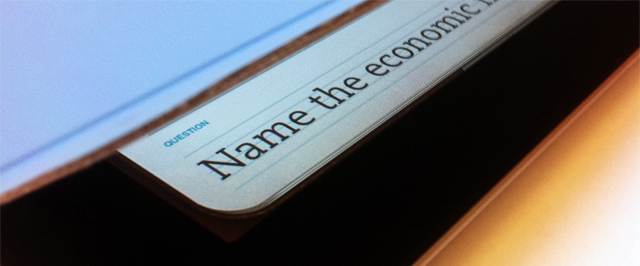
“What’s the best Apple blog on the Internet?” Hopefully “MacStories” is the answer to be revealed by Apple’s Smart Cover, via an app that’s from the same folks who help translate business cards to text and take notes on the fly. Evernote Peek is a brand new app that’s now available for free on the App Store. As a study aid designed specifically around Apple’s Smart Cover, Evernote Peek integrates with your Evernote account: create a new notebook with a subject title, with note titles as the question and note bodies as the answer. Evernote peek is designed to help you strengthen your memory, retain information, all while utilizing the best accessory for your iPad. As you answer questions, Evernote Peek will keep score of the questions you got right and wrong, and you can even add in images for visual aids. Since closing the iPad lid will lock the iPad, Evernote recommends the following.
There are two quick iPad adjustments that we recommend. First, turn up your iPad brightness to about 75%. Second, turn off your iPad’s auto-lock. Now, start studying.
While not completely magic, the idea behind Evernote Peek is pretty great. No more holding your hand over a study sheet or wasting index cards – the iPad’s Smart Cover reveals clues then unfolds as you answer the question. Past the break, we have a quick promotional video of Evernote Peek in action – we think it’s pretty great. When you’re done watching the vid, you can download it here.
[TechCrunch via Evernote Blog]
Access Extra Content and Perks
Founded in 2015, Club MacStories has delivered exclusive content every week for nearly a decade.
What started with weekly and monthly email newsletters has blossomed into a family of memberships designed for every MacStories fan.
Club MacStories: Weekly and monthly newsletters via email and the web that are brimming with apps, tips, automation workflows, longform writing, early access to the MacStories Unwind podcast, periodic giveaways, and more;
Club MacStories+: Everything that Club MacStories offers, plus an active Discord community, advanced search and custom RSS features for exploring the Club’s entire back catalog, bonus columns, and dozens of app discounts;
Club Premier: All of the above and AppStories+, an extended version of our flagship podcast that’s delivered early, ad-free, and in high-bitrate audio.
iCloud: Photo Stream
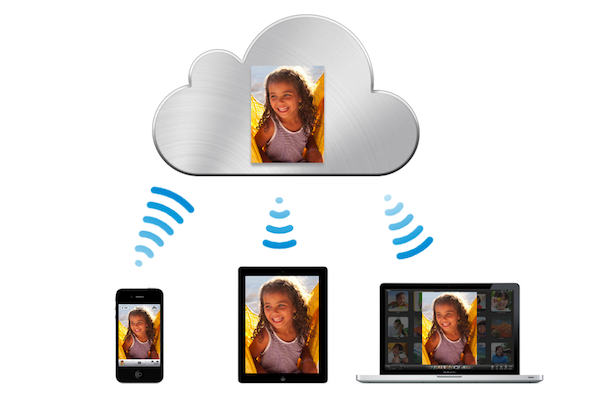
Another cornerstone feature of iCloud that was just unveiled was ‘Photo Stream’ which will bring all your photos to the cloud. It works so that as soon as you take a photo with your iPhone, that photo will instantly be whisked away to the cloud and then pushed back to all of your other devices - whether it be a Mac, iPhone, iPad, Apple TV or even a Windows PC!
How many times have we taken photos on our iPhone and wanted to share them on the iPad. Wouldn’t it be great if they were already there?
Photo Stream is built right into the iOS Photos app so there is “nothing new to learn” and on the Mac it is built right into iPhoto whilst on a PC it integrates with the ‘Pictures’ folder. The Apple TV won’t miss out either, Photo Stream is integrated straight into it.
Each photo will survive on iCloud for 30 days, at which point old photos will no longer be pushed to devices. iOS devices will be able to keep the last 1,000 photos but Macs and PCs will keep all photos.
Access Extra Content and Perks
Founded in 2015, Club MacStories has delivered exclusive content every week for nearly a decade.
What started with weekly and monthly email newsletters has blossomed into a family of memberships designed for every MacStories fan.
Club MacStories: Weekly and monthly newsletters via email and the web that are brimming with apps, tips, automation workflows, longform writing, early access to the MacStories Unwind podcast, periodic giveaways, and more;
Club MacStories+: Everything that Club MacStories offers, plus an active Discord community, advanced search and custom RSS features for exploring the Club’s entire back catalog, bonus columns, and dozens of app discounts;
Club Premier: All of the above and AppStories+, an extended version of our flagship podcast that’s delivered early, ad-free, and in high-bitrate audio.

iOS 5: Newsstand, Subscription Magazines and Newspapers In One Place

New to iOS 5 will be a feature dubbed “Newsstand” which promises to put together all your digital Newspapers and Magazines together in one easy to find place. Scott Forstall, who introduced the feature, said that Magazines from the National Geographic to Vanity Fair to Popular Science will be available whilst Newspapers such as the New York Times and the Daily Telegraph will be available in Newsstand.
Read all about it. All in one place. iOS 5 organizes your magazine and newspaper app subscriptions in Newsstand: a folder that lets you access your favorite publications quickly and easily.
You get the Magazines from the App Store but once added will live in your ‘Newstand’ which lives as an icon on your Homescreen. New issues will be downloaded in the background so that when you pick up “your iPad, the newspaper is ready for you to read it offline”.
Access Extra Content and Perks
Founded in 2015, Club MacStories has delivered exclusive content every week for nearly a decade.
What started with weekly and monthly email newsletters has blossomed into a family of memberships designed for every MacStories fan.
Club MacStories: Weekly and monthly newsletters via email and the web that are brimming with apps, tips, automation workflows, longform writing, early access to the MacStories Unwind podcast, periodic giveaways, and more;
Club MacStories+: Everything that Club MacStories offers, plus an active Discord community, advanced search and custom RSS features for exploring the Club’s entire back catalog, bonus columns, and dozens of app discounts;
Club Premier: All of the above and AppStories+, an extended version of our flagship podcast that’s delivered early, ad-free, and in high-bitrate audio.
iTunes Reveals Potential iOS 5 Feature: “Automatic Download” [Update]
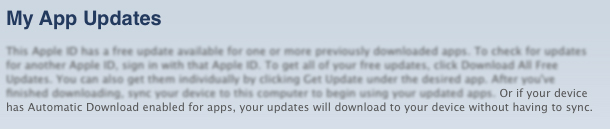
With WWDC right around the corner, many people are getting their scorecards ready. Here’s the center spot for your iOS 5 Bingo card: “Automatic Download” for your iDevices. MacRumors discovered that iTunes is now showing a new sentence on the My App Updates page. It reads, “Or if your device has Automatic Download enabled for apps, your updates will download to your device without having to sync.”
Seems like a very clear indicator that iOS 5 will have the option to automatically grab app updates to your iOS device. Currently, you must either sync or download the updates themselves through the App Store app on iOS.
“Automatic Download” could also suggest that the option could be for more than just iOS apps. People have been wanting a service like this for quite some time and Apple has been rumored to be moving toward the direction of OTA updates and wireless syncing.
Monday, at 10am PDT, we’ll know for sure where the future of iOS (Lion and iCloud) is headed in the coming months. We’ll have live coverage of the event, so please tune in here Monday, June 6 at 9:30 PDT.
Edit by Cody Fink (1:17 AM): Apple was quick about this one. Checking for app updates no longer reveals the message posted above. Instead, Apple has seemed to have temporarily killed the service completely. With my editor and I downloading updates through the App Store on iOS, no updates are available via iTunes update, and the message has been removed.
Access Extra Content and Perks
Founded in 2015, Club MacStories has delivered exclusive content every week for nearly a decade.
What started with weekly and monthly email newsletters has blossomed into a family of memberships designed for every MacStories fan.
Club MacStories: Weekly and monthly newsletters via email and the web that are brimming with apps, tips, automation workflows, longform writing, early access to the MacStories Unwind podcast, periodic giveaways, and more;
Club MacStories+: Everything that Club MacStories offers, plus an active Discord community, advanced search and custom RSS features for exploring the Club’s entire back catalog, bonus columns, and dozens of app discounts;
Club Premier: All of the above and AppStories+, an extended version of our flagship podcast that’s delivered early, ad-free, and in high-bitrate audio.