

DoublePane is an app for those maniacs who like to stay on the keyboard, but want complete control over window positions on their Mac. Similar to what you’d get on a Windows 7 machine, you can replicate the Snap functionality with a few keystrokes by snapping windows left or right, and make them fullscreen if you need to utilize the app’s full real-estate. The latest edition of DoublePane allows global shortcuts for every action, and will now restore the window’s original position before you activated the snap. It’s a great menubar utility (especially if you want to keep a web browser and a word processor open for research), and only costs $2.99 in the Mac App Store. The latest features in DoublePane vastly improve the whole snapping experience, and we want to give away ten copies so you have further control over the desktop space on your Mac. Giveaway info and rules can be had after the break.
Posts in giveaway
Giveaway: Ten Copies of DoublePane for Mac Up for Grabs

Access Extra Content and Perks
Founded in 2015, Club MacStories has delivered exclusive content every week for nearly a decade.
What started with weekly and monthly email newsletters has blossomed into a family of memberships designed for every MacStories fan.
Club MacStories: Weekly and monthly newsletters via email and the web that are brimming with apps, tips, automation workflows, longform writing, early access to the MacStories Unwind podcast, periodic giveaways, and more;
Club MacStories+: Everything that Club MacStories offers, plus an active Discord community, advanced search and custom RSS features for exploring the Club’s entire back catalog, bonus columns, and dozens of app discounts;
Club Premier: All of the above and AppStories+, an extended version of our flagship podcast that’s delivered early, ad-free, and in high-bitrate audio.
Keep Your Files Safe! Two Copies Of Disk Drill Pro Up For Grabs
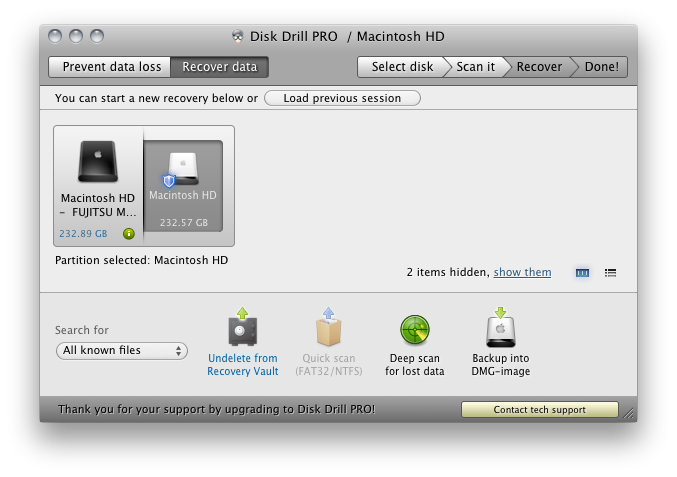
Your Mac can be kind of a jerk sometimes ya know? I mean, it’s totally not your fault that you accidentally dropped that school report in the bucket then emptied the trash the day before it was due. But not to fear: Disk Drill for the Mac knows right where’s it been marked for deletion, and yanks it right from our hard drive (without boring any holes). And if you’re just buying Disk Drill, a deep scan should uncover just what you’re looking for. You need Disk Drill as assurance against unfortunate mishaps, lost files, and damaging deletions. Not only will Disk Drill protect your home folder, but it’ll keep an eye on your hard drive’s health so you’ll never have to worry about a dying disk. And if all goes haywire: just back up your documents to a disk image! It’s that simple, and Disk Drill comes in free and pro versions so you can decide what’s right for you. Super easy to use, we’re giving away two licenses to a couple lucky readers.
Access Extra Content and Perks
Founded in 2015, Club MacStories has delivered exclusive content every week for nearly a decade.
What started with weekly and monthly email newsletters has blossomed into a family of memberships designed for every MacStories fan.
Club MacStories: Weekly and monthly newsletters via email and the web that are brimming with apps, tips, automation workflows, longform writing, early access to the MacStories Unwind podcast, periodic giveaways, and more;
Club MacStories+: Everything that Club MacStories offers, plus an active Discord community, advanced search and custom RSS features for exploring the Club’s entire back catalog, bonus columns, and dozens of app discounts;
Club Premier: All of the above and AppStories+, an extended version of our flagship podcast that’s delivered early, ad-free, and in high-bitrate audio.
The DaisyDisk 2 Developer Giveaway
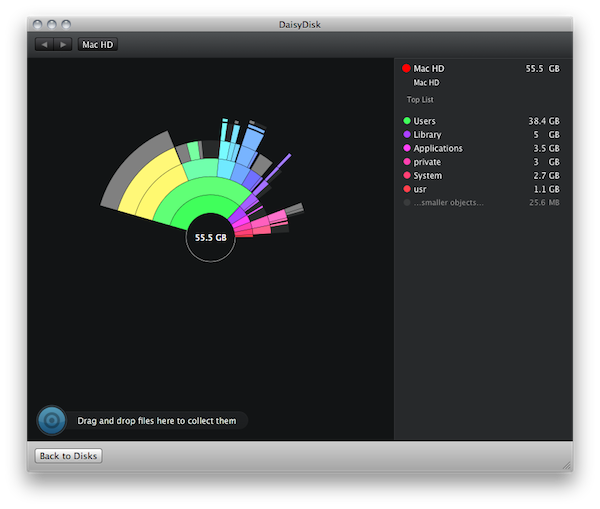
The DaisyDisk Team recently launched DaisyDisk 2, a fantastic visualization tool that’s beautifully designed to help find and free clutter on clogged hard drives. With the UI completely rewritten in Core Animation, tweaks were made and features were installed to turn DaisyDisk from a file scanning machine into a search and destroy monster! Maybe monster isn’t the right word for the kind of elegance DaisyDisk entails, but have you ever seen file scanning as pretty as this? You scan multiple hard disks at once, pinpoint the source of wasted storage space, and remove crud all from the same interface. Managing your filesystem shouldn’t be a priority, but it should be intuitive (and more importantly), useful and fun when it comes to doing the dirty work. The fellas behind this great app sell DaisyDisk for $19.99 with a trail on the web and in the Mac App Store, and you can grab yourself a trial straight from the front page.
So about that giveaway… The DaisyDisk Team wanted to do something very special for our readers consisting of budding developers, designers, and software gurus who aim to create fantastic software for desktops and mobile devices. We’re giving away $500 worth of books open to all of our international readers in the quest for knowledge and further learning.
Access Extra Content and Perks
Founded in 2015, Club MacStories has delivered exclusive content every week for nearly a decade.
What started with weekly and monthly email newsletters has blossomed into a family of memberships designed for every MacStories fan.
Club MacStories: Weekly and monthly newsletters via email and the web that are brimming with apps, tips, automation workflows, longform writing, early access to the MacStories Unwind podcast, periodic giveaways, and more;
Club MacStories+: Everything that Club MacStories offers, plus an active Discord community, advanced search and custom RSS features for exploring the Club’s entire back catalog, bonus columns, and dozens of app discounts;
Club Premier: All of the above and AppStories+, an extended version of our flagship podcast that’s delivered early, ad-free, and in high-bitrate audio.
Giveaway: Mix Music While Mobile With djay For iPhone or iPod touch
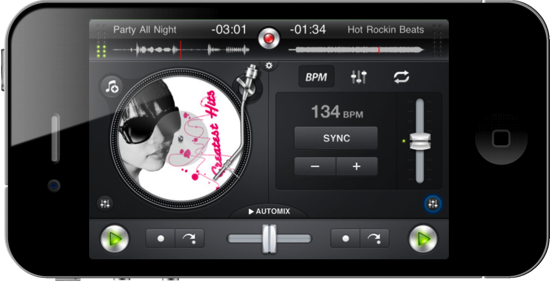
What would you spin with mobile DJ software that integrates directly with your iPhone or iPod music library? Scratch vinyls and interleave music with djay, your personal pocket mixer which loops tracks, fades music, and records live performance right from the palm of your hand. With nothing but a thumb or a free finger, you have precise controls over all of your music thanks to landscape and portrait orientation toggles which give you unhindered access to EQ and Automix controls. Let djay take over your playlist or pre-cue tracks thanks to the polished interface, scrub tracks, and pipe your tunes over Airplay for the ultimate in wireless beats. For only $9.99 in the App Store, it’s like having your own personal studio right in your pocket. Don’t forget about the iPad version, perfect your latest iPad 2 at only $19.99. You can also taste tracks with the Mac thanks to the version found in the Mac App Store, which can be accompanied by a wireless remote for BBQ and scratch synching. We’ve taken a look at the iPad and iPhone versions of djay previously, and we guys could get your groove on with the iPhone version. Past the break, we’re giving away two copies so you can jam wherever your travels take you.
Access Extra Content and Perks
Founded in 2015, Club MacStories has delivered exclusive content every week for nearly a decade.
What started with weekly and monthly email newsletters has blossomed into a family of memberships designed for every MacStories fan.
Club MacStories: Weekly and monthly newsletters via email and the web that are brimming with apps, tips, automation workflows, longform writing, early access to the MacStories Unwind podcast, periodic giveaways, and more;
Club MacStories+: Everything that Club MacStories offers, plus an active Discord community, advanced search and custom RSS features for exploring the Club’s entire back catalog, bonus columns, and dozens of app discounts;
Club Premier: All of the above and AppStories+, an extended version of our flagship podcast that’s delivered early, ad-free, and in high-bitrate audio.
Giveaway: iPad 2 or iPhone 4, QuickShot Is The Camera App Integrated With Dropbox
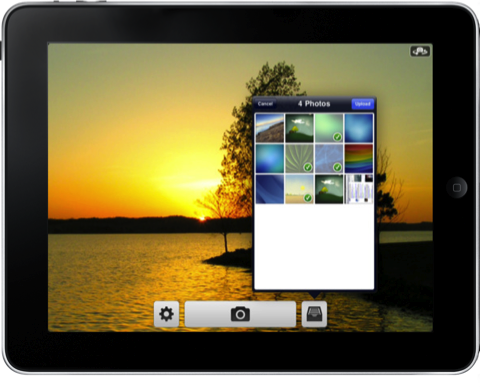
QuickShot is the camera app Apple would make if your photo library existed in Dropbox and not iPhoto. It’s designed to be simple and pleasant to use, working in the background to upload photos as you attend to other tasks and will import old favorites from your Camera Roll so they’re shared to the cloud as well. Configure your iPhone’s camera flash, enable geotagging, set focus and exposure, then snap pictures from the front or rear facing camera for scenery or photo-booth style pics. Right from your camera controls, you see your uploads with the tap of a button, and send your photos off to custom locations for sharing. Federico has taken a look at both the iPhone and iPad versions of QuickShot (and it’s all one universal app), and while you may be familiar with its photo snapping abilities, you may wondering about video. To be implemented soon, you’ll be able to record video from your iPad 2 or iPhone 4 and upload the raw file just as you do with photos. HUGE! Whether you’re working in the field or sharing photos on vacation instantly with friends and family, everyone could use a dose of QuickShot for iOS. It’s only $0.99 in the App Store if you can’t wait, but you might want to stick around. We’re going to run a relatively short giveaway so you too can have a wireless library, and you’ll want to hurry past the break to join in.
Access Extra Content and Perks
Founded in 2015, Club MacStories has delivered exclusive content every week for nearly a decade.
What started with weekly and monthly email newsletters has blossomed into a family of memberships designed for every MacStories fan.
Club MacStories: Weekly and monthly newsletters via email and the web that are brimming with apps, tips, automation workflows, longform writing, early access to the MacStories Unwind podcast, periodic giveaways, and more;
Club MacStories+: Everything that Club MacStories offers, plus an active Discord community, advanced search and custom RSS features for exploring the Club’s entire back catalog, bonus columns, and dozens of app discounts;
Club Premier: All of the above and AppStories+, an extended version of our flagship podcast that’s delivered early, ad-free, and in high-bitrate audio.
Courier Updated With Facebook Support: We’re Giving Away 3 Copies
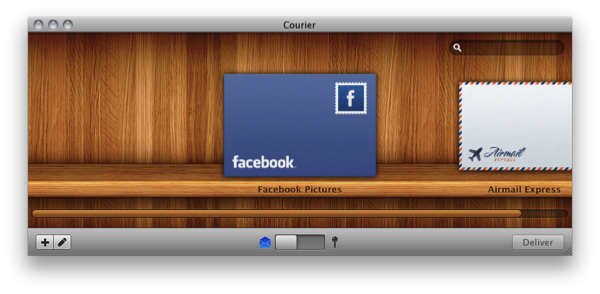
Courier is a smashing Mac app to have if you’re uploading files to Flickr, Youtube, or MobileMe, and some big changes have come along recently to those begging for Facebook support. With the latest update to version 1.1.2, Courier is bringing the ability to upload pictures to your Facebook Pages, and video to your Facebook accounts. With a simple drag and drop after adding your Facebook account, you can deliver files over the Internet in style. Right from the envelope’s stamp, you can easily select which album you’d like to upload photos to, then drag in a bundle of photos right before delivering them straight to your Facebook profile. Courier keeps getting better and better, and it was the first app I purchased on the Mac App Store. For $9.99, Courier is a beautiful app that allows you upload media to your favorite websites. To celebrate the latest inclusion for Facebook albums and video, we’re giving away three copies – just follow the rules below for your chance to win.
Access Extra Content and Perks
Founded in 2015, Club MacStories has delivered exclusive content every week for nearly a decade.
What started with weekly and monthly email newsletters has blossomed into a family of memberships designed for every MacStories fan.
Club MacStories: Weekly and monthly newsletters via email and the web that are brimming with apps, tips, automation workflows, longform writing, early access to the MacStories Unwind podcast, periodic giveaways, and more;
Club MacStories+: Everything that Club MacStories offers, plus an active Discord community, advanced search and custom RSS features for exploring the Club’s entire back catalog, bonus columns, and dozens of app discounts;
Club Premier: All of the above and AppStories+, an extended version of our flagship podcast that’s delivered early, ad-free, and in high-bitrate audio.
We Have Five Copies Of Zen Viewer HD For iPad Up For Grabs
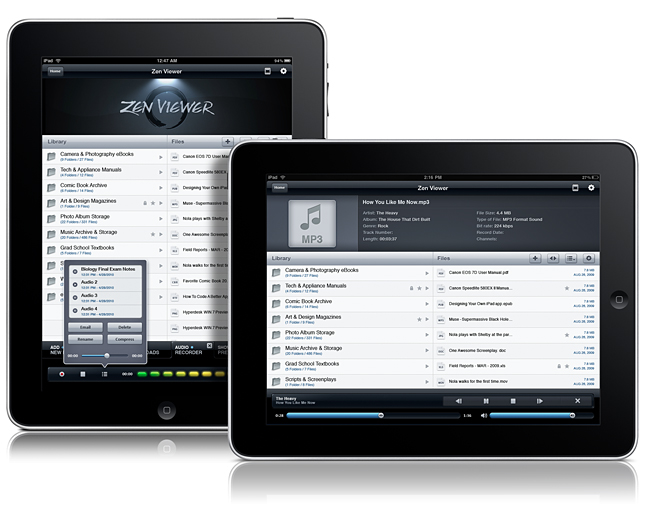
File managers on the iPad need not be boring nor unintuitive. Zen Viewer HD for iPad wrangles documents and media into a stylish file viewer that plays back audio, movies, pictures, PDFs, and gives you the ability to organize documents. You also have the cloud at your fingertips, thanks to Dropbox, Box.net, and MobileMe integration so you can pull files from just about anywhere. Record audio on the fly, manage files and folders (easily get files into Zen Viewer HD by drag & drop while in Manage Mode), and compress & decompress files to save storage space on your iPad. If you want to carry your Windows or Mac files around with you, Zen Viewer shouldn’t disappoint. Currently on sale for $2.99 in the App Store (with some additional artist themes costing $.99 in app), who says managing files shouldn’t be both easy and beautiful? Your new iPad should have a proper system in place for handling all of the documents stored on your home system, so we’re giving away five copies past the break.
Access Extra Content and Perks
Founded in 2015, Club MacStories has delivered exclusive content every week for nearly a decade.
What started with weekly and monthly email newsletters has blossomed into a family of memberships designed for every MacStories fan.
Club MacStories: Weekly and monthly newsletters via email and the web that are brimming with apps, tips, automation workflows, longform writing, early access to the MacStories Unwind podcast, periodic giveaways, and more;
Club MacStories+: Everything that Club MacStories offers, plus an active Discord community, advanced search and custom RSS features for exploring the Club’s entire back catalog, bonus columns, and dozens of app discounts;
Club Premier: All of the above and AppStories+, an extended version of our flagship podcast that’s delivered early, ad-free, and in high-bitrate audio.
DropBook Integrates Facebook With Your Desktop: Review & Giveaway

DropBook is a little more difficult to show off than most apps in part because of its deep integration with your desktop and menubar. It isn’t an app that traditionally sits in your Object Dock, rather, you get a translucent Facebook icon that sits in the lower left corner of your screen which you can drag pictures and favicons/URLs into to instantly share content to your wall. As content is dragged into the Facebook icon, a window appears that shows you the attachment or link to your content. If it’s a picture, you can send it to your album of choice including your profile pictures. On your Mac, a lot of content is bound to be bundled in iPhoto, and you can drag multiple selected photos for a multi-upload. You currently can’t add tags to photos, which might be a deal-breaker for those uploading lots of pictures.
Access Extra Content and Perks
Founded in 2015, Club MacStories has delivered exclusive content every week for nearly a decade.
What started with weekly and monthly email newsletters has blossomed into a family of memberships designed for every MacStories fan.
Club MacStories: Weekly and monthly newsletters via email and the web that are brimming with apps, tips, automation workflows, longform writing, early access to the MacStories Unwind podcast, periodic giveaways, and more;
Club MacStories+: Everything that Club MacStories offers, plus an active Discord community, advanced search and custom RSS features for exploring the Club’s entire back catalog, bonus columns, and dozens of app discounts;
Club Premier: All of the above and AppStories+, an extended version of our flagship podcast that’s delivered early, ad-free, and in high-bitrate audio.
Get Coding For the iPad 2: CodeBox for Mac Review & Giveaway

You’re going to want to create the best apps for the iPad 2, and I bet you have an arsenal of methods and classes that could all use some proper organizing. CodeBox for the Mac wrangles all of your fancy code so you’ll have those App Store winning formulas available right from your menubar.
Access Extra Content and Perks
Founded in 2015, Club MacStories has delivered exclusive content every week for nearly a decade.
What started with weekly and monthly email newsletters has blossomed into a family of memberships designed for every MacStories fan.
Club MacStories: Weekly and monthly newsletters via email and the web that are brimming with apps, tips, automation workflows, longform writing, early access to the MacStories Unwind podcast, periodic giveaways, and more;
Club MacStories+: Everything that Club MacStories offers, plus an active Discord community, advanced search and custom RSS features for exploring the Club’s entire back catalog, bonus columns, and dozens of app discounts;
Club Premier: All of the above and AppStories+, an extended version of our flagship podcast that’s delivered early, ad-free, and in high-bitrate audio.