Posts in Featured

The New iPad Keynote Roundup

iLife on 3 3rd Gen iPads

iLife on 3 3rd Gen iPads

Today’s one of those days when I can sit happily at my desk and know that the tech press didn’t win. Despite the mounting evidence, the alleged photographs of bits and pieces, and the last minute rumors of x-chip and y-feature for a gadget we seemingly knew everything about, Apple still managed to pull a fast one that was so obvious it makes even the most certain journalists curse under their breaths. iPad. You should have seen it coming right? Even the iPad 2 was simply referred to as the iPad on its aluminum shell. iPad. Even if it was just a little surprise, it’s a simple reminder that not even those with the best sources can fully beat Apple at its own game. As long as this continues to be true, I’m pretty sure that means Apple is doing alright.

With that said, let’s check out all of the great stuff Apple just launched.

Read more

Access Extra Content and Perks

Founded in 2015, Club MacStories has delivered exclusive content every week for nearly a decade.

What started with weekly and monthly email newsletters has blossomed into a family of memberships designed for every MacStories fan.

Learn more here and from our Club FAQs.

Club MacStories: Weekly and monthly newsletters via email and the web that are brimming with apps, tips, automation workflows, longform writing, early access to the MacStories Unwind podcast, periodic giveaways, and more;

Club MacStories+: Everything that Club MacStories offers, plus an active Discord community, advanced search and custom RSS features for exploring the Club’s entire back catalog, bonus columns, and dozens of app discounts;

Club Premier: All of the above and AppStories+, an extended version of our flagship podcast that’s delivered early, ad-free, and in high-bitrate audio.

Learn more here and from our Club FAQs.


iPhoto for iOS Review

iPhoto for iOS was released on the App Store earlier today, and after an enthusiastic introduction at Apple’s media event in San Francisco, the latest photo editing app from Cupertino received a controversial “welcome” on various blogs and Twitter streams as users got their hands on the all-new interface and photo management system. So what’s all the fuss about iPhoto for iOS?

I have been trying the app on my iPad 2 and iPhone 4S (running iOS 5.1, of course, as it’s a requirement) for the past few hours, and I think that it is very powerful. As I’ll illustrate in a bit, Apple did manage to squeeze some advanced photo editing and refinement technologies in the mobile version of iPhoto, putting it on the same level if not above iPhoto for Mac when it comes to editing, making quick adjustments, and interacting with your photos. Once mastered, the new gestures and tap commands can be quite powerful, although the app can have a steep learning curve. I also believe, however, that iPhoto for iOS suffers from a serious file management problem, in that it’s the best example of iOS’ lack of a centralized file system where apps are able to easily “talk” to each other and share files or modifications to them.

I want to get this out of my system before I get to the (very) good stuff. If you were hoping to see Apple coming up with an effortless way of importing photos avoiding duplicates and manual management, well, I’m sorry, you’ll be disappointed with iPhoto for iOS. This version of iPhoto is yet another data silo that is self-contained, and won’t simply “sync” the changes it makes to photos out of its closed environment.

I say “simply”, because there are exceptions in iPhoto for iOS, as it doesn’t use the exact same system of iPhoto for Mac when it comes to finding photos on your device. Because iOS devices come with a systemwide “Camera Roll” that’s accessible by other apps, Apple engineers had to make sure iPhoto could access such location – and here’s where I started to run into issues. Read more

Access Extra Content and Perks

Founded in 2015, Club MacStories has delivered exclusive content every week for nearly a decade.

What started with weekly and monthly email newsletters has blossomed into a family of memberships designed for every MacStories fan.

Learn more here and from our Club FAQs.

Club MacStories: Weekly and monthly newsletters via email and the web that are brimming with apps, tips, automation workflows, longform writing, early access to the MacStories Unwind podcast, periodic giveaways, and more;

Club MacStories+: Everything that Club MacStories offers, plus an active Discord community, advanced search and custom RSS features for exploring the Club’s entire back catalog, bonus columns, and dozens of app discounts;

Club Premier: All of the above and AppStories+, an extended version of our flagship podcast that’s delivered early, ad-free, and in high-bitrate audio.

Learn more here and from our Club FAQs.


Apple Releases iOS 5.1 [Direct Links, Screenshots]

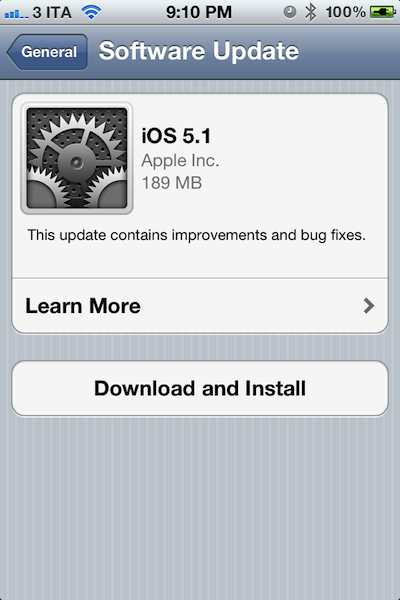
Apple just released the new version of iOS, iOS 5.1, through Software Update. Notable new features in this update include Siri support for Japanese users, a new camera shortcut, and new Camera app for iPad. Full changelog below.

This update contains improvements and bug fixes, including:

  • Japanese language support for Siri (availability may be limited during initial rollout)
  • Photos can now be deleted from Photo Stream
  • Camera shortcut now always visible on Lock Screen for iPhone 4S, iPhone 4, iPhone 3GS and iPod touch (4th generation)
  • Camera face detection now highlights all detected faces
  • Redesigned Camera app for iPad
  • Genius Mixes and Genius playlists for iTunes Match subscribers
  • Audio for TV shows and movies on iPad optimized to sound louder and clearer
  • Podcast controls for playback speed and a 30 second rewind for iPad
  • Updated AT&T network indicator
  • Addresses bugs affecting battery life
  • Fixes an issue that occasionally caused audio to drop for outgoing calls

At the moment of writing this, the update server can’t be reached with iTunes, but the over-the-air update is working through iOS devices. We’ll update this story with more details as we install iOS 5.1 on our devices. Read more

Access Extra Content and Perks

Founded in 2015, Club MacStories has delivered exclusive content every week for nearly a decade.

What started with weekly and monthly email newsletters has blossomed into a family of memberships designed for every MacStories fan.

Learn more here and from our Club FAQs.

Club MacStories: Weekly and monthly newsletters via email and the web that are brimming with apps, tips, automation workflows, longform writing, early access to the MacStories Unwind podcast, periodic giveaways, and more;

Club MacStories+: Everything that Club MacStories offers, plus an active Discord community, advanced search and custom RSS features for exploring the Club’s entire back catalog, bonus columns, and dozens of app discounts;

Club Premier: All of the above and AppStories+, an extended version of our flagship podcast that’s delivered early, ad-free, and in high-bitrate audio.

Learn more here and from our Club FAQs.


Apple Announces iPhoto for iOS: Coming Today at $4.99

At the media event in San Francisco, Apple today announced an all-new version of iPhoto for iPad. Giving users new ways to organize and browse their photos, iPhoto for iPad comes with new effects, new gestures, multi-touch editing, and a new feature to seamlessly share photos between devices.

With a dark interface completely rebuilt for the iPad, iPhoto makes heavy use of gestures to browse and edit photos. With a simple swipe gestures from the side of the screen, users can bring up a list of photos to edit. A double-tap will allow users to automatically find similar pictures, or enter full-screen mode. With support for EXIF information and sharing on various social networks including Flickr, iPhoto for iPad is set to become a great mobile companion to photographers – the app even features an auto-enhance mode to instantly enhance various aspects of an image, as well as other advanced effects. Brushes, white balance, cropping – they can all be accessed through multi-touch gestures and commands in the new iPhoto for iPad.

Aside from skeuomorphic brushes, iPhoto for iPad comes with a new Photo Journals functionality that lets users build “journals” using photos and additional information such as location and weather data using the stored GPS info and various EXIF data from images. Users can move photos around, add captions, choose favorites, and share the results with their friends.

iPhoto is a universal app (runs on the iPhone as well), and it will be released today at $4.99. Check out our complete March 7th coverage here.

[image via]

Access Extra Content and Perks

Founded in 2015, Club MacStories has delivered exclusive content every week for nearly a decade.

What started with weekly and monthly email newsletters has blossomed into a family of memberships designed for every MacStories fan.

Learn more here and from our Club FAQs.

Club MacStories: Weekly and monthly newsletters via email and the web that are brimming with apps, tips, automation workflows, longform writing, early access to the MacStories Unwind podcast, periodic giveaways, and more;

Club MacStories+: Everything that Club MacStories offers, plus an active Discord community, advanced search and custom RSS features for exploring the Club’s entire back catalog, bonus columns, and dozens of app discounts;

Club Premier: All of the above and AppStories+, an extended version of our flagship podcast that’s delivered early, ad-free, and in high-bitrate audio.

Learn more here and from our Club FAQs.


This Is The New iPad: Our Complete Overview

Rumored for the past two years, the new iPad featuring a higher resolution Retina display is finally here, and it’s simply called “iPad “. Announced at Apple’s media event in San Francisco a few minutes ago (our liveblog and March 7 news hub), the new device features the same design of the iPad 2 (flat aluminum back with tapered edges), and it comes in two colors, black & white. Looking at the initial photos of the new iPad, a less tech-savvy eye wouldn’t notice any difference from the current-gen model. The new iPad, however, is packed with completely new hardware components inside, so let’s take a look. Read more

Access Extra Content and Perks

Founded in 2015, Club MacStories has delivered exclusive content every week for nearly a decade.

What started with weekly and monthly email newsletters has blossomed into a family of memberships designed for every MacStories fan.

Learn more here and from our Club FAQs.

Club MacStories: Weekly and monthly newsletters via email and the web that are brimming with apps, tips, automation workflows, longform writing, early access to the MacStories Unwind podcast, periodic giveaways, and more;

Club MacStories+: Everything that Club MacStories offers, plus an active Discord community, advanced search and custom RSS features for exploring the Club’s entire back catalog, bonus columns, and dozens of app discounts;

Club Premier: All of the above and AppStories+, an extended version of our flagship podcast that’s delivered early, ad-free, and in high-bitrate audio.

Learn more here and from our Club FAQs.


The Apple TV Gets A Refresh: New UI, 1080p Playback, Available on March 16 [Photos]

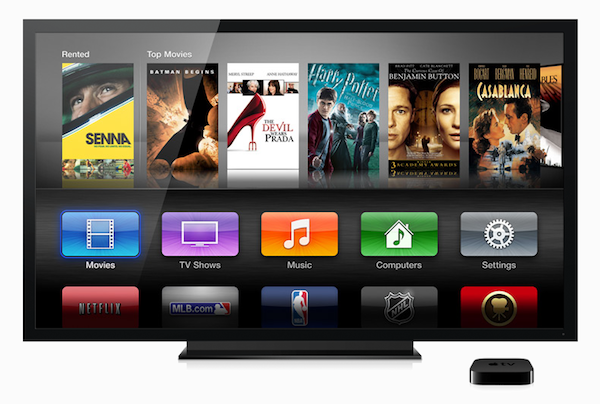
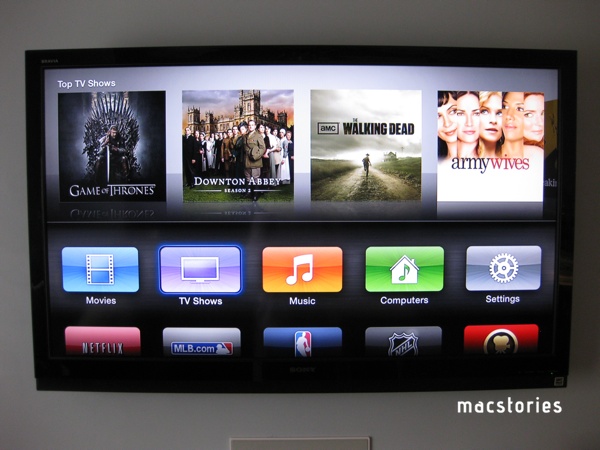
At the media event in San Francisco, Apple CEO Tim Cook announced an update to the Apple TV. The updated model will support 1080p playback, newly added iTunes in the Cloud for movies and TV shows which will allow users to watch their purchased content on-demand in 1080p definition if available. The new Apple TV ships with a new streamlined interface that will make it easier to navigate between apps, browse photos and media from an iCloud account, and initiate playback.

“People are going to love streaming movies and TV shows in 1080p with the new Apple TV, and photos look beautiful displayed at the maximum resolution of your TV,” said Philip Schiller, Apple’s senior vice president of Worldwide Marketing. “Apple TV is easier than ever to use with its new icon-based interface and the ability to access your purchased movies, TV shows and music right from iCloud.”

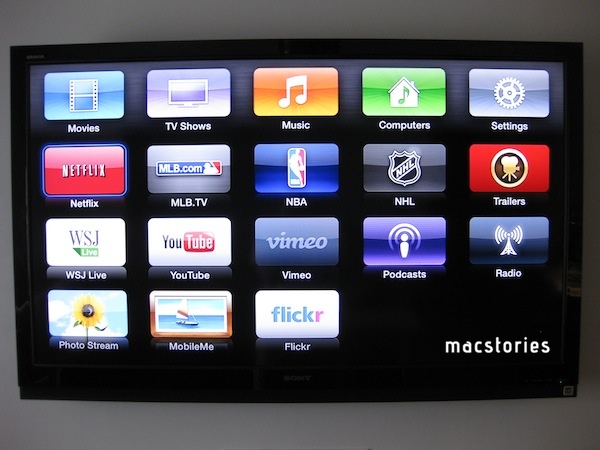
Apple has also prepared several content providers to stream HD quality content to the new Apple TV. Netflix, Vimeo, and of course movies and TV shows available through iTunes will be in HD for consumers on launch day. Apple also stated that there will be over 15,000 movies and over 90,000 TV episodes available on the iTunes Store. Just some of the other notable apps that will be prominently displayed on the Apple TV’s new icon based interface includes YouTube, Flickr, and the Wall Street Journal.

The Apple TV also gained greater integration with iCloud today. Now users can purchase, not just rent, movies and TV episodes from the Apple TV and watch them on their all of their Apple devices. iCloud makes it incredibly easy to access all of your digital content regardless of what device you are using.

The new Apple TV will remain only $99, and it will be available on March 16. Pre-orders for the new Apple TV will begin today.

For additional information, check out the Apple press release on the new Apple TV.

Update: MacRumors is reporting that the 5.0 software update for the current (second generation) Apple TV is live and available for download. They also state that not only has Netflix rolled out 1080p streaming but Netflix also has a new billing option that allows customers to pay for their Netflix subscriptions through their iTunes Store accounts.

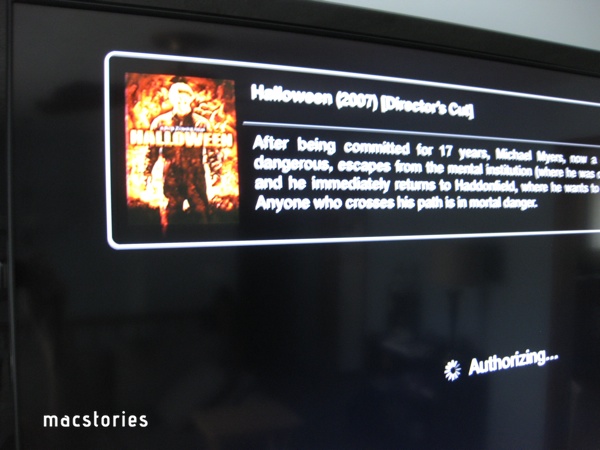
Update #2: From the short amount of time I have spent with the 5.0 update to the (second-gen) Apple TV, I find it to be a really great upgrade for existing Apple TV owners. I love the new movies and TV shows in the Cloud feature. To test it out, I selected the Movies icon on the home screen, browsed to my purchased videos and found a couple of movies I forgot I had purchased well over a year ago. Selecting my Halloween (2007) movie started it as if I had just rented in through iTunes. The process was simple, fast, and very well implemented.

Screenshots of new 5.0 Software.

Update #3 Ars Technica has details on the processor inside the new Apple TV model. It’s not the same of the new iPad.

We asked whether the third-gen Apple TV had the same A5X processor as that in the new iPad (as was previously rumored), but an Apple spokesperson told us that it has a “single-core version of the A5” and it’s not the same as what’s in the iPad. The CPU is capable of handling 1080p HD video. The spokesperson also claimed that users “only need an 8-10 megabit Internet connection” in order to take advantage of 1080p movies from iTunes, but speaking as someone with experience with the second-generation Apple TV at a mere 720p, this depends highly upon your individual ISP.

Access Extra Content and Perks

Founded in 2015, Club MacStories has delivered exclusive content every week for nearly a decade.

What started with weekly and monthly email newsletters has blossomed into a family of memberships designed for every MacStories fan.

Learn more here and from our Club FAQs.

Club MacStories: Weekly and monthly newsletters via email and the web that are brimming with apps, tips, automation workflows, longform writing, early access to the MacStories Unwind podcast, periodic giveaways, and more;

Club MacStories+: Everything that Club MacStories offers, plus an active Discord community, advanced search and custom RSS features for exploring the Club’s entire back catalog, bonus columns, and dozens of app discounts;

Club Premier: All of the above and AppStories+, an extended version of our flagship podcast that’s delivered early, ad-free, and in high-bitrate audio.

Learn more here and from our Club FAQs.


Liveblog: It’s the iPad 3 Event of a Lifetime

It seems like only yesterday when I took a wrong turn at a shopping mall and ended up waiting in line for some magical device I knew nothing about. Granted, there were lots of people wrapped around an Apple Store, but how was I to know Apple was launching a new iPad that was as thin as a pencil, had a faster processor, and could be individualized with those foldable Smart Covers? And if I could predict the future, it sounds like I’ll be waiting in some longish line again for another flat computer that has an even better display, an even faster processor, and surprise features that’ll dazzle us before the glow of a blue Apple retail shirt.

I already know most of you already have your wallets out. Some of you are checking the source code on Apple.com for any imminent hints, while the rest of you are furiously refreshing Apple’s store page. Although, I hope you’ll read our predictions instead (we’re half intelligent, half coffee-addled). But if you’re looking for the real skinny, we’re just going to have to wait for Wednesday. We’ll be here on March 7th: still rambling, still highly caffeinated, and probably drunk on iPad 3 rumors… or is it iPad HD? iPad 2S?

To find out what the name of the next iPad will be, tune in tomorrow at 12:30 pm EST when Don and I will be kicking things off early to answer your questions and engage in general mischief before the iPad event. Whether Apple livestreams the event or not, you’ll get all of our flavorful commentary and up to the minute information about the crazy stuff being presented on stage.

Don’t forget to refresh the MacStories homepage regularly tomorrow — the rest of the MacStories team will be writing articles as fast as these products and numbers and shiny things are being announced! If you can’t be in the now, you can always catch up with the announcements later in the day. Don’t worry — it’ll all be here.

Bookmark this page and set a date for Wednesday, March 7th, for our realtime coverage.

Apple Event Time Zones

13:00 — New York, New York
10:00 — San Francisco, California
08:00 — Honolulu, Hawaii
05:00 — Sydney, Australia
03:00 — Tokyo, Japan
02:00 — Shanghai, China
23:30 — New Delhi, India
22:00 — Moscow, Russia
19:00 — Rome, Italy
18:00 — London, England

Don’t see your city? You can use this link to get your exact time.

Read more

Access Extra Content and Perks

Founded in 2015, Club MacStories has delivered exclusive content every week for nearly a decade.

What started with weekly and monthly email newsletters has blossomed into a family of memberships designed for every MacStories fan.

Learn more here and from our Club FAQs.

Club MacStories: Weekly and monthly newsletters via email and the web that are brimming with apps, tips, automation workflows, longform writing, early access to the MacStories Unwind podcast, periodic giveaways, and more;

Club MacStories+: Everything that Club MacStories offers, plus an active Discord community, advanced search and custom RSS features for exploring the Club’s entire back catalog, bonus columns, and dozens of app discounts;

Club Premier: All of the above and AppStories+, an extended version of our flagship podcast that’s delivered early, ad-free, and in high-bitrate audio.

Learn more here and from our Club FAQs.


iPad 3: Where We Predict the Future

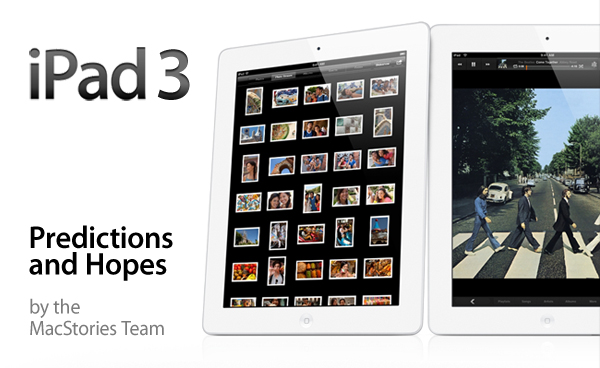
At 10 AM tomorrow, Apple will begin the presentation of one of the most (if not the most) anticipated products in the company’s recent history: the iPad 3. Rumored to feature a Retina Display, improved graphics, and a better camera, the next iPad will have to build on the amazing success of the iPad 2 (where by “amazing” we mean “just look at those numbers”) whilst giving owners of the original iPad a reason to upgrade after two years. And with the possible implications behind the rumored new features, it looks like those who stood in line back in April 2010 will have more than one good reason to consider the Next Big Thing.

As a team, we typically refrain from reporting every single rumor that shows up ahead of an Apple product release, leaving our crystal ball and teardrop-shaped hats under the editorial desk. Having considered the variables behind a Retina iPad 3 in the past, however, we couldn’t resist this time – much like we did back at WWDC ‘11, we had to get together (in a cozy Campfire) and share our March 7th Apple Event predictions. Our own Gabe Glick already explained why he thinks a big announcement will be about software – specifically, he neatly illustrated why Aperture may be coming to iOS and the iPad 3. Below, you can follow the rest of the MacStories team as we reflect on what we think has to happen, what could happen, and what we generally would like to see in a Retina-enabled tablet future. Lots of coffee may or may not have been involved in the editing process of said predictions – pardon the excitement, but we think the next iPad is going to be a fantastic upgrade.

After the break, you’ll find our predictions. We will check back on these later this week, and make sure to tune in on MacStories’ homepage tomorrow for our complete coverage. Read more

Access Extra Content and Perks

Founded in 2015, Club MacStories has delivered exclusive content every week for nearly a decade.

What started with weekly and monthly email newsletters has blossomed into a family of memberships designed for every MacStories fan.

Learn more here and from our Club FAQs.

Club MacStories: Weekly and monthly newsletters via email and the web that are brimming with apps, tips, automation workflows, longform writing, early access to the MacStories Unwind podcast, periodic giveaways, and more;

Club MacStories+: Everything that Club MacStories offers, plus an active Discord community, advanced search and custom RSS features for exploring the Club’s entire back catalog, bonus columns, and dozens of app discounts;

Club Premier: All of the above and AppStories+, an extended version of our flagship podcast that’s delivered early, ad-free, and in high-bitrate audio.

Learn more here and from our Club FAQs.


Apple Reveals New “All-Time Top Apps” Following 25 Billion Downloads

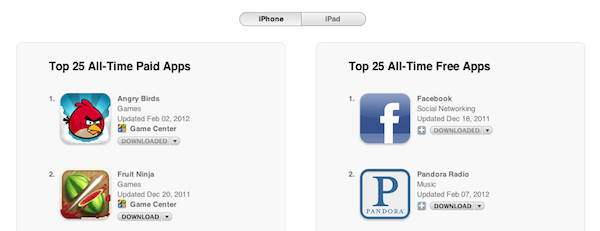
Last night, Apple reached the expected milestone of 25 billion apps downloaded from the App Store since the official opening in 2008. Whilst we’re waiting for the company to announce the winner of a $10,000 App Store gift card, Apple has updated its App Store page that lists the all-time top paid and free apps to reflect the changes occurred in the past 12 months. You may remember Apple posted a similar page in January of last year ahead of 10 billion downloads, and has been tweaking the entries ever since, keeping track of overall downloads in the App Store. We’ve compiled the charts (which include 25 apps each) below. Read more

Access Extra Content and Perks

Founded in 2015, Club MacStories has delivered exclusive content every week for nearly a decade.

What started with weekly and monthly email newsletters has blossomed into a family of memberships designed for every MacStories fan.

Learn more here and from our Club FAQs.

Club MacStories: Weekly and monthly newsletters via email and the web that are brimming with apps, tips, automation workflows, longform writing, early access to the MacStories Unwind podcast, periodic giveaways, and more;

Club MacStories+: Everything that Club MacStories offers, plus an active Discord community, advanced search and custom RSS features for exploring the Club’s entire back catalog, bonus columns, and dozens of app discounts;

Club Premier: All of the above and AppStories+, an extended version of our flagship podcast that’s delivered early, ad-free, and in high-bitrate audio.

Learn more here and from our Club FAQs.