Posts in Featured

Launch Center Pro and OmniFocus
 Launch Center Pro and OmniFocus

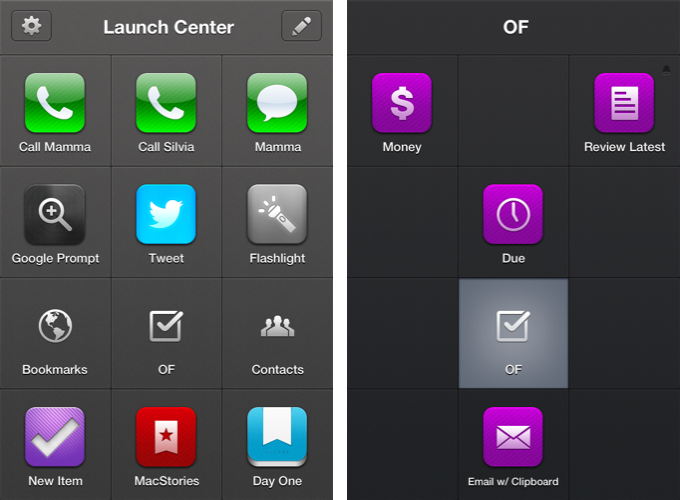
Michael Schechter has created a series of Launch Center Pro templates to speed up the creation process of repetitive tasks in OmniFocus for iPhone, inspired by David Sparks’ snippets for TextExpander and OmniFocus for Mac. With actions to easily attach the contents of the clipboard to a new task or setting up a reminder to follow up on something with a colleague, Michael’s snippets can be huge timesavers if you’ve been looking for a way to automate certain aspects of OmniFocus on the iPhone.

All I’ve done here is create a new group in Launch Center Pro called OF Actions. This allows me to have 11 rapid-fire actions for my most commonly created tasks. Rather than 11 unique actions, I’ve actually created duplicates for most that include whatever I have on the clipboard. This way I have a version that duplicates the Quick Entry field and another that emulates some aspects of the Clipper.

Based on OmniFocus’ new URL scheme and Launch Center Pro’s support for prompts (more details in our review of the app), these snippets won’t offer the same degree of customization found in desktop solutions like the aforementioned TextExpander or Keyboard Maestro, but they surely are the best way to automate OmniFocus on the iPhone for now. Because of the nature of iOS, you won’t be able to set up scripts that, for instance, let OmniFocus communicate with other apps automatically, but at least you’ll be saving some typing and navigation inside the app.

Inspired by Michael’s work, I have set up actions to access my most used perspectives and a new one called “Review Latest” that makes up for the lack of an Inbox perspective on iOS (as it’s project based rather than context based) and displays the latest tasks I may have added without a context or due date using Captio. Furthermore, I have assigned a scheduled reminder to the action, so that every day after dinner I’ll be reminded by Launch Center Pro to process my newest tasks created throughout the day.

The Omni Group’s Ken Case also chimed in on Twitter explaining how OmniFocus URLs work, and Justin Lancy collected the tweets in a Storify bundle. Nick Winja took a look at how it’s possible to access contexts via URL, as well.

You can see the full text for Michael’s Launch Center Pro snippets here.
Permalink

MacStories Interviews: Brett Terpstra

In our ongoing series of interviews with developers and creators in the Apple community, I recently had the chance to talk with Brett Terpstra, developer of Marked, Senior Developer at AOL Tech, TUAW blogger, and “mad scientist” with a knack for finding great solutions through code. When he’s not making awesome things or writing at his personal blog, Brett tweets as @ttscoff.

The interview below was conducted between January 17 and July 4, 2012.

MacStories: Hey Brett! Could you introduce yourself to the readers who haven’t heard about you or haven’t tried any of your apps & scripts before?

Brett Terpstra: Hey Federico,

I’m the original author (now working with Elastic Threads) of a Notational Velocity fork called nvALT, which seems to be what I’m best known for. I also sell an app in the Mac App store called Marked; a MultiMarkdown previewer that watches your text file for changes and updates the preview every time you save it. I’m a bit of a plain text nerd, and a lot of my work focuses on working with and manipulating plain text, as well as keeping data portable and application agnostic. Most of what I do is pure experimentation, coding for the joy of problem solving. Mad science, if you will. Read more

Access Extra Content and Perks

Founded in 2015, Club MacStories has delivered exclusive content every week for nearly a decade.

What started with weekly and monthly email newsletters has blossomed into a family of memberships designed for every MacStories fan.

Learn more here and from our Club FAQs.

Club MacStories: Weekly and monthly newsletters via email and the web that are brimming with apps, tips, automation workflows, longform writing, early access to the MacStories Unwind podcast, periodic giveaways, and more;

Club MacStories+: Everything that Club MacStories offers, plus an active Discord community, advanced search and custom RSS features for exploring the Club’s entire back catalog, bonus columns, and dozens of app discounts;

Club Premier: All of the above and AppStories+, an extended version of our flagship podcast that’s delivered early, ad-free, and in high-bitrate audio.

Learn more here and from our Club FAQs.


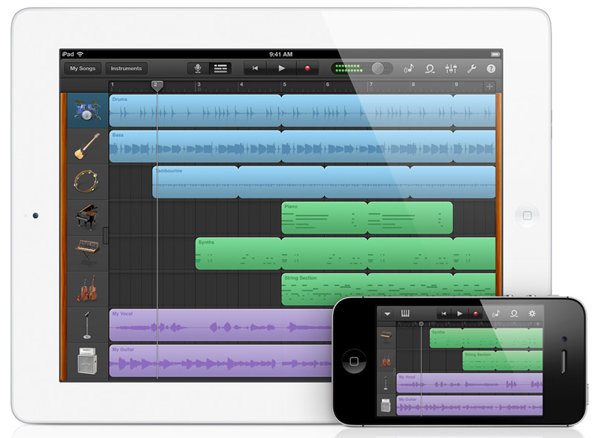
The Current State Of Music-Making and Discovery On The iPad

I have a confession to make: I’m a nerd. Yes, and I’m proud of it, because I think being a nerd means two things: I’m constantly curious about details, and I don’t hesitate to try out new stuff. To satisfy my curiosity, I’ve always dived into Apple’s ecosystem and the latest hardware related to it. Fortunately, my passion for Apple correlates with my love for discovering new music. I’ve been playing guitar since I was eight years old, and I love electronic music from the bottom of my heart as well. I’ve always found myself interested in both the traditional (perhaps organic) hardware side of music, and the more modern, digital software production process.

When the iPhone came out, many blogging colleagues and people around me predicted that its new software system, combined with the mobility of the device itself, would change the way people produce music and think about audible art as a whole. Three years later Apple unveiled the iPad. iPhone music software was indeed present at the time, but people soon recognized that the device’s screen was too small to create usable professional software for it — playing on-screen keyboards was nearly impossible and attempts to build high-end software synths like ReBirth or drum machines ended up in cluttered, untidy screens.

This problem seemed to get solved with the large screen of the iPad. Professional software retailers like KORG immediately started coding software versions of their most successful hardware. For instance, the iElectribe was one of the first apps available after the device’s launch. Over the years, I constantly tried out music apps for the iPad, tested hardware accessories (made possible with the release of iPhone OS 3), and never stopped investigating advantages, problems, and future possibilities of all those apps. Now, five years after the launch of iOS and the iPhone, I think it’s time to look back at how Apple’s mobile devices, with the focus clearly on the iPad, have changed the world of music and how they’ll continue to affect the future.

To do this, I recently went through my app archive and analyzed which kind of music apps remained installed on my devices, and which ones I liked when I tested them, but didn’t gain a place in my personal workflow. I discovered that I had to clearly divide music apps in several areas when discussing them. I distinguished between eight types of available music apps: promotion, discovery, entry level playing apps, handy/learning tools, sketching apps, recording, and professional software.

Throughout this post, I will cover each of those areas separately and point out their current state by discussing the most elaborate app(s) in their respective areas. I will point out the advantages and problems iOS brings to them, and predict — as far ahead as possible — what the future might hold.

Read more

Access Extra Content and Perks

Founded in 2015, Club MacStories has delivered exclusive content every week for nearly a decade.

What started with weekly and monthly email newsletters has blossomed into a family of memberships designed for every MacStories fan.

Learn more here and from our Club FAQs.

Club MacStories: Weekly and monthly newsletters via email and the web that are brimming with apps, tips, automation workflows, longform writing, early access to the MacStories Unwind podcast, periodic giveaways, and more;

Club MacStories+: Everything that Club MacStories offers, plus an active Discord community, advanced search and custom RSS features for exploring the Club’s entire back catalog, bonus columns, and dozens of app discounts;

Club Premier: All of the above and AppStories+, an extended version of our flagship podcast that’s delivered early, ad-free, and in high-bitrate audio.

Learn more here and from our Club FAQs.


MacStories Interviews: Brett Kelly

In our ongoing series of interviews with developers and creators in the Apple community, I recently had the chance to talk with Brett Kelly, Evernote extraordinaire, founder of NerdGap, and creator of Evernote Essentials. When he’s not making things with words and computers, Brett tweets as @inkedmn.

The interview below was conducted between February 3 and July 3, 2012.

MacStories: Hey Brett! Could you introduce yourself to the readers who haven’t heard about you before?

Brett Kelly: Ahoy Federico! I sure can…

My name is Brett Kelly. I’m a writer, podcaster and software developer from Southern California. By day, I’m the Technical Communications Manager for Evernote where I write user documentation and build cool software tools. I write a blog at nerdgap.com and I’m probably best known as the author of the popular getting started guide for Evernote, Evernote Essentials. I’m happily married to my first wife and we have two crazily wonderful children who are crazy.

MS: I’m a proud Evernote customer myself – I use the service every day – and I have read your Evernote Essentials guide. How did you get started with Evernote in the first place? Getting to work for the company you’re already passionate about sounds like a dream job.

BK: Always nice to meet a fellow Evernote user.

Back in early 2008, a friend of mine send me an invite to the private beta for this thing called “Evernote”. I gave it a brief spin and, as soon as I realized that I could stick stuff in there and it would sync between my work and home computers, I was hooked. Remember this was before the iPhone app, as well as the App Store!

I immediately started using the crap out of it; work stuff, personal stuff, it all ended up in Evernote. Almost four years and over 10,000 notes later, I’m a bigger fan of the product than I was last week and I’m both proud and humbled that I get to work with such a ridiculously smart group of people. Read more

Access Extra Content and Perks

Founded in 2015, Club MacStories has delivered exclusive content every week for nearly a decade.

What started with weekly and monthly email newsletters has blossomed into a family of memberships designed for every MacStories fan.

Learn more here and from our Club FAQs.

Club MacStories: Weekly and monthly newsletters via email and the web that are brimming with apps, tips, automation workflows, longform writing, early access to the MacStories Unwind podcast, periodic giveaways, and more;

Club MacStories+: Everything that Club MacStories offers, plus an active Discord community, advanced search and custom RSS features for exploring the Club’s entire back catalog, bonus columns, and dozens of app discounts;

Club Premier: All of the above and AppStories+, an extended version of our flagship podcast that’s delivered early, ad-free, and in high-bitrate audio.

Learn more here and from our Club FAQs.


#MacStoriesDeals - Tuesday

Independence Day in the USA is tomorrow (July 4th) and there are many great deals rolling in! Here are today’s @MacStoriesDeals on hardware, iOS, and Mac apps that are on sale for a limited time, so get them before they end!
Read more

Access Extra Content and Perks

Founded in 2015, Club MacStories has delivered exclusive content every week for nearly a decade.

What started with weekly and monthly email newsletters has blossomed into a family of memberships designed for every MacStories fan.

Learn more here and from our Club FAQs.

Club MacStories: Weekly and monthly newsletters via email and the web that are brimming with apps, tips, automation workflows, longform writing, early access to the MacStories Unwind podcast, periodic giveaways, and more;

Club MacStories+: Everything that Club MacStories offers, plus an active Discord community, advanced search and custom RSS features for exploring the Club’s entire back catalog, bonus columns, and dozens of app discounts;

Club Premier: All of the above and AppStories+, an extended version of our flagship podcast that’s delivered early, ad-free, and in high-bitrate audio.

Learn more here and from our Club FAQs.


Sunstroke - A Solid Fever Client for iPhone

In my review of Reeder 3.0, I mentioned how the app’s implementation of Fever doesn’t allow you to specify a time range to fetch Hot Links. In the way I use Fever, in fact, the possibility to use the app as a way to catch up on important news – rather than constantly checking for updates throughout the day – is a fundamental advantage over standard Google Reader and third-party Reader clients. I recently took a week off the Internet, and relied exclusively on Fever and Flipboard’s Cover Stories to keep up with the most important news I cared about. Being able to set a time range in Fever’s Hot Links is becoming a must-have for me.

Sunstroke by Gone East delivers on the need of a full-featured Fever client for iPhone with solid sharing options, a good interface, and proper Hot Links support. I recently started using Sunstroke as my main Fever client on the iPhone, and I have been very pleased with its results and integration in my workflow. More importantly, Sunstroke concretely allowed me to keep up on the news thanks to its time range-based Hot Links, providing actual tools to filter news I had missed by time period, thereby ensuring I could be brought up to speed on relevant items no matter my absence.

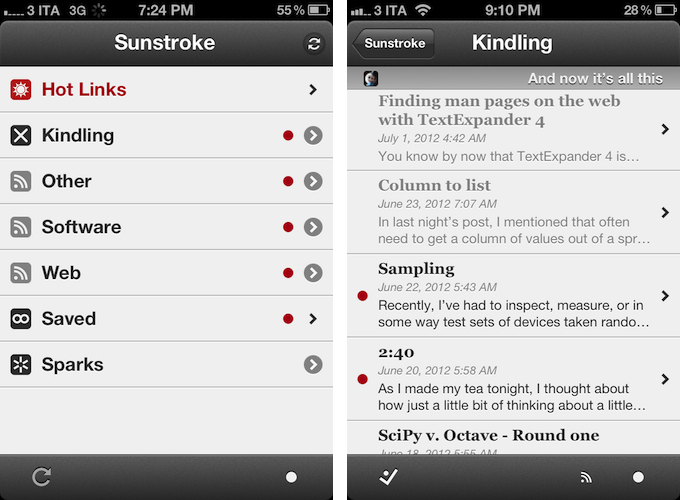
Visually speaking, Sunstroke offers a fairly familiar Fever experience. The main screen hosts Hot Links, Kindling, Saved, and Sparks sections, enabling you to switch between read/unread items and groups configured in your Fever account. I found refresh times to be slightly faster than Reeder’s – albeit it’s worth mentioning how Sunstroke comes with entirely different settings for managing Fever sync.

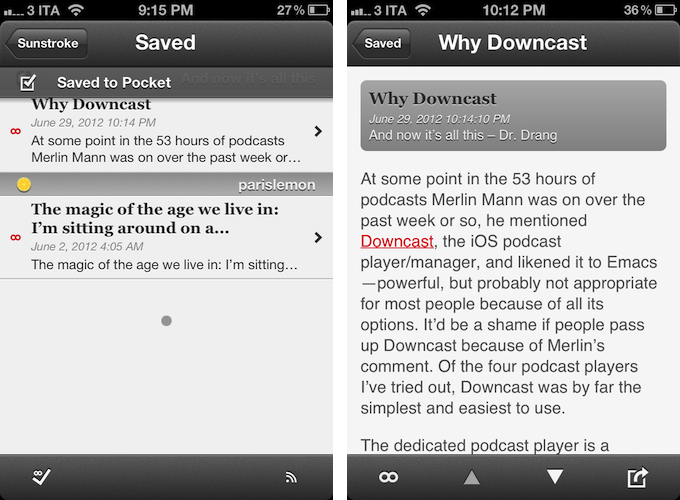
You can set the app to “sync automatically”, delete items after 2, 4, 6, or 10 weeks, and auto-mark items as read as you scroll. This last feature is extremely well done, with smooth scrolling when skimming through hundreds of subscriptions on my iPhone 4S. Overall, I like Sunstroke’s sync indicators and custom icons in the main screen of the app.

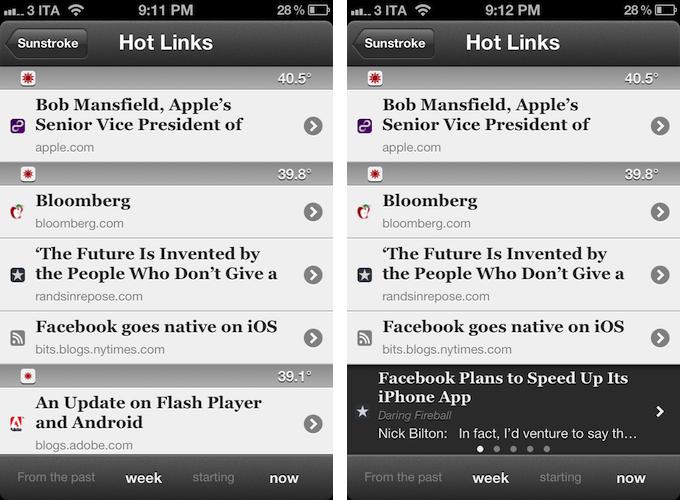
Where Sunstroke really shines is the Hot Links list. Unlike Reeder, a bar across the bottom of the UI lets you display Hot Links “from the past” few days, weeks, and month “starting” now, yesterday, and up to 5 weeks ago. This feature alone made purchasing Sunstroke worth it as it offers a solid yet simple way to set the time range according to which Fever’s hot items will be displayed. Per Fever’s typical presentation, hot items are sorted by “temperature”, and grouped by site.

Sunstroke stores every item from the Fever database on your device, which means every link that contributes to a link’s hotness can be viewed inside the app. This means that a) you can go offline and still tap around links and read articles through Fever’s own mobile viewer (though you can also use the Instapaper mobilizer) and b) you can tap & hold on a hot link to load related items as a swipeable “gallery” inline. The latter option is particularly attractive and well-implemented; my only issue is with the way Fever often cuts off headlines from hot links, but that’s not Sunstroke’s fault.

I found Sunstroke to be very polished in other areas, too. In the settings, you can tell the app to hide unread counts and show newest items first, or to cache images on WiFi-only while also setting a specific cache size.

The app supports sharing through a dedicated sharing button and by tapping & holding any link, and the sharing options include Facebook, Twitter, Pocket, Sparrow, and Instapaper. Like Reeder, you can assign toggles for right/left swipe actions – mine are, unsurprisingly, set to Pocket and “Toggle Saved”, but you can also “Toggle Read”. The notification for saved items is also nicely presented and elegant.

Sunstroke is not perfect (the app crashed once in my tests; there is no iPad version for now; options to control font appearance and size would be welcome), but it undoubtedly is the most complete Fever experience currently available on the iPhone. Sunstroke has got good sharing options, great Hot Links implementation, a fast engine and navigation, and, overall, a feature set meant for heavy Fever users that outpaces Reeder’s basic support for the service.

Fever users looking for a solid iPhone client need to check out Sunstroke, which is available at $4.99 on the App Store.

Access Extra Content and Perks

Founded in 2015, Club MacStories has delivered exclusive content every week for nearly a decade.

What started with weekly and monthly email newsletters has blossomed into a family of memberships designed for every MacStories fan.

Learn more here and from our Club FAQs.

Club MacStories: Weekly and monthly newsletters via email and the web that are brimming with apps, tips, automation workflows, longform writing, early access to the MacStories Unwind podcast, periodic giveaways, and more;

Club MacStories+: Everything that Club MacStories offers, plus an active Discord community, advanced search and custom RSS features for exploring the Club’s entire back catalog, bonus columns, and dozens of app discounts;

Club Premier: All of the above and AppStories+, an extended version of our flagship podcast that’s delivered early, ad-free, and in high-bitrate audio.

Learn more here and from our Club FAQs.


Five

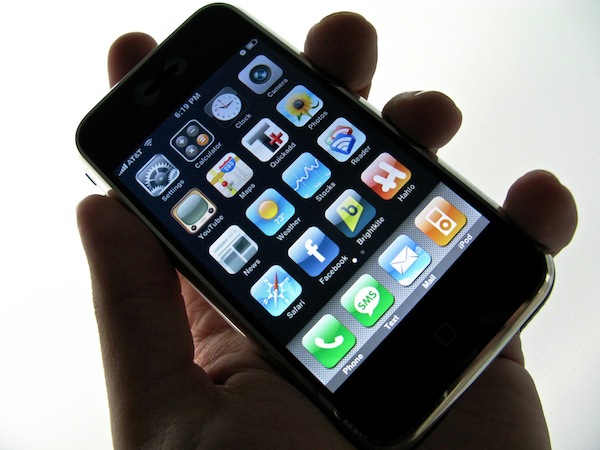
It’s easy to look back at five years of iPhone and say that it was just about technology.

Five years ago, the original iPhone launched in the United States to much hype and a slightly different world. Apple was a much smaller company; Obama wasn’t President of the United States; R.E.M. were still together. The interface design behind the iPhone was, too, a little different than the bits we touch and swipe today. Both Ars Technica and Macworld have published solid retrospectives about the past five years.

The iPhone has created an economy that’s spurring the creation of jobs and new positions all over the globe. It reignited the mobile phone industry, and, in one fell swoop, turned competitors upside down as they struggled to keep their eyes open to the new wind blowing in their direction. The App Store didn’t launch until 2008, but its numbers are the very example of the software revolution spearheaded by the iPhone.

Unlike most inventions of modern history, though, the iPhone created a culture. And that’s because – unlike the ATM or the cordless telephone – the iPhone brought people together. By allowing developers to craft software for consumers willing to pay for it, the iPhone took down the wall between creation and consumption – the virtual barrier that normally separates an inventor from people using a product.

Both sides affected by this change – developers and users – ultimately became the starting point, the goal, and the focus.

The iPhone is about the people.

Like any other company looking for a profit, Apple has always needed to make money with the iPhone. But, after five years, I like to think that there can be a good cause behind profit and industry strategies – that there can be a purpose to “make great products”. And maybe I’m wrong, but I believe the iPhone has proved to be one of those major changes that have made people’s lives better. By combining breakthrough hardware design with the human touch, iPhone didn’t just change the way people communicate, work, and play: it saved lives, improved workplaces, told stories.

Sometimes there’s more to progress than just technology.

[image credit: Flickr]

Access Extra Content and Perks

Founded in 2015, Club MacStories has delivered exclusive content every week for nearly a decade.

What started with weekly and monthly email newsletters has blossomed into a family of memberships designed for every MacStories fan.

Learn more here and from our Club FAQs.

Club MacStories: Weekly and monthly newsletters via email and the web that are brimming with apps, tips, automation workflows, longform writing, early access to the MacStories Unwind podcast, periodic giveaways, and more;

Club MacStories+: Everything that Club MacStories offers, plus an active Discord community, advanced search and custom RSS features for exploring the Club’s entire back catalog, bonus columns, and dozens of app discounts;

Club Premier: All of the above and AppStories+, an extended version of our flagship podcast that’s delivered early, ad-free, and in high-bitrate audio.

Learn more here and from our Club FAQs.


Google Drive for iOS Now Available

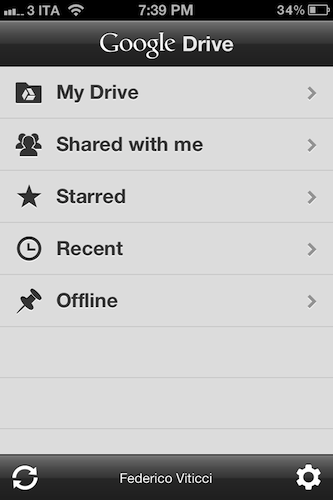
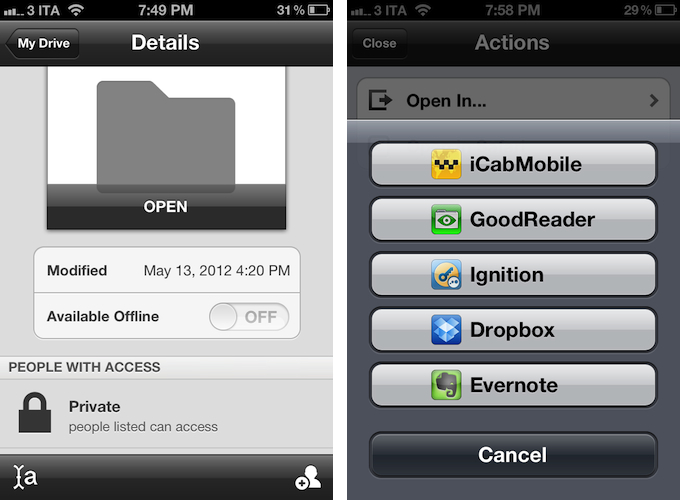
Following a series of announcements at its I/O 2012 event, Google formally introduced the official Drive app for iOS today. Available for free as a universal download for iPhone and iPad, the Google Drive app gives you access to all your documents and folders stored in your Google account, as well as the ones shared with you. Documents can be marked as starred to be easier to find, and made available offline through the details panel of an item view.

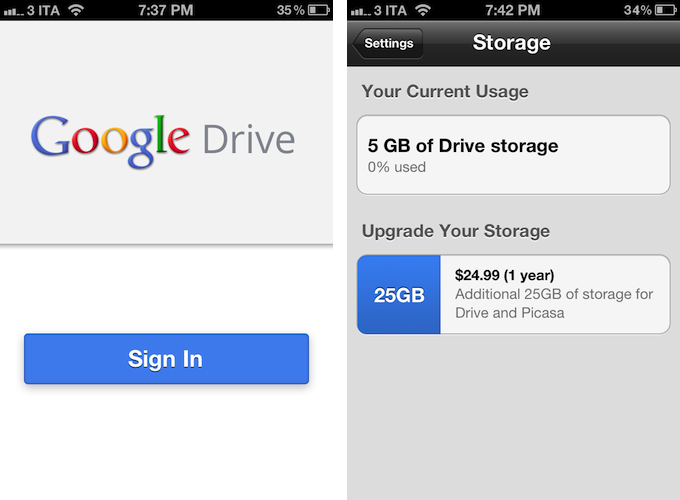
Complying with Apple’s terms for in-app purchases, the Google Drive app allows you to purchase additional storage using your iTunes account.

The Google Drive app for iOS doesn’t come with full editing capabilities – instead, Google is pushing the client as a way to “quickly and easily” find and view your files, pictures, and videos stored on Google’s servers. Files can be shared with collaborators from the app and, obviously, synced to desktop devices, but as far as editing capabilities go, it appears Google is only allowing users to forward documents to other installed iOS apps using the standard “Open In…” menu.

The app’s design is largely similar across the iPhone and iPad, relying on the tablet’s larger screen to display more panels at once and bigger media.

Google Drive for iOS is now available on the App Store.

Access Extra Content and Perks

Founded in 2015, Club MacStories has delivered exclusive content every week for nearly a decade.

What started with weekly and monthly email newsletters has blossomed into a family of memberships designed for every MacStories fan.

Learn more here and from our Club FAQs.

Club MacStories: Weekly and monthly newsletters via email and the web that are brimming with apps, tips, automation workflows, longform writing, early access to the MacStories Unwind podcast, periodic giveaways, and more;

Club MacStories+: Everything that Club MacStories offers, plus an active Discord community, advanced search and custom RSS features for exploring the Club’s entire back catalog, bonus columns, and dozens of app discounts;

Club Premier: All of the above and AppStories+, an extended version of our flagship podcast that’s delivered early, ad-free, and in high-bitrate audio.

Learn more here and from our Club FAQs.


Rovio Officially Introduces “Amazing Alex”, Launching In July On iOS and Android

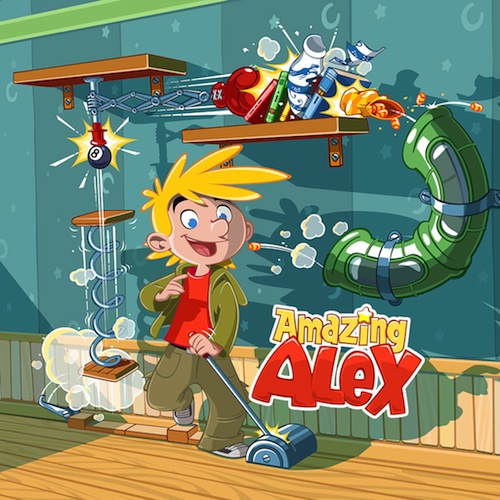
Initially teased back in May, Finnish game maker Rovio formally announced its next game for iOS and Android today, launching a dedicated website, a set of wallpapers, and a video to reveal more details of the upcoming title. Coming “in July 2012” for iOS and Android (in May, Rovio said the game would launch within two months), Amazing Alex will be a puzzle game focused on letting Alex – the main character – build chain reactions across different locations, levels, and using a variety of objects to create fun and engaging Rube Goldberg-like devices and machines.

Rovio acquired the game from developers Snappy Touch and Mystery Coconut – it was originally called Casey’s Contraptions – and reworked it with a new physics engines, new graphics, and further developing the character of Alex.

Whilst it’s still unclear whether Amazing Alex will be a paid title or a “freemium game”, Rovio is already promising 100 levels, regular free updates, 35 interactive objects, and the possibility of building and sharing puzzles with your friends. A promo video posted on Rovio’s website (and also embedded below), doesn’t show any actual gameplay footage, but suggests a highly colorful and distincitive setting for the game.

You can check out the teaser site for Amazing Alex here, and follow @amazingalex on Twitter for future updates.
Read more

Access Extra Content and Perks

Founded in 2015, Club MacStories has delivered exclusive content every week for nearly a decade.

What started with weekly and monthly email newsletters has blossomed into a family of memberships designed for every MacStories fan.

Learn more here and from our Club FAQs.

Club MacStories: Weekly and monthly newsletters via email and the web that are brimming with apps, tips, automation workflows, longform writing, early access to the MacStories Unwind podcast, periodic giveaways, and more;

Club MacStories+: Everything that Club MacStories offers, plus an active Discord community, advanced search and custom RSS features for exploring the Club’s entire back catalog, bonus columns, and dozens of app discounts;

Club Premier: All of the above and AppStories+, an extended version of our flagship podcast that’s delivered early, ad-free, and in high-bitrate audio.

Learn more here and from our Club FAQs.