Posts in Featured

Review: Things 2 With Cloud Sync

Things by Cultured Code, a developer company based in Stuttgart, Germany, has been around since the day the App Store and iOS 2.0 were unveiled. The app is famous for its minimalist, iconic interface and features which are a perfect mix of simplicity and serious business from the very first version on. It’s the perfect example for the ethos of “If 1.0 sucks, all other versions will suck as well”, it was done right the day it came out.

Yet, the first Things just didn’t work for me — I don’t know why, but it didn’t stick. I’ve never tried out other solutions, neither complex workhorse that is OmniFocus, nor have I tried a basic to-do app like Remember The Milk. The last three years, I was a Simplenote guy. I’m really into minimalism; in fact, that’s the reason why I initially desperately wanted to try out Things. But Simplenote worked better than Things for me. You could paste anything into it and the new content would be immediately available across all your devices, and on the web. My notes were always with me. And after I found Notational Velocity for Mac, a Simplenote desktop client, I completely stopped searching for other solutions.

But now, Things have changed. After over a year of beta testing, Things 2 with Cloud sync has finally arrived, and besides its big syncing feature, it’s got a bunch of other cool refinements and new possibilities along the way. Read more

Access Extra Content and Perks

Founded in 2015, Club MacStories has delivered exclusive content every week for nearly a decade.

What started with weekly and monthly email newsletters has blossomed into a family of memberships designed for every MacStories fan.

Learn more here and from our Club FAQs.

Club MacStories: Weekly and monthly newsletters via email and the web that are brimming with apps, tips, automation workflows, longform writing, early access to the MacStories Unwind podcast, periodic giveaways, and more;

Club MacStories+: Everything that Club MacStories offers, plus an active Discord community, advanced search and custom RSS features for exploring the Club’s entire back catalog, bonus columns, and dozens of app discounts;

Club Premier: All of the above and AppStories+, an extended version of our flagship podcast that’s delivered early, ad-free, and in high-bitrate audio.

Learn more here and from our Club FAQs.


The Rise Of Third Party Services And Fall Of Google In iOS

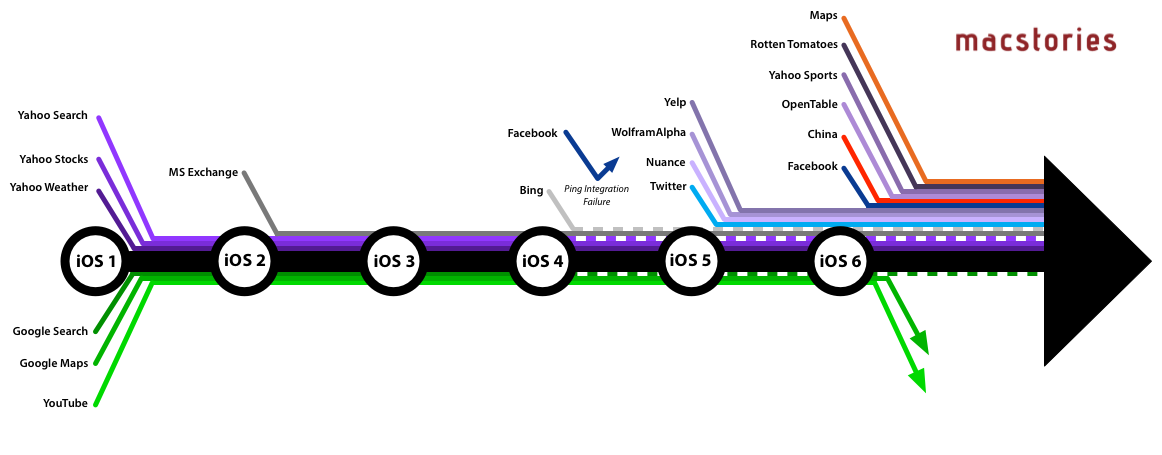
When Apple introduced iOS 6 to the world at this year’s WWDC, one of the most talked about moves was Apple’s decision to step away from their partnership with Google Maps and create their own maps app. In many respects, it wasn’t too surprising given the increasingly strenuous relationship between Apple and Google in the years since the iPhone launched and Google became a competitor with Android, but in recent weeks it was also revealed that YouTube will also no longer be included as a pre-installed app from iOS 6. That leaves Google Search as the only remaining Google service to be integrated into iOS. Yet whilst Apple has been severing its relationship with Google, it has been courting numerous other service providers and integrating them into iOS over the past few years.

Curious to visualise this information, I made a list of every notable service that has been integrated with iOS (and when) and then created the above graphic (click on it to view a larger version). When I had compiled the list, it was pretty compelling (and longer than I had realised), but I think the graphic takes it to the next level and really tells a story about iOS and Apple’s relationship with other services.

Read more

Access Extra Content and Perks

Founded in 2015, Club MacStories has delivered exclusive content every week for nearly a decade.

What started with weekly and monthly email newsletters has blossomed into a family of memberships designed for every MacStories fan.

Learn more here and from our Club FAQs.

Club MacStories: Weekly and monthly newsletters via email and the web that are brimming with apps, tips, automation workflows, longform writing, early access to the MacStories Unwind podcast, periodic giveaways, and more;

Club MacStories+: Everything that Club MacStories offers, plus an active Discord community, advanced search and custom RSS features for exploring the Club’s entire back catalog, bonus columns, and dozens of app discounts;

Club Premier: All of the above and AppStories+, an extended version of our flagship podcast that’s delivered early, ad-free, and in high-bitrate audio.

Learn more here and from our Club FAQs.


Review: The New Day One

Day One

Day One

Twenty years from now, what will you remember?

Last week, a friend of mine found an old MP3 player in her drawer. Upon recovering the contents of the device[1], she synced its music back to her iPod nano, and then she gave it to me. It was full of songs we used to listen to years ago. If songs can be associated with certain moments or periods of your life, than that MP3 player was like a photo album in sound form. Memories. Old emotions and melodies coming back to life, not a distant echo anymore. It felt like grabbing the headphones of 16 year-old me, today, with the knowledge that those moments won’t be coming back, but the experience of someone who cherished them will.

But what do I remember?

In twenty years, I’m not sure I’ll be able to remember the songs I like today, or the faces of people that I care about now. I don’t even know if I’ll be around in twenty years. But I do know that I want to do everything I can to make sure I can get there with my own memories. We are what we know. And I want to remember.

Where the human mind can’t get, I think software can help. In the connected and post-PC era we’re living in, I believe the devices and apps we use play an important role in enabling us to create memories. But just as relevant as “content creation” has become to this discussion, we have to ensure the memories we create today will be preserved digitally for the future.

For the past few months, I have been using a new version of Day One to build an archive of my life. Released today, the new Day One goes beyond the previous version’s support for text entries and adds photos, location, and weather information in an app that, for me, has become more than a simple journaling utility.

Developed by Bloom, Day One went through a remarkable evolution to get to the major updates published today. Last year, I took a look at the app and noted how it was helping me build an “archive of my thoughts” thanks to its simple and elegant interface:

There’s one thing I never really considered storing in a digital archiving app — memories. I’m talking about things like “what did I enjoy doing today” or “I decided to take a walk with my girlfriend” — specific moments that matter in life, that are important, but which our brains often blur and forget after some time to make room for new data to process and maintain.

And then again:

I try to enjoy every moment, but there’s so much the human brain can remember and it’s perfectly normal if something will get lost in the process of assimilating thoughts and processing them to turn them into memories and experiences.

If 2011 Day One was the TextEdit of memories, the new Day One is their Evernote. With support for photo attachments, location data, and improvements to sync and Mountain Lion, today’s Day One wants to overcome the limitations of text to become the window into your past life.

Day One is visual memories. Read more

Access Extra Content and Perks

Founded in 2015, Club MacStories has delivered exclusive content every week for nearly a decade.

What started with weekly and monthly email newsletters has blossomed into a family of memberships designed for every MacStories fan.

Learn more here and from our Club FAQs.

Club MacStories: Weekly and monthly newsletters via email and the web that are brimming with apps, tips, automation workflows, longform writing, early access to the MacStories Unwind podcast, periodic giveaways, and more;

Club MacStories+: Everything that Club MacStories offers, plus an active Discord community, advanced search and custom RSS features for exploring the Club’s entire back catalog, bonus columns, and dozens of app discounts;

Club Premier: All of the above and AppStories+, an extended version of our flagship podcast that’s delivered early, ad-free, and in high-bitrate audio.

Learn more here and from our Club FAQs.


July 2012 In Review

July was an interesting month for MacStories as we covered the launch of the latest version of OS X, Mountain Lion, and launched our first eBook. Containing all our Mountain Lion coverage from the site in addition to exclusive articles, the book was a challenging but immensely rewarding project. With the exception of some advice from a few trusted people, we handled the book’s creation entirely by ourselves and are very proud of the end result. If you haven’t grabbed a copy yet, it’s not too late to change that — and remember that 30% of all proceeds will go directly to the very worthy cause that is the American Cancer Society.

Besides Mountain Lion, the other notable pieces of news were Google’s acquisition of Sparrow, and the all-but-confirmed rumour that the next iPhone and iPad mini will be announced on September 12th. Apps-wise, July was a quiet month as developers readied theirs for Mountain Lion, but we did see the release of the Tweetbot for Mac alpha along with Rovio’s new franchise, Amazing Alex. For stories, we had two great interviews, an excellent piece on discovering and making music on the iPad, talked about the apps and tools we use to write more efficiently, and created some hands-on examples of what the rumoured 7.85” iPad would look and feel like.

Jump the break for the full month in review, and feel free to read previous ‘Month in Review’ editions from 2012.

Read more

Access Extra Content and Perks

Founded in 2015, Club MacStories has delivered exclusive content every week for nearly a decade.

What started with weekly and monthly email newsletters has blossomed into a family of memberships designed for every MacStories fan.

Learn more here and from our Club FAQs.

Club MacStories: Weekly and monthly newsletters via email and the web that are brimming with apps, tips, automation workflows, longform writing, early access to the MacStories Unwind podcast, periodic giveaways, and more;

Club MacStories+: Everything that Club MacStories offers, plus an active Discord community, advanced search and custom RSS features for exploring the Club’s entire back catalog, bonus columns, and dozens of app discounts;

Club Premier: All of the above and AppStories+, an extended version of our flagship podcast that’s delivered early, ad-free, and in high-bitrate audio.

Learn more here and from our Club FAQs.


Mountain Lion Downloaded 3 Million Times In Four Days

Apple hast just announced over 3 million copies of OS X Mountain Lion were downloaded in four days of sale on the Mac App Store, translating to roughly $60 million in revenue on launch day. Apple says it has been the most successful release in the history of OS X.

Just a year after the incredibly successful introduction of Lion, customers have downloaded Mountain Lion over three million times in just four days, making it our most successful release ever,” said Philip Schiller, Apple’s senior vice president of Worldwide Marketing.

On the MAS, Mountain Lion has over 7000 ratings with over 5200 being five-star reviews. Apple has not made Mountain Lion available offline via a $69 USB key as they’ve done with Lion, so far sticking to the Mac App Store (or the purchase of a new Mac) as the only upgrade paths. Apple customers whom have purchased a new Mac between June 11th and July 25th are eligible for a free upgrade through Apple’s Up-to-Date program.

By comparison, OS X Lion exceeded 1 million downloads on its first day of sales (Lion was priced at $29.99); 76 days later, on October 4th, Apple announced 6 million copies of Lion had been downloaded.

Mountain Lion, available for $19.99, includes a wide assortment of new features, including AirPlay Mirroring, the Notification Center, Game Center, Messages, Power Nap for compatible Macs, and apps such as Notes and Reminders. You can read more about Mountain Lion’s new features in our comprehensive review.

Access Extra Content and Perks

Founded in 2015, Club MacStories has delivered exclusive content every week for nearly a decade.

What started with weekly and monthly email newsletters has blossomed into a family of memberships designed for every MacStories fan.

Learn more here and from our Club FAQs.

Club MacStories: Weekly and monthly newsletters via email and the web that are brimming with apps, tips, automation workflows, longform writing, early access to the MacStories Unwind podcast, periodic giveaways, and more;

Club MacStories+: Everything that Club MacStories offers, plus an active Discord community, advanced search and custom RSS features for exploring the Club’s entire back catalog, bonus columns, and dozens of app discounts;

Club Premier: All of the above and AppStories+, an extended version of our flagship podcast that’s delivered early, ad-free, and in high-bitrate audio.

Learn more here and from our Club FAQs.


NYT: Apple Considering Stake In Twitter

NYT: Apple Considering Stake In Twitter

The New York Times’ Nick Bilton and Evelyn Rusli are tonight reporting that Apple is considering an investment in Twitter to the tune of hundreds of millions of dollars. Whilst the companies are not currently in negotiations and there is no guarantee that the two would come to an agreement, earlier talks do suggest “they may form a stronger partnership”.

As the New York Times report explains, the deal would be one of Tim Cook’s “most important strategic decisions as chief executive” because of intensifying competition from Google and Facebook and the fact that Apple has struggled in the past with social. It would be a unique move for Apple, which typically buys a small start-up and absorbs it into the company rather than investing in a company.

The turf wars have fortified alliances and pushed companies to choose sides. Apple’s dealings with Twitter, for instance, began after its relationship with Facebook soured. In 2010, the company was eager to integrate its Ping service with Facebook, but discussions broke down. Mr. Jobs, the Apple chief executive who died last year, told the technology news site AllThingsD that Facebook had demanded “onerous terms that we could not agree to.”

Apple, which had spent months preparing to hook Facebook into iOS, its mobile operating system, swiftly reworked it for Twitter. One former Twitter employee, who described Twitter as the “lucky mistress” in this chain of events, said the partnership was essentially “handed to Twitter on a silver platter.” Ping, in the end, never caught on with users.

One big question to be resolved is whether Twitter would want a large investment from Apple. Earlier this year, chief executive Dick Costolo said Twitter had “truckloads of money in the bank”. At the same time though, Costolo also recently said in an interview that “[Apple] is a great partner, we think of them as a company that our company looks up to”.

The relationship with Apple is so prized at Twitter that the company assigned a vice president, Kevin Thau, to work with Apple full time, according to an Apple employee who asked not to be named.

[via The New York Times]

Permalink

Mountain Lion: Notification Center Explained


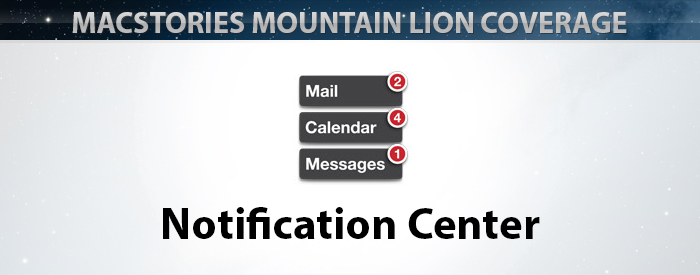
Notifications have been a part of iOS from day one, and last year’s iOS 5 update improved them greatly with Notification Center and the new banner style (the one that rolls down from the top of the screen without disrupting your current activity). They are an integral part of our interactions with our iPhones and iPads — we get them from missed calls, text messages, emails, reminders, social network interactions, apps, games, and so on. But on the Mac, notifications have been more of a hack than a system-level feature: something that developers have implemented themselves, and mostly just when they felt it was absolutely necessary to do so. As a result, they haven’t been nearly as much a part of the OS X experience as they have on iOS.

The most widely-used system for notifications on OS X until now has been Growl: a third-party app that allowed developers to easily implement their own notifications. It was widely adopted by the OS X developer community, and over the years it became an essential install for many Mac users. But Growl isn’t the best solution for notifications because it is still a third party app that the user must go out of their way to install.[1] Whilst this isn’t a problem for an experienced computer user, it is for those that don’t want or need to worry about finding a download link for a third-party notification solution or keeping it up to date (though admittedly this has become less of a problem with Growl’s release on the Mac App Store). And of course Apple itself would never use Growl for notifications for their own apps, some of which could benefit most from notifications (e.g. Mail, Messages, and FaceTime).

Fortunately, in OS X Mountain Lion Apple has now implemented native notifications and Notification Center. If you’ve ever used iOS 5 you’ll instantly be familiar with how they work because Apple has effectively recreated them for the Mac, only making a few changes to suit the different platform. All of Apple’s built-in OS X applications support the new notifications (Messages, Mail, Reminders, Mac App Store, FaceTime, etc) and there is an API for developers to add support for them to their own as well.

Read more

Access Extra Content and Perks

Founded in 2015, Club MacStories has delivered exclusive content every week for nearly a decade.

What started with weekly and monthly email newsletters has blossomed into a family of memberships designed for every MacStories fan.

Learn more here and from our Club FAQs.

Club MacStories: Weekly and monthly newsletters via email and the web that are brimming with apps, tips, automation workflows, longform writing, early access to the MacStories Unwind podcast, periodic giveaways, and more;

Club MacStories+: Everything that Club MacStories offers, plus an active Discord community, advanced search and custom RSS features for exploring the Club’s entire back catalog, bonus columns, and dozens of app discounts;

Club Premier: All of the above and AppStories+, an extended version of our flagship podcast that’s delivered early, ad-free, and in high-bitrate audio.

Learn more here and from our Club FAQs.


Mountain Lion: The MacStories Review

Given how important Mountain Lion — the latest version of OS X, available today — is to Apple’s ecosystem and unification strategy, its announcement was rather unusual. For the past decade, Apple has been relying on media events and developer conferences to serve as the stage for official introductions to major new versions of its desktop operating system. At WWDC 2002, Steve Jobs famously kicked off the event by giving a eulogy for Mac OS 9 as part of the transition to OS X; in 2009, Snow Leopard — the last version of OS X before Apple’s rebranding of “iPhone OS” to “iOS” — was officially unveiled at WWDC in front of over 5,200 developers; and in October 2010, Lion, the eighth major release of OS X, was formally announced and demoed at Apple’s self-hosted “Back to the Mac” media event.

But as Phil Schiller told Daring Fireball’s John Gruber, with Mountain Lion Apple has started “to do some things differently”. On February 16th, 2012, Apple fans and industry watchers checking their Thursday morning news witnessed Apple’s most surprising OS X announcement to date: instead of being unveiled to the press at a media event, Mountain Lion roared into existence as dozens of blog posts were published simultaneously by selected journalists, who had been given “product briefings” and demo copies a week in advance. With Mountain Lion, Apple decided to let the OS speak for itself, saving a proper introduction for WWDC 2012 where a near-final version of the OS was demoed (alongside some new features) and released to developers.

The way Apple handled Mountain Lion’s announcement may have felt unusual at the time, but in hindsight, it made perfect sense given the nature of the upgrade and the way Apple has encouraged letting its mobile and desktop operating systems coexist and benefit from each other.

Mountain Lion Review: PDF Version

Support MacStories and get a beautiful, DRM-free PDF copy of all our Mountain Lion coverage, including this review and exclusive Tips & Tricks.

Buy "MacStories Features: OS X Mountain Lion"

Buy “MacStories Features: OS X Mountain Lion”

More details here.

Cover image by ehtesham/Shutterstock.com

Read more

Access Extra Content and Perks

Founded in 2015, Club MacStories has delivered exclusive content every week for nearly a decade.

What started with weekly and monthly email newsletters has blossomed into a family of memberships designed for every MacStories fan.

Learn more here and from our Club FAQs.

Club MacStories: Weekly and monthly newsletters via email and the web that are brimming with apps, tips, automation workflows, longform writing, early access to the MacStories Unwind podcast, periodic giveaways, and more;

Club MacStories+: Everything that Club MacStories offers, plus an active Discord community, advanced search and custom RSS features for exploring the Club’s entire back catalog, bonus columns, and dozens of app discounts;

Club Premier: All of the above and AppStories+, an extended version of our flagship podcast that’s delivered early, ad-free, and in high-bitrate audio.

Learn more here and from our Club FAQs.


Announcing Our First eBook

MacStories is pleased to announce their first eBook, MacStories Features: OS X Mountain Lion, for $6.99. With a detailed review of Mountain Lion, numerous sections covering its new apps and features in depth, and 30% of its proceeds going to the American Cancer Society, MacStories Features: OS X Mountain Lion is a great way to learn about Mountain Lion, support MacStories, and fight cancer all at once.

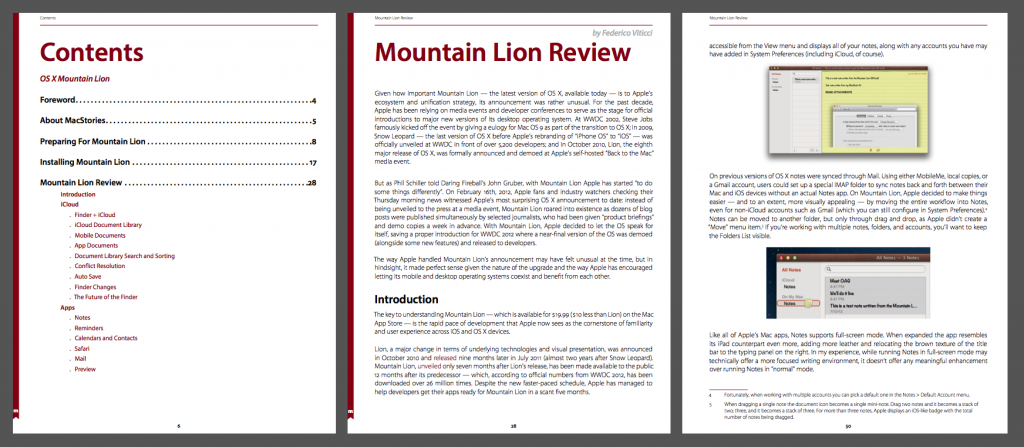
Contents

We’ve put a lot of effort into this book: it contains exclusive guides for preparing your Mac for Mountain Lion, walks you through every aspect of the install process, and contains great tips and tricks you won’t find anywhere else. Every inch of its over 120 pages is custom-designed and optimized for Retina displays, presenting its content in a beautiful, easy-to-read format.

You can download MacStories Features: OS X Mountain Lion here.

Buy Now

Buy Now

Cover image by ehtesham/Shutterstock.com

Access Extra Content and Perks

Founded in 2015, Club MacStories has delivered exclusive content every week for nearly a decade.

What started with weekly and monthly email newsletters has blossomed into a family of memberships designed for every MacStories fan.

Learn more here and from our Club FAQs.

Club MacStories: Weekly and monthly newsletters via email and the web that are brimming with apps, tips, automation workflows, longform writing, early access to the MacStories Unwind podcast, periodic giveaways, and more;

Club MacStories+: Everything that Club MacStories offers, plus an active Discord community, advanced search and custom RSS features for exploring the Club’s entire back catalog, bonus columns, and dozens of app discounts;

Club Premier: All of the above and AppStories+, an extended version of our flagship podcast that’s delivered early, ad-free, and in high-bitrate audio.

Learn more here and from our Club FAQs.