Posts in Featured

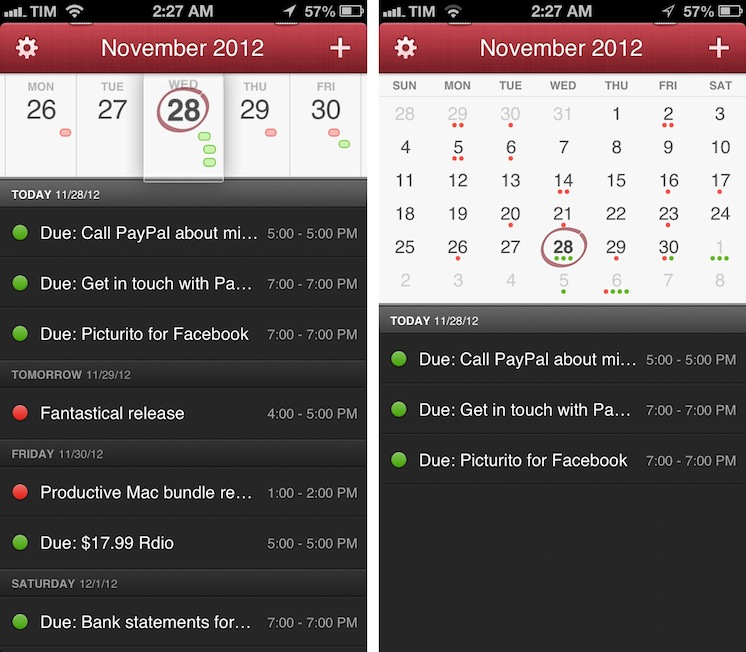
Fantastical for iPhone Review

I wouldn’t call myself a calendar power-user.

Ever since I started organizing the things I have to do with a system I can trust, I’ve faced a workflow conundrum: is this a task or a calendar event?

I know that there’s a difference between so-called “actionable items” and time-based events. Maybe I’m not hooked up right, but I’ve been looking for a way to immediately visualize, in a single interface, all the things that I have to do on a specific day. Independently from their actionable (“you need to do this”) or time-based (“you need to be here”) status, I want a software that, like a personal assistant, tells me exactly what I need to get done.

I have found such system in displaying my OmniFocus items inside my calendar. And now, the system has been enriched by the addition of Fantastical for iPhone.

I’ve been a fan of Fantastical for Mac since I first tried it in May 2011. Replacing iCal’s overly complicated interface with a simple menubar overview of your upcoming events, not only did Fantastical show that a simpler way to access your calendar was possible, it also profoundly changed the third-party OS X development scene with its use of natural language input. Futuristic as a concept, in practice Flexibits managed to bundle a powerful language parser within Fantastical that would recognize commands like “Coffee with Chris tomorrow from 6 to 7” and deconstruct them as specific values for a calendar event. It’s not a fancy gimmick: rather than clicking buttons and menus, I constantly find myself invoking Fantastical on a daily basis, typing away like I’d normally do in a blog post or note, saving events in just a few seconds.

Fantastical is one of my must-have apps for OS X. But how could Flexibits ensure its soul wouldn’t get lost in the transition to iOS? Read more
Access Extra Content and Perks

Founded in 2015, Club MacStories has delivered exclusive content every week for nearly a decade.

What started with weekly and monthly email newsletters has blossomed into a family of memberships designed for every MacStories fan.

Learn more here and from our Club FAQs.

Club MacStories: Weekly and monthly newsletters via email and the web that are brimming with apps, tips, automation workflows, longform writing, early access to the MacStories Unwind podcast, periodic giveaways, and more;

Club MacStories+: Everything that Club MacStories offers, plus an active Discord community, advanced search and custom RSS features for exploring the Club’s entire back catalog, bonus columns, and dozens of app discounts;

Club Premier: All of the above and AppStories+, an extended version of our flagship podcast that’s delivered early, ad-free, and in high-bitrate audio.

Learn more here and from our Club FAQs.


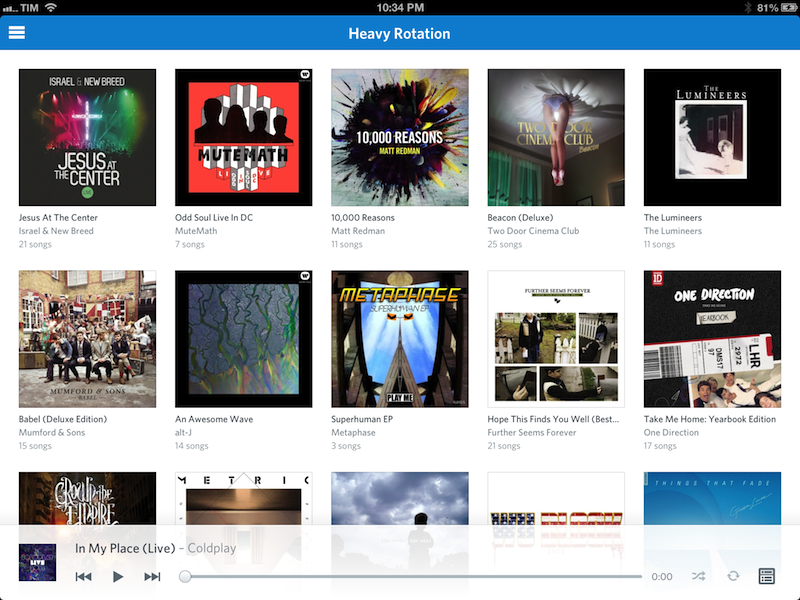
Rdio 2.0

Today, Rdio showed Spotify how to make a modern iOS client for a music streaming service.

I’ve been a Rdio user for over a year now. As I’ve previously written, tweeted, and discussed on various podcast appearances (including one on Generational that will be posted next week) I was a Spotify fan for years. At some point, however, I realized that the playlist-based nature of the service wasn’t working for me, and I switched to Rdio, a competing music streaming service that, like Spotify, lets you listen to a huge catalog of music for a monthly fee.

The distinction between a playlist-based user experience and being able to organize my music in a Collection with albums, songs, and artists made all the difference for me. I don’t like Spotify’s approach to forcing the listener to organize music in a playlist. A group of albums isn’t a playlist: it’s a collection. Read more

Access Extra Content and Perks

Founded in 2015, Club MacStories has delivered exclusive content every week for nearly a decade.

What started with weekly and monthly email newsletters has blossomed into a family of memberships designed for every MacStories fan.

Learn more here and from our Club FAQs.

Club MacStories: Weekly and monthly newsletters via email and the web that are brimming with apps, tips, automation workflows, longform writing, early access to the MacStories Unwind podcast, periodic giveaways, and more;

Club MacStories+: Everything that Club MacStories offers, plus an active Discord community, advanced search and custom RSS features for exploring the Club’s entire back catalog, bonus columns, and dozens of app discounts;

Club Premier: All of the above and AppStories+, an extended version of our flagship podcast that’s delivered early, ad-free, and in high-bitrate audio.

Learn more here and from our Club FAQs.


Spaced 3.0

Spaced 3.0

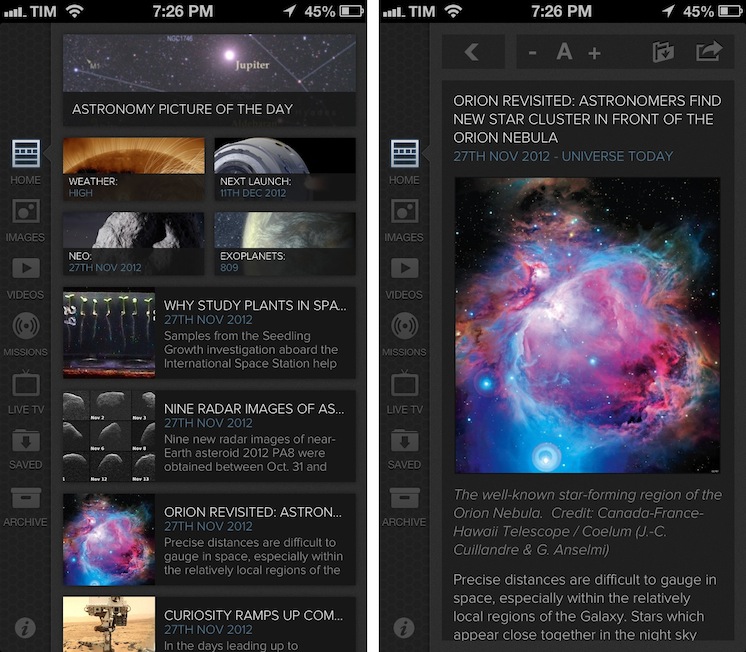
I’m no expert of astronomy or space missions, but I enjoy reading about the subject because I’m completely fascinated by it. I don’t subscribe to dedicated blogs about space news, because I don’t really follow the scene actively – I’m casually interested in reading what’s new when I have the time. For the past two years I’ve been using Spaced to keep up with the most important space news and discoveries; the team behind the app released today a major 3.0 update that adds a completely redesigned UI, iCloud support, and more sections.

Spaced aggregates news from well-established publications and sources and it is perfectly suited for people like me: folks who are curious to know about space but who don’t have the time to read every news item from blogs and magazines they are not even following. The new Spaced comes with a gorgeous black UI that gives even more depth and contrast to the beautiful imagery of NASA including Astronomy Photo of the Day and Image of the Day. In a sidebar on the left, you can now access a Home page featuring a collection of news, missions, NEO data, and photos, or you can browse individual sections to see more photos, videos, and live TV from NASA (including a programming schedule). You can tap on the Missions tab to learn more about single missions like the Webb Telescope and Mars Science Laboratory, or you can just head over Videos, tap Play and watch.

The big new feature of this 3.0 version is iCloud sync: in the Saved view, you access photos, articles, and videos you’ve saved from your iPad or iPhone. iCloud integration has been working reliably for me both on WiFi and 3G. You can also activate push notifications in the Settings for articles and other items, but I decided to keep them off as I prefer opening the app when I have time to read.

I recommend Spaced 3.0 to anyone who’s interested in space news but doesn’t have the time or patience to keep up with blogs, NASA webpages, and magazines. The app is only $0.99 on the App Store.

Permalink

Apple’s Black Friday Sale Now Live in Australia, New Zealand

As announced earlier this week, Apple has now launched the One-Day Shopping Event with discounts on iOS devices, Macs, and accessories. The event will propagate on Apple’s online stores across the world according to different time zones; right now, it is available on Apple’s Australian and New Zealand stores with a dedicated webpage.

Apple reports some important details on its website:

Enjoy special pricing on all the great gifts below. Buy online and get fast, free shipping. Or shop at your favourite Apple Retail Store, where you’ll enjoy faster checkout with Express Shopping.

Shopping event prices are solely available on 23 November, 2012, from 2:01 a.m. to 24 November, 2012, 1:59 a.m. in AEDT, are subject to change, and include GST. Promotional pricing cannot be combined with any other offers. Not all sale products are available in all Apple Retail Stores.

Starting with the iPad 2 and Retina iPad at the top of the list, the exclusive offer doesn’t include the iPad mini. Notably, for Macs, only portables are included, but there are accessories that are usually meant for desktop computers such as Magic Mouse, Magic Trackpad, and Apple’s Wireless Keyboard.

The official One-Day Shopping Event webpage is available here for Australian users. We’ll update this post with links to EU and US pricing as soon as they become available. Note only the base model prices are listed below.

  • iPad: A$498 - save A$41
  • iPad 2: A$398 - save A$31
  • iPod touch (5th gen): A$298 - save A$31
  • iPod touch (4th gen): A$194 - save A$25
  • iPod nano: A$158 - save A$11
  • MacBook Pro (13” Retina): A$1,794 - save A$105
  • MacBook Pro: A$1,244 - save A$105
  • MacBook Air: A$994 - save A$105
  • AirPort Express Base Station: A$108 - save A$11
  • AirPort Extreme Base Station: A$178 - save A$21
  • Time Capsule: A$298 - save A$21
  • Apple Magic Mouse: A$64 - save A$11
  • Magic Trackpad: A$64 - save A$11
  • Apple Wireless Keyboard: A$64 - save A$11
  • iPad Smart Case: A$44 - save A$15
  • iPad Smart Cover (Polyurethane): A$34 - save A$11
  • iPad Smart Cover (Leather): A$58 - save A$21
  • Apple In-Ear Headphones: A$88 - save A$11
  • Apple EarPods: A$28 - save A$7

Access Extra Content and Perks

Founded in 2015, Club MacStories has delivered exclusive content every week for nearly a decade.

What started with weekly and monthly email newsletters has blossomed into a family of memberships designed for every MacStories fan.

Learn more here and from our Club FAQs.

Club MacStories: Weekly and monthly newsletters via email and the web that are brimming with apps, tips, automation workflows, longform writing, early access to the MacStories Unwind podcast, periodic giveaways, and more;

Club MacStories+: Everything that Club MacStories offers, plus an active Discord community, advanced search and custom RSS features for exploring the Club’s entire back catalog, bonus columns, and dozens of app discounts;

Club Premier: All of the above and AppStories+, an extended version of our flagship podcast that’s delivered early, ad-free, and in high-bitrate audio.

Learn more here and from our Club FAQs.


Tokens: Easy Promo Code Generation For Developers

I often hear from my developer friends that generating promo codes for iOS and Mac apps is a tedious and annoying chore. From what I’m told, you have to log into iTunes Connect – which hasn’t the most pleasant interface Apple ever made – and generate these codes that you have to manually copy somewhere to share them via email, Twitter, or other systems. It’s a slow process, and iTunes Connect forces developers to “submit requests” for how many codes they need without offering any sort of social integration.

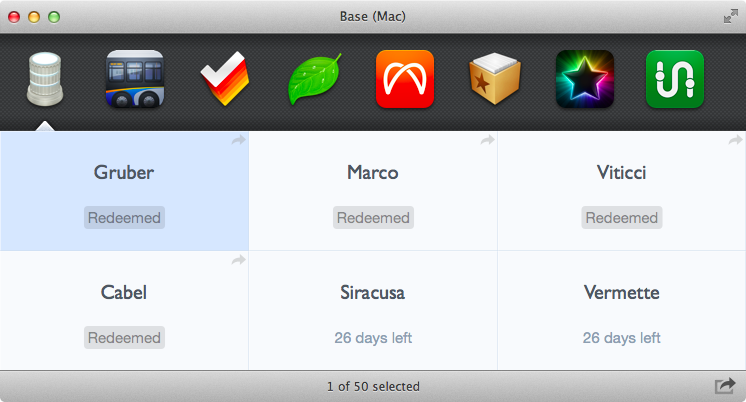
Enter Tokens. Developed by Padraig Kennedy and Oisin Prendiville, Tokens is an automated promo code generator for Mac that makes it super simple to generate and share promo codes for apps available in iTunes Connect. Tokens couldn’t be approved in the Mac App Store because it uses HTML scraping to interact with iTunes Connect remotely; the developers offer a FAQ to understand how Tokens works, for which kind of apps, and why it’s built for OS X 10.8. Read more

Access Extra Content and Perks

Founded in 2015, Club MacStories has delivered exclusive content every week for nearly a decade.

What started with weekly and monthly email newsletters has blossomed into a family of memberships designed for every MacStories fan.

Learn more here and from our Club FAQs.

Club MacStories: Weekly and monthly newsletters via email and the web that are brimming with apps, tips, automation workflows, longform writing, early access to the MacStories Unwind podcast, periodic giveaways, and more;

Club MacStories+: Everything that Club MacStories offers, plus an active Discord community, advanced search and custom RSS features for exploring the Club’s entire back catalog, bonus columns, and dozens of app discounts;

Club Premier: All of the above and AppStories+, an extended version of our flagship podcast that’s delivered early, ad-free, and in high-bitrate audio.

Learn more here and from our Club FAQs.


Evernote 5.0 for iOS Review

Evernote 5

Evernote 5


I have been using the latest Evernote app for iOS, Evernote 5, for the past week. I am not an “Evernote power user”, but having recently revamped my paperless workflow, I thought I had a good opportunity to properly test the major update. I believe Evernote has a strong foundation to build upon, but the first result of this process – the new Evernote 5 for iOS – is far from solid. Read more

Access Extra Content and Perks

Founded in 2015, Club MacStories has delivered exclusive content every week for nearly a decade.

What started with weekly and monthly email newsletters has blossomed into a family of memberships designed for every MacStories fan.

Learn more here and from our Club FAQs.

Club MacStories: Weekly and monthly newsletters via email and the web that are brimming with apps, tips, automation workflows, longform writing, early access to the MacStories Unwind podcast, periodic giveaways, and more;

Club MacStories+: Everything that Club MacStories offers, plus an active Discord community, advanced search and custom RSS features for exploring the Club’s entire back catalog, bonus columns, and dozens of app discounts;

Club Premier: All of the above and AppStories+, an extended version of our flagship podcast that’s delivered early, ad-free, and in high-bitrate audio.

Learn more here and from our Club FAQs.


Half Full Glass

Some people think Apple will eventually “dumb down” OS X and make it a “more casual” platform not suited for power users.

I disagree.

I covered this recurring theme in a section of my Mountain Lion review:

I think the Mac power user will be just fine using Mountain Lion. In practical terms, Mountain Lion’s new features and design choices haven’t hindered my ability to install the apps I want, run macros to automate tedious tasks, or fly through applications using keyboard shortcuts. I prefer Scrivener to Apple’s Notes app, I rely on Keyboard Maestro to be more efficient, and I keep my notes in Dropbox rather than iCloud. On the other hand, I can jot down a quick todo in Reminders knowing instantly that it will “just work”, and I can pick up any conversation I was having on my iPhone thanks to Messages on my Mac. Making the entire operating system more cohesive and refined hasn’t diminished the relevance and utility of third-party software on my Mac; if anything, it’s made the key apps and functionalities I rely on better.

The argument usually goes something like this: iOS is so successful, Apple will eventually make Macs more like it. Plus, Gatekeeper and Sandboxing are signs that this will happen.

Usually, this piece by Rands in Repose is cited as a somewhat obvious confirmation to the fact that Apple is not afraid of “cannibalizing itself”.

This argument needs to be deconstructed on multiple levels. Read more

Access Extra Content and Perks

Founded in 2015, Club MacStories has delivered exclusive content every week for nearly a decade.

What started with weekly and monthly email newsletters has blossomed into a family of memberships designed for every MacStories fan.

Learn more here and from our Club FAQs.

Club MacStories: Weekly and monthly newsletters via email and the web that are brimming with apps, tips, automation workflows, longform writing, early access to the MacStories Unwind podcast, periodic giveaways, and more;

Club MacStories+: Everything that Club MacStories offers, plus an active Discord community, advanced search and custom RSS features for exploring the Club’s entire back catalog, bonus columns, and dozens of app discounts;

Club Premier: All of the above and AppStories+, an extended version of our flagship podcast that’s delivered early, ad-free, and in high-bitrate audio.

Learn more here and from our Club FAQs.


The Magazine 1.1

The Magazine 1.1

Marco Arment shipped today version 1.1 of The Magazine, which I reviewed when it first came out in October:

Marco Arment’s The Magazine falls exactly under this aspect of writing. It’s about people who love technology, delivered as a curated collection of articles from great writers. In a way, it’s the opposite of Instapaper: while Marco’s more popular app is what you make of it, The Magazine is Marco’s own vision. So, yes – you’ll have to trust him on this one.

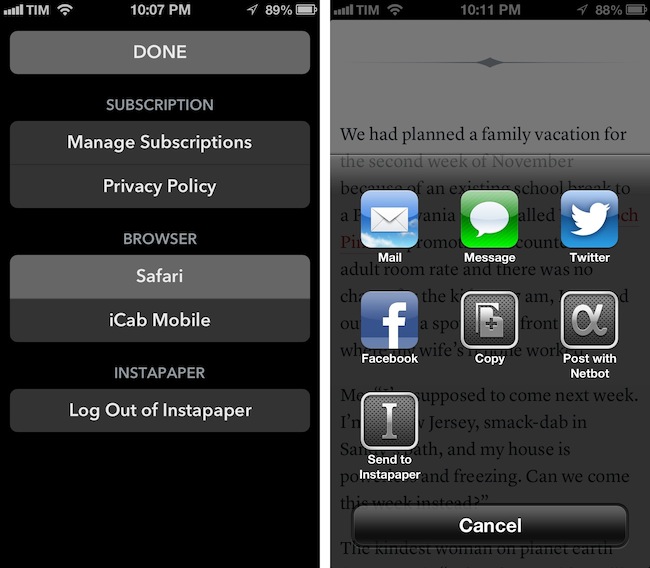
The Magazine has been growing in terms of quality of content and as an app. Version 1.1 adds new sharing options and a settings window to choose the default browser to open links with – a design decision that Marco has extensively discussed on his podcast Build and Analyze with Dan Benjamin. Fortunately, the added screen doesn’t make the app more complex: The Magazine 1.1 scans for installed third-party browsers and offers a popover (on the iPad) or a new view (on the iPhone) to set the default browser. Safari, Chrome, Opera Mini, iCab Mobile, Grazing, Mercury, Dolphin, and Terra are supported. In the same screen, Marco added buttons to manage subscriptions and read the privacy policy, as well as log out of Instapaper if you’ve enabled the service.

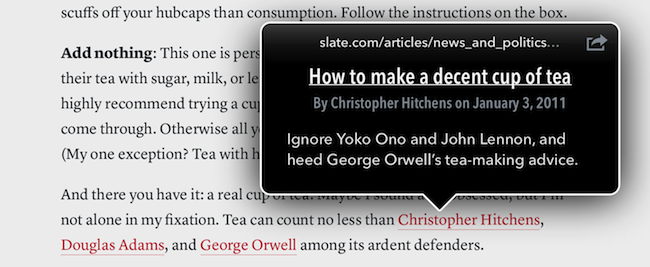
There are more improvements I like in The Magazine 1.1. The hyperlink popovers now have an icon to share and send an article to Instapaper, but you can also share selected text through the same method. It is a small addition, but I particularly appreciate support for posting to App.net using Netbot and its custom callback protocol: if you send a post to Netbot and hit Cancel in Netbot, you will automatically go back to The Magazine. This system is based on Tapbots’ custom protocol for URL callbacks, but it works similarly to x-callback-url, which I’m a big proponent of.

The Magazine 1.1 is now available on the App Store.

Permalink

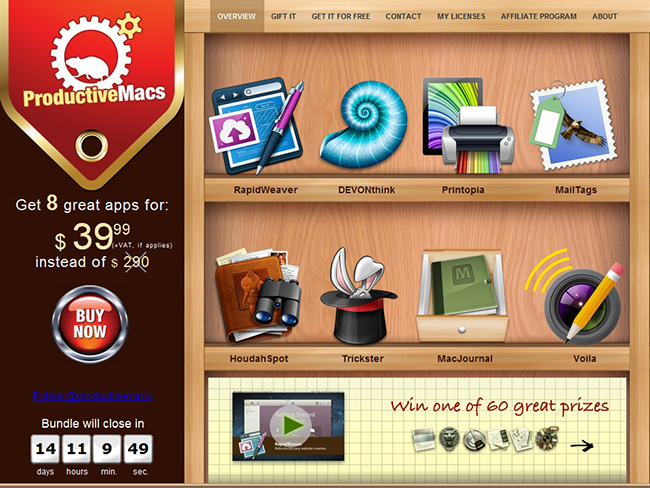
ProductiveMacs Bundle: 9 Great Mac Apps for $29.99

There are some nice software bundles available for the Mac right now, and this one is no exception. Apparent Software has a great ProductiveMacs bundle that contains some excellent utilities that will help you get work done. Some of the highlights of the bundle are TextExpander (one of our favorites), TaskPaper, Trickster (brand new, read our review), and Path Finder. If you had to purchase all nine of these productive goodies separately they would cost $239 but this new bundle is priced at the super-low total of $29.99.

Read more

Access Extra Content and Perks

Founded in 2015, Club MacStories has delivered exclusive content every week for nearly a decade.

What started with weekly and monthly email newsletters has blossomed into a family of memberships designed for every MacStories fan.

Learn more here and from our Club FAQs.

Club MacStories: Weekly and monthly newsletters via email and the web that are brimming with apps, tips, automation workflows, longform writing, early access to the MacStories Unwind podcast, periodic giveaways, and more;

Club MacStories+: Everything that Club MacStories offers, plus an active Discord community, advanced search and custom RSS features for exploring the Club’s entire back catalog, bonus columns, and dozens of app discounts;

Club Premier: All of the above and AppStories+, an extended version of our flagship podcast that’s delivered early, ad-free, and in high-bitrate audio.

Learn more here and from our Club FAQs.