Posts in Featured

The Untapped Potential Of Dual Screen AirPlay Games & Apps

What do you know about Dual Screen AirPlay games? Chances are, you don’t know much about it and might not even know what on earth I’m talking about. It’s a feature of AirPlay - the protocol that allows iOS devices to stream audio and video to an Apple TV. More specifically, Dual Screen AirPlay is the ability for app developers to use a connected Apple TV as a secondary screen, displaying different content on the TV as to what is on the iOS device. In theory it’s an awesome feature that has significant potential. In reality there haven’t been many examples of its implementation, let alone many that did so in a unique and exciting way.

So today I look at where Dual Screen AirPlay has been used, focusing on games in particular and then look to why it hasn’t been as widely deployed. I’ll also touch upon the problems with its implementation, where it could be improved and lastly a brief discussion on its potential in video apps as well.

Read more

Access Extra Content and Perks

Founded in 2015, Club MacStories has delivered exclusive content every week for nearly a decade.

What started with weekly and monthly email newsletters has blossomed into a family of memberships designed for every MacStories fan.

Learn more here and from our Club FAQs.

Club MacStories: Weekly and monthly newsletters via email and the web that are brimming with apps, tips, automation workflows, longform writing, early access to the MacStories Unwind podcast, periodic giveaways, and more;

Club MacStories+: Everything that Club MacStories offers, plus an active Discord community, advanced search and custom RSS features for exploring the Club’s entire back catalog, bonus columns, and dozens of app discounts;

Club Premier: All of the above and AppStories+, an extended version of our flagship podcast that’s delivered early, ad-free, and in high-bitrate audio.

Learn more here and from our Club FAQs.


Watermarker 1.1 with Batch Processing

Watermarker 1.1 with Batch Processing

When my dear friend and MacStories writer Don Southard released the first version of Watermarker, I didn’t know whether posting about it here on MacStories would be appropriate. However, after I’ve come to use the app and know how much Don is committed to making it great, I now think not mentioning it would be a disservice to my readers.

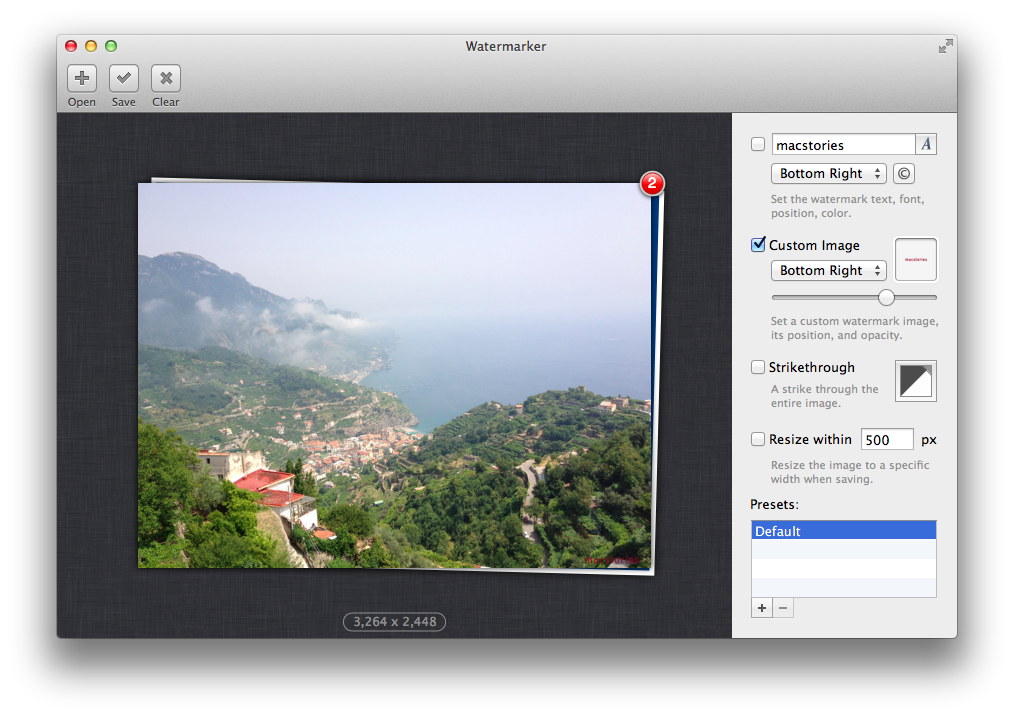
Watermarker provides a simple and automated way to add watermarks to images. You can choose between various options including text, your own logo, or even a customizable strikethrough. The app has a clean interface with the “canvas” (the area where you can drop an image) displayed on the left, and watermarking settings on the right. I like how you can save presets (so I can have one for my “large” MacStories watermark, another one for the smaller version), and the fact that an image’s size is reported right below its preview. Don’t take my word for it – I’m not the only one who thinks Watermark is a fine app.

Today’s update is particularly interesting for my workflow because it adds batch processing. You can drop multiple images at once into the canvas or dock icon (you can also drop an entire folder), and Watermarker will display a red badge in the canvas on top of your “stack” of photos (I wish I could click on the photos in the stack to select them). Once imported, you can set your watermark, and the app will apply it to all images at once; I like how Don also created a slider to set opacity for an image. To export, you can simply drag the images out of the canvas or save them. In both cases, a copy will be created.

I don’t like watermarking images, but Watermarker makes it extremely easy and fast. If I had to nitpick, I’d say that it’d be nice to navigate images in the canvas using the arrow keys (so you could still get a preview of the images you’re watermarking) and have AppleScript support for deeper automation workflows. Even without AppleScript, however, version 1.1 is a great improvement over Watermarker 1.0, which required you to import images one-by-one.

Go check out Watermarker here. The app is available at $7.99 on the Mac App Store.

Permalink

#MacStoriesDeals - Monday

We have many great deals for #MacStoriesDeals today. You can find us as @MacStoriesDeals on Twitter.

Read more

Access Extra Content and Perks

Founded in 2015, Club MacStories has delivered exclusive content every week for nearly a decade.

What started with weekly and monthly email newsletters has blossomed into a family of memberships designed for every MacStories fan.

Learn more here and from our Club FAQs.

Club MacStories: Weekly and monthly newsletters via email and the web that are brimming with apps, tips, automation workflows, longform writing, early access to the MacStories Unwind podcast, periodic giveaways, and more;

Club MacStories+: Everything that Club MacStories offers, plus an active Discord community, advanced search and custom RSS features for exploring the Club’s entire back catalog, bonus columns, and dozens of app discounts;

Club Premier: All of the above and AppStories+, an extended version of our flagship podcast that’s delivered early, ad-free, and in high-bitrate audio.

Learn more here and from our Club FAQs.


MacStories Interviews: John Siracusa

In our ongoing series of interviews with developers and creators in the Apple community, I had the chance to talk with John Siracusa.

John is well known in the Apple community for his detailed OS X reviews and other articles published on Ars Technica. He co-hosted a podcast called Hypercritical for 100 (98) episodes with 5by5’s Dan Benjamin, and he also shares some of his thoughts on tech, games, and pasta on a blog with the same name. On Twitter, you can find John as @siracusa.

The interview below was conducted over email between January 3 and January 15, 2013.

Federico Viticci: Hey John, could you introduce yourself to the readers who haven’t heard about you before?

John Siracusa: Though I’ve spent my career as a web developer, I’m better known on the Internet for my articles at Ars Technica, especially my very long and detailed reviews of OS X going back 13 years, and for my podcast, Hypercritical, which just ended its two-year run. I’m also a regular guest on The Incomparable, a podcast about geeky books, movies, TV shows, comics, and video games. Read more

Access Extra Content and Perks

Founded in 2015, Club MacStories has delivered exclusive content every week for nearly a decade.

What started with weekly and monthly email newsletters has blossomed into a family of memberships designed for every MacStories fan.

Learn more here and from our Club FAQs.

Club MacStories: Weekly and monthly newsletters via email and the web that are brimming with apps, tips, automation workflows, longform writing, early access to the MacStories Unwind podcast, periodic giveaways, and more;

Club MacStories+: Everything that Club MacStories offers, plus an active Discord community, advanced search and custom RSS features for exploring the Club’s entire back catalog, bonus columns, and dozens of app discounts;

Club Premier: All of the above and AppStories+, an extended version of our flagship podcast that’s delivered early, ad-free, and in high-bitrate audio.

Learn more here and from our Club FAQs.


Could Apple Be Moving To Twice-Yearly iPhone & iPad Releases?

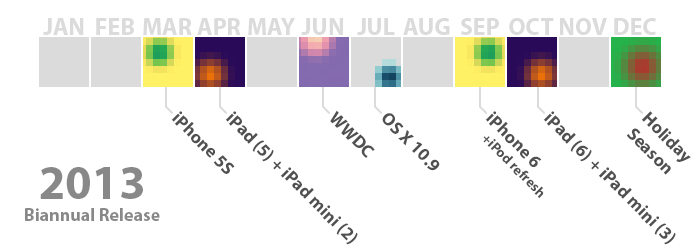
Just over a month ago, Horace Dediu of Asymco penned an article entitled ‘Does S stand for Spring’ in which he hypothesised that perhaps Apple might be moving to a biannual (twice-yearly) release cycle for the iPhone and iPad. Over the past month I’ve gone back to read Dediu’s hypothesis as news articles and analyst opinions surfaced and I did some analysis of Apple myself. It’s got to the point that I really think Dediu’s hypothesis has got real potential to become reality. So I decided to take some time to present Dediu’s evidence in a slightly different way, elaborating on some of his evidence and hopefully add to the discussion. But if you haven’t read the Asymco article yet, I’d highly recommend you do so before proceeding:

‘Does S stand for Spring?’ - Asymco

Read more

Access Extra Content and Perks

Founded in 2015, Club MacStories has delivered exclusive content every week for nearly a decade.

What started with weekly and monthly email newsletters has blossomed into a family of memberships designed for every MacStories fan.

Learn more here and from our Club FAQs.

Club MacStories: Weekly and monthly newsletters via email and the web that are brimming with apps, tips, automation workflows, longform writing, early access to the MacStories Unwind podcast, periodic giveaways, and more;

Club MacStories+: Everything that Club MacStories offers, plus an active Discord community, advanced search and custom RSS features for exploring the Club’s entire back catalog, bonus columns, and dozens of app discounts;

Club Premier: All of the above and AppStories+, an extended version of our flagship podcast that’s delivered early, ad-free, and in high-bitrate audio.

Learn more here and from our Club FAQs.


Mapping Apple’s International iPhone & iPad Rollouts

Apple has on three seperate occasions announced that the iPhone 5 will have the fastest international rollout of any iPhone ever - at the announcement keynote, during the Q4 earnings call, and in their press release announcing opening weekend sales of the iPhone 5 in China. The claim was, no doubt, meant to impress investors, press and the general public, but I was curious as to how fast it really was compared to previous iPhone rollouts. So I decided to track down the launch schedules of all the iPhones to date and then again with the iPad. In the end I found a few trends, some oddities and that Apple’s claim was (mostly) true.

iPhone 5 will be available in more than 100 countries by the end of December, making it the fastest iPhone rollout ever.

Read more

Access Extra Content and Perks

Founded in 2015, Club MacStories has delivered exclusive content every week for nearly a decade.

What started with weekly and monthly email newsletters has blossomed into a family of memberships designed for every MacStories fan.

Learn more here and from our Club FAQs.

Club MacStories: Weekly and monthly newsletters via email and the web that are brimming with apps, tips, automation workflows, longform writing, early access to the MacStories Unwind podcast, periodic giveaways, and more;

Club MacStories+: Everything that Club MacStories offers, plus an active Discord community, advanced search and custom RSS features for exploring the Club’s entire back catalog, bonus columns, and dozens of app discounts;

Club Premier: All of the above and AppStories+, an extended version of our flagship podcast that’s delivered early, ad-free, and in high-bitrate audio.

Learn more here and from our Club FAQs.


Mac App Store: Year Two

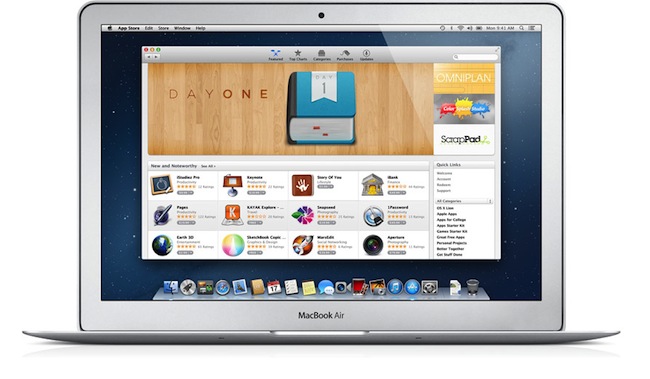
Today, the Mac App Store turns 2.

Last year, I concluded my retrospective of one year of Mac App Store wondering whether 2012 would see more developers struggling to get their Mac apps approved for sale.

The Mac App Store is not without its flaws, and questions loom ahead as to whether Apple will lock down the system eventually — allowing customers to only install apps from the Mac App Store (as also recently suggested by Adam Engst on Macworld) — and cause a general confusion among developers and consumers as sandboxing is enforced and apps will need to comply to a stricter set of rules to be accepted on the Mac App Store.

A full year after that post, I believe it’s safe to say one word epitomizes Apple’s 2012 with the Mac App Store: uncertainity. Read more

Access Extra Content and Perks

Founded in 2015, Club MacStories has delivered exclusive content every week for nearly a decade.

What started with weekly and monthly email newsletters has blossomed into a family of memberships designed for every MacStories fan.

Learn more here and from our Club FAQs.

Club MacStories: Weekly and monthly newsletters via email and the web that are brimming with apps, tips, automation workflows, longform writing, early access to the MacStories Unwind podcast, periodic giveaways, and more;

Club MacStories+: Everything that Club MacStories offers, plus an active Discord community, advanced search and custom RSS features for exploring the Club’s entire back catalog, bonus columns, and dozens of app discounts;

Club Premier: All of the above and AppStories+, an extended version of our flagship podcast that’s delivered early, ad-free, and in high-bitrate audio.

Learn more here and from our Club FAQs.


Longform for iPad

Longform for iPad

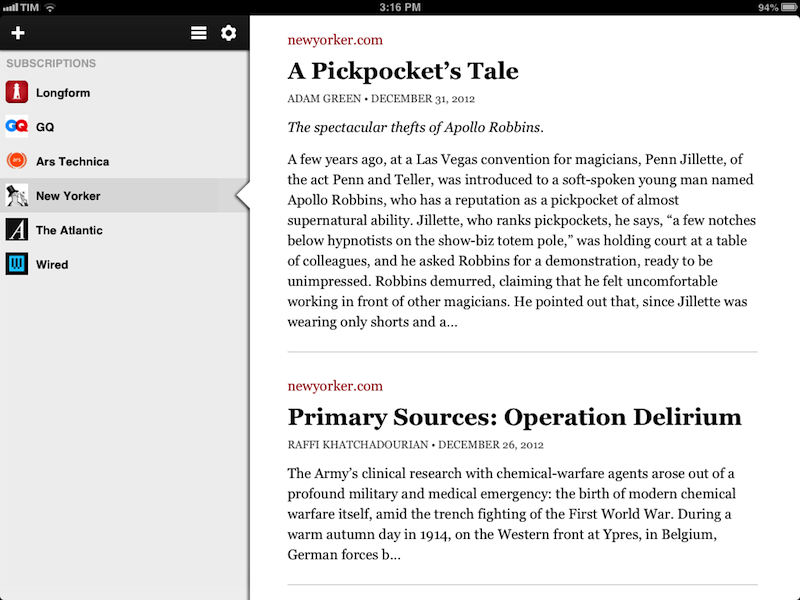
I’ve recently tweeted about how I re-discovered Longform and their iPad app, and I thought the app deserved a mention here as well. Like the name implies, Longform is a service that curates “new and classic non-fiction from around the web” in the form of direct links to articles you can read in your browser. While there are many services like it, I prefer the clean look of Longform’s website and the human aspect of their curation: for instance, the summaries Longform provides feel like they’re written by humans rather than automated scrapers. The format of the website, Twitter account, and “Best Of” lists feel like they’re managed by people who actually read the links they curate. Even their About page is simple and elegant.

The iPad app (soon to be joined by an iPhone version) has become my go-to app for discovering articles I want to read. Even better: while I discover a lot of articles about tech via Twitter and RSS, Longform allows me to read great pieces of non-fiction out of my “geek comfort zone”, such as this story about Apollo Robbins or this terrific story by Eric Puchner. The iPad app comes with the standard stream of Longform-curated links, but it also lets you add “subscriptions” to specific sites, so you can, for example, view only articles from The New Yorker or GQ.

Longform doesn’t care about read-later drama and nerd gossip: it’s service-agnostic in the way it supports Instapaper, Pocket, and Readability – so you’ll be able to easily send articles to your app of choice. A subtle touch that I really appreciate is that, while the app comes with its own text-only “Read mode”, it defaults to a standard Web view when opening links, so I’m sure the website owner gets a page view from me before I send the article to Instapaper. If you do want to read within Longform, there are settings to adjust fonts and sharing options, but, overall, I prefer the presentation and feature set of Instapaper for these tasks.

More than an anonymous web service, Longform is a group of human editors whom I trust to bring me content I wouldn’t discover otherwise. The iPad app is only $0.99 on the App Store.

Permalink

iPad in Real Life: Erik Hess, F-5N Tiger II Pilot

I believe people aren’t using iPads only as devices to “watch videos” or “catch up on reading”. Perhaps many people are; but there are some individuals who, thanks to the power and portability of the iPad, have managed to fit the device into their workflows and personal lives in ways that most of us wouldn’t expect. I think these stories deserve to be told. And they need to be told by the people who experience them first-hand.

For the first installment of a (non-regular) “iPad in Real Life” series, I asked Erik Hess to show me how the iPad has improved his flying experience in the cockpit.

Erik Hess spent 13 years as a pilot in the US Navy flying F–14B Tomcats and F/A–18E/F Super Hornets from aircraft carriers. He’s now a full-time designer and partner at high90 and continues to fly the F–5N Tiger II as an adversary pilot in the US Navy Reserve. He posts occasionally at his blog The Mindful Bit and you can find him on Twitter.

I asked Erik to share his experience in using the iPad as a flight-aiding tool in the cockpit. The result is a detailed account written by Erik himself covering a wide range of aspects from software used and replacing paper charts to portability and the importance of the Retina display. Perfect for what I was looking for, I left Erik’s thoughts mostly untouched because I believe, for this series, I should let these voices speak for themselves. Aside from minor editing, I chose to offer Erik’s own story, rather than my summary of it.

Read more

Access Extra Content and Perks

Founded in 2015, Club MacStories has delivered exclusive content every week for nearly a decade.

What started with weekly and monthly email newsletters has blossomed into a family of memberships designed for every MacStories fan.

Learn more here and from our Club FAQs.

Club MacStories: Weekly and monthly newsletters via email and the web that are brimming with apps, tips, automation workflows, longform writing, early access to the MacStories Unwind podcast, periodic giveaways, and more;

Club MacStories+: Everything that Club MacStories offers, plus an active Discord community, advanced search and custom RSS features for exploring the Club’s entire back catalog, bonus columns, and dozens of app discounts;

Club Premier: All of the above and AppStories+, an extended version of our flagship podcast that’s delivered early, ad-free, and in high-bitrate audio.

Learn more here and from our Club FAQs.