Posts in Featured

Week Calendar HD Review

weekcal

weekcal

Week Calendar has always been a calendar app for power users. I remember taking my first look at the iPhone version in March 2011, calling it a “powerful iCal alternative for iPhone”; two months later, I covered the release of the iPad client, which was then given a new theme to better differentiate it from Apple’s own Calendar app.1 After a long absence on the App Store, Week Calendar for iPad is back today as Week Calendar HD, which I have been testing for the past few months.

Just like its predecessors, Week Calendar is a calendar app for power users. You will find dozens of options and settings to tweak, perhaps even too many if you don’t like the idea of tweaking every font size, calendar behavior, or menu to your liking. The compromise of using a feature-rich app as Week Calendar is that there is an initial learning curve – not too steep, but definitely something worth keeping in mind if you want to get the most out of the app.

Therefore, instead of listing every single feature in detail, I’ll try to focus on the ones that I have been using on a daily basis.2

Read more

Access Extra Content and Perks

Founded in 2015, Club MacStories has delivered exclusive content every week for nearly a decade.

What started with weekly and monthly email newsletters has blossomed into a family of memberships designed for every MacStories fan.

Learn more here and from our Club FAQs.

Club MacStories: Weekly and monthly newsletters via email and the web that are brimming with apps, tips, automation workflows, longform writing, early access to the MacStories Unwind podcast, periodic giveaways, and more;

Club MacStories+: Everything that Club MacStories offers, plus an active Discord community, advanced search and custom RSS features for exploring the Club’s entire back catalog, bonus columns, and dozens of app discounts;

Club Premier: All of the above and AppStories+, an extended version of our flagship podcast that’s delivered early, ad-free, and in high-bitrate audio.

Learn more here and from our Club FAQs.


Chrome for iOS Updated With Messages Sharing, New History Menu

Chrome

Chrome

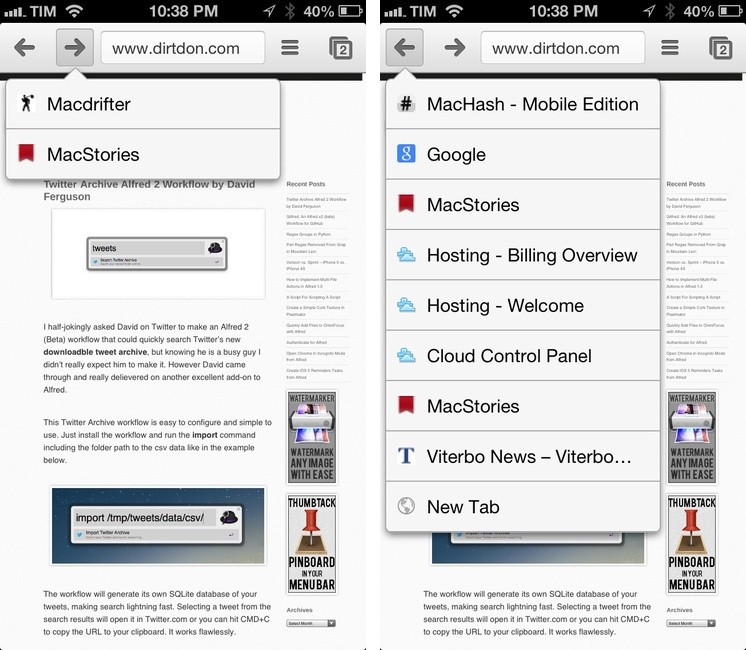
Released earlier today, Google Chrome for iOS has been updated with built-in Messages sharing and a new menu to access previously-visited webpages.

Available from the Share menu in the top toolbar, Messages integration brings up a modal Messages window to send a webpage’s title and URL to someone else. This is a good addition – I’ve long relied on bookmarklets and third-party apps to forward Chrome links to Messages – but unfortunately one I’ll make little use of, as iOS doesn’t let you quickly address a message to a pre-defined group of contacts.1

I find the new History menu much more interesting for my daily Chrome workflow. Similarly to Safari, you can now tap & hold the Back/Forward buttons to show a list of websites you have navigated to; tapping on one will take you back to that page. Like Apple’s implementation, this is a per-tab history; unlike Safari, the list of pages is shown in a dropdown menu rather than a full-screen modal view (on iPhone).

Read more

Access Extra Content and Perks

Founded in 2015, Club MacStories has delivered exclusive content every week for nearly a decade.

What started with weekly and monthly email newsletters has blossomed into a family of memberships designed for every MacStories fan.

Learn more here and from our Club FAQs.

Club MacStories: Weekly and monthly newsletters via email and the web that are brimming with apps, tips, automation workflows, longform writing, early access to the MacStories Unwind podcast, periodic giveaways, and more;

Club MacStories+: Everything that Club MacStories offers, plus an active Discord community, advanced search and custom RSS features for exploring the Club’s entire back catalog, bonus columns, and dozens of app discounts;

Club Premier: All of the above and AppStories+, an extended version of our flagship podcast that’s delivered early, ad-free, and in high-bitrate audio.

Learn more here and from our Club FAQs.


#MacStoriesDeals - Friday

We have many great deals for #MacStoriesDeals today. You can find us as @MacStoriesDeals on Twitter.

Read more

Access Extra Content and Perks

Founded in 2015, Club MacStories has delivered exclusive content every week for nearly a decade.

What started with weekly and monthly email newsletters has blossomed into a family of memberships designed for every MacStories fan.

Learn more here and from our Club FAQs.

Club MacStories: Weekly and monthly newsletters via email and the web that are brimming with apps, tips, automation workflows, longform writing, early access to the MacStories Unwind podcast, periodic giveaways, and more;

Club MacStories+: Everything that Club MacStories offers, plus an active Discord community, advanced search and custom RSS features for exploring the Club’s entire back catalog, bonus columns, and dozens of app discounts;

Club Premier: All of the above and AppStories+, an extended version of our flagship podcast that’s delivered early, ad-free, and in high-bitrate audio.

Learn more here and from our Club FAQs.


Simple Japanese Emoticons with Kaomoji

At MacStories, we use iMessage on a daily basis as our team chat. Alongside the occasional meme, Twitter link, or article we need to check out, the Japanese emoticon is a common occurrence in our group thread. I’ve always wondered whether my fellow teammates learned to manually type out flipping tables and other emoticons – also known as kaomojis – while I was stuck using the good-looking, but obvious Apple default emoji. If you happen to live in a team chat of remote workers every day you know how much more successful an original GIF or meme can be.

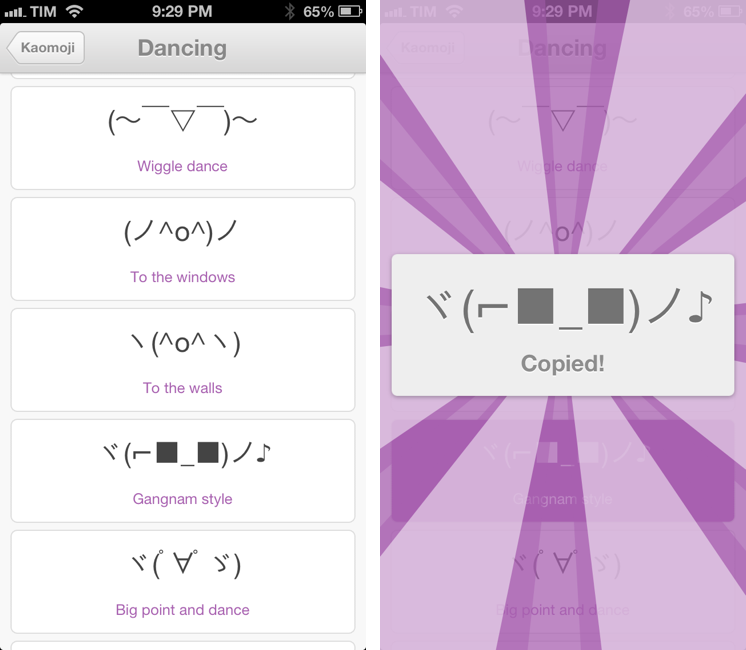
My quest towards iMessage emoticon domination is over with Kaomoji. A simple $0.99 iPhone app made by Richard Henry (product designer at Quora), Kaomoji contains 1,000 Japanese-style emoticons organized in 28 categories such as Happy, Sad, Evil, Love, Cats, Dogs, Dancing, and the game-changing Table Flip.

Kaomoji’s UI is clean and focused on the actual emoticons. Categories are color-coded, and tapping on one will open a dedicated page with properly colored highlights and fonts. It’s a nice touch. The app has only one feature: copy. Tapping on a kaomoji will bring up a manga-like success message showing a bigger version of the emoticon with the text “Copied”. Once copied, you can paste the text anywhere – be it iMessage, Twitter, Facebook, or any other app.

Kaomoji does one thing extremely well. I like the selection of emoticons, and if I had to nitpick I’d say it’d be nice to have built-in Twitter and Messages/Facebook actions to send text without leaving the app. I would also like to see an iPad version in the future.

Kaomoji is only $0.99 on the App Store.

Let’s also put the table back. ┬──┬◡ノ(° -°ノ)

Access Extra Content and Perks

Founded in 2015, Club MacStories has delivered exclusive content every week for nearly a decade.

What started with weekly and monthly email newsletters has blossomed into a family of memberships designed for every MacStories fan.

Learn more here and from our Club FAQs.

Club MacStories: Weekly and monthly newsletters via email and the web that are brimming with apps, tips, automation workflows, longform writing, early access to the MacStories Unwind podcast, periodic giveaways, and more;

Club MacStories+: Everything that Club MacStories offers, plus an active Discord community, advanced search and custom RSS features for exploring the Club’s entire back catalog, bonus columns, and dozens of app discounts;

Club Premier: All of the above and AppStories+, an extended version of our flagship podcast that’s delivered early, ad-free, and in high-bitrate audio.

Learn more here and from our Club FAQs.


Evernote 5.2 Gets New Snippet View, PDF Viewer

Evernote52

Evernote52

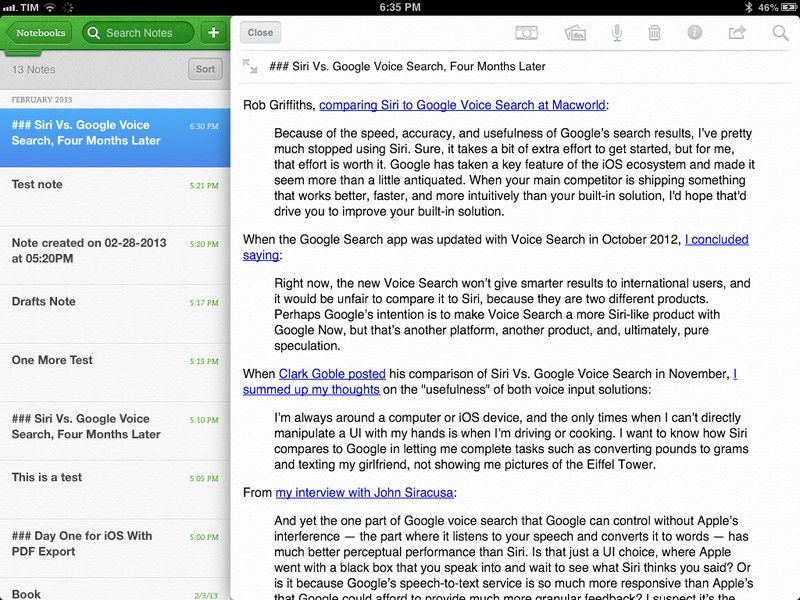
Evernote for iOS has been updated today to version 5.2. I have been testing the update for the past weeks, and I believe it brings a number of very welcome improvements, especially for iPad owners.

In my original review of Evernote 5, I noted how the new app’s interface felt clunky to navigate in notebooks with a large number of notes, causing related slowdowns when scrolling a note list and, worse, crashes. Version 5.2 brings an all-new snippet view for iPad, which speeds up navigation considerably and works better than the old thumbnail-based navigation when dealing with multiple notes.

Read more

Access Extra Content and Perks

Founded in 2015, Club MacStories has delivered exclusive content every week for nearly a decade.

What started with weekly and monthly email newsletters has blossomed into a family of memberships designed for every MacStories fan.

Learn more here and from our Club FAQs.

Club MacStories: Weekly and monthly newsletters via email and the web that are brimming with apps, tips, automation workflows, longform writing, early access to the MacStories Unwind podcast, periodic giveaways, and more;

Club MacStories+: Everything that Club MacStories offers, plus an active Discord community, advanced search and custom RSS features for exploring the Club’s entire back catalog, bonus columns, and dozens of app discounts;

Club Premier: All of the above and AppStories+, an extended version of our flagship podcast that’s delivered early, ad-free, and in high-bitrate audio.

Learn more here and from our Club FAQs.


RegexMatch for iPad

RegexMatch

RegexMatch

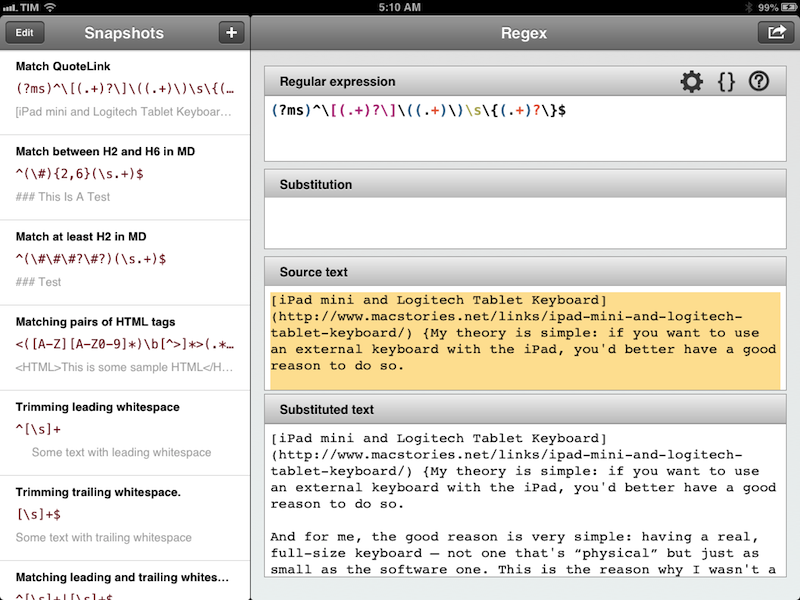
There seems to be a scarcity of easy-to-use, well designed iOS apps for testing and previewing regular expressions. I’ve only seen a few on the App Store, and they tend to look ugly or lack the feature set that I need. Fortunately, RegexMatch is a good start if you’ve been looking for a way to test and save regexes on the iPad.

RegexMatch has a clean interface that’s easy to navigate and good-looking. On the left side, there’s a sidebar listing all your Snapshots – regular expressions you’ve created and saved manually. You can create as many snapshots as you want, but I wish there was some kind of folder organization for people who, like me, will test several versions of the same regex. Read more

Access Extra Content and Perks

Founded in 2015, Club MacStories has delivered exclusive content every week for nearly a decade.

What started with weekly and monthly email newsletters has blossomed into a family of memberships designed for every MacStories fan.

Learn more here and from our Club FAQs.

Club MacStories: Weekly and monthly newsletters via email and the web that are brimming with apps, tips, automation workflows, longform writing, early access to the MacStories Unwind podcast, periodic giveaways, and more;

Club MacStories+: Everything that Club MacStories offers, plus an active Discord community, advanced search and custom RSS features for exploring the Club’s entire back catalog, bonus columns, and dozens of app discounts;

Club Premier: All of the above and AppStories+, an extended version of our flagship podcast that’s delivered early, ad-free, and in high-bitrate audio.

Learn more here and from our Club FAQs.


Year Walk Review

Last night, I finished Year Walk – the latest game from Simogo, creators of Bumpy Road and Beat Sneak Bandit – and even if games don’t belong in my usual area of coverage here at MacStories, I think Year Walk deserves a special mention.

Calling Year Walk a “game” is actually reductive. Even though it plays like a game, Year Walk is an experience spanning various aspects of storytelling, Swedish folklore, multitouch interactions, sound, and additional reading material available in a Year Walk Companion app.

Year Walk is the most unique “game” I have played on iOS in years. I’ll try my best to describe its appeal in this post. Read more

Access Extra Content and Perks

Founded in 2015, Club MacStories has delivered exclusive content every week for nearly a decade.

What started with weekly and monthly email newsletters has blossomed into a family of memberships designed for every MacStories fan.

Learn more here and from our Club FAQs.

Club MacStories: Weekly and monthly newsletters via email and the web that are brimming with apps, tips, automation workflows, longform writing, early access to the MacStories Unwind podcast, periodic giveaways, and more;

Club MacStories+: Everything that Club MacStories offers, plus an active Discord community, advanced search and custom RSS features for exploring the Club’s entire back catalog, bonus columns, and dozens of app discounts;

Club Premier: All of the above and AppStories+, an extended version of our flagship podcast that’s delivered early, ad-free, and in high-bitrate audio.

Learn more here and from our Club FAQs.


Reader X 2.0

ReaderX

ReaderX

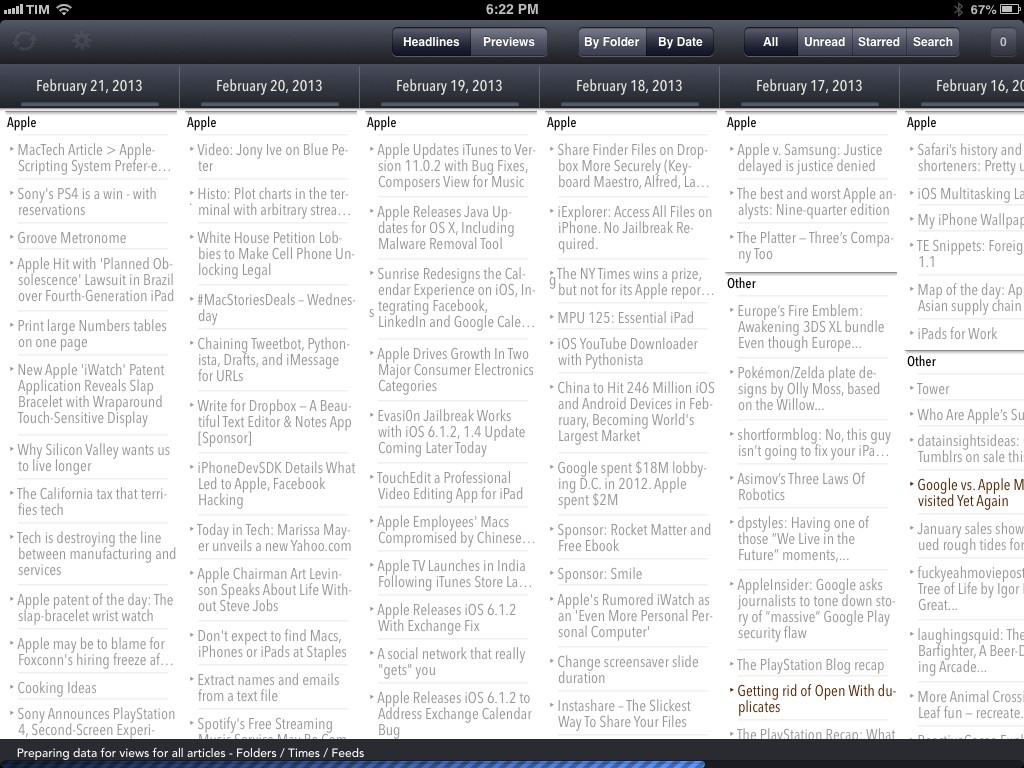
MacStories readers know that my favorite Google Reader client these days is Mr. Reader, especially after an update that added a “services menu” to the app, substantially increasing its interoperability with other apps. However, I’ve also been a fan of Reader X as a companion Google Reader app. A year after its original release in February 2012, developer Wolfgang Augustin released Reader X 2.0, which is a solid update that adds several new functionalities while building upon the original concept of the app.

Read more

Access Extra Content and Perks

Founded in 2015, Club MacStories has delivered exclusive content every week for nearly a decade.

What started with weekly and monthly email newsletters has blossomed into a family of memberships designed for every MacStories fan.

Learn more here and from our Club FAQs.

Club MacStories: Weekly and monthly newsletters via email and the web that are brimming with apps, tips, automation workflows, longform writing, early access to the MacStories Unwind podcast, periodic giveaways, and more;

Club MacStories+: Everything that Club MacStories offers, plus an active Discord community, advanced search and custom RSS features for exploring the Club’s entire back catalog, bonus columns, and dozens of app discounts;

Club Premier: All of the above and AppStories+, an extended version of our flagship podcast that’s delivered early, ad-free, and in high-bitrate audio.

Learn more here and from our Club FAQs.


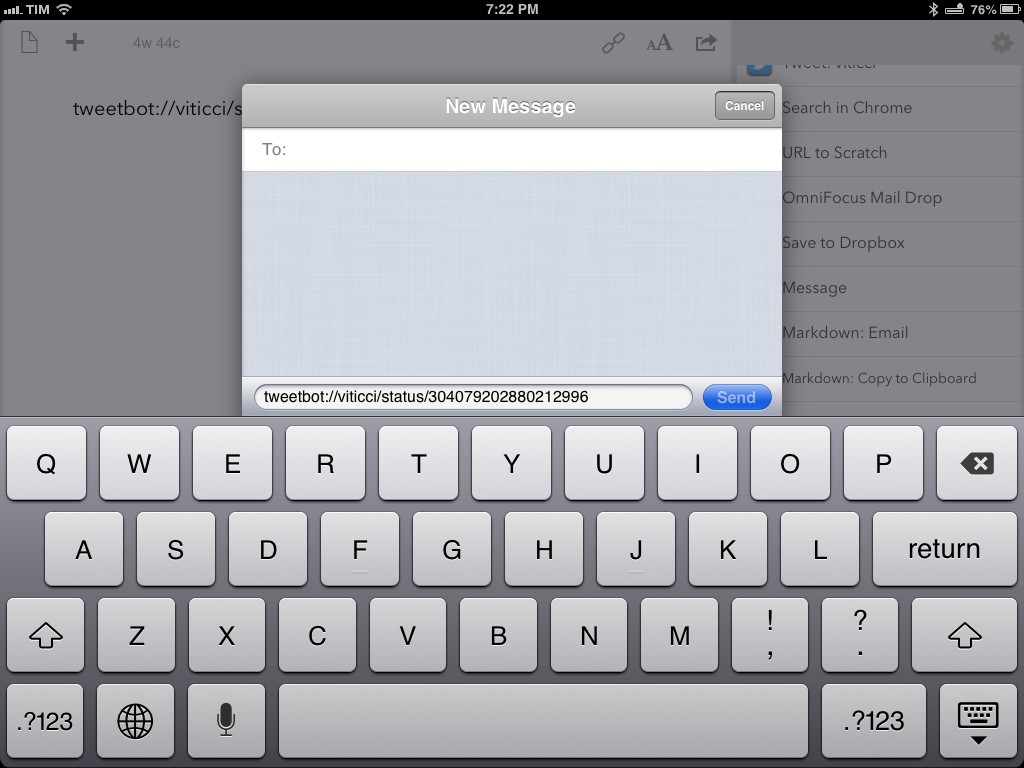
Chaining Tweetbot, Pythonista, Drafts, and iMessage for URLs

DraftsMessages

DraftsMessages

Last night, Tweetbot for iOS was updated with support for the Twitter 1.1 API, which, among various requirements, includes the need of linking a tweet’s timestamp – the date and time when it was sent – to its unique URL on twitter.com. In Tweetbot, you can now open the tweet detail view and tap on the timestamp to automatically open the Twitter website in your default browser; in terms of interaction, I like this change because it lets me open tweets in Google Chrome with just one tap.

In thinking about the update last night, I realized that:

  • My team and I use iMessage for daily communication;
  • The majority of URLs we share are Twitter URLs;
  • We all use Tweetbot on iOS and OS X;
  • Easier browser access means easier bookmarklet triggering;
  • Drafts can access iMessage.

And I concluded that:

  • I could chain every piece of the puzzle together;
  • Hopefully somebody else will find it useful and adapt the workflow to other similar scenarios.

Therefore, I created a browser bookmarklet, a Python script, and a Drafts action to automate the entire process and demonstrate how you can convert Twitter URLs to tweetbot:// URLs and send text from Pythonista to Drafts.

As usual, I am posting the following workflow as a proof of concept that you can modify and adapt to your needs. For instance, you can change the action that is triggered in Drafts, the x-success parameter that will be triggered, or the way Twitter links are converted to Tweetbot-specific URLs.

Read more

Access Extra Content and Perks

Founded in 2015, Club MacStories has delivered exclusive content every week for nearly a decade.

What started with weekly and monthly email newsletters has blossomed into a family of memberships designed for every MacStories fan.

Learn more here and from our Club FAQs.

Club MacStories: Weekly and monthly newsletters via email and the web that are brimming with apps, tips, automation workflows, longform writing, early access to the MacStories Unwind podcast, periodic giveaways, and more;

Club MacStories+: Everything that Club MacStories offers, plus an active Discord community, advanced search and custom RSS features for exploring the Club’s entire back catalog, bonus columns, and dozens of app discounts;

Club Premier: All of the above and AppStories+, an extended version of our flagship podcast that’s delivered early, ad-free, and in high-bitrate audio.

Learn more here and from our Club FAQs.