Posts in Featured

The Inception Of iPhone Decals

Available soon on Etsy, this iPhone decal is quite possibly the silliest thing I’ve seen in a while. Basically, it applies a standard iPhone UI sticker to the back of the iPhone, so it’ll look like you’re staring at the back of the device while you’re carrying it. People around you will see the screen, but you are looking at the screen.

See? Paradox.

[via The Next Web]

Access Extra Content and Perks

Founded in 2015, Club MacStories has delivered exclusive content every week for nearly a decade.

What started with weekly and monthly email newsletters has blossomed into a family of memberships designed for every MacStories fan.

Learn more here and from our Club FAQs.

Club MacStories: Weekly and monthly newsletters via email and the web that are brimming with apps, tips, automation workflows, longform writing, early access to the MacStories Unwind podcast, periodic giveaways, and more;

Club MacStories+: Everything that Club MacStories offers, plus an active Discord community, advanced search and custom RSS features for exploring the Club’s entire back catalog, bonus columns, and dozens of app discounts;

Club Premier: All of the above and AppStories+, an extended version of our flagship podcast that’s delivered early, ad-free, and in high-bitrate audio.

Learn more here and from our Club FAQs.


The Washington Post App for iPad Now Available, Free Access Until February 2011

An official Washington Post app for iPad was approved earlier today, and it’s available for free in the App Store here. What’s so interesting about it? Just like the official New York Times app, full access is granted until February 2011 (NYT app grants fere full access until January 2011) for free. No need to submit payment information, but an existing washingtonpost.com account is already required.

You can also create an account in-app. After February 2011, the service will go paid (with a so-called “paywall”) and you’ll need to have a subscription to enjoy the contents of The Washington Post on the iPad. Read more

Access Extra Content and Perks

Founded in 2015, Club MacStories has delivered exclusive content every week for nearly a decade.

What started with weekly and monthly email newsletters has blossomed into a family of memberships designed for every MacStories fan.

Learn more here and from our Club FAQs.

Club MacStories: Weekly and monthly newsletters via email and the web that are brimming with apps, tips, automation workflows, longform writing, early access to the MacStories Unwind podcast, periodic giveaways, and more;

Club MacStories+: Everything that Club MacStories offers, plus an active Discord community, advanced search and custom RSS features for exploring the Club’s entire back catalog, bonus columns, and dozens of app discounts;

Club Premier: All of the above and AppStories+, an extended version of our flagship podcast that’s delivered early, ad-free, and in high-bitrate audio.

Learn more here and from our Club FAQs.


Apple Considering Scrollable Menus and Toolbars For Lion and iOS 5?

A new European patent filing discovered by Patently Apple details how Apple might implement different interaction methods for menus and toolbars in the next version of OS X, Lion, and in the future iteration of their mobile operating system, iOS. The patent, filed in Q2 1010 and published last week, shows two specific models: scrollable menus and toolbars.

The main concept behind the patent is that menus and toolbars take too much space on screen, and the large majority of users don’t need to look at these elements all the time. To save space and implement multitouch gesture-based navigation in menus, there could be a way to scroll through toolbar icons and dropdown menus both on the desktop and iPhone / iPad. Read more

Access Extra Content and Perks

Founded in 2015, Club MacStories has delivered exclusive content every week for nearly a decade.

What started with weekly and monthly email newsletters has blossomed into a family of memberships designed for every MacStories fan.

Learn more here and from our Club FAQs.

Club MacStories: Weekly and monthly newsletters via email and the web that are brimming with apps, tips, automation workflows, longform writing, early access to the MacStories Unwind podcast, periodic giveaways, and more;

Club MacStories+: Everything that Club MacStories offers, plus an active Discord community, advanced search and custom RSS features for exploring the Club’s entire back catalog, bonus columns, and dozens of app discounts;

Club Premier: All of the above and AppStories+, an extended version of our flagship podcast that’s delivered early, ad-free, and in high-bitrate audio.

Learn more here and from our Club FAQs.


Calvetica, The Minimal App That Reinvented Calendars On My iPhone

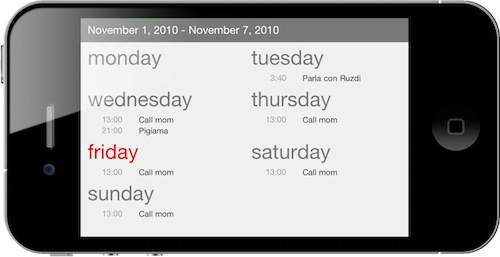
In my quest to searching for the perfect Google Calendar setup on iOS and OS X, I’ve already stopped by the gates of miCal, a full-featured calendar software for iPhone that could use some UI refinements, but allows you to swipe between lots of calendar views in seconds. miCal isn’t exactly elegant or “great-looking”, but it gets the job done.

When I first asked on Twitter which was the “app to have” when it comes to calendars, practically everyone replied with one word: Calvetica. What’s the deal about Calvetica? I had heard about it before I went asking on Twitter for calendar app suggestions, but I had never really focused on exploring its functionalities – nor did I bother to download it for that matter. So when I got all those recommendations (even from people I deeply respect and admire such as Dave) I realized it was time to try the Helvetica-based calendar thing.

A week later, I’m completely addicted to the features and interface schemes offered by Calvetica. Do we already have a winner here? Read on past the break to find out. Read more

Access Extra Content and Perks

Founded in 2015, Club MacStories has delivered exclusive content every week for nearly a decade.

What started with weekly and monthly email newsletters has blossomed into a family of memberships designed for every MacStories fan.

Learn more here and from our Club FAQs.

Club MacStories: Weekly and monthly newsletters via email and the web that are brimming with apps, tips, automation workflows, longform writing, early access to the MacStories Unwind podcast, periodic giveaways, and more;

Club MacStories+: Everything that Club MacStories offers, plus an active Discord community, advanced search and custom RSS features for exploring the Club’s entire back catalog, bonus columns, and dozens of app discounts;

Club Premier: All of the above and AppStories+, an extended version of our flagship podcast that’s delivered early, ad-free, and in high-bitrate audio.

Learn more here and from our Club FAQs.


Simplepedia Is A Minimal Wikipedia Reader For Your iPad

I don’t know how I missed this in June. Maybe I was too busy shooting pictures with my iPhone 4. Remember when we first saw the Retina Display? Yeah, good times.

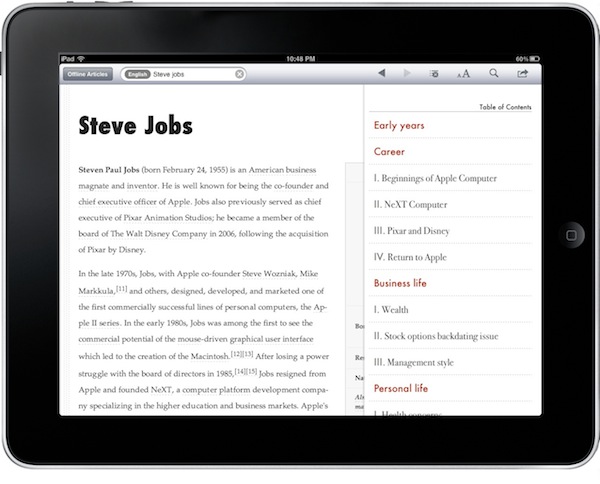
Simplepedia, developed by the same guy behind PDFMate, is a minimal and, well, simple Wikipedia reader for iPad. It comes with a standalone iPhone version, too, but I haven’t tried that one. On the iPad, the app can do two things: search for Wikipedia articles and save them for offline reading. That’s really it, folks. Read more

Access Extra Content and Perks

Founded in 2015, Club MacStories has delivered exclusive content every week for nearly a decade.

What started with weekly and monthly email newsletters has blossomed into a family of memberships designed for every MacStories fan.

Learn more here and from our Club FAQs.

Club MacStories: Weekly and monthly newsletters via email and the web that are brimming with apps, tips, automation workflows, longform writing, early access to the MacStories Unwind podcast, periodic giveaways, and more;

Club MacStories+: Everything that Club MacStories offers, plus an active Discord community, advanced search and custom RSS features for exploring the Club’s entire back catalog, bonus columns, and dozens of app discounts;

Club Premier: All of the above and AppStories+, an extended version of our flagship podcast that’s delivered early, ad-free, and in high-bitrate audio.

Learn more here and from our Club FAQs.


iPhoto 9.1 With Calendars Support Now Available

A few minutes ago Apple released an updated version of iPhoto, which reaches version 9.1 and adds support for Calendars, a feature that mysteriously went missing in the first iteration of iPhoto ‘11. Apple already announced an update with Calendars support was on its way.

Check out the official changelog below:

This update adds several new print product options to iPhoto ‘11. It also improves overall stability and addresses a number of other minor issues.

- Provides the ability to create and order calendars in iPhoto.
- Additional letterpress holiday greeting card themes are now available.
- Fixes an issue that prevented videos downloaded from MobileMe or Flickr from importing correctly into iPhoto events.
- The update is recommended for all users of iPhoto ‘11.

You can download the update in Software Update or at Apple’s support page for iPhoto 9.1.

Access Extra Content and Perks

Founded in 2015, Club MacStories has delivered exclusive content every week for nearly a decade.

What started with weekly and monthly email newsletters has blossomed into a family of memberships designed for every MacStories fan.

Learn more here and from our Club FAQs.

Club MacStories: Weekly and monthly newsletters via email and the web that are brimming with apps, tips, automation workflows, longform writing, early access to the MacStories Unwind podcast, periodic giveaways, and more;

Club MacStories+: Everything that Club MacStories offers, plus an active Discord community, advanced search and custom RSS features for exploring the Club’s entire back catalog, bonus columns, and dozens of app discounts;

Club Premier: All of the above and AppStories+, an extended version of our flagship podcast that’s delivered early, ad-free, and in high-bitrate audio.

Learn more here and from our Club FAQs.

iAds Rolling Out Internationally [Screenshots]

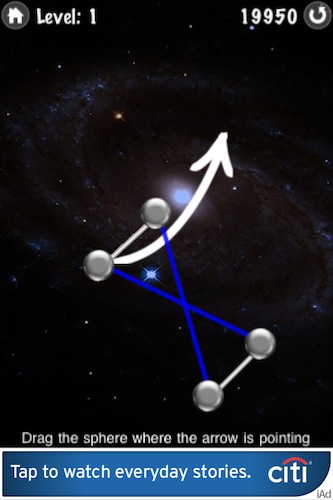
It appears that Apple has flipped the switch on iAds, which are now showing up for iPhone users outside the United States and United Kingdom. I’ve personally downloaded a free iAd-supported iPhone app and I got to see two different campaigns: a CitiBank one and an AT&T one. Both the iAds are working fine in Italy.

With Apple getting ready to release iOS 4.2, a worldwide launch of iAds for iPad as well wouldn’t be much of a surprise. Read more

Access Extra Content and Perks

Founded in 2015, Club MacStories has delivered exclusive content every week for nearly a decade.

What started with weekly and monthly email newsletters has blossomed into a family of memberships designed for every MacStories fan.

Learn more here and from our Club FAQs.

Club MacStories: Weekly and monthly newsletters via email and the web that are brimming with apps, tips, automation workflows, longform writing, early access to the MacStories Unwind podcast, periodic giveaways, and more;

Club MacStories+: Everything that Club MacStories offers, plus an active Discord community, advanced search and custom RSS features for exploring the Club’s entire back catalog, bonus columns, and dozens of app discounts;

Club Premier: All of the above and AppStories+, an extended version of our flagship podcast that’s delivered early, ad-free, and in high-bitrate audio.

Learn more here and from our Club FAQs.

AnyRing & Ringtone Designer Pro, Two Easy Ways To Create iPhone Ringtones

I haven’t been a huge fan of custom iPhone ringtones until I found out that Apple revised its policy about apps that allow you to edit songs on-device (the revision apparently came with the public release of the Review Guidelines) and directly export them to iTunes. When I did, I downloaded Ringtone Designer Pro for iPhone and started rolling with it.

Last week, though, I also discovered a neat app in the Cydia Store called AnyRing (BigBoss repository, $3.99) that, in a very ugly interface, lets you set any song on your iPhone as your default ringtone. Read more

Access Extra Content and Perks

Founded in 2015, Club MacStories has delivered exclusive content every week for nearly a decade.

What started with weekly and monthly email newsletters has blossomed into a family of memberships designed for every MacStories fan.

Learn more here and from our Club FAQs.

Club MacStories: Weekly and monthly newsletters via email and the web that are brimming with apps, tips, automation workflows, longform writing, early access to the MacStories Unwind podcast, periodic giveaways, and more;

Club MacStories+: Everything that Club MacStories offers, plus an active Discord community, advanced search and custom RSS features for exploring the Club’s entire back catalog, bonus columns, and dozens of app discounts;

Club Premier: All of the above and AppStories+, an extended version of our flagship podcast that’s delivered early, ad-free, and in high-bitrate audio.

Learn more here and from our Club FAQs.


iPhotoSync Lets You Effortlessly Transfer Photos Between iPhoto Libraries

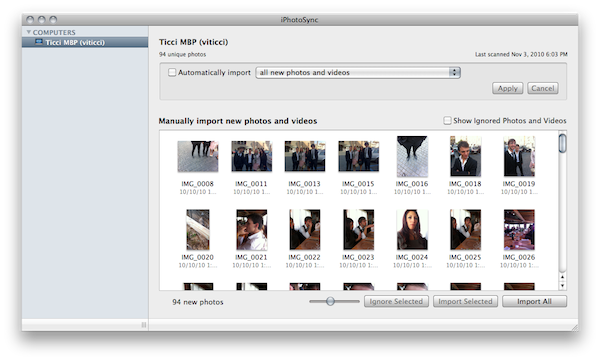
If you have recently upgraded to iPhoto ‘11 (I bet many of you have) and you still haven’t found the time to set up that Dropbox-based library synchronization between all your computers you read about on some blog or forum board, perhaps you’d like to wait to give iPhotoSync a try. I was indeed about to drop my entire iPhoto library in Dropbox, but then I realized that iTunes (apps and music) was my priority, so I went for a local sync option. iPhotoSync is an app that can run in the background as an “agent” and allows you to sync iPhoto libraries across multiple Macs running on the same local network.

Developed by Haystack Software (the same guys behind Arq for Mac) and completely compatible with the latest iPhoto versions, iPhotoSync is really simple: make sure you have two Macs running iPhoto and iPhotoSync on the same local network, fire up the app on both Macs, let the iPhoto libraries communicate with each other. For instance, you’ll be able to pull all the new photos from another Mac’s iPhoto library, automatically sync photos added to a specific event, automatically sync photos added in the last month. Basically, iPhotoSync transfers photos back and forth.

Read more

Access Extra Content and Perks

Founded in 2015, Club MacStories has delivered exclusive content every week for nearly a decade.

What started with weekly and monthly email newsletters has blossomed into a family of memberships designed for every MacStories fan.

Learn more here and from our Club FAQs.
Club MacStories: Weekly and monthly newsletters via email and the web that are brimming with apps, tips, automation workflows, longform writing, early access to the MacStories Unwind podcast, periodic giveaways, and more;

Club MacStories+: Everything that Club MacStories offers, plus an active Discord community, advanced search and custom RSS features for exploring the Club’s entire back catalog, bonus columns, and dozens of app discounts;

Club Premier: All of the above and AppStories+, an extended version of our flagship podcast that’s delivered early, ad-free, and in high-bitrate audio.

Learn more here and from our Club FAQs.