Posts in Featured

iOS 4.3 Gestures, Bezels and An Apple Patent From Last Year

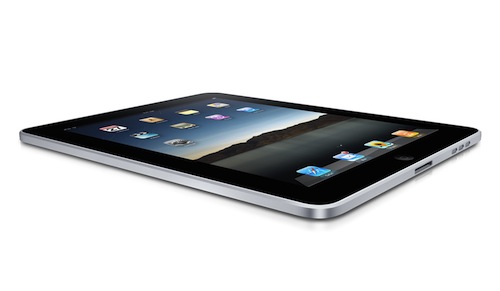
In the first beta of iOS 4.3, Apple introduced “multitasking gestures” for iPad: offered as a preview for developers to play with and test compatibility with apps, these 4 and 5-finger multitouch gestures allow users to execute a series of actions otherwise assigned to the Home button. You can switch back and forth between apps, open and close the multitasking tray or pinch back to the homescreens. The gestures need to be activated through Xcode as, again, they are a developer preview of a feature that won’t even be enabled in the public release of iOS 4.3, as Apple let devs know last night.

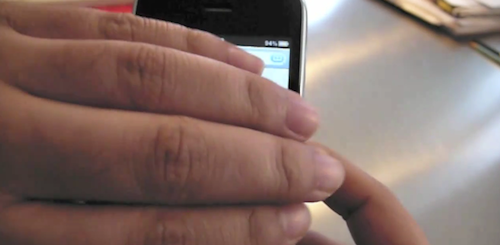
The presence of gestures that offer some functionalities previously exclusive to the Home button also let the rumor mill run wild, with some bloggers speculating that Apple may get rid of the Home button in the next iterations of the iPad and iPhone. Personally, I think gestures on the iPhone’s tiny screen are a terrible idea – and it gets worse if you have non-average, big hands.

Gestures are a neat new feature for the iPad that provide a glimpse at something Apple is clearly working on: more multi-touch capabilities for iOS devices. These very same gestures, though, gave several developers a hard time trying to figure out how to integrate them with their apps. Read more
Access Extra Content and Perks

Founded in 2015, Club MacStories has delivered exclusive content every week for nearly a decade.

What started with weekly and monthly email newsletters has blossomed into a family of memberships designed for every MacStories fan.

Learn more here and from our Club FAQs.

Club MacStories: Weekly and monthly newsletters via email and the web that are brimming with apps, tips, automation workflows, longform writing, early access to the MacStories Unwind podcast, periodic giveaways, and more;

Club MacStories+: Everything that Club MacStories offers, plus an active Discord community, advanced search and custom RSS features for exploring the Club’s entire back catalog, bonus columns, and dozens of app discounts;

Club Premier: All of the above and AppStories+, an extended version of our flagship podcast that’s delivered early, ad-free, and in high-bitrate audio.

Learn more here and from our Club FAQs.


Here’s Why Gestures On The iPhone Are A Bad Idea

Rumor has it Apple may be willing to implement the multitasking gestures already seen in the iOS 4.3 beta for iPad on the iPhone as well. Those willing to believe that gestures will take over buttons on our mobile devices someday even claim that Apple may get rid of the Home button altogether on the next iPhone and iPad.

Four and five-finger gestures on the iPhone’s screen, however,  have always sounded like a terrible idea to us. And now there’s video proof that, indeed, the iPhone isn’t meant for all those fingers.

It goes like this: a Youtube user enables multitasking gestures on the iPhone (weren’t they supposed to only being tested internally?) and records a video of the multi-touch galore in action. The result is embedded below. And, quite frankly, we do believe the Home button is here to stay.

[Youtube via Engadget] Read more

Access Extra Content and Perks

Founded in 2015, Club MacStories has delivered exclusive content every week for nearly a decade.

What started with weekly and monthly email newsletters has blossomed into a family of memberships designed for every MacStories fan.

Learn more here and from our Club FAQs.

Club MacStories: Weekly and monthly newsletters via email and the web that are brimming with apps, tips, automation workflows, longform writing, early access to the MacStories Unwind podcast, periodic giveaways, and more;

Club MacStories+: Everything that Club MacStories offers, plus an active Discord community, advanced search and custom RSS features for exploring the Club’s entire back catalog, bonus columns, and dozens of app discounts;

Club Premier: All of the above and AppStories+, an extended version of our flagship podcast that’s delivered early, ad-free, and in high-bitrate audio.

Learn more here and from our Club FAQs.


Further Evidence of Camera in iPad 2 and Photo Booth and FaceTime Apps

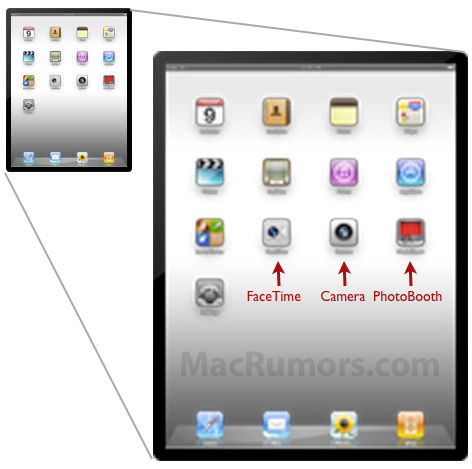
After digging around the 4.3 Beta 2 of iOS for iPad, Mac Rumors has found fairly solid evidence that pretty much confirms not only a camera addition to the iPad but also the addition of a Camera app (obviously), FaceTime and Photo Booth apps.

An image (homeScreenOverlayFaceTime~ipad.png)  used by the iPad in the Setting’s app to preview the wallpaper was found by Mac Rumors to contain three extra icons that do not exist on the image contained in iOS 4.2, those additional icons were those for a FaceTime, Camera and Photo Booth app.

FaceTime and Photo Booth are also largely dependent on the presence of a front facing camera, whilst a Camera app would seem rather redundant without a rear facing camera and so it could be thus presumed that this latest discovery seems to confirm previous reports of both a front facing and rear facing camera on the iPad 2.

Mac Rumors also says they found filters for Photo Booth that included the effects of Thermal Camera, Mirror, X-Ray, Kaleidoscope, Light Tunnel, Squeeze, Twirl and Stretch.

[Via Mac Rumors]

Access Extra Content and Perks

Founded in 2015, Club MacStories has delivered exclusive content every week for nearly a decade.

What started with weekly and monthly email newsletters has blossomed into a family of memberships designed for every MacStories fan.

Learn more here and from our Club FAQs.

Club MacStories: Weekly and monthly newsletters via email and the web that are brimming with apps, tips, automation workflows, longform writing, early access to the MacStories Unwind podcast, periodic giveaways, and more;

Club MacStories+: Everything that Club MacStories offers, plus an active Discord community, advanced search and custom RSS features for exploring the Club’s entire back catalog, bonus columns, and dozens of app discounts;

Club Premier: All of the above and AppStories+, an extended version of our flagship podcast that’s delivered early, ad-free, and in high-bitrate audio.

Learn more here and from our Club FAQs.


Next Generation iPad May Have Proximity Sensor

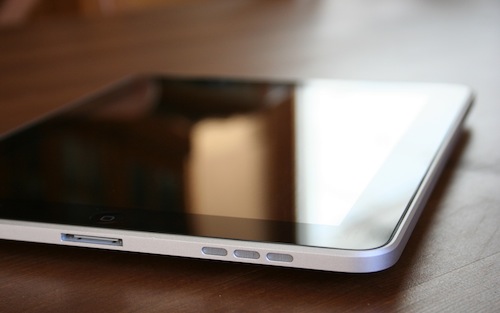
The next generation iPad may gain additional superpowers as it automatically powers on when you lift your case’s cover.

A new string spotted in iOS 4.3 reveals that Apple may be sweating the small stuff to perfect the user experience in the latest update: one particular item notes that the future iPad may have the capability to turn its screen on and off when a cover is removed and applied. The assumption is that you’ll want to open Apple’s case to access the iPad, so why not turn it and on and off for you without having to hit the power button? The Brazilian iPhone Blog notes that this feature would be accessible via the Settings app, where it can be enabled and disabled per your preference. The current iPad does have an ambient light sensor, but the proximity sensor would further refine its environmental awareness in respect to accessories.

[via iPhone Blog]

Access Extra Content and Perks

Founded in 2015, Club MacStories has delivered exclusive content every week for nearly a decade.

What started with weekly and monthly email newsletters has blossomed into a family of memberships designed for every MacStories fan.

Learn more here and from our Club FAQs.

Club MacStories: Weekly and monthly newsletters via email and the web that are brimming with apps, tips, automation workflows, longform writing, early access to the MacStories Unwind podcast, periodic giveaways, and more;

Club MacStories+: Everything that Club MacStories offers, plus an active Discord community, advanced search and custom RSS features for exploring the Club’s entire back catalog, bonus columns, and dozens of app discounts;

Club Premier: All of the above and AppStories+, an extended version of our flagship podcast that’s delivered early, ad-free, and in high-bitrate audio.

Learn more here and from our Club FAQs.


The AppSumo Do Work Bundle Giveaway

Productivity shouldn’t have to be so hard ya know? Twitter for Mac is the desktop wasteland for lost productivity, iTunes is eating away at my soul thanks to those dozen or so unplayed podcasts, and those sticky notes cluttering the desktop aren’t exactly great for organizing meaningful information. What if we threw out all the distractions, handed you a proper notepad, and even backed up all those juicy documents you’re now furiously creating with the power of the cloud? AppSumo clearly has a thing for picking out all the right apps for the job, and we’re giving away five bundles just in case reading MacStories isn’t productive enough.

Read more

Access Extra Content and Perks

Founded in 2015, Club MacStories has delivered exclusive content every week for nearly a decade.

What started with weekly and monthly email newsletters has blossomed into a family of memberships designed for every MacStories fan.

Learn more here and from our Club FAQs.

Club MacStories: Weekly and monthly newsletters via email and the web that are brimming with apps, tips, automation workflows, longform writing, early access to the MacStories Unwind podcast, periodic giveaways, and more;

Club MacStories+: Everything that Club MacStories offers, plus an active Discord community, advanced search and custom RSS features for exploring the Club’s entire back catalog, bonus columns, and dozens of app discounts;

Club Premier: All of the above and AppStories+, an extended version of our flagship podcast that’s delivered early, ad-free, and in high-bitrate audio.

Learn more here and from our Club FAQs.


The Problems with a High Resolution Display on the iPad 2

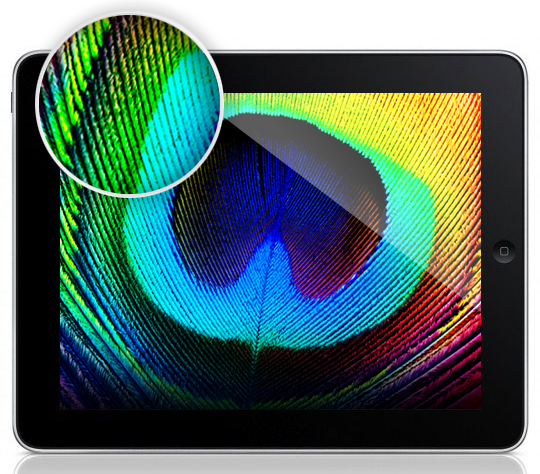
Over the past few weeks there has been quite a back and forth discussion on the possible inclusion of a Retina or high resolution display on the iPad 2. Facts seemed to solidify when Engadget ran an article suggesting the second-generation iPad would have a high resolution display, though they did not specify the exact resolution. But then John Gruber yesterday seemed to disagree with that suggestion citing cost issues, uncovered UI graphics of an iPad camera app that are not optimized for a high resolution display and his own sources.

So why has there been so much doubt and to and fro-ing over whether the iPad 2’s display is high resolution? Well put simply, because there are so many barriers that would have to be overcome and issues that Apple would have to resolve.  Click through to read the full article.

Read more

Access Extra Content and Perks

Founded in 2015, Club MacStories has delivered exclusive content every week for nearly a decade.

What started with weekly and monthly email newsletters has blossomed into a family of memberships designed for every MacStories fan.

Learn more here and from our Club FAQs.

Club MacStories: Weekly and monthly newsletters via email and the web that are brimming with apps, tips, automation workflows, longform writing, early access to the MacStories Unwind podcast, periodic giveaways, and more;

Club MacStories+: Everything that Club MacStories offers, plus an active Discord community, advanced search and custom RSS features for exploring the Club’s entire back catalog, bonus columns, and dozens of app discounts;

Club Premier: All of the above and AppStories+, an extended version of our flagship podcast that’s delivered early, ad-free, and in high-bitrate audio.

Learn more here and from our Club FAQs.


No Retina Display On The iPad 2?

Following speculation of a higher resolution “Retina Display” to be implemented in the next generation iPad (“iPad 2) that has surfaced in the past months, Daring Fireball’s John Gruber weighed in last night, claiming that according to his sources the iPad 2 won’t have a Retina Display:

I asked around, and according to my sources, it is too good to be true: the iPad 2 does not have a retina display. I believe the iPad 2’s display will remain at 1024 × 768. Its display may be improved in other ways — brighter, better power consumption, thinner, perhaps. Maybe it uses the new manufacturing technique Apple introduced with the iPhone 4 display, which brings the LCD closer to the surface of the touchscreen glass — making it look more like pixels on glass rather than pixels under glass. But my sources are pretty sure that it’s not 2048 × 1536 or any other “super high resolution”.

Read more

Access Extra Content and Perks

Founded in 2015, Club MacStories has delivered exclusive content every week for nearly a decade.

What started with weekly and monthly email newsletters has blossomed into a family of memberships designed for every MacStories fan.

Learn more here and from our Club FAQs.

Club MacStories: Weekly and monthly newsletters via email and the web that are brimming with apps, tips, automation workflows, longform writing, early access to the MacStories Unwind podcast, periodic giveaways, and more;

Club MacStories+: Everything that Club MacStories offers, plus an active Discord community, advanced search and custom RSS features for exploring the Club’s entire back catalog, bonus columns, and dozens of app discounts;

Club Premier: All of the above and AppStories+, an extended version of our flagship podcast that’s delivered early, ad-free, and in high-bitrate audio.

Learn more here and from our Club FAQs.


Graphical Analysis of Apple’s Q1 2011 Financial Report

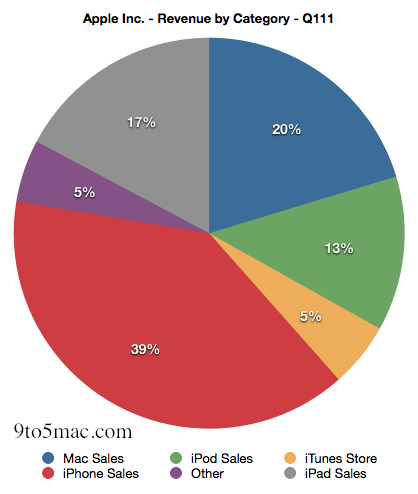
So you’ve probably heard or read about Apple’s gangbusters performance in their Q1 2011 financial results, if not head over here for a full rundown of the data. However for all those that prefer seeing numerical data in graphics or want to truly grasp how significant Apple’s results have been, stick around.

Read more

Access Extra Content and Perks

Founded in 2015, Club MacStories has delivered exclusive content every week for nearly a decade.

What started with weekly and monthly email newsletters has blossomed into a family of memberships designed for every MacStories fan.

Learn more here and from our Club FAQs.

Club MacStories: Weekly and monthly newsletters via email and the web that are brimming with apps, tips, automation workflows, longform writing, early access to the MacStories Unwind podcast, periodic giveaways, and more;

Club MacStories+: Everything that Club MacStories offers, plus an active Discord community, advanced search and custom RSS features for exploring the Club’s entire back catalog, bonus columns, and dozens of app discounts;

Club Premier: All of the above and AppStories+, an extended version of our flagship podcast that’s delivered early, ad-free, and in high-bitrate audio.

Learn more here and from our Club FAQs.


Apple’s 2011: iPad Bigger Than Macs, And Yet The Mac Is Growing

Apple’s Q1 2011 financial results are both unsurprising and, quite frankly, incredible. We all expected Apple to post record, blockbuster sales and revenue figures after the holiday season; yet, seeing the numbers on Apple’s official press release is a completely different story. Apple sold more than 7 million iPads in the last quarter, 16.2 million iPhones and more than 4 million Macs. Apple’s iPod business is “in decline” with 19.4 million iPods sold, but the iPod hasn’t been Appel’s main and only mobile business for four years now. Read more

Access Extra Content and Perks

Founded in 2015, Club MacStories has delivered exclusive content every week for nearly a decade.

What started with weekly and monthly email newsletters has blossomed into a family of memberships designed for every MacStories fan.

Learn more here and from our Club FAQs.

Club MacStories: Weekly and monthly newsletters via email and the web that are brimming with apps, tips, automation workflows, longform writing, early access to the MacStories Unwind podcast, periodic giveaways, and more;

Club MacStories+: Everything that Club MacStories offers, plus an active Discord community, advanced search and custom RSS features for exploring the Club’s entire back catalog, bonus columns, and dozens of app discounts;

Club Premier: All of the above and AppStories+, an extended version of our flagship podcast that’s delivered early, ad-free, and in high-bitrate audio.

Learn more here and from our Club FAQs.