Posts in reviews

Metapho 3.0 Adds Video Support and More

Metapho is a powerful utility for accessing, editing, and removing metadata from photos and videos. When I reviewed Metapho 2.0, I was impressed with how easy it was to access and edit image metadata. With version 3, Metapho has been extended into new areas without sacrificing the ease of use of prior versions.

Perhaps the biggest change is that Metapho now supports video. Earlier versions of the app could only handle still photos, so it’s nice to see video added to the mix. The process works the same way as with photos. Access a video using Metapho’s action extension from the Photos app or from within the Metapho app itself. Metapho displays the video’s metadata, which can be edited or stripped.

One of Metapho’s strengths is its design. Whether you start in the app itself or its extension Metapho displays the metadata for images in a clear and concise manner. Today’s update changes the layout by adding cropped versions of the photos or videos you are working on at the top of the page, so you know which image you are working on without it taking up an unnecessary amount of vertical space on your iPhone.

Metapho’s extension also got a refresh with version 3. For the first time, you can select multiple photos to edit. It’s a small change, but one that should speed up the editing process for anyone working with several images or videos.

Metapho is not a utility that I use often, but I keep it tucked away in a folder because when I need it, there’s no better way to edit photo and video metadata. It’s a great example of a thoughtfully designed app, so I’m glad to see its functionality expanded without compromising its utility.

Metapho is available on the App Store.


Game Day: Pigeon Wings

Pigeon Wings is a hyper-fast, racing game with shoot ‘em up elements and a lot of personality. You play as Pigeon, a pigeon-pilot tasked with saving Megalopolis from the evil Duke Dexter. The backstory immediately sets a light-hearted, humorous tone for the game that doesn’t get bogged down in long cut scenes explaining what’s happening. What sets Pigeon Wings apart though, is its tilt control steering system. The controls work flawlessly becoming second nature so quickly that they fade into the background making it easy to get lost in the game’s short races.

Read more


Transmit 5 Review

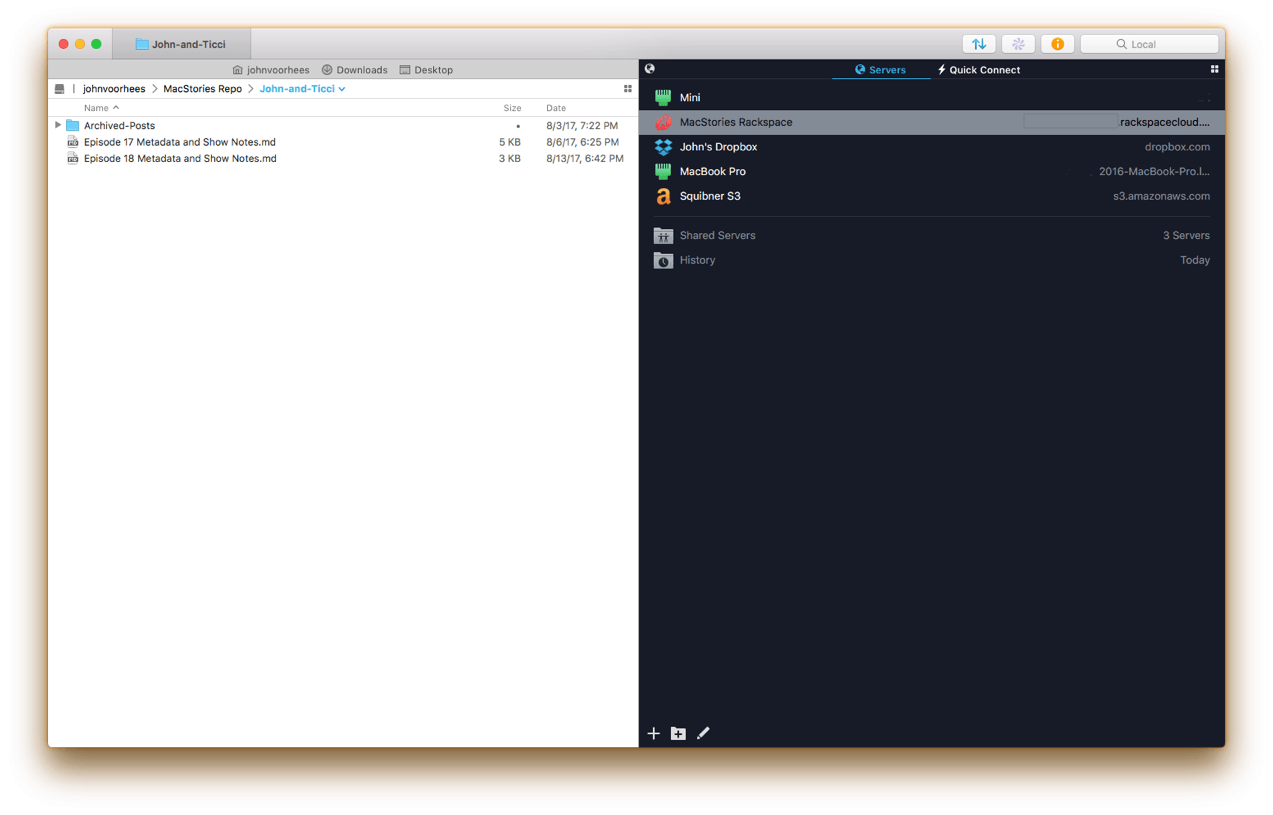
If you’ve used a Mac for a while, you’ve likely come across Panic’s file transfer app Transmit. Not long ago, I would have probably still described it as an FTP app even though it’s handled things like Amazon S3 file transfers for a while. However, with the recent release of version 5, Transmit for macOS has become much more than an FTP client adding support for ten cloud services. Moreover, Panic has taken the opportunity to rewrite its file transfer engine so that it’s faster, tweak virtually every feature, and update and streamline the app’s design. The result is an all-new Transmit that is both familiar and more capable than ever before.

Read more


Neo Angle Review: No Turning Back

You might be tempted to feel confident after the first few levels of Neo Angle, the follow-up game from Blyss developer Dropout Games. After all, you just have to move your triangle to a certain spot on the grid, occasionally picking up small fuel cells along the way. Early on, the most challenging part may be refraining from bobbing your head to the music.

Read more


Unobstruct Clears a Path to a Better Web Reading Experience

Too many websites wreck the reading experience by floating interface elements on top of articles. One of the worst offenders has been Medium, which John Gruber called out on Daring Fireball recently. Medium has made some improvements since then but didn’t eliminate floaters, and there are many other sites with social media buttons, branded navigation bars, and other material that hovers over webpages even as you scroll down the page. The practice makes it especially hard to read on the smaller screens of mobile devices.

Inspired by the Daring Fireball article and a JavaScript bookmarklet to which Gruber later linked, Troy Gaul, a developer at The Iconfactory, created Unobstruct, a Safari content blocker for iOS that eliminates floating bars, buttons, and other UI elements. The simple app, which Gaul fittingly announced in a post on Medium, removes any HTML that is set to sit on top of a site’s content and not scroll.

Unobstruct doesn’t hide persistent navigation bars by default because doing so would make it impossible to get around some sites. Instead, you can use the app’s action extension from the share sheet to hide the bar. Later, if you need the navigation bar, you can simply reload the page to get it back.

I love Unobstruct’s colorful and feisty robot icon. It adds a bit of fun and whimsy to an otherwise utilitarian app. For insight into the icon’s design, be sure to check out Ged Maheux’s blog post, in which he details how he started the design by making rough sketches in The Iconfactory’s drawing app Linea, then moved to Adobe Illustrator after Gaul had picked his favorite.

Unobstruct doesn’t block as broad a variety of webpage elements as some content blockers, but its singular focus on floaters pays off. In my testing, the app worked flawlessly to remove floating buttons automatically, as did the extension for eliminating navigation bars. Branding and sharing are important to websites, but they shouldn’t get in the way of the core experience – reading. The trend of obscuring content with floaters is a shame, but I’m glad I have Unobstruct to make browsing those sites a little nicer each day.

Unobstruct is available on the App Store.


Game Day: kubrain

Gamebra.in’s new puzzle game, kubrain, proves that there is still room for creativity and innovation in the color matching puzzle genre popularized ages ago by Tetris. Like many other games in the category, kubrain requires players to match colored blocks as they descend onto a playing field, but there’s a mind-bending twist. The playing field is a 3D cube that players can rotate to make room for incoming blocks. The result radically changes the way you approach the game compared to other matching games creating a challenging and novel gaming experience that is fun to play and difficult to master.

Read more


Streets Adds User-Generated Panoramas and Extends Its URL Scheme

When I first reviewed Streets by FutureTap over a year ago, I was impressed with the beautiful Google Street View panoramas that it allows users to browse. Whether you want to armchair travel around the globe or just see what a coffee shop looks like before you leave home to meet a friend, Streets makes it effortless to navigate between map and panorama views. In addition to browsing Streets’ gallery of famous locales, it keeps a list of recent searches, favorites, and allows you to search addresses and your contacts for places.

With the update today, Streets expands its photographic content with user-generated panoramas. When you zoom into the map view, you will see little blue dots, some of which represent panoramas from users. When you switch to the panorama view, those images are now part of what you’ll see. Pull down on the drawer that extends from the top of the panorama view and, among other things, you’ll see information about the photographer that took the shot. If you also have FutureTap’s app Where To? installed, some panoramas allow you to open that app for more details about the location you are viewing.

Also, Streets has extended its URL scheme to allow the app to put images on the clipboard. When Apple acquired the Workflow app last spring, the app lost the ability to use Google’s Street View imagery as part of workflows. Streets’ URL scheme extension is a clever work-around that allows Workflow users who have Streets installed to get Street View images once again.

Whether I’m planning a trip or meeting a friend for lunch, Streets has become my go-to method of checking out a location in advance. The simple navigation makes it a great choice when you’re mobile and using your iPhone or sitting back and enjoying Streets’ panoramas on an iPad. With its latest update, Streets has upped its imagery game and added an excellent solution users with Street View workflows.

Streets is available on the App Store.


Swarm Shifts Focus to Become a Personal Travel Timeline

Swarm received an update this week that takes the app in a new direction. The latest version of the app deemphasizes location sharing with friends, mayorships, and sticker and coin collecting. Those elements are still there, mostly tucked away behind the ‘Friends’ tab, but the focus has shifted. Now, the app centers around the creation of a personal timeline as a sort of journal of places you’ve visited.

Read more