

While we’re literally mere hours from the Mac App Store launch in MacStories time, I wanted to show you all a nifty little utility that you can get your hands on tomorrow. While I don’t like the idea of developers simply porting iOS apps to the desktop (I’m afraid of “gunking up” OS X), I do like the idea that small developers such as myself can get encourage to just start making things and have almost instant visibility. Chronos is one of those apps, a tool made to fill a missing spot on the OS X desktop that keeps track of how long you spend on a project, and its various tasks. What’s really neat is that it’s super simple to use: add a project, a few tasks, and start the timer. If you need to, you can add time to an existing task just in case you forgot to set the clock when you began coding away. Little indie apps like this are what I’ll be looking forward to: I like seeing good ideas that fill a gap and can be improved on over time.
Posts in reviews
Preview: Chronos Is A Simple Time Tracking Utility Heading To The Mac App Store
WebCamera Puts iSight On Your iPhone, iPod For Video Chatting

The iSight is actually pretty darned good when it comes to taking photos and video. My Twitter avatar? That’s totally done with just the iSight. When I was asked to check out WebCamera, I had my doubts about how well it would function as a disembodied iSight. Turns out it works pretty decently, though I can’t see myself deploying WebCamera full-time. It’s handy when you need to show off pics of your family in real time - you’d look kind of silly walking around with a MacBook, prying the lid back, and trying to aim the darned thing everywhere. WebCamera gives you the freedom to move and record over your local network by turning your iPhone into a WebCam, making it useful to revisit all the relatives who already miss you from the Holidays.
Remote Conductor: All-in-One OS X Controller for iPad
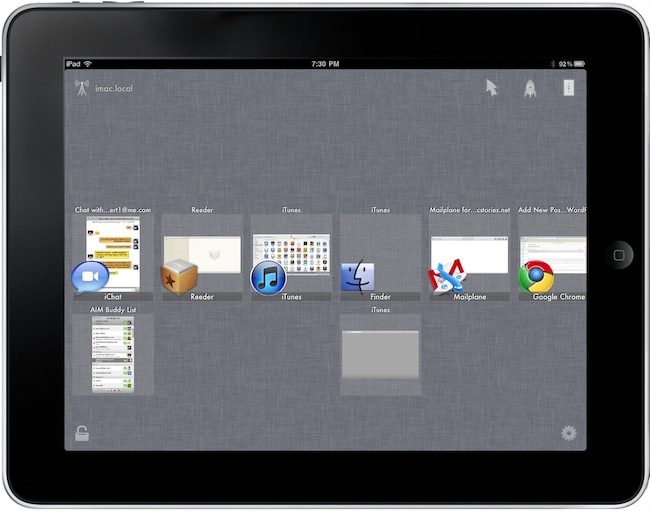
If you’re that kind of user who has set up a home entertainment system based on a machine running OS X, then probably you’re always looking for the next big thing in remote control. Several users, instead of buying a dedicated set-top box like an Apple TV or a Roku Player, prefer to get a relatively entry-level machine like a Mac Mini and route all their music, movies and photos through it. Because entertainment aside, the thing also happens to be a computer that can backup itself on a daily basis and serve content to other computers or iOS devices in the house. Just think of all the iTunes libraries or Plex installations shared through Mac Minis or, at best, Mac Pros that are powerful enough to be both desktop machines and entertainment systems for when the work is done and all you need is a good movie. A Mac computer set for such tasks, however, needs a good remote control system because, frankly, you just can’t use a mouse and keyboard on your couch.
Sure, you could use an Apple Remote and get most of your things done without having to lift a finger, but what about all those times when you want to use the stuff a computer also comes with – you know, like a web browser and high-def Youtube videos scaled to take all your TV screen? After all, even if geared towards home entertainment purposes, it’s a computer. And it needs to be remotely controlled. You could buy a VNC app like Screens for your iPhone and iPad, and control the computer that’s running on the TV in front of you with the comfort of also having it in your hands, in a portable app. Perhaps, though, you don’t need to have its screen mirrored on an iOS device and you just want a remote app that acts like a touchpad and lets you quickly launch and quit apps, and check on running ones.
Remote Conductor, a new iPad app by m3me, aims at reinventing the “remote controlling” app genre by combining in a single package features like a touchpad, multi-touch gestures support and some sort of application launcher and OS X-like Exposè to let you easily and effortlessly control your Mac’s screen from anywhere in your room using an iPad. Read more
Draftpad, The Simple Notepad That Works With Any App
On your iPhone or iPad, I bet you’re using a note taking app like Simplenote, PlainText or Writings to organize your notes and have them backed up online. There are hundreds of alternative note-taking applications available in the App Store, and I’m not going to pretend I haven’t thought about trying a different one each week at least a couple of times. They all look so attractive. But I sticked with Writings, in the end. Still, aside from those users who are firmly convinced Apple’s own Notes app is the best you can have on the iOS platform no matter what, the note-taking app genre is strong and alive in the App Store.
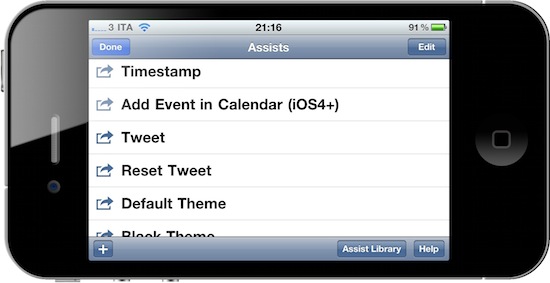
Draftpad, developed by Manabu Ueno, might look like yet another take on mobile note capturing, but it’s not. Indeed it is a notepad that lets you jot down quick notes and thoughts, but it hasn’t got built-in online sync nor any other tagging or folder management capability. Instead, Draftpad is all about doing stuff with the text you just wrote. This app can “route” text to a plethora of external native / 3rd party apps, like Apple’s SMS app or Facebook. You can write text and then share it via email or Twitter, search on Google, add it as a Calendar event or make it the body text of a new SMS, send it to Facebook or search in Maps. The “assist library” (the commands you can perform on text) can be extended and you can even write your own actions if you know how to play around with custom URI handlers.
Draftpad comes with a bunch of non-app related actions, too, like “insert timestamp” or “copy all text”. There’s also the possibility to switch to a black theme and check on your previous notes by tapping on the History button in the main page. What I really like, though, is that the app comes with support for multiple Twitter clients out of the box, and if you know how to find your way around iOS you can make Draftpad work with any app that supports text input. It’s really neat. And all of this for free, both for iPhone and iPad.
Draftpad won’t become your new Simplenote but it’s a great addition to iOS – a notepad that’s customizable and you can extend to work with your favorite apps. This is exactly what I’d like to see in a “Services” menu in iOS 5.
With The 1.4 Update, Dialvetica Aims At Replacing Apple’s Phone App
Dialvetica is a “contact contacter” for the iPhone developed by the same creators of the hugely popular Calvetica calendar application. In his review of the first version of Dialvetica, Chris wrote:
Dialvetica is such a breeze to use, and once you get your contact defaults set up, prepare to move your Contacts.app to a folder and off the home screen. Where else can you email, call and SMS within the same app and keep it clean and simple? It’s also faster than using iOS’s Spotlight too.
Dialvetica is faster than Apple’s contacts app, but most of all it allows you to quickly call, email or text someone with just a few taps. Thanks to a custom “sticky” keyboard that sits at the bottom of the app, you’ll be able to filter out your contacts list and get to the friend you need to email the party invitation to. Dialvetica learns from your habits and will display the most contacted people at the top of the window over time.
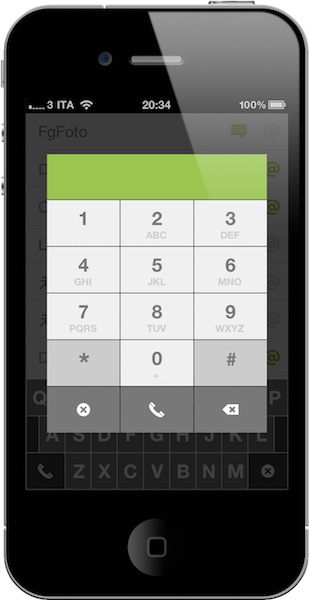
With the latest 1.4 update, which is propagating in iTunes now, Dialvetica aims at completely replacing Apple’s Phone app in your dock. With the introduction of a custom dialpad, the app now lets you compose phone numbers, but as you can guess relies on the Phone app to initiate the actual calls. The advantage is that if you’ve been using Calvetica to quickly go through your contacts, you can now use it to make phone calls, too, and put Apple’s phone app in a folder away from your homescreen.
I don’t know if I’m going to replace Favorites on my iPhone with this, but I’m pretty sure thousands of users will find Dialvetica 1.4 the best alternative to the stock phone application. Give it a try.
SwiftRing for Mac Combines Gestures and Keyboard Shortcuts
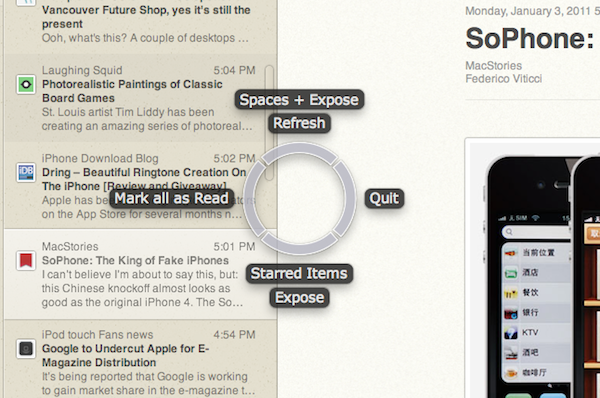
SwiftRing is a new app for OS X that’s still in beta and available as a free download here. It’s also one of the new apps for the Mac I’m most excited about, as I believe it shows great room for improvement, it’s promising and it combines two of my favorite things about the Mac platform: gestures and keyboard shortcuts. I love to get things done with the keyboard, especially when I’m in a hurry and shortcuts come in handy to save precious time. Still, multi-touch gestures on my MacBook’s trackpad (and Magic Trackpad on the iMac) have spoiled me with their ease to use, speed and, sometimes, “cool factor”.
SwiftRing aims at delivering the best of both worlds through a system-wide circular interface that appears as an overlay to any app (even the Finder itself) and allow you to perform any action that has a keyboard shortcut with a simple gesture. Read more
Ecoute 2.0 - Small, Powerful Alternative to iTunes
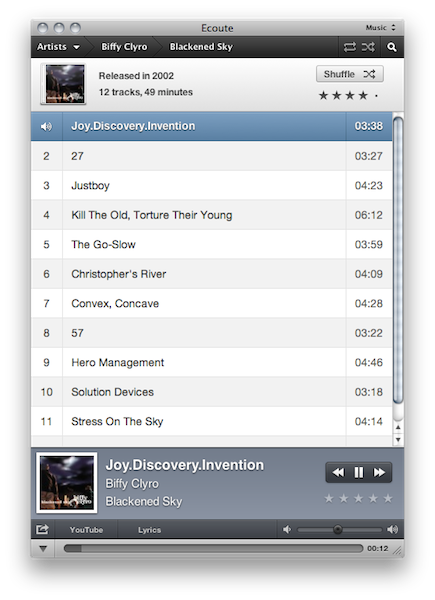
Just like any other alternative to iTunes on the Mac, Ecoute has been around for a while. Since Apple shipped its very own music player and digital hub years ago, many developers have tried to come up with original solutions for all those who couldn’t stand iTunes. And as iTunes grew bigger to accommodate apps, books, podcasts and just about anything you can put on an iPhone or iPod, thousands of users and even more developers started feeling the need of a minimal music player, again. What began as a hobby for a limited number of users (“let’s not use iTunes for music”) evolved into a real segment of a market willing to keep iTunes closed to listen to music libraries. And I understand the position of the users and developers that first thought about jumping out of iTunes: why would one need to stare at iTunes and all its features and options all the time, when you just need to listen to some music?
In spite of iTunes becoming many people’s less used music player over time, the apps that have surfaced in the past years that allow us to just play music are, in most cases, nothing but standalone iTunes controllers that strip away the clutter and focus on albums, artists and songs. They fetch a user’s library, take the music out of it and display it into a minimal, sometimes non-existent, user interface. Coversutra, Bowtie: they are two popular iTunes controllers for OS X that have gained support for other features such as last.fm scrobbling and iOS remote streaming. But in the end, they rely on iTunes.
So did Ecoute 1.0, and so does the just-released Ecoute 2.0. Ecoute is a well-known music player for OS X that plays music from iTunes, but doesn’t require you to keep iTunes running in the background. It automatically finds a user’s iTunes library file and takes content from there. It comes with a neat desktop widget for quick play / pause actions, but it’s also got its dedicated interface. Ecoute 2.0 depends on iTunes, but it adds great value while giving you a reason to stay out of Apple’s software at the same time. Read more
Update: A Minimal App For Simple Sharing
On our iPhones and iPads, we run Twitter clients. Be it Twitter, Twitterrific, Osfoora or some beta app no one knows about, many of us rely on these standalone apps to share links, thoughts and comments on Twitter. We do the same for Facebook (even if there’s no official app for iPad, third party clients are well known in the App Store), LinkedIn and other social networks. The problem: some would like to have the possibility to forward some status updates to other social networks they’re subscribed to (and likely have some friends on) without having to copy the message every single time in a new app. A few people I know use hashtags on Twitter to beam a tweet to Facebook or Google Buzz, but I don’t like the option. Next time I want to share the same message on Twitter and Facebook, what should I use?
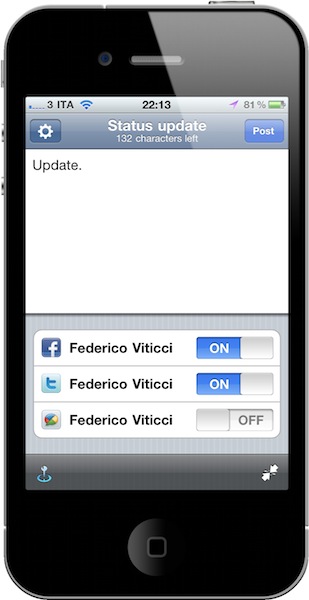
Update is a neat $0.99 utility for iPhone which lets you do one thing: write down a status update and choose the social networks you want to send it to. Everything happens in one screen. That’s it. Once you’ve authorized the supported services (Twitter, Facebook, Google Buzz, LinkedIn and Hyves) in the settings, you’ll get a simple on/off menu in the compose window to choose the active services. Type, and share. You can tell the app to grab your location data or shrink URLs contained in the message. You can’t attach pictures, but I guess this is one of the non-features that make Update a great app: it’s simple and focused on text messages. If you need more, go download a dedicated client.
I like the developers’ approach with Update. It’s available at $0.99 in the App Store, and even if it’s not the app for everyone I surely appreciate its simplicity. Recommended.
Discourse, The Beautiful Dictionary App
The iOS platform doesn’t lack great dictionary apps. From Terminology for iPhone and iPad (both of them reviewed on MacStories) to the dozens available for free on the App Store, users can stay assured there’s a way to check on word meanings, references and, at best, thesaurus with an app. After all, it would be strange otherwise.
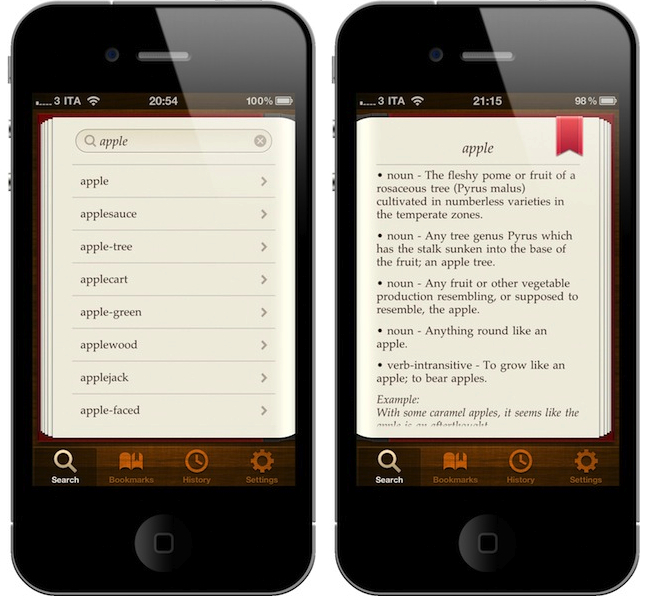
Still, there’s always room for better. So developer Emilio Palàez (also known for his Notified app in Cydia) and designer Mathieu White set out to create the most beautiful and easy to use dictionary app for the iPhone. Discourse, which we previewed on MacStories a few weeks ago, is now available. As I expected when running the beta version, Discourse is pretty great. Read more