

A few weeks ago we released MacStories Perspective Icons, a set of 20,000 icons for custom perspectives in OmniFocus Pro. As I’ve previously detailed, I’ve been using these icons myself for my own OmniFocus setup, which is heavily based on perspectives as personalized views that allow me to visualize my task manager via different...
 Our iOS WWDC Wishes
 John
JohnThis week Federico and John cover the latest news about WWDC and conclude their WWDC wishes series with a look at iOS, including Messages, Files, Shortcuts, the share sheet, the App Store, and more.
 Opening Articles Saved for Later in GoodLinks or Reeder
As John and I discussed in today’s episode of MacStories Unplugged for Club members, read-later apps appear to be having a resurgence at the moment, partly due to new technologies offered by Apple (such as Universal purchases and CloudKit) but also because of the lack of updates to Safari Reading List. Over the past...
How I Use Custom Perspectives in OmniFocus
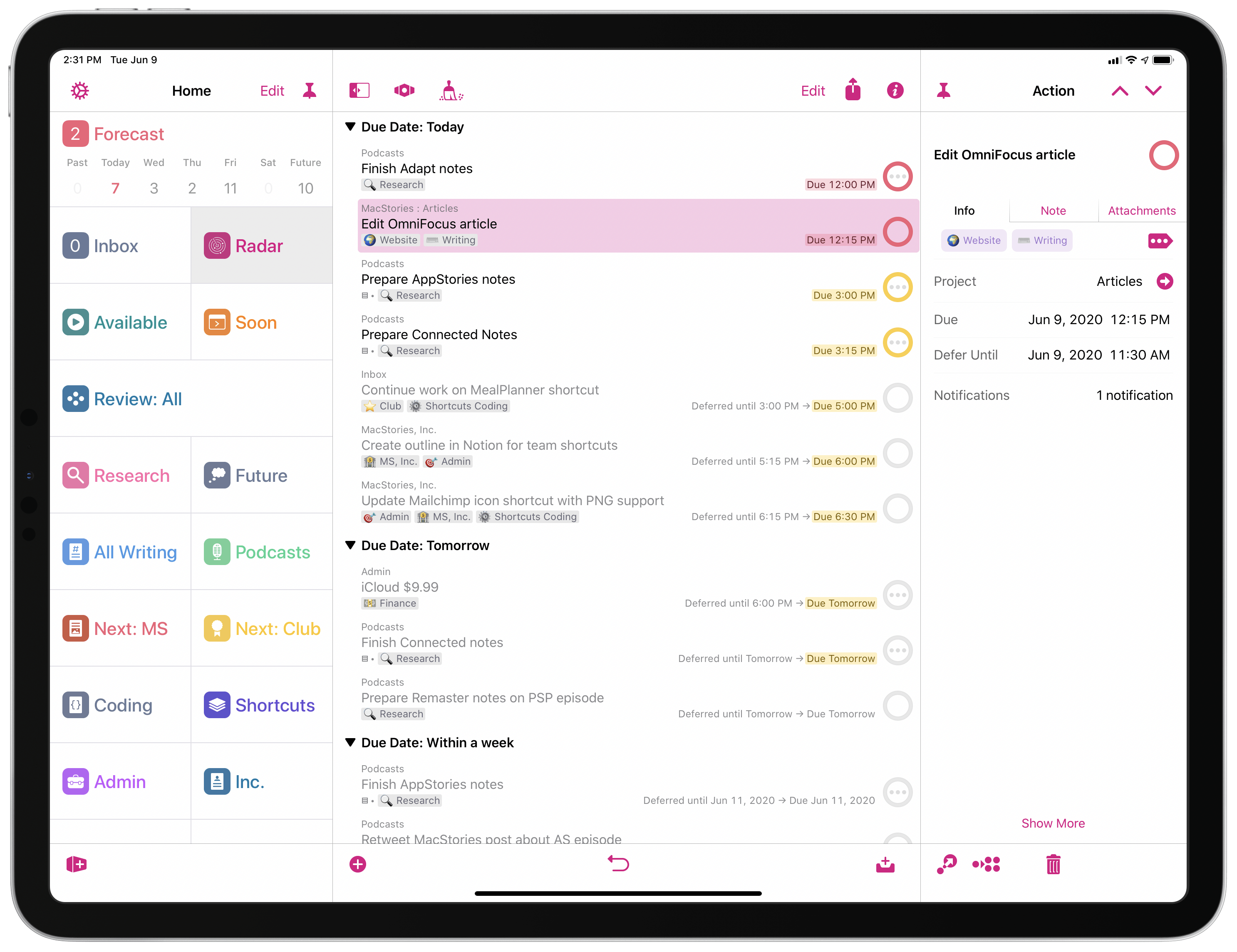
A few weeks ago, we released the latest product under the MacStories Pixel brand: MacStories Perspective Icons, a set of 20,000 custom perspective icons for OmniFocus Pro. You can find more details on the product page, read the FAQ, and check out my announcement blog post here. The set is available at $17.99 with a launch promo; Club MacStories members can purchase it at an additional 15% off.
As part of the release of MacStories Perspective Icons (which, by the way, takes advantage of a new feature in OmniFocus 3.8 to install custom icons with a Files picker), I wanted to write about my perspective setup in OmniFocus and explain why custom perspectives have become an integral component of my task management workflow.
Let me clarify upfront, however, that this article isn’t meant to be a primer on custom perspectives in OmniFocus. If you’re not familiar with this functionality, I recommend checking out this excellent guide over at Learn OmniFocus; alternatively, you can read The Omni Group’s official perspective documentation here. You can also find other solid examples of OmniFocus users’ custom setups around the web such as these two, which helped me better understand the power and flexibility of perspectives in OmniFocus when I was new to the app. In this story, I’m going to focus on how I’ve been using perspectives to put together a custom sidebar in OmniFocus that helps me navigate my busy life and make sense of it all.
Our macOS WWDC Wishes

AppStories Episode 167 - Our macOS WWDC Wishes
0:00
34:51
34:51
This week Federico and John continue their WWDC wishes series with a look at macOS, including the bug fixes, system-level changes, and Apple app enhancements they would like to see at WWDC this year.
Saving Multi-Page PDFs with Clickable URLs in DEVONthink and Highlights
With WWDC only a couple weeks away, I’m continuing to consolidate the PDF-based research workflow I’ve been covering on both Connected and AppStories over the past month. I don’t want to rehash those conversations here, but to sum up: I plan to use a combination of DEVONthink and Highlights to hold research material for...
Our watchOS and tvOS WWDC Wishes
AppStories Episode 166 - Our watchOS and tvOS WWDC Wishes
0:00
41:39
41:39
This week, Federico and John share their wishes for watchOS and tvOS including a fitness app, more customization and complication options, APIs for third-party TV remotes, and more.
How I’m Using Perspectives in OmniFocus
Yesterday, we released the latest product under the MacStories Pixel brand – MacStories Perspective Icons, a set of 20,000 custom perspective icons for OmniFocus Pro. You can find more details on the product page, read the FAQ, and check out my announcement blog post here. As we mentioned at the top of this issue...
Tot’s New Share Extension→
Craig Hockenberry, writing on The Iconfactory blog:
We’re happy to announce a new version of Tot with some features frequently requested by the app’s legion of fans.
The main focus of today’s release are system extensions that allow Tot to co-exist with other apps. To this end, we’ve added a Sharing extension for both iOS and macOS. Additionally, there’s also a widget for iOS that lets you quickly access any of Tot’s dots. Like everything else in Tot, attention was paid to minimizing friction, allowing information to be collected as quickly as possible.
Tot’s new share extension is, quite possibly, the best one I’ve ever tried for a plain text note-taking app. In an intuitive, compact UI, the extension offers everything I need: I can pick one of Tot’s seven dots; I can choose to append or prepend text to a dot; the extension even lets me pick the number of line breaks I want to put between a dot’s existing content and the new text I’m inserting into a note. And here’s the best part: the upper section of the share extension’s popup has a full, scrollable preview of the selected dot, so I can see what the entire note will look like before appending or prepending text. Tot is the first note-taking app I’ve used that gets this aspect of sharing text/links to an extension right.
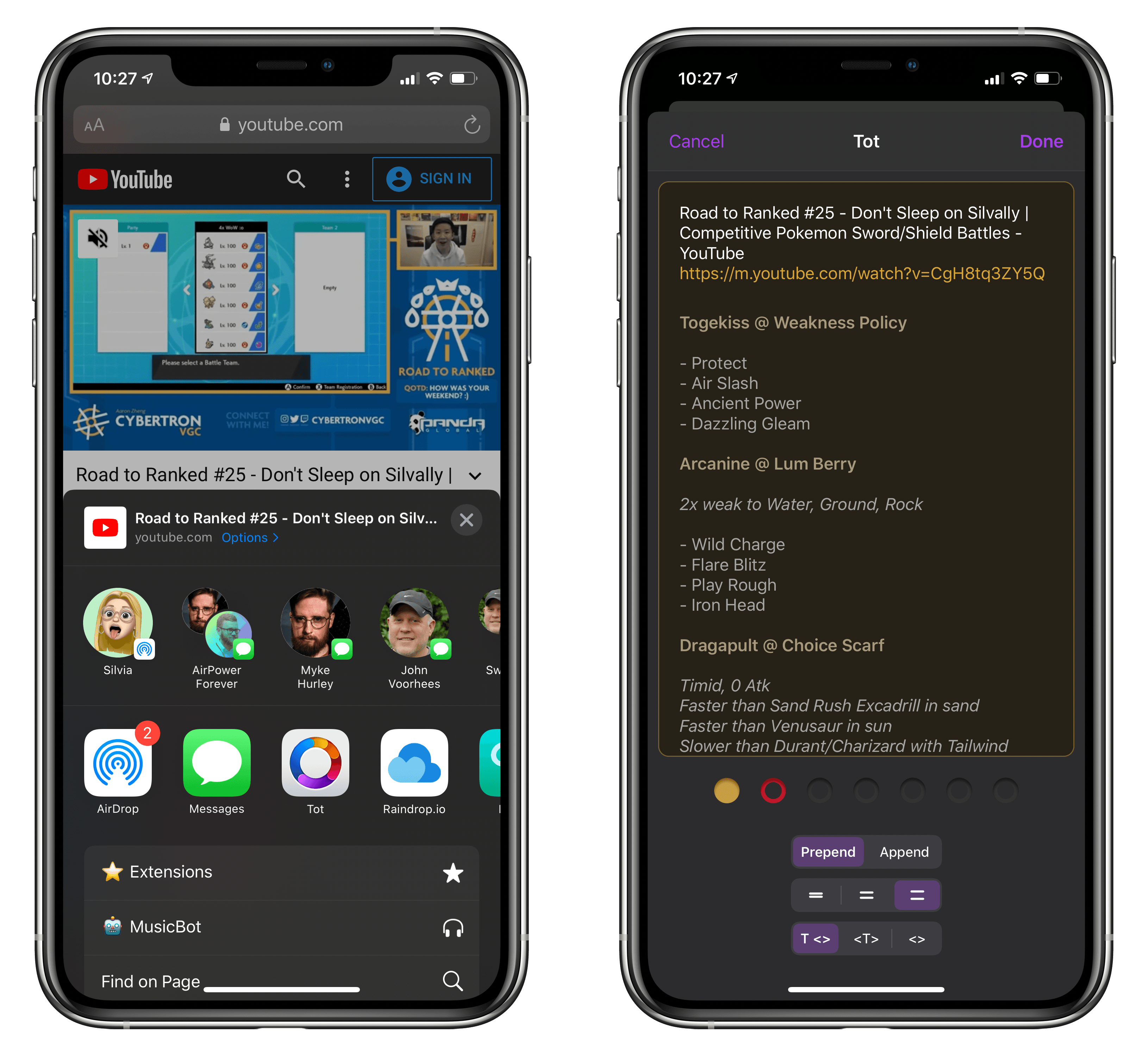
It may be considered a small enhancement to the app, but Tot’s new extension shows how much consideration went into designing an experience that is both powerful and willing to get out of the way as quickly as possible. I wish more note-taking apps offered a share extension similar to The Iconfactory’s app, which, months after its original release, I still use as my go-to scratchpad every day.