

For the past weeks, I’ve been busy writing documentation for upcoming MacStories projects and managing the launch of different Club-related services we plan to roll out in 2021. For this reason, I had to devote less time to writing and building shortcuts and more to administrative tasks. As a distraction from these responsibilities, however,...
 iPhone and iPad Accessory Extravaganza
 John
JohnGoodTask 6.4 Brings Kanban-Style Board View for Reminders Lists and Smart Lists
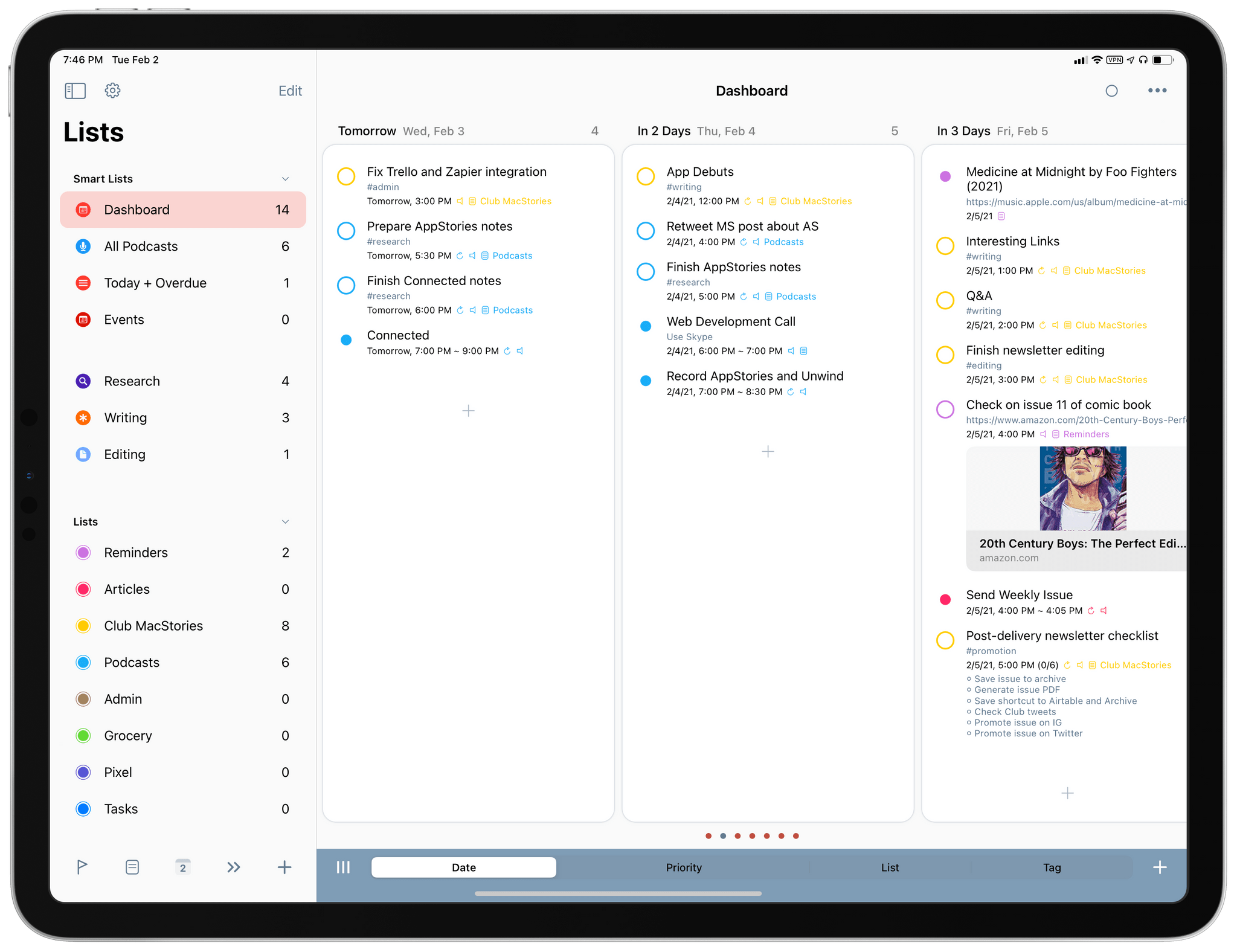
In our Workflows Revisited: Task Management episode of AppStories from December, I explained my decision to keep using GoodTask – the powerful third-party Reminders client – as my primary task manager. We’ve mentioned GoodTask several times on both MacStories and AppStories before; for those not familiar with it, GoodTask uses Reminders as its “database” for tasks, but it enhances the experience with power-user features such as smart lists, customizable quick actions for task templates, and a variety of view options that can be personalized and applied on a per-list basis. Essentially, if you like the convenience and system integrations of Reminders but find yourself wanting more flexibility from Apple’s Reminders app, you need to give GoodTask a try.
In that episode of AppStories, I mentioned how, in my experiments with other task managers, I came across a feature I would have liked to see in GoodTask: Todoist’s board view. Introduced last year, board view lets you visualize tasks in a Todoist project with a Kanban board reminiscent of Trello, and it comes with support for sections and multiple sorting options. You can read more about it here. I used Todoist for a couple months to keep track of tasks related to my iOS and iPadOS 14 review last year, and I found its board view a terrific way to visualize different groups of tasks within a project; Trello is also one of the services we use to manage Club MacStories, so the Kanban methodology resonates with me and I like the idea of dragging and dropping tasks across columns. For those reasons, as I detailed on AppStories, I believe that a board view is the kind of functionality that more task managers should implement in addition to standard list views.
Fortunately, GoodTask developer Hanbum Kim listened to my request (which was also followed by other helpful comments by AppStories listeners on Twitter) and brought board views to GoodTask 6.4, released today for iOS, iPadOS, and macOS. GoodTask’s new board view is exactly what I was hoping Kim would be able to ship in their powerful Reminders client, and it’s giving me the additional flexibility for visualizing tasks and due dates I’ve long sought in GoodTask.
Everything but the Text Editor

AppStories Episode 203 - Everything but the Text Editor
0:00
42:34
42:34
This week, Federico and John cover everything about their writing workflows except the text editor, including research apps, their scratchpad setups, PDF annotation, mind mapping, dictionaries, and shortcuts, along with a segment on text-based podcast editing and transcripts.
 Lesser-Known Details I Appreciate in Spotify
As I’ve explained on both Connected and AppStories in recent weeks, I switched from Apple Music to Spotify as my primary music streaming service and plan on using it throughout 2021. There were several reasons behind this decision (I recommend listening to the “surprise” segment in this episode of AppStories), but, above all, I...
Spotify Shortcuts for Media Playback, Lyrics, and Playlists
Later this week in the January issue of the Monthly Log, I’m going to cover some of the unappreciated features of Spotify, which I’ve been using as my primary music streaming service for nearly two months now. Today, I want to cover one area where Spotify falls short compared to Apple Music: its non-existent...
How Matt Birchler Is Using Hey Email, Almost One Year Later→
Great overview by Matt Birchler on how he’s using Hey for email, almost one year into switching to the service exclusively.
When I was using Gmail and Outlook as the back end for all of my email, I had my pick of the litter when it came to email apps. Apple Mail, Spark, Outlook, Gmail, Airmail, Edison, Blue, Newton, Spike, Polymail…the world was my oyster, and I took part in that game of switching email apps every few months. Spark would release an update and I’d go to it. Then Outlook would do something new and I’d be back there. Then Outlook would have a bug and I’d run to Apple Mail, which would inevitably grow bland and then I’d move back to Spark and the whole cycle would start again.
Was that choice? Absolutely, but was it good for my email? No way.
I switched to Hey for my personal and work email a few months ago (we talked about it in this episode of AppStories), and I haven’t looked back since. The system provided by Hey for managing and organizing incoming email is what sets it apart from the competition, and it’s so good I don’t mind being locked into a proprietary service. Unlike Birchler, I use The Paper Trail a lot and open The Feed less frequently, but I plan on following his suggestion regarding Hey’s widgets by adding a large one to the second page of my Home Screen.
App Modularity
This week, Federico and John discuss the many aspects of app modularity, including where it started, how it’s supported by Apple, what developers are doing to push modularity forward, and trends to watch for in 2021.
Creating Reminders via an Amazon Echo and Zapier Automation
As I explained on AppStories earlier this week, we recently went through a reorganization phase in our household that resulted in embracing the Alexa ecosystem once again and getting rid of our three HomePods (which are temporarily sitting in storage, but it’s my intention to sell at least two of them). We now have...