


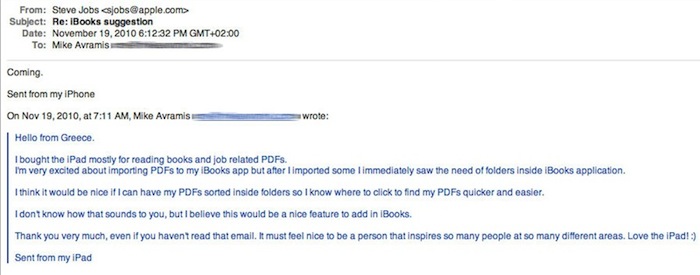
With another email originally posted on MacLife.gr forums (Greek), Steve Jobs replied to a user asking for better PDF management through folders and said the feature is “coming”. Seriously, that’s the only word in the email. We can’t verify the headers of the email and MacLife.gr has no track record of previous Steve Jobs email-related material, but we think this one’s legit. Read more
Apple TV 4.1 Update Addresses FreeType and PNG Vulnerabilities→
Apple TV 4.1 Update Addresses FreeType and PNG Vulnerabilities
Multiple vulnerabilities exist in FreeType, the most serious of which may lead to arbitrary code execution when processing a maliciously crafted font. These issues are addressed by updating FreeType to version 2.4.2.
With a support document posted a few hours ago, Apple confirmed that the latest 4.1 update for the 2nd gen Apple TV also includes fixes for vulnerabilities found in FreeType and the libpng library. Both of them could have lead to arbitrary code execution, much like this summer’s JailbreakMe security hole.
Steve Jobs Says They’re Taking A “Giant Leap To Driverless Printing”
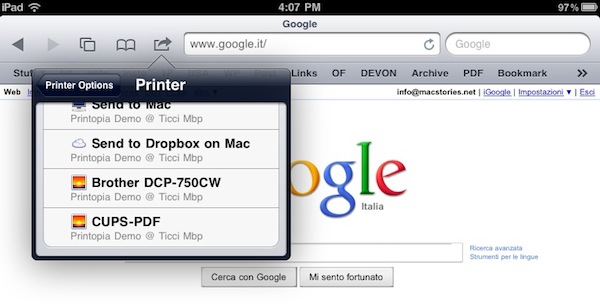
Ok, so AirPrint’s removal from OS X 10.6.5 left a few people disappointed. Users were expecting to be able to print from iOS 4.2 to any printer shared through a Mac or PC, but the feature didn’t make the cut in the final version of 10.6.5. Sure, you can achieve the same functionality using 3rd party tools like Printopia, but unofficial tweaks – even if well developed and stable – are never quite like Apple’s own implementation. In the case of AirPrint, mostly because it takes huge resources and teams to achieve stable and fast driverless printing.
That is exactly what Steve Jobs allegedly told a MacRumors forum member in a recent email exchange. Apple is doing the best they can to re-introduce the feature in the next iterations of OS X, and we have to wait. Read more
Command Guru Is Back: Details On New Apps and Interview

Command Guru is a well-known iOS and Mac development studio based in Italy. You may have heard of them thanks to the iPhone Reality Show, an event that took place last year and was aimed at gathering iPhone designers and developers from all around the globe to create an iPhone app in just one week. All recorded and broadcasted live by the Command Guru team in their office. It was a huge event that attracted thousands of viewers and developers alike.
Now, Command Guru went under some sort of “forced silence” for the past few months, as they were focused on an internal re-organization (they acquired Doseido, makers of Sally Park and Headline for Mac) and planning of new apps for iPhone, iPad and Mac. Lots of things have been going around at Command Guru’s headquarters, and we had the chance to chat with their CEO to get to know more about the details of the new software. I’m testing their new iPhone app at the moment and I have to admit it’s really good.
To stay up to date with the new apps coming from Command Guru, make sure to follow @commandguru on Twitter or check out their Facebook page. A teaser website of the upcoming iPhone app is available here.
Now jump after the break, and read what Command Guru CEO Alessio Zito Rossi told us about the current state of iOS and Mac development, their upcoming apps and…an Apple II. Read more
Jobs and Ive Rejoice: Apple Granted Patents for iPhone 4 and iPad Industrial Design
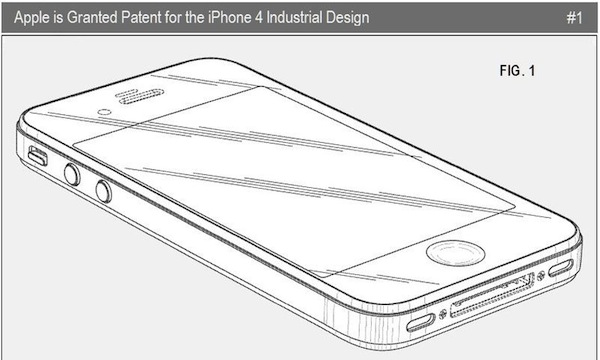
Apple wins dozens of design and tech patents every week, and most of them are about unannounced features and products the engineers at Cupertino may or may not use in the future. Think about the hybrid iMac: we haven’t heard anything about it yet, but the patent is out there. Same applies for hundreds of different patents: they’re cool to look at, but it’s likely that you’ll never see them in action.
Today’s patent, though, is a major win for Apple’s design team and Steve Jobs: as Patently Apple reports, Apple was granted patents for the iPhone 4 and iPad industrial design and the iPhone UI overview. Read more
TaskForce: The Uber Minimal To-Do App for iPhone
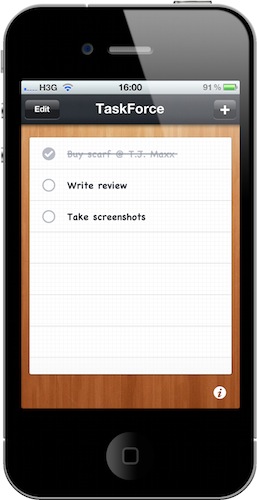
I love OmniFocus, but many of you guys probably don’t need its complex feature set and just would like to have a simple todo list app for iPhone. You know, something like a digital piece of paper where you can jot down tasks, mark them as complete and delete them.
That’s it, no contexts, projects, teammates or tags to choose from. Personally I wouldn’t go anywhere with such a system and I know there are thousands of apps similar to the one I’m going to write about available in the App Store – yet TaskForce is minimal and polished enough to deserve a mention.
TaskForce for iPhone is a simple and beautiful app that does just that: it allows you to create a list with tasks and delete them once you’ve completed them. Read more
T.J. Maxx Mystery Solved: A Marketing Strategy

You remember T.J. Maxx and their brief iPad adventure, right? The popular apparel retail chain started selling iPads last week, at the curious price of $399 – which was $100 off Apple’s suggested price. Steve Jobs, of course, didn’t like the idea and allegedly confirmed a user T.J. Maxx wasn’t an authorized reseller. The Internet, on the other hand, went nuts over the news.
So why did T.J. Maxx sell those iPads in the first place? Well, it turns out it was all a marketing strategy to end up on tech blogs (like this one) and generate traffic in their stores. They bought the iPads from retail (perhaps an Apple Store, who knows) at $40.000, they sold them at $32.000 generating a loss of $8.000 but they ended up on all major blogs and thousands of people visited their stores hoping to find a discounted iPad. With just $8.000, they gained a huge visibility that would have costed way more with standard advertising methods. Very clever. Read more
GridTab for Safari Enables iPad-like Tabs On The iPhone | Cydia Store
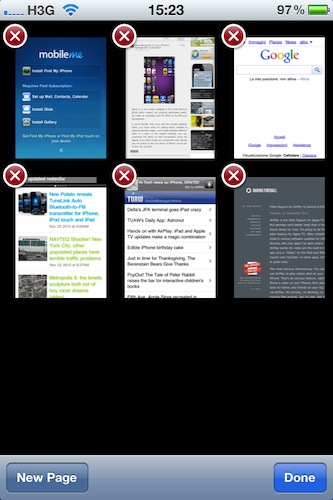
Is there’s one thing I can’t stand on Safari for iPhone is the way it displays “tabs”: by default, when you hit the tabs button in the toolbar you’re brought to a page with a “gallery” of all your open pages, and you have to swipe between them to navigate to the site you want to switch to. On the iPad, Safari is much better: it doesn’t display real desktop tabs (although there’s an iCab for that), but at least it presents them as beautiful thumbnails on a dark grid. It’s easier to switch between websites on the iPad because you just have to tap.
GridTab, a new tweak available on the Cydia Store at $0.99, enables iPad-like tab navigation on the iPhone. Once installed, you’ll be able to switch between open pages just like on the iPad by tapping on thumbnails. Very cool.
GridTab is available at $0.99, and I highly recommend it.
Barrel Brings 3D To Your iPhone’s Springboard | Cydia Store
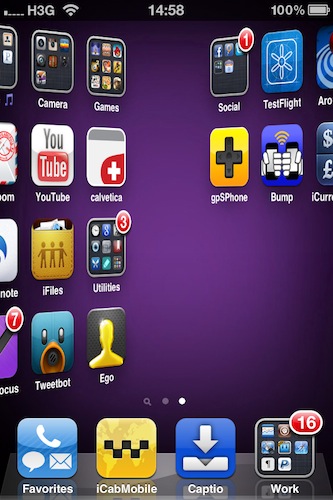
Barrel is a new tweak available in the Cydia Store at $2.99 which doesn’t do anything particularly useful, but adds an incredibly cool 3D effect to the iPhone’s Springboard.
If you’re familiar with Linux and the Compiz desktop effect, you know what I’m talking about: instead of swiping between pages, you’ll swipe between different sides of a cube. In the tweak’s settings, you can customize the effect so that homescreen icons will appear to be either inside our outside the cube. Words pay not justice to the cool factor of Barrel, you’ve got to see it by yourself. Read more