Federico Viticci

10766 posts on MacStories since April 2009

Federico is the founder and Editor-in-Chief of MacStories, where he writes about Apple with a focus on apps, developers, iPad, and iOS productivity. He founded MacStories in April 2009 and has been writing about Apple since. Federico is also the co-host of AppStories, a weekly podcast exploring the world of apps, Unwind, a fun exploration of media and more, and NPC: Next Portable Console, a show about portable gaming and the handheld revolution.

AT&T “Working with Apple” To Show 4G Indicator on iPhone 4S

AT&T “Working with Apple” To Show 4G Indicator on iPhone 4S

According to a document posted by This is my next, AT&T is “working with Apple” to enable a 4G indicator in the iPhone 4S’ status bar.

the carrier is apparently “working with Apple” to change the indicator in the iPhone 4S (which tops out at 14.4Mbps, up from the iPhone 4′s 7.2Mbps) to show “4G” in the status bar as well. That’s surprising considering Apple’s general reluctance over the past four years to bow to carrier pressure on… well, pretty much anything — and what’s more, the indicator will require an iOS update to enable.

Among the improvements of the iPhone 4S, there are faster download speeds through HSDPA, which Apple has purposely avoided to define as “4G speeds” leaving the debate on 4G standards to “others to talk about” (as Phil Schiller noted at the October 4th event). The confusion generates from the “4G” marketing term, used by carriers like AT&T to indicate both HSPA+ and LTE networks. AT&T is rolling out improvements to its Long Term Evolution network while giving “4G speeds” to the older HSPA+ standard, a marketing choice that has caused confusion among consumers, the tech press, and device makers.

In the past, Apple has shied away from implementing carrier’s modifications to the iPhone’s software, giving them only choices over App Store 3G download limits, or Personal Hotspot. AT&T seems pretty confident they’ll enable the 4G indicator through a software update – iOS 5 is coming out on October 12th, two days ahead of the 4S’ release. Check out the leaked document here.

Permalink

App Journal, Episode 5: Mercury, MacHash, Music+, Worml

App Journal is a weekly series aimed at showcasing apps we have enjoyed using on our iPhones, iPads, and Macs, but decided not to feature in a standalone, lengthy review here on MacStories. App Journal is a mix of classic reviews, weekly app recommendations, and a diary of our experiences with apps that still deserve a proper mention.

Amidst iPhone 4S and Siri announcements, the sad news of Steve Jobs’ passing and iPhone pre-orders, App Journal took a break last week and is back this week with quick episode in preparation of the app releases that will follow after the launch of iOS 5 and iCloud on October 12th. You can expect a whole new category of apps for iPhone, iPad and Mac once iOS 5 and iCloud will be available to all users – developers have been spending all summer studying the new APIs, which include pretty neat things like Twitter integration, Newsstand, and iCloud Storage.

In the meantime, I’ve collected four simple apps that I’ve been trying in between Apple keynotes and iPhone 4S news. Check them out after the break, and stay tuned for more App Journal episodes in the next weeks. Read more


Tweet Speaker: Listen To Your Twitter Timeline

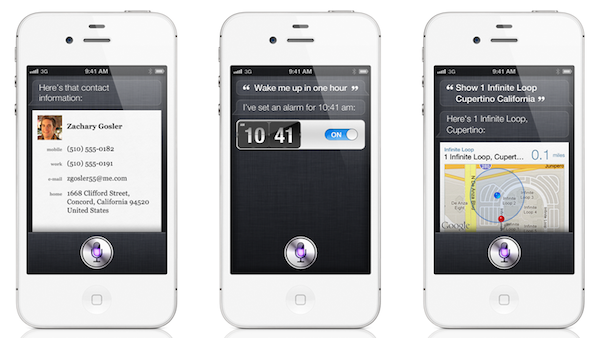
At the “Let’s talk iPhone” media event earlier this week, Apple officially previewed Siri, a voice assistant that will be integrated with several functionalities and apps of iOS 5 on the new iPhone 4S: Siri is a new way to get things done and obtain information just by asking. In the Siri demo, Senior VP of iOS Software Scott Forstall showed that it’ll be possible to get word definitions, look up anything on the Internet, do basic currency conversion, create reminders, and more. In fact, the list of Siri commands seems quite impressive, and the fact that the system is integrated with online services like Yelp and Wolfram Alpha should allow for always up-to-date, reliable and real-time data that lives outside the iPhone itself, but it’s immediately accessible.

What Apple didn’t preview during the Siri demo, and which I’m not sure will ship with the final version of the app next week, is Twitter integration. In iOS 5, Twitter is integrated systemwide to let you tweet photos and webpages, update your Address Book contacts and sign in with any Twitter enabled app. But will Siri be able to read your Twitter timeline? Or send a mention to a specific user? Or, again, will Siri eventually get these capabilities, if not next week perhaps in a few months?

I don’t know, but right now, there’s this sweet new app by App Cubby out in the App Store, it’s called Tweet Speaker and it lets listen to your Twitter timeline for $2.99.

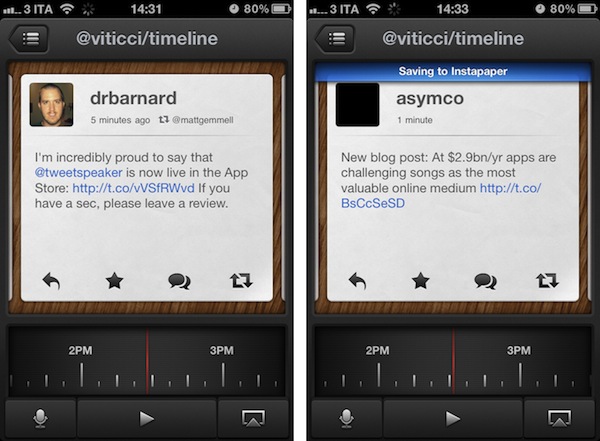
Both App Cubby’s website and iPhone app share a beautiful design and attention to detail. Tweet Speaker offers an interesting mix of dark UI elements, clean and simple tweets and 3D buttons that provide a nice contrast again the wood texture in the background. Tweet Speaker looks great, and its interface is functional to the app’s main feature. Once authenticated with your Twitter account, Tweet Speaker will begin loading tweets from your timeline; alternatively, you can switch to mentions or a specific Twitter list. In the timeline view, a bar at the bottom lets you move between hours of the day and jump to, say, tweets from the afternoon or early in the morning. Tweet Speaker is fast at loading tweets and it’s even got support for Tweet Marker, if you’re already using the service in apps like Twitterrific or Tweetbot. A nice touch in Tweet Speaker’s UI are the small notification popups that will appear on screen as tweets are loaded or items sent to Instapaper (natively supported), and I also like the app’s horizontal pull-to-refresh that appears as you reach the most recent tweet in your timeline.

As you hit the play button, Twitter Speaker will start reading your tweets. There’s only one male voice available now (more will be coming soon), and it sounds pretty natural. I like how this voice treats retweets and mentions differently, saying “Mark retweeted  from Chris” or “Tim said in reply to Sofia” – it even goes as far as trying to fetch the title of an http:// link when available (like the title of an article on this site). Perhaps the touch functionality of Tweet Speaker won’t be used much when jogging or driving, but the app enables you to reply to tweets, retweet them, mark them as favorites, and load conversations between users. You can follow/unfollow users directly from Tweet Speaker, configure a tap&hold action for Safari or Instapaper – you can also send your iPhone’s audio to AirPlay to listen to tweets on the big screen or through your favorite speakers.

Tweet Speaker isn’t your regular Twitter client, it’s a Twitter companion that you might find useful if you’ve ever wanted to be able to listen to your Twitter stream while looking at a beautifully designed app. Get it here.


“Keep Looking, Don’t Settle”

Three years ago, I didn’t know what to do with my life. University wasn’t really for me, and I had just been fired from a job I didn’t like anyway. As I stood for weeks at a point where I needed to figure out how to survive without going back to my parents asking for help, it hit me: I could try writing about Apple for a few months and maybe someone was going to like the things I had to say and maybe I could make a living out of that. I decided I was going to do what I always loved: discussing technology.

I’m 23 now, and I write about Apple products every day. I don’t run a huge news site, my English is far from perfect, and I never met Steve Jobs. I never will. Yet somehow, I feel like I must thank him for making it possible for a guy with an iPhone in his pocket to turn a passion into a business that seems to be enjoyed by a few readers every day. Something I do believe in. That gets me out of bed in the morning. That makes me fight with my girlfriend sometimes, because I should care less about news reporting and spend a little more time with her in the evening.

Steve Jobs was – is – a visionary genius of our time, a leader, an artist and a man who firmly believed in what he loved, as well as the things he didn’t like.

This personal, brief and sincere “thank you” isn’t about the qualities of Steve Jobs. We all know those stories. For those who don’t, now it’s a good time to start reading.

I thank Steve Jobs for creating products that let me stay up at 5 am, writing. I thank Steve Jobs because he was right: the only way to do great work is to do what you love. And I know I am.

Thank you Steve.


Siri Example Phrases

Siri Example Phrases

Erica Sadun at TUAW says they’ve tracked down a series of example phrases for the iPhone 4S’ voice assistant, Siri. The list of “Apple-supplied examples” includes categories like Alarms, Friends, Messages, and Notes. The “Email” commands are the ones that intrigued me the most:

  • Email Lisa about the trip
  • Email Jennifer about the change in plans

  • New email to Susan Park

  • Mail Dad about the rent check

  • Email Dr. Manning and say I got the forms, thanks

  • Mail Lisa and Jason about the party and say I had a great time

In the first two examples, I assume Siri will start composing a new email message with “trip” and “change in plans” in the Subject field. That’s also assuming Siri interprets “about” as the subject of “email” – which would make sense. But the last phrase is where I think Siri will really prove its potential – chaining different fields and multiple strings of text together. You see, the last phrase contains a command (mail), two Address Book contacts (Lisa and Jason), a subject (about the party) and the message (I had a great time). The examples Apple ran yesterday on stage were rather simple, albeit still impressive, and provided some context into Siri’s artificial intelligence.

What I’m really curious about at this point is the chaining of multiple commands – if I had an assistant in real life, I imagine I’d ask her to “schedule a meeting with Jason then call Chris and check on my schedule for Friday”. Will Siri be able to go back and forth between multiple commands from a single question? Perhaps something a little simpler than my example above? Will it support basic if/then operations? I guess we’ll have to wait for a real hands-on to find out.

In the meantime, check out the full list of examples over at TUAW.

Permalink

Sparrow 1.4 Gets CloudApp Integration, Pull to Refresh

Sparrow, the minimal email client for the Mac that recently gained with full Lion compatibility, received a new update in the Mac App Store, this time adding native integration with file sharing service CloudApp, a “pull to refresh” gesture to check for new messages, and a number of fixes and improvements aimed at enhancing the email experience and make it faster and more stable.

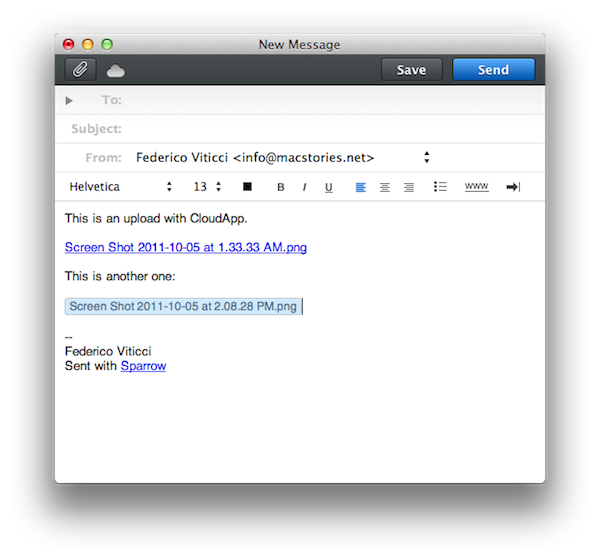
With CloudApp support, users are now able to drag & drop files into Sparrow’s compose window, and have the app automatically upload them to CloudApp and insert a clickable link in the message. Once authenticated with your CloudApp account in Sparrow’s preferences, every time you’d like to send an attachment through CloudApp, you won’t need to have CloudApp installed on your Mac: Sparrow will directly communicate with CloudApp’s servers and upload the file for you. The UI for this action is very simple – the top section of the message is a CloudApp “drop zone”, while the lower part at the bottom is for classic email attachments as explained by the developers in this article. There is a new cloud indicator in the top toolbar of the compose window to show the status of an upload, which will turn blue after it’s complete. Overall, CloudApp integration is well done, simple and useful if you share with CloudApp on a daily basis.

Sparrow 1.4 also comes with the “pull to refresh” gesture made popular by Loren Brichter’s Tweetie on the iPhone years ago, and later implemented by thousands of other App Store apps. In Sparrow, you can pull the inbox to check for new messages, and whilst I don’t think I’ll ever use this functionality as I like my email client to stay in the background and refresh every few minutes automatically, I assume some people who want to manually check for new messages will like this option.

As usual with every Sparrow update, there’s a series of bug fixes and improvements under the hood. Sparrow now syncs and sends emails faster than before, and Gmail-like reverse threads have been implemented in the conversation view. Sparrow is now compatible with Zoho and Lotus Domino, it’s got a new draft management system and the mail database has been improved, too.

Sparrow 1.4 can be considered a minor update, but it’ll make those who rely on CloudApp for their file sharing needs more efficient when dealing with email. You can get Sparrow 1.4 on the Mac App Store.


iPhone 4S: An Interplay of Hardware and Software

Here’s a quick thought about the new iPhone 4S. There really isn’t much to say about the iPhone 4S as a device: it’s the iPhone 4, only faster. It looks like an iPhone 4. It weighs just like an iPhone 4 (unless you’re going to feel a 3-gram difference). It’s got the same Retina Display of the iPhone 4, and its glass back is just as likely to break as the iPhone 4’s. The iPhone 4 is the foundation of the new iPhone 4S.

But the iPhone 4S is undoubtedly better than the iPhone 4. Thanks to the dual-core A5 CPU and dual-core graphics Apple put into it, the 4S will deliver snappier navigation between apps and webpages, up to seven times faster graphics and an overall more responsive experience. In practical terms, this means the multitasking tray will open faster, launch apps in less time, and Safari will load webpages faster. Game developers will be able to create more impressive games with more complex graphics and texturing techniques; app makers will take advantage of the iPhone 4S’ A5 to develop software with more elaborate actions and architectures.

In day to day usage, the iPhone 4S will be the iPad 2 of hardware upgrades: when compared to an old iPhone 4, it’ll look amazingly fast. Even if I haven’t tried an iPhone 4S yet, this is pure math. The iPhone 4S is faster. Perhaps not every corner of the OS will show that, but the hardware will allow for faster operations out of the box.

The A5 processor (and faster graphics, and presumably more RAM) doesn’t simply make games more powerful and apps quicker to open and use. The A5 processor – a custom-made silicon designed by Apple – has repercussions on a variety of software-related functionalities, and this has enabled Apple to come up with new features that won’t make it to the iPhone 4 once iOS 5 comes out next week.

The iPhone 4S is the finest example of Apple’s interplay of hardware and software yet.

Take the new camera for example. Thanks to a new 8 MP sensor, wider aperture, new lenses and backside illumination, it shoots better, sharper, more vibrant pictures. They look good. The new optics inside the iPhone’s camera have allowed Apple to improve on one of the most popular aspects of the iPhone, which is taking photos everywhere you go. Yet the new camera isn’t just about the optic hardware itself: because of the A5’s processing power, Apple has added face detection for better exposure and focus when a subject is recognized, as well as better white balance. The iPhone 4S’ A5 comes with a new Image Signal Processor designed by Apple. On top of that, the faster 4S also happens to record 1080p video with image stabilization and noise reduction.

This is fairly technical stuff, but you see where this is going. In a demo of the iPhone 4S posted by the BBC earlier today, I noticed something odd about the 4S camera: the swiping animation to switch from the camera view to the Camera Roll (a new feature of iOS 5) looked strangely fast and smooth. I’ve been testing iOS 5 on my iPhone 4, and I can tell you that animation isn’t as nearly as responsive and immediate as the BBC’s demo video. Throughout the day, I’ve looked at other hands-on videos (not many of them are around this time, unfortunately), read first impressions from journalists who were in Cupertino and yes – everyone reported the camera was faster and more responsive. A simple functionality like swiping back to your Camera Roll to see the picture you’ve just taken has been improved thanks to new hardware. These are the details the make the experience better, more balanced and enjoyable as the months roll in and you get used to a device.

At this point, it’s starting to feel like iOS 5 was specifically designed for the iPhone 4S. The most technologically advanced features of iOS 5 are now available on the iPhone: improved camera and HD video recording, AirPlay Mirroring, Siri. That’s not to say Apple didn’t exclude some of these from the iPad due to design compromises (the thinner iPad 2 wouldn’t probably have room for the 4S’ camera) or obvious impracticality (Siri on a tablet?), but on a checklist comparing Apple’s devices running iOS 5, the iPhone 4S gets more. The iPad 2 still has Photo Booth on its side, but I wouldn’t be surprised to see it on the iPhone soon.

The importance of “hardware that enables better software” and “powerful software based on advanced hardware” is best explained by Apple’s own slide. Four hardware-related features (A5, new wireless system, new camera, 1080p HD recording), four software-related functionalities coming to the 4S. And that’s not to count the 200+ features of iOS 5, which will benefit from the improved specs of the iPhone.

The iPhone 4S is a good phone because it’s based on the iPhone 4. But the 4S has got some new stuff that has been made possible by its new hardware, and it will make for a more pleasant experience thanks to iOS 5, for a simple reason: Apple understands that hardware and software together drive innovation and customer satisfaction, not specs alone.


iPhone 4S First Impressions Focus on Speed Improvements

Earlier today, Apple announced the new iPhone 4S, an upgrade to the existing iPhone 4 with improved A5 processor, new 8 MP camera with better optics, faster download speed on 3G, Bluetooth 4.0, and more. You can read more about the iPhone 4S in our general overview; however, members of the press who were invited to Apple’s media event in Cupertino have begun posting their first impressions and hands-ons about the iPhone 4S. It appears this time around Apple won’t let journalists take photos or videos in the hands-on area – possibly to avoid noise hiccups with Siri, the new voice assistant, shown on video.

Engadget notes the iPhone 4S is faster than the previous model, with faster loading times when navigating between pages and opening the camera application (which seemed faster in the BBC demo of Siri, too). Furthermore, Engadget was also able to test the new voice assistant, Siri:

The most impressive part was the demo of Siri, the new assistant that lets you do just about anything you can do on your phone – but with your voice. We tried to psych it out with a bunch of random requests, including the history of Chester, Vermont (a lovely town) and the best Ramen places in San Francisco. Siri never faltered, never missed a beat. It worked as well as Scott’s demo up on the stage. There’s nothing better to say than that. We even sent ourselves a few text messages, which Siri transcribed to a T. Of course, the lady on the other end still sounds eerily robotic, but we’re hoping for smoother responses from the alien within in a future update.

Jim Dalrymple at The Loop covers the differences in antenna design:

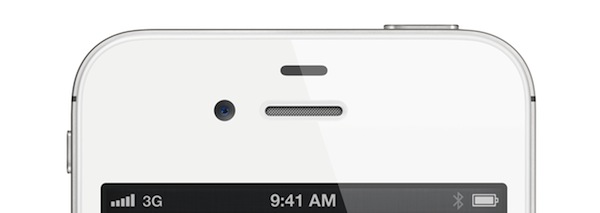
What is a bit different are the number of black bands that are on the iPhones. The current model has three bands — one on each side on the bottom, and one on the top. The iPhone 4S has four bands — two on the top and two on the bottom.

The bands are where Apple houses the antennas for the device. The Wi-Fi, wireless and Bluetooth technologies use these areas. It’s not clear at this point if Apple moved any antennas or what they added the extra band.

Slashgear was also impressed with the speed of the new device. The website writes “there’s no lag to be found” when switching between apps, and “webpages rendered instantly”. Similarly to Engadget, first impressions with Siri are very good:

Siri is arguably the main draw. Apple’s new voice-control assistant, Siri makes promises that we’ve learnt to be wary about over the years, but after a brief test we’re surprisingly impressed. Easily activated, with a new microphone icon on the regular on-screen keyboard, Siri managed just what it did on-stage during the keynote. We could ask it local information, such as the weather or to find nearby stores, while online searching and complex questions for Wolfram Alpha were handled with little delay. Speed can be the killer for services like this – people just won’t wait if their phone takes 30 seconds to look up an answer – but Siri delivered in just seconds.

The iPhone 4S will be available on October 14th in 7 countries (US, Canada, Australia, the UK, France, Germany, and Japan) with pre-orders starting this Friday, October 7th. Apple has decided to keep the 8 GB iPhone 4 and 8 GB iPhone 3GS around at lower price points, and will release the iPhone 4S in 22 more countries on October 28th. Read more


New iPod Nano Features Available to 2010 Model via Software Update

Earlier today, Apple announced a new iPod nano model, which will ship with an updated version of its software pre-installed. This new iPod nano software will include new clock faces, new fitness features, and a refreshed user interface with bigger icon navigation. From Apple’s press release:

iPod nano now features larger icons for even easier navigation of its intuitive Multi-Touch™ user interface, and you can choose from 16 new digital clock faces, ranging from classic analog looks to your favorite Disney characters including Mickey Mouse and Minnie Mouse. iPod nano now tracks your runs and walks right out of the box with no accessory required, making it even easier to get your fitness program up and running. iPod nano can track the time, pace and distance of your run, the calories you burn, and the number of steps you walk. iPod nano encourages you with motivational real-time voice feedback during your run, available in seven languages, while listening to your favorite music or FM radio station. You can also easily upload workouts to the Nike+ website to set goals, track your progress and challenge friends. The ultra portable iPod nano is available in seven colors including silver, graphite, blue, green, orange, pink and (PRODUCT) RED.

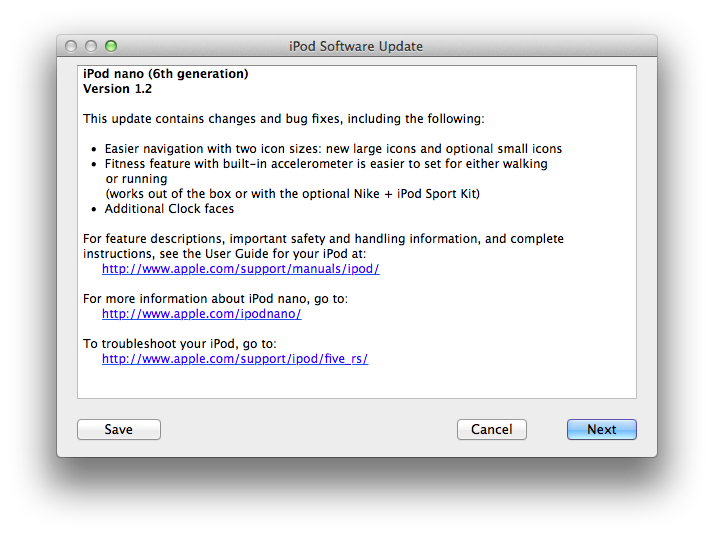
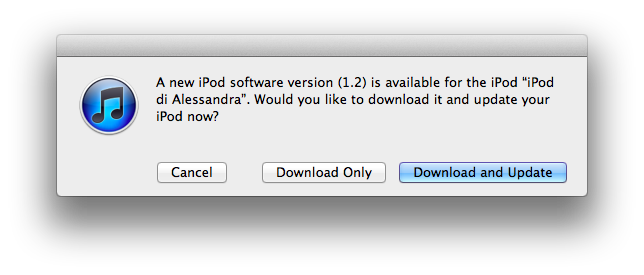
Whereas many had initially claimed the new iPod nano software would be exclusive to the latest nano model, Apple has made available a software update in iTunes that enables the latest functionalities on the 2010 iPod nano. The update can be installed now by iPod nano 2010 owners by checking for updates in iTunes, as shown below. Interestingly enough, the new navigation UI is optional and users can revert back to the old grid interface in the iPod’s settings.