

 John
JohnThis week, Federico and John look at the history of read-later apps and the many similarities and differences between them and today’s read-later apps, like Matter and Reader, as well as link organizers, such as GoodLinks and Anybox.
 Keeping Up with Twitter…without Twitter
Ever since I moved from Twitter to Mastodon (you can find me here), I’ve felt the need to figure out a way to keep up with people who are still using Twitter and whose tweets I find useful and interesting. Understandably, not everybody is ready or wants to move away from Twitter, but if I’m...
The Vivaldi Web Browser, Top 3 Albums, Whisper AI, and Avatar
Here are the highlights from the Club MacStories Discord this week: skribblenik shared thoughts on the web browser Vivaldi In the Music channel Haphazard kicked off a great discussion of everyone’s favorite three albums of all time In the developer channel, members compared notes about using OpenAI’s Whisper speech to text engine on the Mac...
 Gone but Not Forgotten: The Third-Party Apps (Part 2)

AppStories Episode 311 - Gone but Not Forgotten: The Third-Party Apps (Part 2)
0:00
45:57
45:57
This week, Federico and John conclude their ‘Gone but Not Forgotten’ series with more third-party apps, including productivity, communications, and entertainment apps, plus games.
MKBHD on Apple’s Processing Techniques for iPhone Photos→
In his latest video, MKBHD eloquently summarized and explained something that I’ve personally felt for the past few years: pictures taken on modern iPhones often look sort-of washed out and samey, like much of the contrast and highlights from real life were lost somewhere along the way during HDR processing, Deep Fusion, or whatever Apple is calling their photography engine these days. From the video (which I’m embedding below), in the part where Marques notes how the iPhone completely ignored a light source that was pointing at one side of his face:
Look at how they completely removed the shadow from half of my face. I am clearly being lit from a source that’s to the side of me, and that’s part of reality. But in the iPhone’s reality you cannot tell, at least from my face, where the light is coming from. Every once in a while you get weird stuff like this, and it all comes back to the fact that it’s software making choices.
That’s precisely the issue here. The iPhone’s camera hardware is outstanding, but how iOS interprets and remixes the data it gets fed from the camera often leads to results that I find…boring and uninspired unless I manually touch them up with edits and effects. I like how Brendon Bigley put it:
Over time though, it’s become more and more evident that the software side of iOS has been mangling what should be great images taken with a great sensor and superbly crafted lenses. To be clear: The RAW files produced by this system in apps like Halide are stunning. But there’s something lost in translation when it comes to the stock Camera app and the ways in which it handles images from every day use.
Don’t miss the comparison shots between the Pixel 7 Pro and iPhone 14 Pro in MKBHD’s video. As an experiment for the next few weeks, I’m going to try what Brendon suggested and use the Rich Contrast photographic style on my iPhone 14 Pro Max.
Todoist Tasks for Obsidian Updated
Earlier this week, we uploaded version 1.0.1 of the Todoist Tasks plugin for Obsidian to the Downloads area of Club MacStories. This new version brings full compatibility with the latest Todoist API and Obsidian 1.0. In case you missed the original announcement last year, Todoist Tasks is a plugin we released for Club MacStories+ and...
The 2022 MacStories Selects Awards
AppStories Episode 310 - The 2022 MacStories Selects Awards
0:00
01:06:13
01:06:13
This week, Federico, John, and Alex introduce the fifth annual MacStories Selects award winners and interview the MacStories Selects Lifetime Achievement award winner, Greg Pierce, the creator of Drafts.
iPadOS 16.2 and Stage Manager for External Displays: Work in Progress, But Worth the Wait
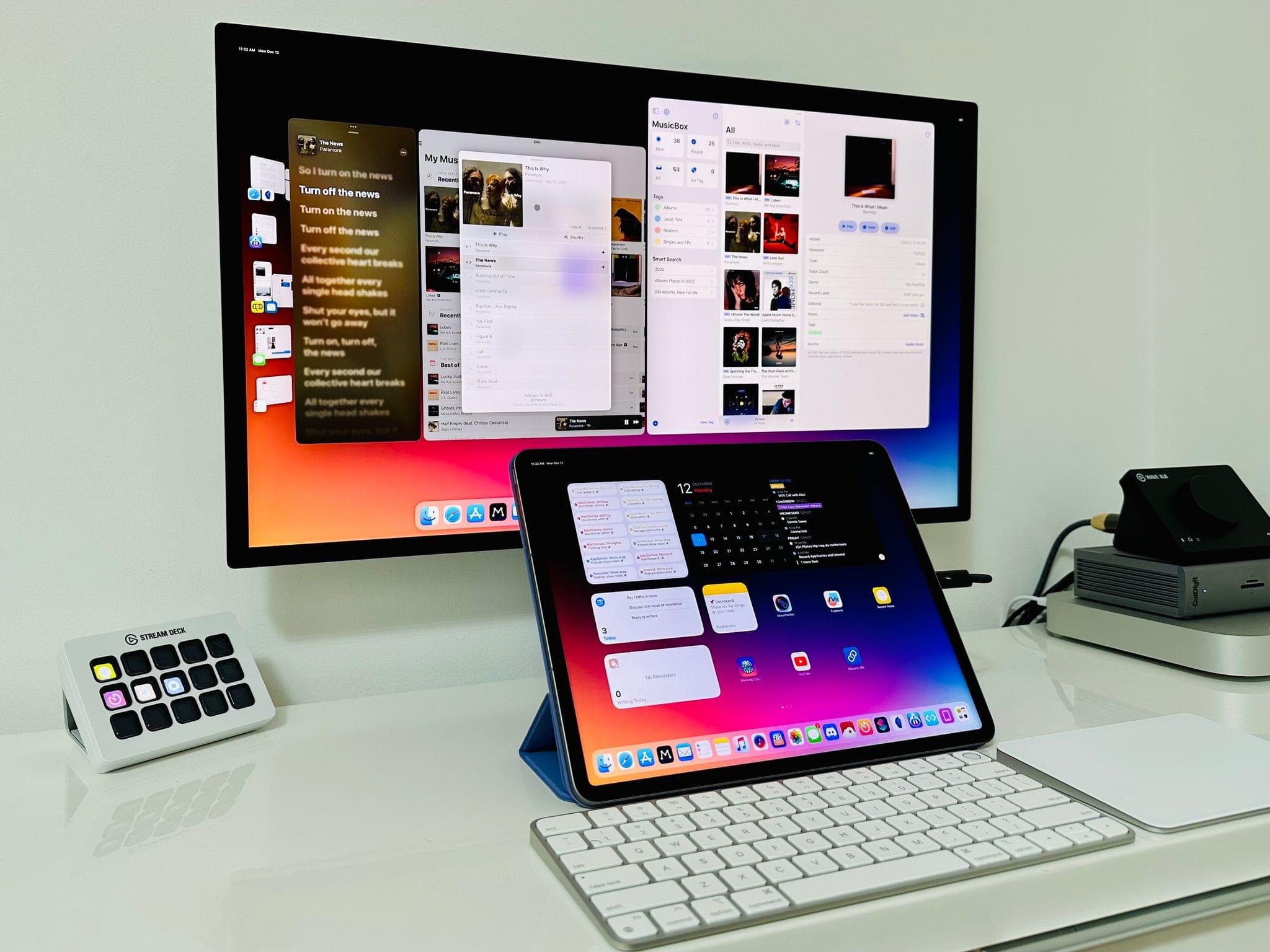
Ever since I last wrote about iPadOS 16, I have continued using Stage Manager on my iPad Pro. As I wrote in October, I like the idea behind Stage Manager more than its implementation. Despite the flawed design of its multitasking concepts and bugs I still encounter on a daily basis, it’s undeniable that Stage Manager lets me get more things done on my iPad by virtue of its concurrent app windows.
With today’s release of iPadOS 16.2, the idea behind Stage Manager achieves the full vision first presented in June, while its design and technical implementation remain stuck in an unpolished, half-baked state. Which is to say: conceptually, I love that Stage Manager in iPadOS 16.2 allows me to extend my iPad to an external display and put four additional windows on it; I’ve waited years for this feature, and it’s finally here. Technically speaking, however, the performance of this mode leaves a lot to be desired, with frequent crashes on my iPad Pro and an oft-confusing design that, I will reiterate, needs a rethinking.
Over the past couple of months, I’ve learned to live with Stage Manager, accept its quirks, and use what’s good about it to my advantage. As I recently wrote for Club MacStories members, I’ve put my money where my mouth is: I’ve gone all-in with Stage Manager on my iPad Pro and completely rebuilt my work setup around the M2 iPad Pro and Apple Studio Display, using Universal Control to seamlessly control iPadOS from a nearby Mac mini. (You can read the full story here.) After all, no other device in Apple’s ecosystem can effortlessly turn from a tablet into a laptop and into a desktop workstation like the iPad Pro can.
I’ve been working toward this vision for iPad modularity and contextual computing for the past several years. So now that Stage Manager has unlocked the final piece of the puzzle with external display integration, how good is it in practice?
And more importantly: was it worth the wait?
Gone but Not Forgotten: The Third-Party Apps (Part 1)
AppStories Episode 309 - Gone but Not Forgotten: The Third-Party Apps (Part 1)
0:00
39:13
39:13
This week, Federico and John extend last week’s ‘Gone but Not Forgotten’ theme to third-party apps, including Dropbox text editors, Twitter apps, email clients, and more.