

With all the recent discussion about modern and alternative web browsers (including this episode of AppStories, which I recommend listening to in case you missed it), I’ve been studying a lot of third-party browsers for iOS so I can be better prepared in case Apple will have to allow non-WebKit browser engines in iOS 17...
The Mac and iPad Pro Are on a Collision Course→
Jason Snell, in an excellent column for Macworld:
Sometimes I look back at all the effort Apple has made with the iPad Pro and wonder if it was worth it. All the additions of Mac-ish features have added complexity that’s probably lost on most users of iPadOS, and the power users for whom they were intended are probably well aware of all the ways they don’t really match up the Mac features they’re duplicating.
I want to see what happens when the walls come down. Today’s iPad Pro is powered by the same chip that’s in the MacBook Air. Would it be such a cataclysm if I could simply reboot that iPad into macOS or run macOS inside a virtual machine?
Likewise, what if the Mac had a touchscreen and Apple Pencil support and came in shapes that weren’t the traditional laptop? What if the Mac began to offer the ergonomic flexibility that iPadOS is so good at? What if I ripped the keyboard off a MacBook and had the option to switch to a touch-based mode that was essentially iPadOS?
I love this story, which I recommend reading in its entirety, because it feels as if Jason stared directly into my soul and wrote about something I’ve been feeling for the past several months.
From my perspective, Stage Manager’s failure to reinvent multitasking and iPadOS’ perennial lack of pro features (Jason mentions a proper audio subsystem in his story, and I agree; I wrote this four years ago, and nothing has improved) were the final straw that convinced me to start looking elsewhere for a convertible computer in my life. I could buy a MacBook Air, but I don’t want to be stuck with a laptop that doesn’t have a touchscreen and whose keyboard you can’t detach.
I fear that I’m going to have to wait a couple of years for the Apple computer I want to exist, and I’m not sure anymore that iPadOS can evolve in meaningful ways in the meantime.
 Listener Q&A
 John
John
 Using Readwise Reader as My RSS Client
For the past week, I’ve been trying to use Readwise Reader as my all-in-one destination for articles I read on the web: instead of splitting my time between the excellent Unread (which recently added direct Readwise integration as a custom sharing option) and the Reader app, I decided to follow the suggestion of a handful...
The Future of Web Browsers
Running Apple Frames from the Command Line and Enabling Passthrough Mode
Earlier this week, I released version 3.1 of Apple Frames. For those who missed it, in addition to enabling support for more devices and including some bug fixes, Apple Frames’ biggest new feature is the inclusion of a new lightweight API to automate the shortcut itself. As I explained on MacStories, the Apple Frames API...
Apple Frames 3.1.1 with Support for Passthrough Mode→
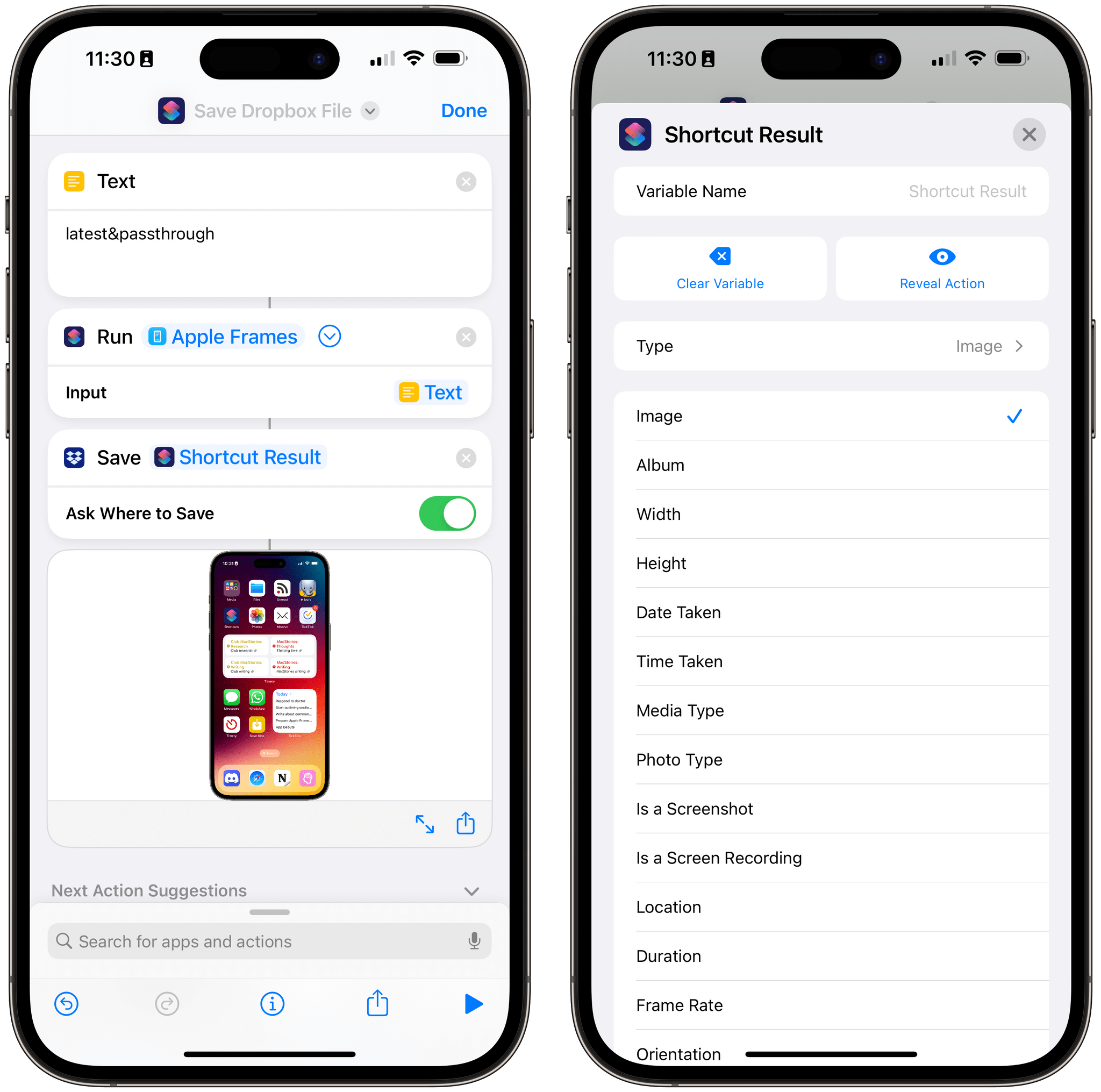
I just released a small update to Apple Frames 3.1, which came out earlier this week, with a new output command: &passthrough. With this output command for the Apple Frames API, you’ll be able to generate a framed image (from whatever source you like) and simply pass its result to the next action in a shortcut as a native image variable.
I wrote about this as part of my Extension column in MacStories Weekly today, where I also covered the ability to run Apple Frames from the command line on macOS. Here’s the excerpt about version 3.1.1 of Apple Frames and the new passthrough mode:
As I was researching this column for Weekly, I realized there was an obvious candidate for an output command I did not include in Apple Frames 3.1: a passthrough command to, well, pass framed images along as input for the next action of a shortcut.
Here’s what I mean: when you run Apple Frames from a helper shortcut using the ‘Run Shortcut’ action, that action produces an output variable called ‘Shortcut Result’. If you’re running Apple Frames as a function, thus turning it into a feature of another workflow, it can be useful to take the framed images it produces and use them as a native variable in other actions of the shortcut. The problem is that the output commands I launched with Apple Frames 3.1 all involved “storing” the framed images somewhere, whether it was Files or the system clipboard.
This is no longer the case with the
&passthroughoutput command I added to Apple Frames 3.1.1, which you can redownload from the MacStories Shortcuts Archive or directly from this link. If you run the Apple Frames API with this command, framed images will be passed along as native output of the shortcut, which you can reuse as a variable elsewhere in a shortcut that’s invoking Apple Frames.
And:
Any shortcut or longer workflow that involves running Apple Frames in the background and retrieving the screenshots it frames can take advantage of this method, allowing you to bypass the need to store images in the clipboard, even if temporarily. Essentially, passthrough mode turns Apple Frames into a native action of the Shortcuts app that returns a standard image variable as its output.
This is the only change in version 3.1.1 of Apple Frames, and I’m excited to see how people will take advantage of it to chain Apple Frames with other shortcuts on their devices. You can download the updated version of Apple Frames below.

Apple Frames
Add device frames to screenshots for iPhones (11, 8/SE, and 12-13-14 generations in mini/standard/Plus/Pro Max sizes), iPad Pro (11” and 12.9”, 2018-2022 models), iPad Air (10.9”, 2020-2022 models), iPad mini (2021 model), Apple Watch S4/5/6/7/8/Ultra, iMac (24” model, 2021), MacBook Air (2020-2022 models), and MacBook Pro (2021 models). The shortcut supports portrait and landscape orientations, but does not support Display Zoom; on iPadOS and macOS, the shortcut supports Default and More Space resolutions. If multiple screenshots are passed as input, they will be combined in a single image. The shortcut can be run in the Shortcuts app, as a Home Screen widget, as a Finder Quick Action, or via the share sheet. The shortcut also supports an API for automating input images and framed results.
Apple Frames 3.1: Extending Screenshot Automation with the New Apple Frames API
Update, March 3: Version 3.1.1 of Apple Frames has been released with support for a new passthrough output command. This post has been updated to reflect the changes. You can redownload the updated shortcut at the end of this post.
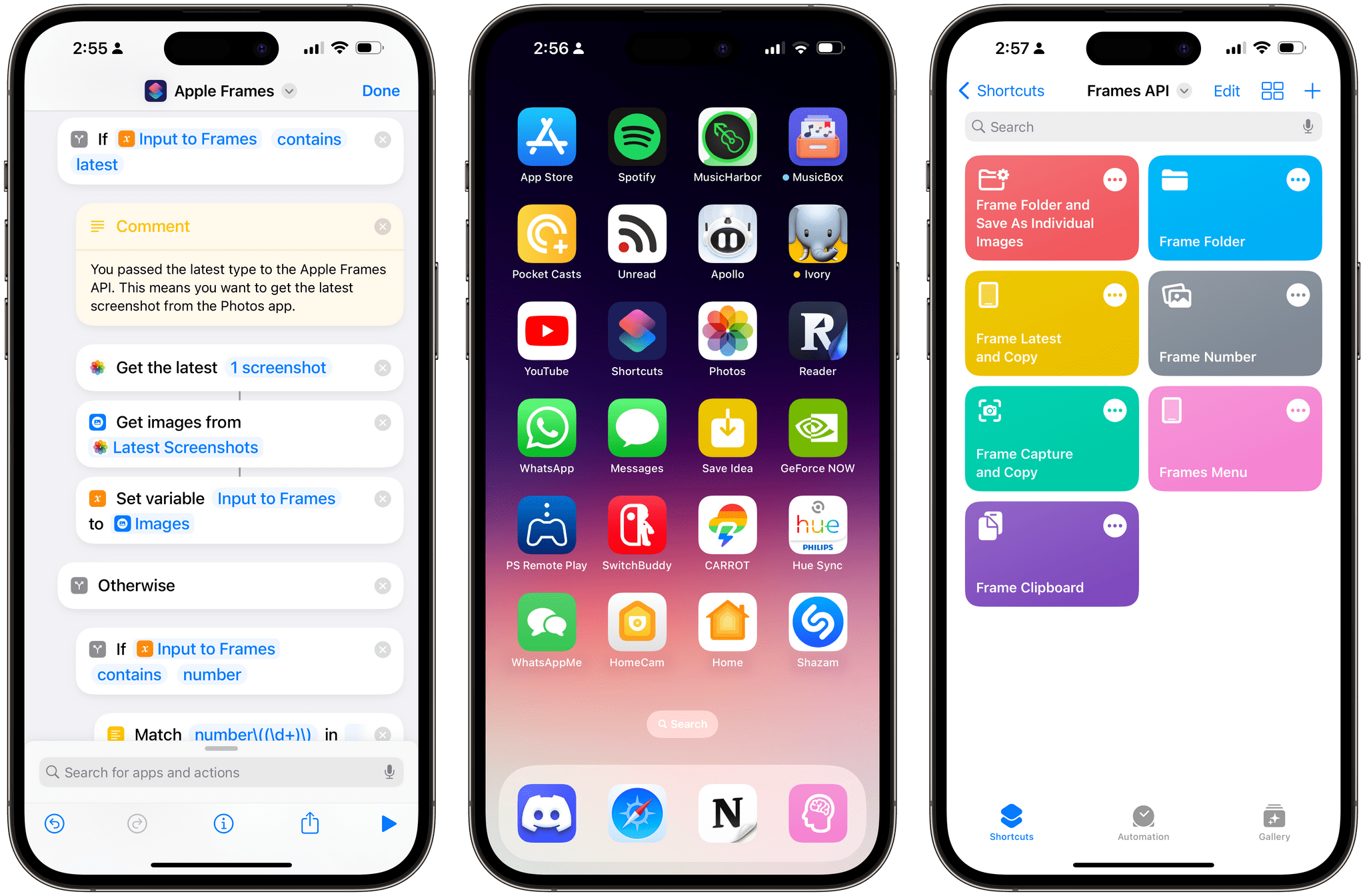
Today, I’m happy to introduce something I’ve been working on for the past couple of months: Apple Frames – my shortcut to put screenshots captured on Apple devices inside physical device frames – is getting a major upgrade to version 3.1 today. In addition to offering support for more devices that I missed in version 3.0 as well as some bug fixes, Apple Frames 3.1 brings a brand new API that lets you automate and extend the Apple Frames shortcut itself.
By making Apple Frames scriptable, I wanted to allow power users – such as designers and developers who rely on this shortcut to frame hundreds of images each week – to save valuable time without compromising the accessible nature of Apple Frames for other people. This is why all of the new advanced features of Apple Frames are optional and hidden until you go look for them specifically. Furthermore, even if you do want to use the Apple Frames API, you’ll see that I designed it in the spirit of Shortcuts: it does not require any code and it’s entirely powered by simple, visual ‘Text’ actions.
I’m incredibly excited about what Apple Frames can do in version 3.1, so let’s dive in.
A Real-Time Messaging Scratchpad
Like many fellow nerds reading this column, I find myself wanting to quickly share bits of text and URLs between computers more than most people. I don’t know what it is about a fast, reliable scratchpad that appeals so much to folks like John and me (and I’m guessing many of you), but it’s a...