Federico Viticci

10759 posts on MacStories since April 2009

Federico is the founder and Editor-in-Chief of MacStories, where he writes about Apple with a focus on apps, developers, iPad, and iOS productivity. He founded MacStories in April 2009 and has been writing about Apple since. Federico is also the co-host of AppStories, a weekly podcast exploring the world of apps, Unwind, a fun exploration of media and more, and NPC: Next Portable Console, a show about portable gaming and the handheld revolution.

Google’s Document On Data Compression In Chrome For iOS

Last week, I wondered whether Google’s new data compression feature for Chrome for iOS was partially motivated by the inability to use the Nitro engine to speed up page load times. Today, I have stumbled upon the technical document that details how the data-saving process actually works – in short, it uses Google’s proxy to optimize web traffic sent by Chrome.

The proxy server receives the request initiated on the mobile device, initiates a request for the required resource on your behalf, and then optimizes each asset before delivering it back to the client. The content optimization is performed by our open-source PageSpeed libraries, which are specifically tuned for the Chrome Mobile browser. The rendering of the page, and all JavaScript execution, is performed by the client’s browser.

Of note, the transcoding of images from JPEG and PNG to WebP:

Over 60% of the transferred bytes, for an average page, are images. Hence, the proxy takes great care to optimize and transcode all images to the WebP format, which requires fewer bytes than other popular formats, such as JPEG and PNG. The proxy supports the new WebP lossless format for certain images, and also optimizes the perceptual quality of each image based on device screen resolution and pixel density of your device.

I’ve never been a fan of speed optimization through proxies personally, but I’m curious to try out Google’s implementation. The feature is still rolling out for Chrome users on iOS.
Permalink


The Menu Bar, Episode 015

The peerless Federico Viticci visits the bar to chat naming your band/blog, the allure of Apple, Microsoft’s thick cake of middle-managers, the lovechild of Automator & Sublime Text, and making things that don’t suck.

I was invited on one of my favorite podcasts and we had a great discussion about Apple’s culture, the topics we pick for MacStories, and more. We also talked about my favorite upcoming app, Editorial.

Listen to the episode here.

Permalink

Apple Announces 1 Billion Podcast Subscriptions

Apple has today announced that they reached 1 billion podcast subscriptions in iTunes:

From comedy to hard news to sports to innovative educational content and so much more, podcasting has transformed the global media landscape. Podcasts on iTunes launched in the summer of 2005 and since then, we’ve seen countless episodes downloaded and streamed. But the heart of podcasting is finding your favorite voices in this exciting field and subscribing to the best ones. To celebrate 1 billion podcast subscriptions, we’re highlighting some of the most popular podcasts of all times, as well as a collection of captivating new shows.

Apple is celebrating the milestone with a custom iTunes page that features podcasts under Classics, What’s Hot, and New & Noteworthy. The Classics include This Week in Tech, This American Life, and Stuff You Should Know, among others.

Apple also gave additional numbers to Macworld, providing more insight into available episodes and podcast subscriptions.

Permalink

Bugshot 1.1

In my review of Bugshot 1.0, I mentioned the app’s poor scrolling on iOS 6 devices and lack of Open In menu to send annotated images to other apps.

Version 1.1 is out today on the App Store, and it brings performance improvements, Open In support, and a Blur tool to pixelate sensitive information. I didn’t think about a Blur tool when I first covered the app, but it is indeed a great addition to Bugshot (with a cool implementation).

Bugshot is $0.99 on the App Store.

Permalink


QuickRadar for Apple Radar

Since iOS 7’s release, I have been submitting entries to Apple’s Radar, the company’s bug tracking system. The problem with Radar is that, for some reason, it comes with an outdated and slow interface that’s prone to errors and random logouts, making the process of filing radars tedious and unpleasant. A number of apps to “fix” Radar have surfaced over the years, but lately I’ve been trying an enjoying QuickRadar. I remembered it deserved a mention here thanks to Clark’s link two days ago.

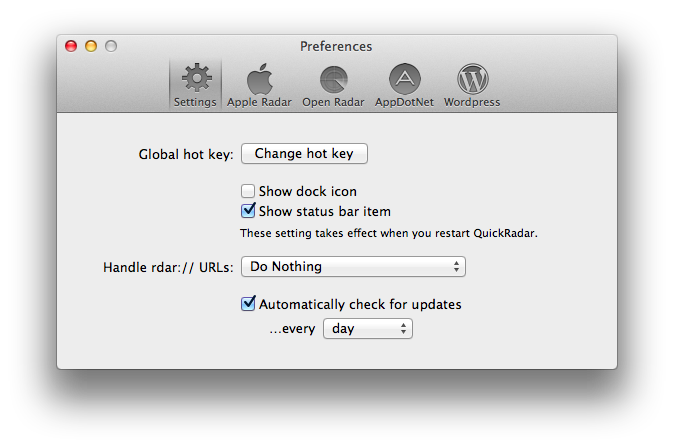
QuickRadar is a menubar app for the Mac that signs you into Apple’s Radar and that can be activated with a keyboard shortcut. Instead of redirecting you to Radar’s web UI, it lets you write your bug report in a window on your Mac, and when you click “Submit” it’ll take care of uploading the report for you without launching the website. The app can also file duplicates, handle rdar:// URLs to launch them in OpenRadar or filing them as duplicates, and it comes with sharing options for WordPress and App.net if you want to share your radar’s number with the world. Like Tokens (another app made out of frustration with an Apple-made web UI), QuickRadar uses web scraping to communicate with Apple’s bug reporter.

QuickRadar is still in the alpha stages and has some rough edges. For instance, it doesn’t support file uploads for attachments, although the developer says they’re on the roadmap. Version 0.7 was released earlier this week with improved Preferences and support for Mountain Lion’s Notification Center.

You can download QuickRadar here.


iOS 7 and New Apps

Gedeon Maheux:

I’m sure many users are expecting developers of popular applications to simply update interface elements, compile some code and easily drop a brand spanking new version of their app onto the App Store for free. There’s little doubt that the majority of iOS 7 updates to existing apps will be free (which will please Apple), but I suspect there will be a surprising number of developers who will use the launch of the new operating system to completely re-boot their app, and why not? The visual and interactive paradigms iOS 7 mark a natural breaking off point and a perfect opportunity to re-coup costs. Some existing paid apps might even adopt an iOS 7 only strategy which means they’ll have no choice but to charge again.

This makes sense. One more reason why Apple will need to clearly and strongly highlight iOS 7 apps on the App Store.

Permalink

Human Authenticity

Great points by David Barnard:

There is nothing inherently authentic about anything created digitally. There’s nothing genuine about 0’s and 1’s and any particular sequence that describes pixels on a screen. Humans created the hardware and software that sequence those bits, and unless we’re talking about some sort of futuristic research project, everything created digitally is created for some ultimate form of human consumption.

Software doesn’t have to use realistic textures to be “physically authentic”.

Permalink