Federico Viticci

10618 posts on MacStories since April 2009

Federico is the founder and Editor-in-Chief of MacStories, where he writes about Apple with a focus on apps, developers, iPad, and iOS productivity. He founded MacStories in April 2009 and has been writing about Apple since. Federico is also the co-host of AppStories, a weekly podcast exploring the world of apps, Unwind, a fun exploration of media and more, and NPC: Next Portable Console, a show about portable gaming and the handheld revolution.

Examining Apple App and OS Design Trends

AppStories+ Deeper into the world of apps
0:00
34:40

AppStories+ Deeper into the world of apps

This week, Federico and John examine Apple’s Sports and Journal apps and visionOS for clues to what their designs may mean for the next major revisions of Apple’s OSes.

Read more


A Shortcut to Create Shortcut Presets in visionOS

Now that visionOS 1.1 has fixed the bug that caused windows to disappear when launching apps with shortcuts, I realized that it was time to start using shortcuts a lot more when working with the Vision Pro. And so, just like I can now have shortcuts that create “window presets” for me with a single...


The Best Small Feature of visionOS 1.1

Apple released visionOS 1.1 earlier today. The update focuses on a variety of performance enhancements (I’m intrigued to test improved cursor control and Mac Virtual Display), but, arguably, updated Personas are the most important feature of this release.

I haven’t recreated my Persona for visionOS 1.1 yet, but judging by comparisons I’ve seen online, Apple’s 3D avatars should now look more realistic and, well, less creepy than before. David Heaney at UploadVR has a good rundown of the changes in this update.

I’m here to talk about what is, for me, the best small feature of visionOS 1.1, which isn’t even mentioned in Apple’s changelog. In the launch version of visionOS last month, there was an annoying bug in the Shortcuts app (which is still running in compatibility mode) that caused every ‘Open App’ action to open the selected app but, at the same time, also remove every other window from your field of view.

I ran into this issue when I thought I could use shortcuts to instantly recreate groups of windows in my workspace; I was unpleasantly surprised when I realized that those shortcuts were always hiding my existing windows instead. And even worse, every other Shortcuts action that involved launching an app (like Things’ ‘Show Items’ action) also caused other windows to disappear. It was, frankly, terrible.

All of this has been fixed in visionOS 1.1. Using ‘Open App’ actions in Shortcuts doesn’t hide other currently open windows anymore: it just spawns new ones for the apps you selected. This means that a shortcut like this…

…when run on the Vision Pro with visionOS 1.1 will open a Safari window and an Obsidian one in front of other windows I have already open, without hiding them. This unlocks some interesting possibilities for “preset shortcuts” that open specific combinations of windows for different work contexts (such as my writing workspace above) with one tap, which could even be paired with a utility like Shortcut Buttons for maximum efficiency in visionOS. Imagine having quick launchers for your ‘Work’ windows, your ‘Music’ workspace, or your ‘Research’ mode, and you get the idea.

I guess what I’m saying is that my favorite feature of visionOS 1.1 is a bug fix that hasn’t even been mentioned by Apple in their release notes. Maybe I’ll change my mind if my updated Persona won’t make me look like an exhausted 50-year-old Italian blogger anymore, but, for now, this Shortcuts update made visionOS 1.1 worth installing immediately.


Emulation on iPhone

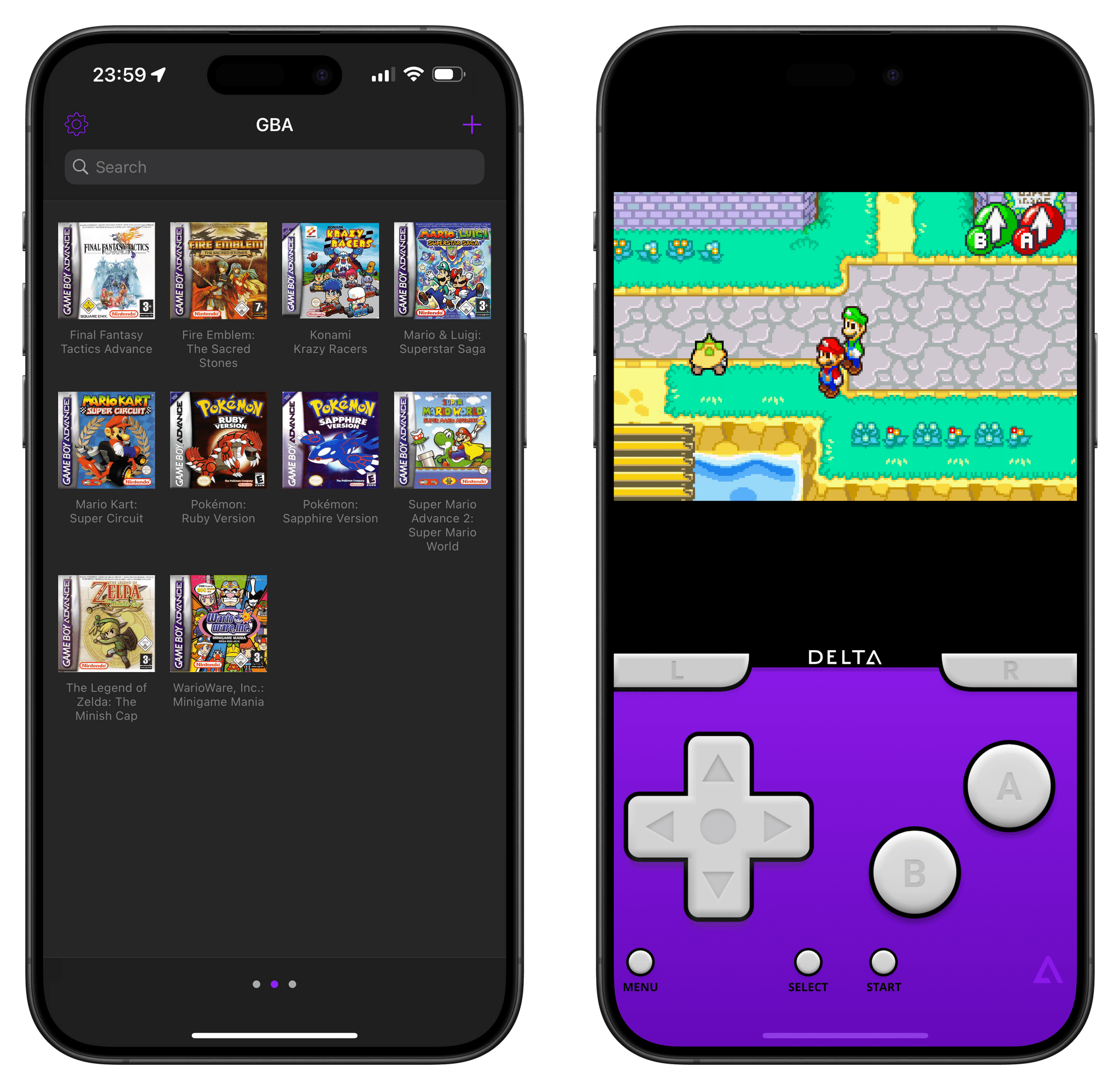
Last year I wrote an about retro gaming on iOS. I’ve had a lot of fun playing games on the platform, especially through emulation. Much of what I wrote last year is still applicable today, but I thought I’d revisit the topic with a focus on the state of emulation on iOS and all of the software and accessories you’ll need to get started.

Excellent overview by Mike Rockwell on the different options iPhone users have for running emulators on iOS. I can also recommend the G8 controller, which, as Club members know, I even modded to fit an iPad Pro.

See also: Wulff Den’s video on using the iPhone as a gaming handheld, and Riley Testut’s announcement that AltStore’s MarketplaceKit entitlement has been accepted by Apple in Europe.

Permalink

Introducing the MacPad

AppStories+ Deeper into the world of apps

AppStories Episode 373 - Introducing the MacPad

0:00
51:28

AppStories+ Deeper into the world of apps

This week, Federico introduces the world to the MacPad, a hybrid Mac/iPad that he built from an M2 MacBook Air and 11” iPad Pro, and John quizzes him on the build process, software involved, and what it’s like to use.

Read more


MacPad: How I Created the Hybrid Mac-iPad Laptop and Tablet That Apple Won’t Make

Hello, MacPad.

Hello, MacPad.

It all started because I wanted a better keyboard for my Vision Pro. I had no idea that, in looking for one, I’d accidentally create the hybrid Apple computer of my dreams.

As I quickly discovered after working on the Vision Pro daily, you can get by without an external trackpad, but a keyboard is necessary if you want to type something longer than a passcode. That’s where my journey began: if I wanted to write and edit articles on the Vision Pro, what would the best keyboard-trackpad setup be?

Over the past few weeks, I’ve tested all the options at my disposal. I started with an Apple Magic Trackpad and Keyboard, which I then placed inside a Twelve South MagicBridge (it was too uncomfortable to put on my lap for longer stretches of time). Next, I tried using different types of “trays” for these two accessories that offered a laptop-like layout (comfort was better, but lack of palm rejection was an issue). I even attempted to revive an old Brydge keyboard and use it with the Vision Pro, but, alas, third-party trackpads aren’t supported on visionOS at the moment.

Eventually, I settled on the solution that I should have known was coming for me all along: the best keyboard and trackpad combo for a Vision Pro is a Mac laptop. So I started using my MacBook Air every day, taking advantage of Mac Virtual Display and Universal Control to get work done with the Vision Pro in a mix of classic desktop apps and new visionOS experiences. I’ll write more about this soon, but, so far, it’s felt powerful and flexible in a way that iPadOS hasn’t made me feel in a while.

But something kept nagging me.

Read more


Apple Vision Pro Entertainment Apps

AppStories+ Deeper into the world of apps

AppStories Episode 372 - Apple Vision Pro Entertainment Apps

0:00
33:26

AppStories+ Deeper into the world of apps

This week, Federico and John share some of their favorite visionOS entertainment apps.

Read more


Turning a Things Task’s Notes into a Markdown Document

I shared my collection of advanced shortcuts for the Things app in the Automation Academy for Club Plus and Premier members yesterday, but as I was finalizing the story, I realized there was one more shortcut I wanted to build, which I could share here in MacStories Weekly. Lately, I’ve noticed that I’ve started taking...