Federico Viticci

10919 posts on MacStories since April 2009

Federico is the founder and Editor-in-Chief of MacStories, where he writes about Apple with a focus on apps, developers, iPad, and iOS productivity. He founded MacStories in April 2009 and has been writing about Apple since. Federico is also the co-host of AppStories, a weekly podcast exploring the world of apps, Unwind, a fun exploration of media and more, and NPC: Next Portable Console, a show about portable gaming and the handheld revolution.

OmniFocus for iOS Adds Deep Automation Features→

Derek Reiff, writing on The Omni Blog:

Recently customers have been wanting to take advantage of automation apps like Workflow, Drafts, Pythonista, and others to quickly add new actions or projects or switch to different views inside OmniFocus.

With 2.14, OmniFocus now includes best-of-class support for callback URLs. At its simplest, this means that you can create a workflow that adds more than one item to OmniFocus. But we didn’t just add support for two-way communication between OmniFocus and other apps, we added support for automating a whole lot more of the powerful capabilities of OmniFocus.

Ken goes into the nitty gritty in a detailed Discourse post. But aside from doing the usual name and note additions, you can add estimates, attachments, dates, repetition rules, flags, and even set a project to Parallel.

While I won’t be switching away from 2Do, I’ve tried the beta of OmniFocus 2.14 and the new automation features on iOS are impressive. I think a lot of people are going to reconsider OmniFocus and take advantage of callbacks for app integrations.

The examples posted by Ken Case on the forums should give you an idea of the improved capabilities. It’s no surprise that The Omni Group continues to redefine what making pro apps on iOS means.

It’s also great to see TaskPaper being used as a structured text communication format – I’d like to see more developers follow this route.
Permalink

Earnest: Take Control of Your Student Loans [Sponsor]

Did you know you can refinance your student loans, save thousands, and make your new loan incredibly easy to manage? Our sponsor this week, Earnest, has created the most flexible refinancing experience to help financially responsible grads take control of their student loans, at earnest.com.

Their product helps clients save an average of almost $18,000, with variable rates starting as low as 2.13% APR. Earnest never charges any fees — so no fees for origination, and no penalties for paying off your loan quickly or changing your terms down the line. They let you customize your payment to match your budget and timeline, and their simple dashboard makes it easy to manage your loan – even from your phone.

Earnest can do this because they’re a new kind of lender — one that looks at things traditional banks don’t, like your savings habits and earnings potential — to give you the lowest possible rates. And even better, their expert in-house customer service team is available via phone, email, and chat for the life of your loan.

It takes less than two minutes to find out how much you could save, and they even have a special offer for our readers: get a $150 bonus when you refinance through earnest.com/macstories.

Don’t get stuck paying more than you have to — check out earnest.com/macstories and take two minutes to see your personalized rate estimate today.

Our thanks to Earnest for sponsoring MacStories this week.


Dropbox Project Infinite→

Interesting announcement from Dropbox today – a way to download files on-demand when using the desktop client:

With Project Infinite, we’re addressing a major issue our users have asked us to solve. The amount of information being created and shared has exploded, but most people still work on devices with limited storage capacity. While teams can store terabyte upon terabyte in the cloud, most individuals’ laptops can only store a small fraction of that. Getting secure access to all the team’s data usually means jumping over to a web browser, a clunky user experience at best.

Project Infinite will enable users to seamlessly and securely access all their Dropbox files from the desktop, regardless of how much space they have available on their hard drives. Everything in the company’s Dropbox that you’re given access to, whether it’s stored locally or in the cloud, will show up in Dropbox on your desktop. If it’s synced locally, you’ll see the familiar green checkmark, while everything else will have a new cloud icon.

In a way, this makes the desktop app more similar to the mobile clients – everything is always in Dropbox, and it’s downloaded locally only when you need it. Smart move.

Permalink

Canvas, Episode 8: Apple Mail→

You might think of Apple Mail as being a slightly weak client but, as we shall see, it’s more powerful than you think. We tackle some of the special smart mailboxes that exist in Apple Mail, look at notifications and composing mail.

On the latest episode of Canvas, we covered the email client that millions of users deal with on a daily basis: Apple Mail. We have an episode coming about third-party email options, but, in the meantime, there’s quite a bit to discover in Mail, too. You can listen here.

Permalink

Apple Posts New iPhone 6s Ads Highlighting Touch ID, 4K Video

Apple aired two new iPhone 6s commercials earlier today, highlighting the 4K video shooting capabilities of the device, as well as the Touch ID sensor with various iOS app integrations.

In the 1-minute 4K ad, dubbed ‘Onions’, Apple imagines a scenario in which a young girl shoots a close-up video of her mother cutting onions that somehow turns into a movie phenomenon. In the ad, the ‘Onions’ movie even goes on to win an award (with a ceremony hosted by actor Neil Patrick Harris) with a tongue-in-cheek tone that, presumably, wants to communicate how the iPhone’s camera can be used to shoot high-quality footage – whether it’s an onion or an actual movie.

In the second ad, Apple follows the style of its previous, fast paced iPhone 6s commercials to focus on what can be done with Touch ID on iOS 9. The ad shows people paying for products with Apple Pay, starting a car with Touch ID in a dedicated iPhone app, logging into bank accounts, and more.

You can watch the ads below.

Read more


All New watchOS Apps to Be Native Starting June 1→

During the weekend, Apple announced that, starting June 1, all new watchOS app submissions will have to be native – written with the watchOS 2 SDK.

This, of course, doesn’t enforce existing watchOS 1.0 apps (built with the first SDK) to be updated for watchOS 2, so it’ll be interesting to see how Apple will handle developers who launched a watchOS app last year, saw a muted response, and then ignored watchOS 2 due to a lack of incentives.

In my experience, the performance of watchOS 2 apps has only been marginally better than old watchOS 1.0 ones, and I haven’t heard of developers rushing to support watchOS 2 as a must-rewrite-everything effort. If I had to speculate, perhaps new iPhone apps for iOS 10 or later could only support watchOS 3 – but, again, that wouldn’t solve the issue for watchOS 1.0 apps currently on the App Store. Quite a curious conundrum.

Permalink

App Debuts

Google Analytics Google Analytics for iOS has received a major update with a brand new design (and icon), the ability to save customized reports to the dashboard for quick access, sharing, and deeper segment functionalities. The app is now a full-featured way to access Analytics from an iPhone or iPad. Draftly Draftly is a...


On the 9.7” iPad Pro’s Color Gamut→

I’ve been waiting for someone to explain the practical benefits of the new Retina display in the 9.7-inch iPad Pro. Craig Hockenberry has done the hard work and wrote about it with clear examples to understand the differences:

After using this iPad for a couple of weeks, I’ve realized it’s like the advances of Retina in an important way: I never want to use a lesser display again. And as with higher density, I think it’s obvious that Apple will eventually update all its products to use this improved screen technology. I can’t wait!

It also wouldn’t surprise me to see these wider color gamuts coming to the cameras in our devices. All iOS devices currently create images in the sRGB gamut, while professional gear can produce images in ProPhoto or AdobeRGB. High dynamic range (HDR) photos need a wider range of color, too.

He’s also writing a book about color management for developers. It sounds like this is going to be an important area for iOS developers to learn going forward.

Permalink

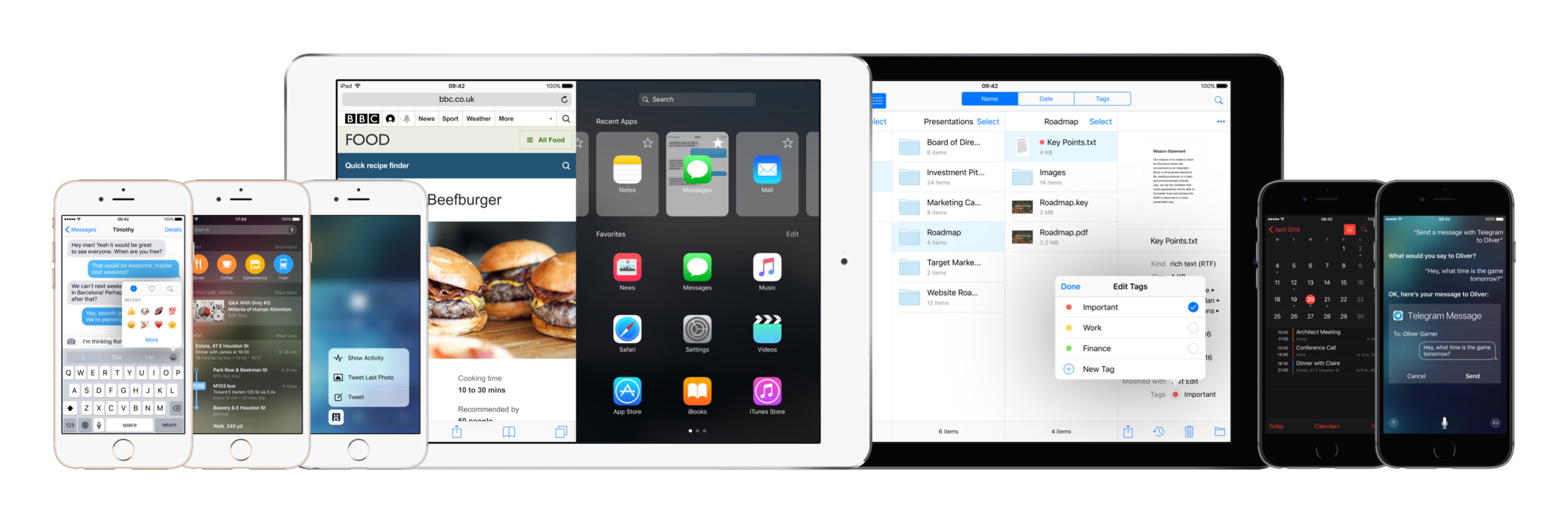
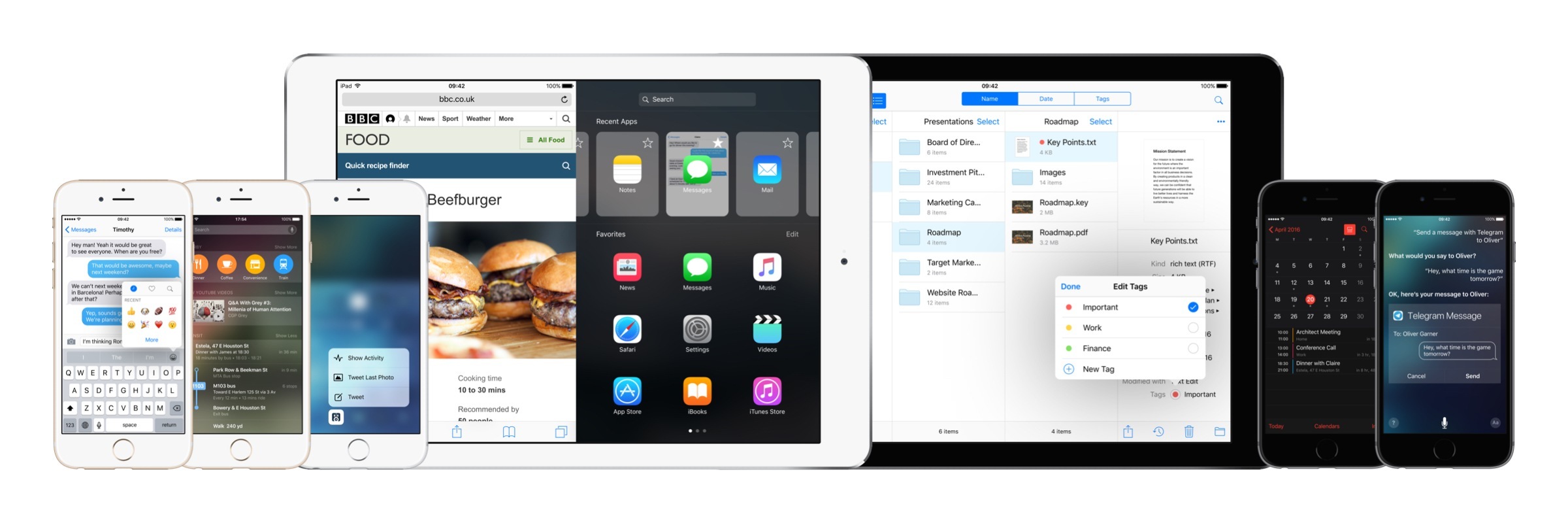
iOS 10: Wishes and Concept Video

iOS 10 concept.

iOS 10 concept.


(Full-res)

I almost can’t believe there was a time when the iPad didn’t have Split View. Or that, for years, I thought Apple would never bring split-screen multitasking to iOS.

More than any other iOS update before, iOS 9 has fundamentally reinvented the role of the iPad in my computing life. As I’ve written in my iOS 9 review and look at the iPad one year after my decision to stop using my Mac, iOS 9 and its multitasking improvements have catapulted the iPad away from the old limitations of iOS into a different league.

With iOS 9 and the iPad Pro, the list of tasks I can’t perform on my iPad is down to a single item.

I’ve never been happier with an iOS device and operating system than I am with the iPad Pro and iOS 9. Getting my work done is faster; using apps in Split View is a treat compared to iOS 8; and the software keyboard (despite some problems) continues to impress me with the addition of trackpad mode and the Shortcut Bar. The iPhone 6s, too, has been a pleasant surprise thanks to its superior performance and 3D Touch.1

There’s never been a better time to be an iOS user. But that doesn’t mean that everything’s perfect. When it comes to iOS, happiness is often a fleeting moment – a temporary satisfaction with the current state of things before the inevitable longing for something deeper. Such is the constant pursuit of the future.

Every year, I put together a list of the changes I’d like to see in the next version of iOS. I’ve been doing this for several years now. This year, I wanted to prepare something bigger. The tenth version of iOS due to be released later this year will be a major milestone for Apple and iOS users. It only felt appropriate to celebrate the occasion with a different take on my annual iOS wish list.

For the past few months, I’ve been collaborating with Sam Beckett (author of a fantastic Control Center concept we linked to a while back) to visualize my iOS 10 wishes with a professional concept video and static mockups. Sam and I discussed my ideas for a couple of months, and he was able to visualize2 what I would like to have in iOS 10 – both for the iPhone and iPad – with a style and attention to detail I’m extremely happy with.

Below, you’ll find a collection of my iOS 10 wishes, organized in tentpole features (the ones also shown in the video) plus additional sub-sections. Some of these wishes have been on my list for years; others are a consequence of the features Apple shipped with iOS 9.

Let’s get started.

Read more


  1. I use 3D Touch heavily every day. Peek previews for tweets and links in Tweetbot, Home screen actions, keyboard cursor control, and channel shortcuts in Slack are gestures I intuitively perform daily. ↩
  2. He was also very patient. As you can imagine, I sent him a lot of ideas and comments before signing off on the final version. I can't recommend working with Sam enough. ↩