In my Future of Workflow article from last year (published soon after the news of Apple’s acquisition), I outlined some of the probable outcomes for the app. The more optimistic one – the “best timeline”, so to speak – envisioned an updated Workflow app as a native iOS automation layer, deeply integrated with the system and its built-in frameworks. After studying Apple’s announcements at WWDC and talking to developers at the conference, and based on other details I’ve been personally hearing about Shortcuts while at WWDC, it appears that the brightest scenario is indeed coming true in a matter of months.
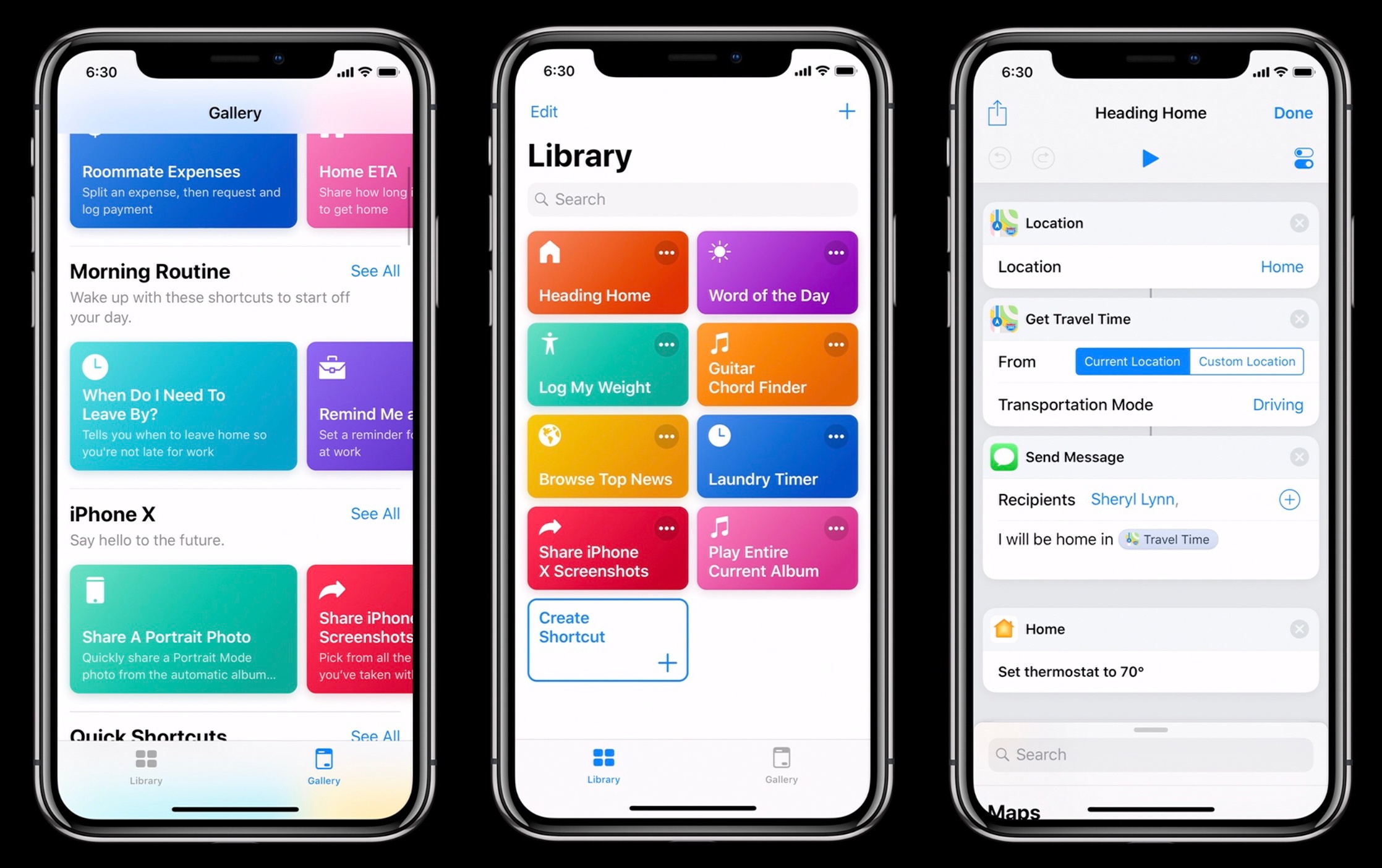
On the surface, Shortcuts the app looks like the full-blown Workflow replacement heavy users of the app have been wishfully imagining for the past year. But there is more going on with Shortcuts than the app alone. Shortcuts the feature, in fact, reveals a fascinating twofold strategy: on one hand, Apple hopes to accelerate third-party Siri integrations by leveraging existing APIs as well as enabling the creation of custom SiriKit Intents; on the other, the company is advancing a new vision of automation through the lens of Siri and proactive assistance from which everyone – not just power users – can reap the benefits.
While it’s still too early to comment on the long-term impact of Shortcuts, I can at least attempt to understand the potential of this new technology. In this article, I’ll try to explain the differences between Siri shortcuts and the Shortcuts app, as well as answering some common questions about how much Shortcuts borrows from the original Workflow app. Let’s dig in.
Read more
In this very special live episode, Stephen is joined by Jason Snell and Serenity Caldwell to talk about macOS Mojave and Screen Time before going over the Happy-o-meter results and talking about Shortcuts with Myke and Federico.
Recording this episode of Connected last week was one of my highlights from WWDC. If you still don’t know the results of our Happy-o-meter, now’s a great time to catch up. You can listen here.
Sponsored by:
- Microsoft: Learn about building intelligent iOS apps that scale
- Away: Travel smarter with the suitcase that charges your phone. Get $20 off with the code ‘connected’.
- Timing: The automatic time tracking app for macOS. Use this link to save 10% on your purchase.
In an update rolled out last week, Apple fixed two of my longstanding annoyances with Apple Music: there is a new screen that lists popular albums coming soon, and every upcoming album now features an actual release date.
Here’s Mitchel Broussard, writing for MacRumors:
Apple appears to be rolling out a series of updates for Apple Music today, including a small but useful new section called “Coming Soon,” which allows subscribers to check out new albums about to be released over the next few weeks.
[…]
In another addition, Apple is now making it possible to easily see album launch dates on their respective pages on iOS and macOS. In the Editors’ Notes section, following the traditional encouragement to add the pre-release album to your library, there’s a new line that begins “Album expected…” followed by the album’s specific release date. Some albums not listed in Coming Soon still have a release date specified on their pages, so this update appears to be a bit more wide-ranging.
As someone who likes to keep up with new music, I’m glad to see Apple pushing these small but needed improvements to the service.
Furthermore, as noted by AppleInsider, the iOS 12 version of Apple Music features the ability to search for songs by lyrics. I’ve been using the beta on my iPhone and iPad for the past week, and lyrics search has already saved me a few minutes I would have otherwise spent looking for songs on Google. Built-in lyrics differentiate Apple Music from Spotify, so it’s good to see Apple expanding support throughout the app.
Speaking of smaller features I wouldn’t have expected to see at last week’s WWDC, Bryan Gaz, writing for Digital Photography Review, has noticed some welcome improvements to camera import and RAW files in iOS 12:
Now, when you plug in Apple’s SD card to Lightning adapter (or camera connection kit), the Photos app will show up as an overlay on whatever app you’re using. This comes as a much less invasive method than previously used in iOS 11, wherein whatever app you were in would be switched over to the full-screen Photos app for importing. It also means you can multitask more efficiently, importing photos while getting other stuff done.
[…]
Now, when photos are detected on a card, iOS 12 will automatically sort through the content and determine if any of the photos have already been imported. If they have, they will be put in a separate area so you don’t accidentally import duplicates. Another new feature is a counter on the top of the screen that lasts you know how many photos are being displayed and how much space they take up on the memory card. This should help alleviate the guesswork involved when trying to determine whether or not you have enough storage on your iOS device.
I’ve never imported photos on my iPad using the Lightning to SD Card Camera Reader because I don’t have a camera, but I know that the import process is one of the pain points for photographers who want to use an iPad in their workflows. The idea of having Photos show up automatically in Slide Over upon connecting an external device is interesting; it perfectly ties into the iPad’s focus on drag and drop for multitasking and file transfers. It seems like this approach would work nicely for importing files from external USB devices if only Apple decided to add support for those too.
Update: After looking into this more closely, it appears that Photos only appears automatically upon connecting an SD card if it’s already in Slide Over mode. This isn’t as convenient as DP Review’s original report, but at least all the other improvements mentioned in the story are indeed part of iOS 12.
Federico and John discuss the apps on their current iPhone X Home screens.
Read more
Federico and John look at what Apple could do to use iOS and its large developer community to revitalize the Mac app ecosystem.
Read more
The WWDC Happy-o-meter is back! Come along with Stephen, Myke and Federico on a trail of joyful wishes and hopeful dreams.
If you want to know which kind of announcements would make us happy at next week’s WWDC, you can’t miss the latest episode of Connected. Even better: the results of this “challenge” will be discussed in front of an audience at our live show in San Jose on Wednesday. You can listen here.
Sponsored by:
- Pingdom: Start monitoring your websites and servers today. Use offer code CONNECTED to get 30% off.
- Skillshare: Thousands of classes to help you do your best work. Get 2 months of unlimited access to over 20,000 classes for $0.99.
- PDFpen 10, from Smile: The ultimate tool for editing PDFs and go paperless.
Question: I like to take and organize notes based on the events on my calendar (I use G Suite with Apple Mail as a client). No note-taking app does this except for Agenda for Mac, which is great, but I really need to take notes on iPhone and iPad too. Is it possible to create...
Federico and John go in-depth on two recently-updated apps. In this installment of Pick 2, Federico covers Spark 2, which has added app integrations into the iOS version and team collaboration to the iOS and Mac versions while John covers 1Password 7 for the Mac, a significant redesign that expands the functionality and flexibility of features like Watchtower and Vaults.
Read more



 John
John