John
John
AppStories Episode 141 - Pick 2: Reeder for the Mac and iOS
0:00
47:22
47:22
This week, Federico and John cover one of their favorite RSS client for the Mac and iOS: Reeder by Silvio Rizzi.

 Pick 2: Reeder for the Mac and iOS
  Integrating Shortcuts and Apple Music with MusicKit
 In 2017, Apple introduced MusicKit, an API for searching and controlling Apple Music functionality. Previously, searching Apple’s music catalog was limited to the iTunes Search API, which only includes music that can be purchased from the iTunes Store. The iTunes Search API hasn’t been meaningfully updated in years, and at least when it comes...
On this week’s episode of Adapt:
Ryan outlines why now is the perfect time to revisit the iPad’s Home screen, then Federico details Pages’ Smart Annotation feature, and the guys celebrate Thanksgiving with some iPad gratitude.
You can listen below (and find the show notes here), and don’t forget to send us questions using #AskAdapt and by tagging our Twitter account.




On this week’s episode of Connected:
There are a lot of iPhone cases to talk about, as well as new information about HomeKit Secure Video and Deep Fusion. One of us bought a TV, but no one here is ordering a Cybertruck.
You can listen below (and find the show notes here).
Sponsored by:
Black Friday and Cyber Monday are nearly upon us, and we’ve prepared something truly special to celebrate the occasion at MacStories: starting today through Monday, December 2, MacStories Shortcuts Icons will be available at 50% off the regular price.
To purchase MacStories Shortcuts Icons at $7.49 rather than the usual $14.99, tap the ‘Buy’ button below and enter promo code bficons19 at checkout.
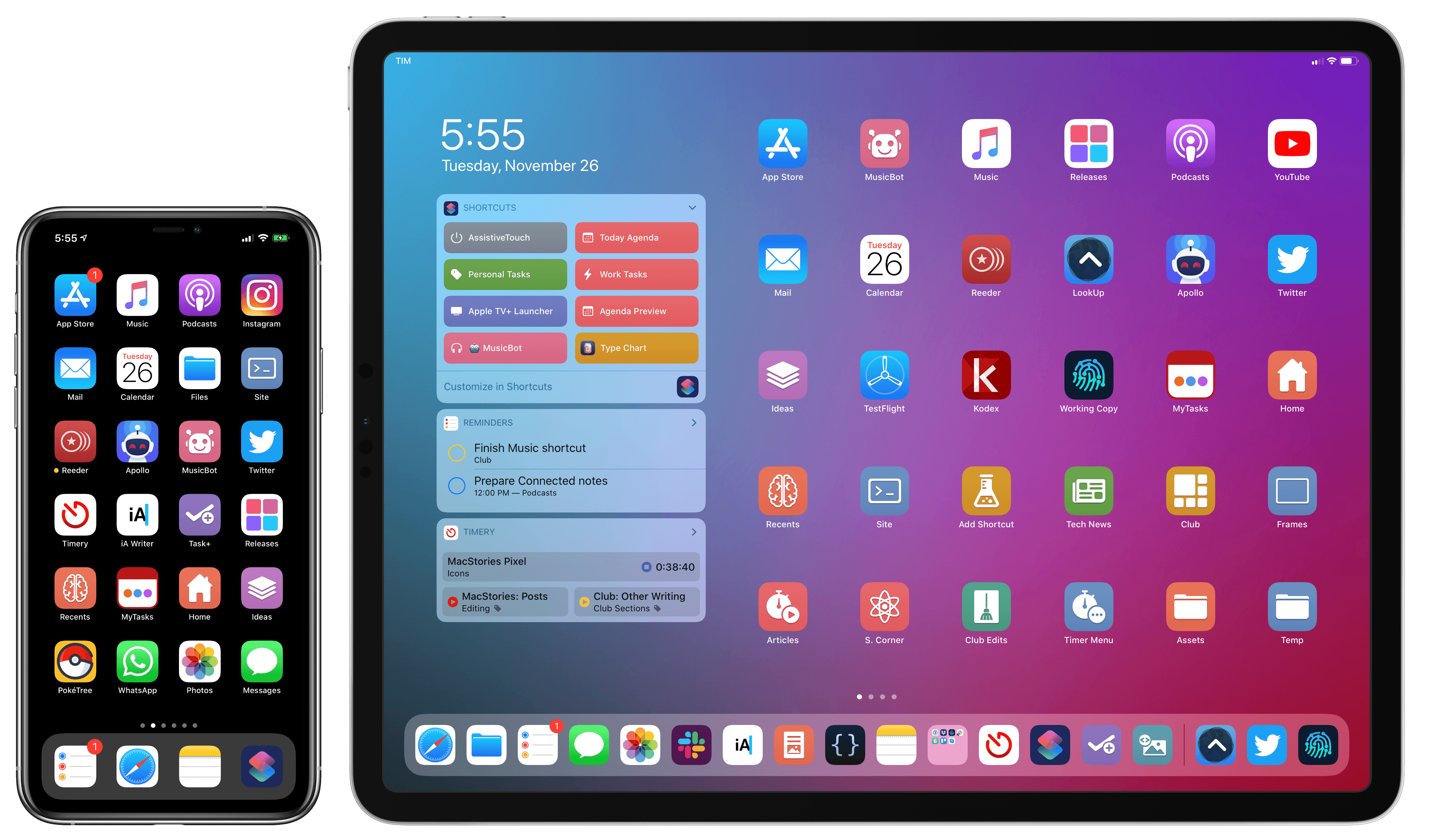
For those not familiar with MacStories Shortcuts Icons, they’re a set of 350 custom icons for shortcuts added to your iPhone and iPad Home screen. You can read more about them here. Designed specifically with Shortcuts users in mind, these icons expand upon the options provided by Apple in the Shortcuts app, bringing glyphs for task management, calendars and files, AirPlay, home automation, and lots more. With MacStories Shortcuts Icons, you’ll be able to personalize your iOS and iPadOS Home screen by pinning shortcuts whose icons are representative of their purpose. If you use the MacStories Shortcuts Archive on a regular basis, you’ll be happy to know that every shortcut from the archive is represented in MacStories Shortcuts Icons.
You can take a look at what MacStories Shortcuts Icons have enabled our Ryan to do with his iPad Home screen in this article. And you can take a look at my own iPad and iPhone Home screens below – both are based on MacStories Shortcuts Icons.
Both Silvia and I are incredibly humbled by the amazing response to MacStories Shortcuts Icons since we launched them in September. For this reason, we want to take Black Friday and Cyber Monday as an opportunity to let even more people enjoy the benefits of a Shortcuts-based Home screen powered by MacStories Shortcuts Icons.
MacStories Shortcuts Icons will be available at 50% off through Monday, December 2 at 11:59 PM Eastern. Once again, make sure to use promo code bficons19 at checkout for the deal to apply. You can purchase MacStories Shortcuts Icons here or by tapping the Buy button below.
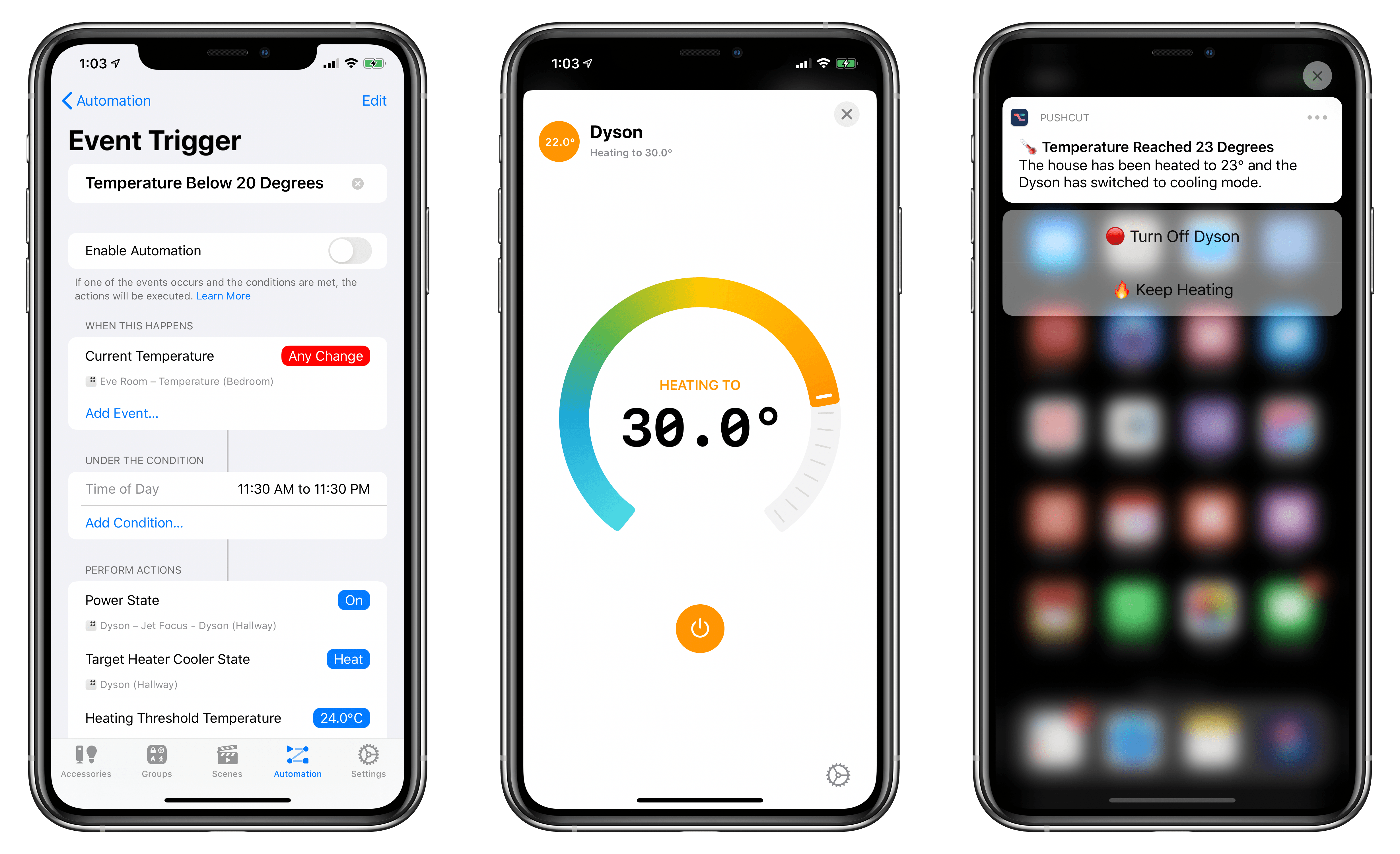
A few weeks ago, following a long research process, my girlfriend and I finally decided to buy a Dyson fan for our apartment – specifically, the Pure Hot + Cool model. We’ve been keeping an eye on this product for a while as a potential solution to purify air as well as heat our (small) apartment; unlike other Dyson fans, this one combines cooling and heating modes in a single compact, good-looking product that we’ve placed on top of an IKEA BESTÅ cabinet in our hallway. So far, we’re liking it a lot.
Whenever I buy a new appliance these days, one of my priorities is to ensure that it can become part of our HomeKit setup, either via native HomeKit support, custom integration via homebridge, or, if all else fails, a smart plug. As far as native HomeKit fans are concerned, I couldn’t find anything here in Italy that combined cooling and heating functions in a single product. Modern Dyson fans do not come with official HomeKit support either, but they can communicate over Wi-Fi using a proprietary service called Dyson Link. This service can be controlled via an iPhone app (which comes with a virtual remote and stats collected by the fan’s built-in sensors) or Amazon’s Alexa assistant. As I was researching the Pure Hot + Cool, I discovered a homebridge plugin that, with minimal configuration, allows you to add a Dyson fan along with its sensors and different modes to your Home setup as a series of accessories and sensors. And since I’m already using homebridge to bring HomeKit compatibility to various devices around the house (including two TVs), adding a new one wasn’t a hard decision at all.
Our Favorite HomeKit Gear, Apps, and Automations
Checking Pokémon Evolutions with Shortcuts I, along with six million other people, have been playing Pokémon Sword on my Nintendo Switch over the past week. I’m loving the game so far: as I discussed on the latest episode (#82) of my videogame podcast Remaster with Myke Hurley, Pokémon Sword has managed to recapture a sense of adventure, combined with...
Great idea by Matthew Cassinelli: using the new HomePod and AirPlay 2 actions for home automation in iOS 13.2, it is possible to automate a HomePod’s volume level (including its Siri responses) throughout the day.
But one of the nagging problems with HomePod is the way Siri, regardless of the current time of day, will respond loudly at whatever volume you’ve previously set.
Whether it’s the middle of the night or super early in the morning, it’s all too common to ask Siri something and the answer shouted backed at you, only because you listened to music loudly sometime yesterday. Hopefully nobody wakes up, you curse at how dumb your supposedly “smart” speaker can be, and frantically try to turn it down.
Thankfully, iOS 13.2 provides a route to a solution by adding HomePods and AppleTV to scenes and automations – the HomePod didn’t fix this on its own, but, with a Home Automation, you can make it “smart” enough yourself.
As I explained when iOS 13.2 came out, you can put together these automations by using the ‘Adjust Audio Only’ option after selecting a HomePod or compatible AirPlay 2 speaker in the Home app. I just set this up for my three HomePods and Sonos One, and, sure enough, at 11:20 PM, volume was set to 15% on all my speakers (it should be raised back up to 50% tomorrow at noon).
In theory, I would like to turn this automation into a shortcut and add a Pushcut notification to confirm the volume change (and optionally shuffle a playlist by choosing a HomeKit scene from the notification’s actions). There’s a bug that prevents me from doing this in the latest iOS 13.3 beta, but I’ll keep it in mind for the future.